
Solved Changing a Removable Disk to Local Disk?

Callum22

New member
Local time
2:49 AM
Messages
4
Hi Folks,

I have created an encrypted drive (X) on my system (Windows 7 - 64 bit) and wish to store my emails there. I did this successfully in Vista.

To do this I need to change X:/ from a Removable Disk to a Local Disk, please can somebody explain to me how and wehre to do this?


OS Name: Windows 7 Home Premium
Version: 6.1.7601 Service Pack 1 build 7601
System Type: x64-based PC
 

Attachments
  • Capture.PNG
    Capture.PNG
    9.8 KB · Views: 71

My Computer My Computer

OS
Windows Home Premium 64 bit Version: 6.1.7601 Service Pack 1 build 7601
All of my drives, internal\external\flash all show as local in the drives property page, what does the drive property of X say ?
 

My Computer My Computer

Computer Manufacturer/Model Number
DIY
OS
Windows 7 home premium x64
CPU
AMD FX-4100 AM3+ 3.6GHz 12MB Black Edition
Motherboard
Asus M5A97 Pro
Memory
Crsair vengeance 12Gb DDR3 1600MHz CL9
Graphics Card(s)
Asus GTX 560 1GB
Sound Card
Realtek onboard
Monitor(s) Displays
Hanns G 1680x1050 native
Hard Drives
OCZ 128Gb Petrol ssd
2x500 Gb Samsung
PSU
OCZ StealthXstream II 500W
Internet Speed
8Mb or better
Hi Cyclic,

Thanks for getting back to me, much appreciated :)

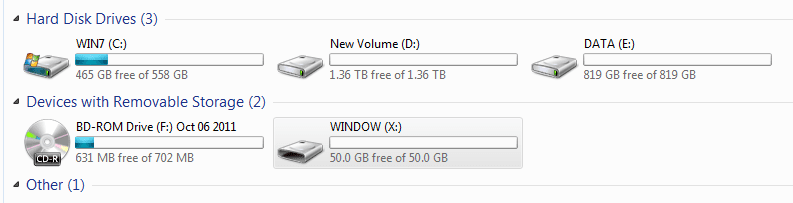
In My Computer there are two headings:

Hard Disk Drives
This is where my C: drive is

Devices with removable Storage
This is where my virtual drive, X: is

If I right click C: in Properties/General it is described as Type: Local Disk

If I right click on my X: Properties/General it is described as Type: Removable Disk

I understand that Windows 7 will not store my email on this drive unless it is Local.
 

My Computer My Computer

OS
Windows Home Premium 64 bit Version: 6.1.7601 Service Pack 1 build 7601
Please post an image from disk management. You can go to disk management page by typing "disk management" in the search field inside start menu and selecting the option from control panel "create and format hard disk partitions". This will give us a clear picture of your system's drives both internal and external.

Your drive X: is showing as a removable disk, means it is connected to the system either by USB, eSATA or firewire. These types of disks can not be converted to a local disk. A local disk is a disk which is either connected to the system through a parallel ATA, serial ATA or SCSI.
 

My Computer My Computer

Computer Manufacturer/Model Number
Toshiba Satellite P775-S7232
OS
MS Windows 7 Ultimate 64-bit SP1
CPU
i5-2410M 2.3GHz (2.9GHz Turbo-Boost) Sandy Bridge 32nm
Motherboard
Toshiba PHRAA ver. PSBY1U-00F003
Memory
4GB+4GB Samsung DDR3 PC3-10700 (1333 MHz)
Graphics Card(s)
Video Intel(R) HD Graphics Family, 1696MB available memory
Sound Card
Realtek High Definition Audio version=6.0.1.6323
Monitor(s) Displays
17.3 " Trubrite TFT LCD, LED Backlit
Screen Resolution
1600x900 32 bit, Native support for 720P content
Hard Drives
TOSHIBA MK6476GSXN
580.614 [GB] partitioned C: 80GB and D: 500GB with hidden recovery partitons.

Spare bay for 2nd HDD but no SATA connector :-(
PSU
Toshiba AC/DC Adapter
Case
Notebook
Cooling
Built-in Fan
Keyboard
Premium Raised Tile keyboard
Mouse
Logitech M215 wireless mouse
Internet Speed
Not fast enough
Other Info
Built-in Harman Kardon speakers with Dolby Advanced Audio, Waves MaxxAudio® 3. HDMI, 1xUSB3+3xUSB2 ports, WebCam, Battery life 4hrs 11mins, 4GB Readyboost SDHC card, WD My Book Essential Ext HDDs 2 TB, 2x1TB, My Passport SE 1TB and WDTV 1st Gen for Multimedia playing on a Sony Wega 32" LCD.
Recent addition to my toys are Asus Transformer Pad TF300T with 32GB onboard sd card + 32GB microsd card.
Folks, just found it and fixed the issue :)

What a great forum and I really do appreciate tyour help folks.

From a very sunny and bright Scotland today , thank you!

Callum
 

My Computer My Computer

OS
Windows Home Premium 64 bit Version: 6.1.7601 Service Pack 1 build 7601
I am happy to know that you have resolved the issue. By the way how you did it?
 

My Computer My Computer

Computer Manufacturer/Model Number
Toshiba Satellite P775-S7232
OS
MS Windows 7 Ultimate 64-bit SP1
CPU
i5-2410M 2.3GHz (2.9GHz Turbo-Boost) Sandy Bridge 32nm
Motherboard
Toshiba PHRAA ver. PSBY1U-00F003
Memory
4GB+4GB Samsung DDR3 PC3-10700 (1333 MHz)
Graphics Card(s)
Video Intel(R) HD Graphics Family, 1696MB available memory
Sound Card
Realtek High Definition Audio version=6.0.1.6323
Monitor(s) Displays
17.3 " Trubrite TFT LCD, LED Backlit
Screen Resolution
1600x900 32 bit, Native support for 720P content
Hard Drives
TOSHIBA MK6476GSXN
580.614 [GB] partitioned C: 80GB and D: 500GB with hidden recovery partitons.

Spare bay for 2nd HDD but no SATA connector :-(
PSU
Toshiba AC/DC Adapter
Case
Notebook
Cooling
Built-in Fan
Keyboard
Premium Raised Tile keyboard
Mouse
Logitech M215 wireless mouse
Internet Speed
Not fast enough
Other Info
Built-in Harman Kardon speakers with Dolby Advanced Audio, Waves MaxxAudio® 3. HDMI, 1xUSB3+3xUSB2 ports, WebCam, Battery life 4hrs 11mins, 4GB Readyboost SDHC card, WD My Book Essential Ext HDDs 2 TB, 2x1TB, My Passport SE 1TB and WDTV 1st Gen for Multimedia playing on a Sony Wega 32" LCD.
Recent addition to my toys are Asus Transformer Pad TF300T with 32GB onboard sd card + 32GB microsd card.
In the software that created the disk I was able to mount the Safe as local drive.

If i could pass on useful advice to other Forum members it would be to keep your emails on an encrypted drive so that if your computer is ever stolen at least your emails remain secure.

Thanks again rraod


My Computer My Computer

OS
Windows Home Premium 64 bit Version: 6.1.7601 Service Pack 1 build 7601
Back
Top