Changing C: drive

geophoto

New member
Local time
4:10 PM
Messages
4
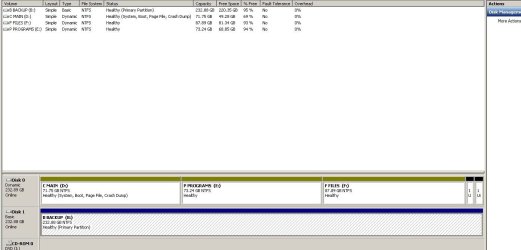
Somewhere along the line in loading Win 7 over Vista the C:drive has been designated as the D drive. When I try to change it with disk mgt. I get the error that I do not have the proper parameter. I have no problem using it as is and on the desktop it shows at C: but would prefer that I can make this change.The HD has been proportioned into 3 drives and the other two are easily changed if I wish.
 
Last edited:

My Computer

OS
win 7
Post a snip of your Disk Management window...
 

My Computer

Computer Manufacturer/Model Number
Self-Built
OS
Vista Ultimate X64/ Windows 7 Dual-boot
CPU
Q6600
Motherboard
ASUS P5K
Memory
4G OCZ PC2 8500 Platinum
Graphics Card(s)
EVGA 8800GTS Vid Card
Hard Drives
500G Seagate SATA
200G Seagate SATA
100G WD Caviar SATA
80G WD Caviar IDE
PSU
OCZ Elite 800W PSU
Case
RaidMax Smilodon Case

My Computer

Computer Manufacturer/Model Number
* BFK Customs *
OS
W 7 64-bit Ultimate
CPU
Intel Q9550 Yorkfield
Motherboard
ASUS P5Q Pro
Memory
8GB Dominator 8500C5D
Graphics Card(s)
ATI : XFX 5870
Sound Card
Realtek HD Audio 7-1
Monitor(s) Displays
1x 47" LCD HDMI & 3x 26" LCD HDMI
Screen Resolution
1920x1080P & 1920x1200
Hard Drives
1x 80GB Intel X25-M G2 SSD : 1x 500GB & 1x 640GB WD Caviar Black(s)
PSU
Corsair 620HX
Case
Cooler Master RC-690
Cooling
Tuniq Tower 120, 2x 140mm and 3x 120mm case fans
Keyboard
Microsoft 500
Mouse
Razer Diamondback 3G
Internet Speed
14 Mb/s
Other Info
1x Koutech 3Gb/s SATA HDD Hot Swap Rack
Post a snip of your Disk Management window...
DISK%20MGT.PNG
 

My Computer

OS
win 7
If I may ask, what is the reason you are using "Dynamic" partitions?

Vista and 7 use a "System Reserved" "Primary" 100MB partition to hold the boot code, to be a boot partition, and provide a boot menu when more than one OS is installed. Windows does not allow the change of the drive letter when the partition you want to change is the one with the boot code and Operating System being used. So when you boot to Vista, you cannot change the Vista drive letter, and when you boot to 7, you can not change the 7 drive letter. I have found that using the 100MB "System Reserved" partition allows for giving other partitions any drive letter.

Cheers!
Robert
 

My Computer

OS
...
Thanks for the feedback. I'm not that knowledgable and should pick up a book on OS to better understand what these things. If I wanted to start from scratch, it seems that I would have to format the entire drive and then start over again. Thanks again.
 

My Computer

OS
win 7
Thanks for the feedback. I'm not that knowledgable and should pick up a book on OS to better understand what these things. If I wanted to start from scratch, it seems that I would have to format the entire drive and then start over again. Thanks again.
You are most welcome, geophoto. If you can backup everything, starting over can sometimes be easier. But you do have other options if you are interested in them.

I found this link to be very helpful of partitions: Understanding Disk Partitions

Cheers!
Robert
 

My Computer

OS
...

My Computer

Computer Manufacturer/Model Number
* BFK Customs *
OS
W 7 64-bit Ultimate
CPU
Intel Q9550 Yorkfield
Motherboard
ASUS P5Q Pro
Memory
8GB Dominator 8500C5D
Graphics Card(s)
ATI : XFX 5870
Sound Card
Realtek HD Audio 7-1
Monitor(s) Displays
1x 47" LCD HDMI & 3x 26" LCD HDMI
Screen Resolution
1920x1080P & 1920x1200
Hard Drives
1x 80GB Intel X25-M G2 SSD : 1x 500GB & 1x 640GB WD Caviar Black(s)
PSU
Corsair 620HX
Case
Cooler Master RC-690
Cooling
Tuniq Tower 120, 2x 140mm and 3x 120mm case fans
Keyboard
Microsoft 500
Mouse
Razer Diamondback 3G
Internet Speed
14 Mb/s
Other Info
1x Koutech 3Gb/s SATA HDD Hot Swap Rack
Back
Top