Changing Chrome's fonts?

yonyz

Banned
Local time
12:43 AM
Messages
30
Hi,

I'm using Google Chrome on Windows 7, and I don't like its default fonts. Is there a way to force Chrome to use fonts other than those of the website or the operating system?

I'd like to use Verdana or Helvetica.

Thanks in advance.
 

My Computer

OS
Windows 7 32-bit
i have contacted our Chrome specialist, he should be he soon.
 

My Computer

Computer type
PC/Desktop
Computer Manufacturer/Model Number
Dell XPS 420
OS
Windows 10, Home Clean Install
CPU
Intel Core2 processsor Q8200(2.33Ghz 1333FSB) Quad Core Tech
Motherboard
Dell
Memory
6 gb
Graphics Card(s)
ATI Radeon 256MB HD3650
Sound Card
Intergrated 7.1 Channel Audio
Monitor(s) Displays
Dell SP2009W 20"
Hard Drives
640 GB Serial ATA Hard drive
Cooling
Fan
Keyboard
Dell USB Keyboard
Mouse
Dell Premium Optical USB
Internet Speed
DSL 2.85
Why yes, there is!

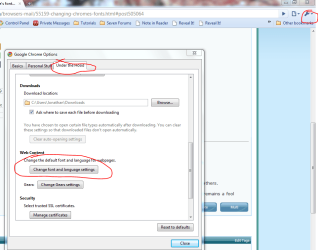
Click the wrench icon in the upper-right corner, and click Options. Navigate to Under the Hood, and scroll down to the Font section. See attached screenshots.
chrome.PNG

Hope this helps,
~Jonathan
 

My Computer

Computer Manufacturer/Model Number
Custom
OS
Windows 7 Professional x64
CPU
Intel i7 2600K OC'd @ 4620 MHz
Motherboard
Asus P8Z68-V Pro
Memory
16GB GSkill Sniper 2133 Mhz (4x4GB)
Graphics Card(s)
EVGA GeForce GTX 480 SuperClocked+
Sound Card
Realtek High Definition Audio
Monitor(s) Displays
2x Acer S273HLbmii 27"
Screen Resolution
2 x 1920x1080
Hard Drives
64GB Crucial M4 SSD

Storage: Hitachi 1TB 5400RPM, Samsung 1.5TB 5400RPM
PSU
Corsair HW Series 750w (modular)
Case
Cooler Master HAF 932 Advanced Blue Edition
Cooling
CM Hyper 212+ CPU cooler, 3x 230mm + 1x 140mm case fans
Keyboard
Logitech MK320 (wireless)
Mouse
Logitech MK320 (wireless)
Internet Speed
30 Mb/s : 2 Mb/s
Thank you Jonathan, for sharing your expertise with the poster and all other interested members.
 

My Computer

Computer type
PC/Desktop
Computer Manufacturer/Model Number
Dell XPS 420
OS
Windows 10, Home Clean Install
CPU
Intel Core2 processsor Q8200(2.33Ghz 1333FSB) Quad Core Tech
Motherboard
Dell
Memory
6 gb
Graphics Card(s)
ATI Radeon 256MB HD3650
Sound Card
Intergrated 7.1 Channel Audio
Monitor(s) Displays
Dell SP2009W 20"
Hard Drives
640 GB Serial ATA Hard drive
Cooling
Fan
Keyboard
Dell USB Keyboard
Mouse
Dell Premium Optical USB
Internet Speed
DSL 2.85
I've changed the fonts there, but it doesn't affect 99% of the websites I tried.
 

My Computer

OS
Windows 7 32-bit
While there is a slight possibility of a bug in Chrome, it is more likely that other sites are just overriding Chrome's default settings. Have you ever seen a browser that can do what you are looking for?

What sites are you trying?
 

My Computer

Computer Manufacturer/Model Number
Custom
OS
Windows 7 Professional x64
CPU
Intel i7 2600K OC'd @ 4620 MHz
Motherboard
Asus P8Z68-V Pro
Memory
16GB GSkill Sniper 2133 Mhz (4x4GB)
Graphics Card(s)
EVGA GeForce GTX 480 SuperClocked+
Sound Card
Realtek High Definition Audio
Monitor(s) Displays
2x Acer S273HLbmii 27"
Screen Resolution
2 x 1920x1080
Hard Drives
64GB Crucial M4 SSD

Storage: Hitachi 1TB 5400RPM, Samsung 1.5TB 5400RPM
PSU
Corsair HW Series 750w (modular)
Case
Cooler Master HAF 932 Advanced Blue Edition
Cooling
CM Hyper 212+ CPU cooler, 3x 230mm + 1x 140mm case fans
Keyboard
Logitech MK320 (wireless)
Mouse
Logitech MK320 (wireless)
Internet Speed
30 Mb/s : 2 Mb/s
Yes, Firefox can do it, because it has this option called "Allow pages to choose their own fonts, instead of my selections...". However, I do not like using Firefox.

You can try it on just about any website.
 

My Computer

OS
Windows 7 32-bit
I am sorry to say that Chrome has no such option. The best it has is a default font, that in most cases will be overridden by the page.

That's one thing that bugs me about Chrome, the lack of options like FF has.
 

My Computer

Computer Manufacturer/Model Number
Custom
OS
Windows 7 Professional x64
CPU
Intel i7 2600K OC'd @ 4620 MHz
Motherboard
Asus P8Z68-V Pro
Memory
16GB GSkill Sniper 2133 Mhz (4x4GB)
Graphics Card(s)
EVGA GeForce GTX 480 SuperClocked+
Sound Card
Realtek High Definition Audio
Monitor(s) Displays
2x Acer S273HLbmii 27"
Screen Resolution
2 x 1920x1080
Hard Drives
64GB Crucial M4 SSD

Storage: Hitachi 1TB 5400RPM, Samsung 1.5TB 5400RPM
PSU
Corsair HW Series 750w (modular)
Case
Cooler Master HAF 932 Advanced Blue Edition
Cooling
CM Hyper 212+ CPU cooler, 3x 230mm + 1x 140mm case fans
Keyboard
Logitech MK320 (wireless)
Mouse
Logitech MK320 (wireless)
Internet Speed
30 Mb/s : 2 Mb/s
Edit it

Edit the 'Preferences' file


Using text editor to open "Documents and Settings\User_Name\Local Settings\Application Data\Google\Chrome\User Data\Default\Preferences"
Look for the section of code that looks like the following example (if its not in the file, try adding it yourself)
"webkit": {
"webprefs": {
"default_fixed_font_size": 11,
"default_font_size": 12,
"fixed_font_family": "Bitstream Vera Sans Mono",
"minimum_font_size": 12,
"minimum_logical_font_siz": 12,
"sansserif_font_family": "Times New Roman",
"serif_font_family": "Arial",
"standard_font_is_serif": false,
"text_areas_are_resizable": true
}
}


Thats it:)
 

My Computer

Computer Manufacturer/Model Number
x
OS
xp, vista, seven
CPU
x
Motherboard
x
Memory
x
Graphics Card(s)
x
Sound Card
x
Monitor(s) Displays
x
Hard Drives
x
PSU
x
Case
x
Cooling
x
Thanks, but I've already gone as far as using OS X Leopard most of the time (though I only installed it 3 days ago), because I love its fonts and the overall "user experience". I still have 7 installed, though, for gaming. I'm just dual-booting...
 

My Computer

OS
Windows 7 32-bit
Back
Top