Changing desktop image

speedy

New member
Local time
5:38 AM
Messages
12
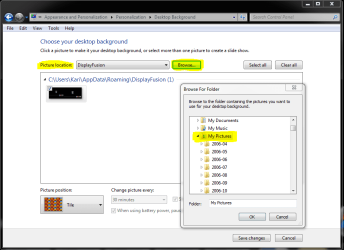
Hi, I installed 7 ultimate yesterday. I have the aero theme for my desktop, but the problem is that it doesn't let me Browse any folder to change the image...:S I tried several things, but i had the same result.
Help? thx
 

My Computer

Computer type
PC/Desktop
OS
Windows 7
CPU
i5-3570k
Motherboard
Asus P8Z77-V
Memory
Corsair 8GB DDR3 1600 CL9
Graphics Card(s)
Gigabyte HD 7850 2gb
hi Speedy, welcome to the Seven Forums.

If you have a Windows 7 Starter Edition, you are done. Starter Edition does not let you change the wallpaper. Any other version (Home Basic, Home Premium, Professional, Ultimate, Enterprise), right click on desktop and choose Personalize from menu. Click Desktop Background (bottom left) and choose the folder your image is located from the Picture location drop down menu.

Choose the image / images you want to use, click Save changes (bottom right).

Hope this helps.

Kari
 

My Computer

Computer type
Laptop
Computer Manufacturer/Model Number
HP ENVY 17-1150eg
OS
Windows 10 Pro x64 EN-GB
CPU
1.6 GHz Intel Core i7-720QM Processor
Memory
6 GB
Graphics Card(s)
ATI Mobility Radeon HD 5850 Graphics
Sound Card
Beats sound system with integrated subwoofer
Monitor(s) Displays
17" laptop display, 22" LED and 32" Full HD TV through HDMI
Screen Resolution
1600*900 (1), 1920*1080 (2&3)
Hard Drives
Internal: 2 x 500 GB SATA Hard Disk Drive 7200 rpm
External: 2TB for backups, 3TB USB3 network drive for media
Cooling
As Envy runs a bit warm, I have it on a Cooler Master pad
Keyboard
Logitech diNovo Media Desktop Laser (bluetooth)
Mouse
Logitech Performance Mouse MX
Internet Speed
50/10 Mbps VDSL
Antivirus
Windows Defender 4.3.9431.0
Browser
Maxthon 3.5.2., IE11
You can copy the image you like and place It in the c:\windows\web\wallpaper directory. I believe it has to be in .jpg format.
 

My Computer

Computer Manufacturer/Model Number
Cheap $399.00 E-Machine
OS
Windows 7 Pro & Vista Home Premium
CPU
Athlon 64 3800+ (Orleans) 2.40GHz
Motherboard
Winfast
Memory
2GB DDR2 RAM DIMM
Graphics Card(s)
NVIDIA GeForce 8500 GT 512 MB memory HDMI out
Sound Card
creative X-Fi Exteme 7..1 channel
Monitor(s) Displays
Acer V223W 22" widescreen DVI
Screen Resolution
1680x1050
Hard Drives
WDC WD5 500GB
WDC WD25 250GB
PSU
OCZ 550 watt
Case
Gateway
Cooling
2 fans
Keyboard
Dell
Mouse
Sony Vaio
Internet Speed
18MB/s down - .72MB /s up
The wallpaper (background image) can be located anywhere you want. Just browse to it and choose it as I told you earlier.

Windows 7 can use all normal image formats as wallpaper (bmp, gif, png, jpg etc.).

Kari
 

My Computer

Computer type
Laptop
Computer Manufacturer/Model Number
HP ENVY 17-1150eg
OS
Windows 10 Pro x64 EN-GB
CPU
1.6 GHz Intel Core i7-720QM Processor
Memory
6 GB
Graphics Card(s)
ATI Mobility Radeon HD 5850 Graphics
Sound Card
Beats sound system with integrated subwoofer
Monitor(s) Displays
17" laptop display, 22" LED and 32" Full HD TV through HDMI
Screen Resolution
1600*900 (1), 1920*1080 (2&3)
Hard Drives
Internal: 2 x 500 GB SATA Hard Disk Drive 7200 rpm
External: 2TB for backups, 3TB USB3 network drive for media
Cooling
As Envy runs a bit warm, I have it on a Cooler Master pad
Keyboard
Logitech diNovo Media Desktop Laser (bluetooth)
Mouse
Logitech Performance Mouse MX
Internet Speed
50/10 Mbps VDSL
Antivirus
Windows Defender 4.3.9431.0
Browser
Maxthon 3.5.2., IE11
I'll try what reghakr says, because the problem is that it doenst load any folder when i try to choose a picture :S
pd: i hace w7 ultimate
 

My Computer

Computer type
PC/Desktop
OS
Windows 7
CPU
i5-3570k
Motherboard
Asus P8Z77-V
Memory
Corsair 8GB DDR3 1600 CL9
Graphics Card(s)
Gigabyte HD 7850 2gb
It worked reghakr way, but thz to both of u....Now i'll try to find out why I couldn't browse any folder..:S

TY^^
 

My Computer

Computer type
PC/Desktop
OS
Windows 7
CPU
i5-3570k
Motherboard
Asus P8Z77-V
Memory
Corsair 8GB DDR3 1600 CL9
Graphics Card(s)
Gigabyte HD 7850 2gb
Are you sure you did it right? It is very strange if it does not work as I described; then you have some bigger problems.

Kari
 

Attachments

  • wallpaper.PNG
    wallpaper.PNG
    27.2 KB · Views: 35

My Computer

Computer type
Laptop
Computer Manufacturer/Model Number
HP ENVY 17-1150eg
OS
Windows 10 Pro x64 EN-GB
CPU
1.6 GHz Intel Core i7-720QM Processor
Memory
6 GB
Graphics Card(s)
ATI Mobility Radeon HD 5850 Graphics
Sound Card
Beats sound system with integrated subwoofer
Monitor(s) Displays
17" laptop display, 22" LED and 32" Full HD TV through HDMI
Screen Resolution
1600*900 (1), 1920*1080 (2&3)
Hard Drives
Internal: 2 x 500 GB SATA Hard Disk Drive 7200 rpm
External: 2TB for backups, 3TB USB3 network drive for media
Cooling
As Envy runs a bit warm, I have it on a Cooler Master pad
Keyboard
Logitech diNovo Media Desktop Laser (bluetooth)
Mouse
Logitech Performance Mouse MX
Internet Speed
50/10 Mbps VDSL
Antivirus
Windows Defender 4.3.9431.0
Browser
Maxthon 3.5.2., IE11
it worked, see above post
 

My Computer

Computer Manufacturer/Model Number
Cheap $399.00 E-Machine
OS
Windows 7 Pro & Vista Home Premium
CPU
Athlon 64 3800+ (Orleans) 2.40GHz
Motherboard
Winfast
Memory
2GB DDR2 RAM DIMM
Graphics Card(s)
NVIDIA GeForce 8500 GT 512 MB memory HDMI out
Sound Card
creative X-Fi Exteme 7..1 channel
Monitor(s) Displays
Acer V223W 22" widescreen DVI
Screen Resolution
1680x1050
Hard Drives
WDC WD5 500GB
WDC WD25 250GB
PSU
OCZ 550 watt
Case
Gateway
Cooling
2 fans
Keyboard
Dell
Mouse
Sony Vaio
Internet Speed
18MB/s down - .72MB /s up
Are you sure you did it right? It is very strange if it does not work as I described; then you have some bigger problems.

Kari

I know it has to be like that, but it doesnt work...dont know why. Tomorrow i'll try to find out that tonight im really tired...
 

My Computer

Computer type
PC/Desktop
OS
Windows 7
CPU
i5-3570k
Motherboard
Asus P8Z77-V
Memory
Corsair 8GB DDR3 1600 CL9
Graphics Card(s)
Gigabyte HD 7850 2gb
Back
Top