Changing Dual Booting from XP/Vista to XP/7

abrucewebb

New member
Member
Local time
9:52 AM
Messages
11
Hi,
I currently have XP Pro as my primary OS on drive C: and Vista Business as a dual boot on a separate hard drive, drive D:.

I want to upgrade the Vista installation to Win7; however I want to do a clean install upgrade so I can upgrade to 7 64 bit from the Vista 32 bit.

What do I have to do to do this successfully so that after installing the 7 64 bit I still have a dual boot option with XP/7? I want XP to be my primary OS with 7 as a secondary OS.

Thanks for any help you can give me.
 

My Computer My Computer

At a glance

xp pro/vista businessi7 920
Computer Manufacturer/Model Number
self built
OS
xp pro/vista business
CPU
i7 920
Motherboard
evga xm58
Hi,
I currently have XP Pro as my primary OS on drive C: and Vista Business as a dual boot on a separate hard drive, drive D:.

I want to upgrade the Vista installation to Win7; however I want to do a clean install upgrade so I can upgrade to 7 64 bit from the Vista 32 bit.

What do I have to do to do this successfully so that after installing the 7 64 bit I still have a dual boot option with XP/7? I want XP to be my primary OS with 7 as a secondary OS.

Thanks for any help you can give me.
Hi,can you post a screen shot using the snipping tool of your disc management?

You can find disc management via Control panel (small icon view)>Admin Tools>Computer Management>Disk Management

Then we can go from there.
Dan
 

My Computer My Computer

At a glance

Windows 7 Ultimate 64bitAMD Phenom II 555 Black Edition Quad Core OC'...G Skill RipJaw 1333MHz 4GBATI raideon 4250 HD/XFX ATI Radeon 1GB HD4650
Computer Manufacturer/Model Number
Blue Shards 1.0
OS
Windows 7 Ultimate 64bit
CPU
AMD Phenom II 555 Black Edition Quad Core OC'd to 4.0GHz
Motherboard
ASUS M4A88T-M
Memory
G Skill RipJaw 1333MHz 4GB
Graphics Card(s)
ATI raideon 4250 HD/XFX ATI Radeon 1GB HD4650
Sound Card
Realteck HD Audio
Monitor(s) Displays
2x 22" Widescreen HD Monitors
Hard Drives
500GB Sata 7500RPM
80GB IDE
PSU
850W OCUK Modular
Case
Antec Dark Fleet DF-30
Cooling
Titan Fenrir Pro (CPU)
Keyboard
Logitech Wireless
Mouse
Logitech Wireless
Internet Speed
24Meg
Other Info
Getting soon-
2TB 7200RPM HDD
+8GB RAM
30GB SSD
HD6950/70
Boot the Win7 DVD, custom install to the desired HD, using Drive Tools to delete, create New and then format your partition(s) there.
 
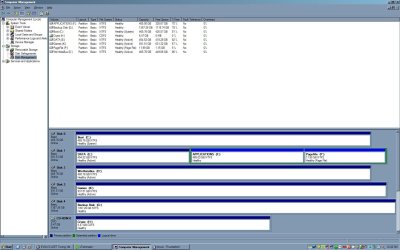
That's what I thought. I was just concerned that the boot manager would look for the non-exist Vista OS rather than the upgrade to Win 7. I didn't see a reply button for Dan, so I wanted to post the screen shot here, but am not sure how to do that. I have attached it as a jpg file, Disk Mgmt.

Thanks for your help.

bruce


moz-screenshot-2.png
moz-screenshot-3.png
moz-screenshot-4.png
moz-screenshot-5.png

moz-screenshot.png
moz-screenshot-1.png
 

Attachments

  • Disk Mgmt.jpg
    Disk Mgmt.jpg
    137.8 KB · Views: 41

My Computer My Computer

At a glance

xp pro/vista businessi7 920
Computer Manufacturer/Model Number
self built
OS
xp pro/vista business
CPU
i7 920
Motherboard
evga xm58
That's what I thought. I was just concerned that the boot manager would look for the non-exist Vista OS rather than the upgrade to Win 7. I didn't see a reply button for Dan, so I wanted to post the screen shot here, but am not sure how to do that. I have attached it as a jpg file, Disk Mgmt.

Thanks for your help.

bruce


moz-screenshot-2.png
moz-screenshot-3.png
moz-screenshot-4.png
moz-screenshot-5.png

moz-screenshot.png
moz-screenshot-1.png
Jesus thats a lot of room lol

You can go ahead and do ask greg says.
I would advise removing the other Hd's first leaving only the XP and Vista HD connected with the vista HD second in line.
Then boot the Win7 disc>Install>advanced>Format >Format the vista HD>then point Win7 to that location.
When your done(Win7 is installed) run start up repair three times

That should do the trick
Dan
 

My Computer My Computer

At a glance

Windows 7 Ultimate 64bitAMD Phenom II 555 Black Edition Quad Core OC'...G Skill RipJaw 1333MHz 4GBATI raideon 4250 HD/XFX ATI Radeon 1GB HD4650
Computer Manufacturer/Model Number
Blue Shards 1.0
OS
Windows 7 Ultimate 64bit
CPU
AMD Phenom II 555 Black Edition Quad Core OC'd to 4.0GHz
Motherboard
ASUS M4A88T-M
Memory
G Skill RipJaw 1333MHz 4GB
Graphics Card(s)
ATI raideon 4250 HD/XFX ATI Radeon 1GB HD4650
Sound Card
Realteck HD Audio
Monitor(s) Displays
2x 22" Widescreen HD Monitors
Hard Drives
500GB Sata 7500RPM
80GB IDE
PSU
850W OCUK Modular
Case
Antec Dark Fleet DF-30
Cooling
Titan Fenrir Pro (CPU)
Keyboard
Logitech Wireless
Mouse
Logitech Wireless
Internet Speed
24Meg
Other Info
Getting soon-
2TB 7200RPM HDD
+8GB RAM
30GB SSD
HD6950/70
The only possible problems I see are the two Data drives E and K which are incorrectly marked Active. I would boot free Partition Wizard CD to rightclick Modify>Set to Inactive both E and K partitions. Otherwise you could keep them unplugged during install as Minotar suggests.

Boot from Win7 DVD, select Custom install, use Drive Tools (advanced) to format Vista partition before installing Win7 there. http://www.sevenforums.com/tutorials/5166-dual-boot-installation-windows-7-vista.html

If there is no interfference from other drives, the System MBR should remain on XP drive and be updated by Win7 to maintain a dual boot. If this fails, post back here a screenshot of full Win7 Disk Management drive map, using Snipping Tool in Start Menu attaching file using paper clip in reply box.
 
OK. Thanks for the advice. I will take care of the active partitions now and try the upgrade this weekend when I have the time and will post the results.

bruce
 

My Computer My Computer

At a glance

xp pro/vista businessi7 920
Computer Manufacturer/Model Number
self built
OS
xp pro/vista business
CPU
i7 920
Motherboard
evga xm58
I want to thank you all for all your advice. I did the upgrade and it worked well with just a small hitch. I tried to do the install from my Toshiba DVD ROM and the installation program said I was missing drivers for it (and there are no drivers I can find as they say it uses native Windows drivers). I then tried from my Sony DVD burner and the installation hung. I finally tried from my USB external Mad Dog DVD burner and was successful.

Been spending a lot of time customizing today.

Once again, thanks for your help.

bruce
 

My Computer My Computer

At a glance

xp pro/vista businessi7 920
Computer Manufacturer/Model Number
self built
OS
xp pro/vista business
CPU
i7 920
Motherboard
evga xm58
Probably needed to be run from Vista to pick up the SATA drivers for some reason. Did your external boot, or run the DVD from Vista?
 
I wanted to upgrade from 32 bit Vista to 64 bit Win7 so I had to do a clean install. The message said that the driver missing was for the DVD Rom I had the install disk in at the time. Funny thing is the install disk read the disk, copied the installation files, and only gave me the error when I clicked on install now. My external DVD burner booted and the install program ran flawlessly from it. The funny thing is that now that Win7 is installed it reads all the drives with no problem.

Once again, thanks for all your help.

bruce
 

My Computer My Computer

At a glance

xp pro/vista businessi7 920
Computer Manufacturer/Model Number
self built
OS
xp pro/vista business
CPU
i7 920
Motherboard
evga xm58
Back
Top