Solved Changing External Hard Drive Letter

RP McIntosh

New member
Member
VIP
Local time
10:07 AM
Messages
135
I have a situation that isn't really a major problem, but is slightly annoying, and somewhat puzzling.

I have an external 1TB Iomega USB hard drive on my system. It is set to be Drive Y. Most of the time, everything is fine. But occasionally, after I boot the system, I'll get the pop up on the screen asking me what I want to do with Drive J. And yes, the "new" Drive J is, indeed, really my Iomega external drive. I can go into Disk Management, and reassign the drive letter back to Y, and everything is fine again.

Sometimes, it keeps the Y drive letter for several months at a time. But other times, the system treats it as a new drive and assigns drive letter J to it--in anywhere from a few days to several months after the previous time.

As I said, it doesn't happen often enough to be a problem, but I'm curious as to what causes it. Anyone have any insights into this little puzzle?
 

My Computer

Computer Manufacturer/Model Number
Dell
OS
Windows 7 Ultimate 64
CPU
Intel i7-975
Memory
12 GB
Graphics Card(s)
ATI Radeon HD 5870
Sound Card
Sound Blaster X-Fi Titanium
Monitor(s) Displays
Dell U2410
Hard Drives
3, SATA 1.5 TB each
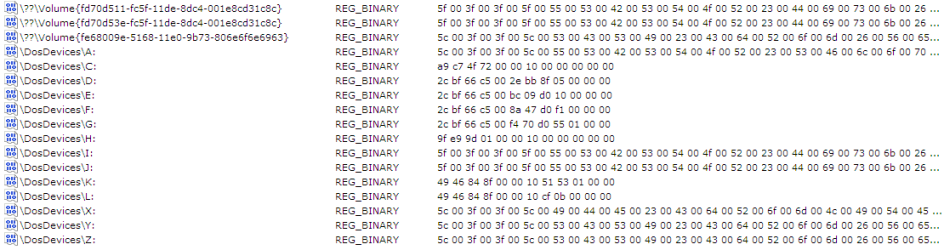
Look in your registry under HKEY_LOCAL_MACHINE\SYSTEM\MountedDevices. That's where drive letter assignments are stored. Find \DosDevices\Y: on the left side and note the data value on the right. The next time it happens, check the same registry location but find \DosDevices\J: and see if the data value is the same as before. Also see if there's still an entry for \DosDevices\Y:.

(Option Two)
http://www.sevenforums.com/tutorials/82994-drive-letter-add-change-remove-windows-7-a.html

MountedDevices.PNG
 
Last edited by a moderator:

My Computer

OS
Windows 7 Professional x64
Look in your registry under HKEY_LOCAL_MACHINE\SYSTEM\MountedDevices. That's where drive letter assignments are stored. Find \DosDevices\Y: on the left side and note the data value on the right. The next time it happens, check the same registry location but find \DosDevices\J: and see if the data value is the same as before. Also see if there's still an entry for \DosDevices\Y:.

(Option Two)
http://www.sevenforums.com/tutorials/82994-drive-letter-add-change-remove-windows-7-a.html

View attachment 174151

Thanks. I've exported that registry key to a text file, so that the next time it happens, I can compare the entries as you suggest. I'll let you know what happens, though it may be some time before I get the behavior again.

I'm guessing that there will NOT still be an entry for \DosDevices\Y: only because when I go to Disk Management to change the drive letter, Y is always available as a drive letter. I'm guessing that if there were an entry for it in the key, the drive letter would not be available in Disk Management.
 

My Computer

Computer Manufacturer/Model Number
Dell
OS
Windows 7 Ultimate 64
CPU
Intel i7-975
Memory
12 GB
Graphics Card(s)
ATI Radeon HD 5870
Sound Card
Sound Blaster X-Fi Titanium
Monitor(s) Displays
Dell U2410
Hard Drives
3, SATA 1.5 TB each
RP I think you've stumbled on one of Windows 7's annoying quirks. It will assign drive letters as it darn well pleases at times. So far no one has a solution for it but really causes no harm. :sarc:
 

My Computer

Computer type
PC/Desktop
Computer Manufacturer/Model Number
Home Built Desktop By DataTech
OS
Windows 7 Ultimate X64 SP1
CPU
Intel i5-2550K, Differing ~4.4-4.8GHz No built in GPU
Motherboard
ASUS P8Z68-V PRO/GEN3
Memory
16GB G.Skill Sniper 1866MHz @ 2133MHz 2x8GB
Graphics Card(s)
ASUS GTX650TIB-DC2OC-2GD5, (650TI Boost)
Sound Card
Onboard Realtek 5-1
Monitor(s) Displays
Samsung P2570HD
Screen Resolution
1920x1080
Hard Drives
Samsung 840 Pro 256GB SSD for OS, 500GB Seagate Constellation (Enterprise drive) for Data
PSU
Corsair HX650W
Case
Inwin Dragon Rider
Cooling
Hyper 212 EVO w/two Noctua fans, push-pull, @1300 RPM
Keyboard
E-Z Eyes, bright yellow keys with large characters
Mouse
steelseries SENSEI Laser Pro Gaming
Internet Speed
48-51Mbs Mbs down, 11 Mbs up Xfinity Cable
Antivirus
Norton Internet Security 2013
Browser
IE 10, Opera, Pale Moon if needed
Other Info
4 case fans, LG BluRay-RE, ASUS DVD-RW, Mr. Fusion power supply, 1.21 gigawatts.
These are just some random thoughts so please forgive me if it sounds weird. Also, my usual disclaimer: I'm not an expert in anything. :)

Instead of leaving the external drive as just (Y: ) what would happen if you renamed it to something else? Like "Data Backup (Y: )".

http://www.sevenforums.com/tutorials/66118-drive-rename.html

Another thought is perhaps one of your system files got damaged or corrupt in some way. You could try running a System File Checker scan. It will check the integrity of all protected Windows 7 system files and replace incorrect, corrupted, changed, or damaged versions with the correct versions if possible.

http://www.sevenforums.com/tutorials/1538-sfc-scannow-command-system-file-checker.html

And a final thought is if you have any other removable USB devices like a flash drive, camera, scanner, etc. If the Iomega external drive is unplugged (or if it has a separate power switch that gets turned off) and another device is plugged in, it might be assigned Drive Y: because that's a known assigned drive letter that's been previously used. Then when you plug in or turn on the Iomega it may get assigned J: because for whatever the reason, it's also a known drive letter that's been previously used. (I don't think Windows 7 or the computer will make a distinction between a HD, Flash drive, camera, etc. But I could be wrong.)

Anyway, just my two cents worth.
 

My Computer

Computer type
Laptop
Computer Manufacturer/Model Number
Sony Vaio VPCEB47GM Laptop
OS
Win 7 Pro 64-bit
CPU
Intel i5 2.4 Ghz
Memory
8GB DDR3
Graphics Card(s)
Intel HD 3000
Sound Card
IDT High Definition
Monitor(s) Displays
15.6 WGXA Anti-Glare LED
Screen Resolution
1280x800
Hard Drives
640Gb 7200rpm
Antivirus
MSE
Browser
Opera (primary) with IE9 backup

My Computer

Computer Manufacturer/Model Number
Too many to describe...
OS
Windows 7 x64 pro/ Windows 7 x86 Pro/ XP SP3 x86
RP I think you've stumbled on one of Windows 7's annoying quirks. It will assign drive letters as it darn well pleases at times. So far no one has a solution for it but really causes no harm. :sarc:


Thanks. I agree it's a minor annoyance. But I feel better finding out that it is something that others experience too, and not some more serious problem with my system.
 

My Computer

Computer Manufacturer/Model Number
Dell
OS
Windows 7 Ultimate 64
CPU
Intel i7-975
Memory
12 GB
Graphics Card(s)
ATI Radeon HD 5870
Sound Card
Sound Blaster X-Fi Titanium
Monitor(s) Displays
Dell U2410
Hard Drives
3, SATA 1.5 TB each
These are just some random thoughts so please forgive me if it sounds weird. Also, my usual disclaimer: I'm not an expert in anything. :)

Instead of leaving the external drive as just (Y: ) what would happen if you renamed it to something else? Like "Data Backup (Y: )".

http://www.sevenforums.com/tutorials/66118-drive-rename.html

Another thought is perhaps one of your system files got damaged or corrupt in some way. You could try running a System File Checker scan. It will check the integrity of all protected Windows 7 system files and replace incorrect, corrupted, changed, or damaged versions with the correct versions if possible.

http://www.sevenforums.com/tutorials/1538-sfc-scannow-command-system-file-checker.html

And a final thought is if you have any other removable USB devices like a flash drive, camera, scanner, etc. If the Iomega external drive is unplugged (or if it has a separate power switch that gets turned off) and another device is plugged in, it might be assigned Drive Y: because that's a known assigned drive letter that's been previously used. Then when you plug in or turn on the Iomega it may get assigned J: because for whatever the reason, it's also a known drive letter that's been previously used. (I don't think Windows 7 or the computer will make a distinction between a HD, Flash drive, camera, etc. But I could be wrong.)

Anyway, just my two cents worth.

Thanks for the comments. Actually, it has a name (IOMEGA_HDD) which I assume is the default that Iomega gave it. And I have run the SFC and it comes up clean. The only other USB device I have is a card reader (which registers as 4 drives when connected). But I only connect it when I want to use it. Windows always assigns it drive letters J, K, L, and M. And that's fine with me. I originally put the Iomega drive to Y so that if I used other devices, the drive letter wouldn't be affected, since I use it for backup, and my backup software is configured to backup to predetermined drives and folders. But apparently, it is a quirk of Windows, so I'll just live with it.
 

My Computer

Computer Manufacturer/Model Number
Dell
OS
Windows 7 Ultimate 64
CPU
Intel i7-975
Memory
12 GB
Graphics Card(s)
ATI Radeon HD 5870
Sound Card
Sound Blaster X-Fi Titanium
Monitor(s) Displays
Dell U2410
Hard Drives
3, SATA 1.5 TB each

My Computer

Computer Manufacturer/Model Number
Dell
OS
Windows 7 Ultimate 64
CPU
Intel i7-975
Memory
12 GB
Graphics Card(s)
ATI Radeon HD 5870
Sound Card
Sound Blaster X-Fi Titanium
Monitor(s) Displays
Dell U2410
Hard Drives
3, SATA 1.5 TB each
Back
Top