
I have read about, downloaded and used a number of utilities to change icons for file types. They all work. However, when I change the file type for cfg, the icons for txt, ini, log, xml; also change to the icon I set for cfg.
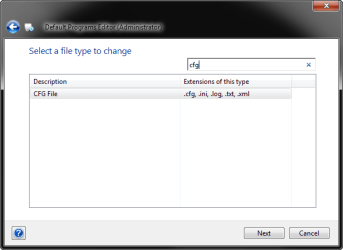
This had me baffled. Whether I used FileTypesMan, Types or Default Programs Editor; the result was the same. What I need to point out is that Programmers Notepad is now the default program for each of those types. I am guessing that's why their types are grouped together in Default Programs Editor. A screenshot is attached.
How do I go about separating these types for the purpose of differentiating their icons. Thanks for the help.
Graham
This had me baffled. Whether I used FileTypesMan, Types or Default Programs Editor; the result was the same. What I need to point out is that Programmers Notepad is now the default program for each of those types. I am guessing that's why their types are grouped together in Default Programs Editor. A screenshot is attached.
How do I go about separating these types for the purpose of differentiating their icons. Thanks for the help.
Graham
Attachments
My Computer
At a glance
Windows 7 Ultimate x64 SP14770K16 GB running at 2133GTX 780
- Computer type
- PC/Desktop
- Computer Manufacturer/Model Number
- Custom Build
- OS
- Windows 7 Ultimate x64 SP1
- CPU
- 4770K
- Motherboard
- Asus Maximus VI Hero
- Memory
- 16 GB running at 2133
- Graphics Card(s)
- GTX 780
- Sound Card
- Onboard Motherboard
- Monitor(s) Displays
- Sony 32 inch TV
- Screen Resolution
- 1920 x 1080
- Hard Drives
- 1 x Crucial MX100 256GB
1 x Crucial M500 956GB
1 x Western Digital Black 3TB
- Cooling
- Corsair H110 for CPU, 3 x 140mm PWM Case Fans
- Antivirus
- Norton Internet Security
- Browser
- Default - Firefox 31.0

