Changing file version

stinkyboy

New member
Local time
1:53 AM
Messages
6
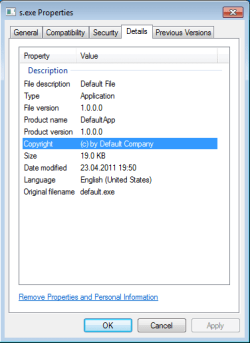
I made an executable file with freebasic compiler :geek: (basicly i turned qbasic source file into stand-alone executable) and i wonder if there is ANY way to change version of file so it is displayed at properties in "details" menu?
i searched youtube and wikipedia and windows help but nothing. :mad: :banghead:
pls help me, i have some plans with it and i really want to add version info
 

My Computer

OS
Windows 7 ultimate x32
You need to add it to the file first, because freebasic compiler does not do that.

I would use Restorator 2007.
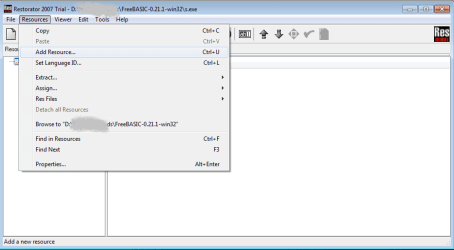
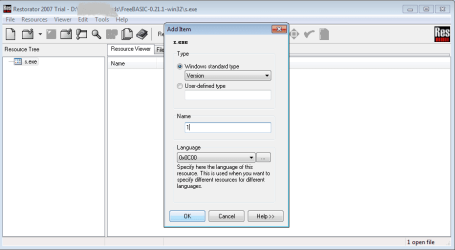
In the program menu Resources - Add Resource - Windows Standard type- Version

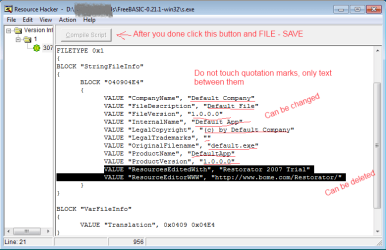
And then because trial version of Restorator leaves trial marks inside exe file, I would use Resource Hacker to edit these marks (in resource hacker it is not possible to add a new Version resource as easy as in Restorator).
 
Last edited:

My Computer

Computer type
PC/Desktop
OS
Windows 8.1 ; Windows 7 x86 (Dec2008-Jan2013)
Other Info
"The scale icon at the top right of a post or tutorial is how you can give rep to the member."

My Computer

Computer type
PC/Desktop
Computer Manufacturer/Model Number
Custom Build
OS
Windows 10 Pro x64
CPU
Intel Core i5 4440 @Stock
Motherboard
Gigabyte Z97 D3H
Memory
4 x 4GB HyperX Fury DDR3
Graphics Card(s)
Gigabyte GTX 1050Ti O4G
Sound Card
Integrated
Monitor(s) Displays
Dell P2417H
Screen Resolution
1920 x 1080
Hard Drives
Samsung EVO 850 120GB / Toshiba DT01ACA050 1TB 7200prm 32MB
PSU
Riotoro Onyx 750W
Case
NZXT H500 Black-Red
Cooling
Stock CPU + NZXT 120mm + 2x120mm red fans
Keyboard
Modecom Volcano Lanparty
Mouse
Asus ROG Gladius / DeepCool E-Pad Plus
Internet Speed
DOCSIS 50/3 Mbit
Browser
Google Chrome
Other Info
Asus K55VJ(i5 3210M, GT635M / 2GB, 8GB DDR3, 500GB HDD)
StalkeR, Resource Hacker was just mentioned above.

However, have you actually tried yourself to insert a version resource in the file with Resource Hacker without knowing a structure of a version resource? It is impossible.
 

My Computer

Computer type
PC/Desktop
OS
Windows 8.1 ; Windows 7 x86 (Dec2008-Jan2013)
Other Info
"The scale icon at the top right of a post or tutorial is how you can give rep to the member."
I didn't saw that. My mistake. And I haven't used Res Hacker for a long time....
 

My Computer

Computer type
PC/Desktop
Computer Manufacturer/Model Number
Custom Build
OS
Windows 10 Pro x64
CPU
Intel Core i5 4440 @Stock
Motherboard
Gigabyte Z97 D3H
Memory
4 x 4GB HyperX Fury DDR3
Graphics Card(s)
Gigabyte GTX 1050Ti O4G
Sound Card
Integrated
Monitor(s) Displays
Dell P2417H
Screen Resolution
1920 x 1080
Hard Drives
Samsung EVO 850 120GB / Toshiba DT01ACA050 1TB 7200prm 32MB
PSU
Riotoro Onyx 750W
Case
NZXT H500 Black-Red
Cooling
Stock CPU + NZXT 120mm + 2x120mm red fans
Keyboard
Modecom Volcano Lanparty
Mouse
Asus ROG Gladius / DeepCool E-Pad Plus
Internet Speed
DOCSIS 50/3 Mbit
Browser
Google Chrome
Other Info
Asus K55VJ(i5 3210M, GT635M / 2GB, 8GB DDR3, 500GB HDD)
You need to add it to the file first, because freebasic compiler does not do that.

I would use Restorator 2007.
In the program menu Resources - Add Resource - Windows Standard type- Version

And then because trial version of Restorator leaves trial marks inside exe file, I would use Resource Hacker to edit these marks (in resource hacker it is not possible to add a new Version resource as easy as in Restorator).
can you pls explain how to do it? :confused:
 

My Computer

OS
Windows 7 ultimate x32
1. Download Restorator 2007 Here
2. Start downloaded file and install
3. Open Restorator 2007 shortcut in Start-Programs menu
4. In Restorator 2007 open file, which you have compiled in freebasic compiler.
5.In the Restorator 2007 menu Resources - Add Resource, Choose Windows Standard type- Version
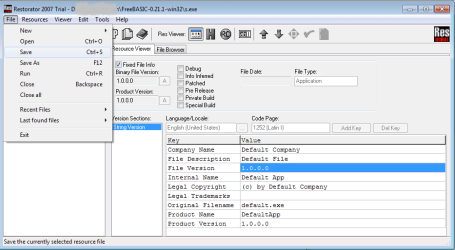
6. Edit new fields which appeared with corresponding information.7. Save file, exit Restorator 2007.

7.Download and install Resource Hacker from here
8. Open modified file in Resource Hacker
9. In the left menu choose the Corresponding resource in this case Version Info/1/Language number
10. Change whatever mentions of trial version and click button "Compile Script" and Save file.
 

My Computer

Computer type
PC/Desktop
OS
Windows 8.1 ; Windows 7 x86 (Dec2008-Jan2013)
Other Info
"The scale icon at the top right of a post or tutorial is how you can give rep to the member."
i did it exactly like that and still when i go to propeties->details there is nothing under file version shown​
 

My Computer

OS
Windows 7 ultimate x32
Might have missed something.
Here it is in pictures.
 

Attachments

  • 1.png
    1.png
    13.8 KB · Views: 78
  • 2.png
    2.png
    12.2 KB · Views: 76
  • 3.png
    3.png
    19.5 KB · Views: 79
  • 4.png
    4.png
    8.5 KB · Views: 60
  • 5.png
    5.png
    19.2 KB · Views: 90

My Computer

Computer type
PC/Desktop
OS
Windows 8.1 ; Windows 7 x86 (Dec2008-Jan2013)
Other Info
"The scale icon at the top right of a post or tutorial is how you can give rep to the member."
Back
Top