
Changing folder icons win 7 home premium

lajekahr

New member
Local time
11:31 PM
Messages
3
I've searched and found several things online that agree with the post on this forum here:
http://www.sevenforums.com/customization/17237-how-apply-image-folder.html

But unfortunately, the properties pane on any folder I right click on in my documents library does not have a "customize" tab!!! Folders on my desktop have the customize tab.

Yes, I'm the administrator, this is a home desktop not on a domain and fresh install of win 7.

I'm at a loss at this point.
 

Attachments
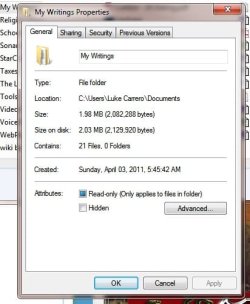
  • no-customize-tab.jpg
    no-customize-tab.jpg
    30.8 KB · Views: 12

My Computer

OS
Win 7 Home Premium 32bit
CPU
Pentium D
Memory
4Gb
Graphics Card(s)
Nvidia 460GTX GC
Sound Card
M-Audio Revolution
Monitor(s) Displays
LG LCD
Hard Drives
1.5Tb Hitachi 7500 RPM
150Gb
Okay, still confused but at least I found a 'workaround'.

When I went to my documents by clicking on my computer and going through the folders instead of clicking the my documents library, I was able to change it...

**scratches head**
 

My Computer

OS
Win 7 Home Premium 32bit
CPU
Pentium D
Memory
4Gb
Graphics Card(s)
Nvidia 460GTX GC
Sound Card
M-Audio Revolution
Monitor(s) Displays
LG LCD
Hard Drives
1.5Tb Hitachi 7500 RPM
150Gb

My Computer

Computer type
Laptop
OS
Windows 7 Ultimate
Cool beans!

Thanks for the info.
 

My Computer

OS
Win 7 Home Premium 32bit
CPU
Pentium D
Memory
4Gb
Graphics Card(s)
Nvidia 460GTX GC
Sound Card
M-Audio Revolution
Monitor(s) Displays
LG LCD
Hard Drives
1.5Tb Hitachi 7500 RPM
150Gb
lajekahr, that is the way Windows 7 works. You do have to go through Users, or C:\ to get the customize tab. Sorry I missed this the 1st time :confused:

A Guy
 

My Computer

Computer type
PC/Desktop
OS
Windows 10 Home x64
CPU
INTEL Core i5-750 Quad-Core 3.37GHz
Motherboard
ASUS P7P55D
Memory
HyperX Fury Black Series 8GB (2 x 4GB) 1866Mhz
Graphics Card(s)
EVGA GeForce GTX 750 Superclocked 1GB 128-Bit GDDR5
Monitor(s) Displays
LG 32MA68HY 32" IPS
Screen Resolution
1920 x 1080
Hard Drives
Samsung 840 Evo 120GB, SEAGATE 500GB Barracuda® 7200.12, SATA 3 Gb/s, 7200 RPM, 16MB cache
PSU
ANTEC TruePower New TP-550, 80 PLUS, 550W
Case
ANTEC Three Hundred Illusion
Cooling
COOLER MASTER Hyper 212 Plus, 4 x 120mm 1 x 140mm Noctua's
Internet Speed
85 + Mbps
Antivirus
Avast
Browser
Vivaldi
Back
Top