Changing font size, how?

Kika

New member
Member
VIP
Local time
11:29 PM
Messages
113
Location
England
How to change with W7 the font size on dialog buttons, menues, for folders, etc? I cant find even the place to do it. On vista it was where themes were listed, under theme selection was drop down menu where could select font size. Where it is on Windows 7? :shock:
I don't mean DPI, I only want to change font size for folder names and the space between folders.
 

My Computer

Computer Manufacturer/Model Number
IBM
OS
Windows 7 x64
CPU
Intel Core 2 T8100 @ 2.10GHz
Memory
3 GB SO-DIMM DDR2-800
Graphics Card(s)
Nvidia GeForce Go 7300
Sound Card
SteelSeries Siberia 7.1 3D
Screen Resolution
1680x1050
Mouse
Logitech MX
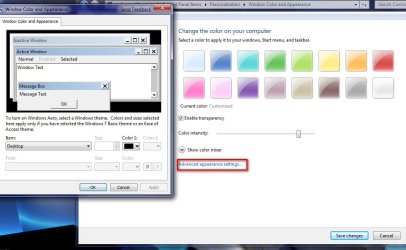
It is a bit hidden but here it is Control Panel\All Control Panel Items\Personalization\Window Color and Appearance or just right click and go to personalization and once you are in color and appearance you find what you are after in advanced appearance settings.

http://www.sevenforums.com/tutorials/1175-fonts-change.html

2009-01-25_004542.jpg
 

My Computer

Computer Manufacturer/Model Number
Home Brew
OS
Windows 7 Ultimate Vista Ultimate x64
CPU
Core 2 Duo E8500 3.16Ghz @ 3.8Ghz
Motherboard
eVGA 750i FTW
Memory
2x2Gigs Patriot PC2-6400 LL
Graphics Card(s)
Inno3D GeForce GTX260 216 SP
Monitor(s) Displays
ASUS VW222U 22" 2ms Response time
Screen Resolution
1680x1050
Hard Drives
SATA 150GB
SATA II 250GB
USB IDE 750GB Ext.
PSU
HYTEC 600W & Thermaltake 650W Toughpower Power Exp
Case
Thermaltake Armor LCS (Liquid Cooling System)
Cooling
Liquid Cooling System
Keyboard
Logitech G15 Gaming Keyboard
Mouse
Logitech G9 Gaming Mouse
Yes found now :) Thanks alot.
 

My Computer

Computer Manufacturer/Model Number
IBM
OS
Windows 7 x64
CPU
Intel Core 2 T8100 @ 2.10GHz
Memory
3 GB SO-DIMM DDR2-800
Graphics Card(s)
Nvidia GeForce Go 7300
Sound Card
SteelSeries Siberia 7.1 3D
Screen Resolution
1680x1050
Mouse
Logitech MX
Your welcome Kika.
 

My Computer

Computer Manufacturer/Model Number
Home Brew
OS
Windows 7 Ultimate Vista Ultimate x64
CPU
Core 2 Duo E8500 3.16Ghz @ 3.8Ghz
Motherboard
eVGA 750i FTW
Memory
2x2Gigs Patriot PC2-6400 LL
Graphics Card(s)
Inno3D GeForce GTX260 216 SP
Monitor(s) Displays
ASUS VW222U 22" 2ms Response time
Screen Resolution
1680x1050
Hard Drives
SATA 150GB
SATA II 250GB
USB IDE 750GB Ext.
PSU
HYTEC 600W & Thermaltake 650W Toughpower Power Exp
Case
Thermaltake Armor LCS (Liquid Cooling System)
Cooling
Liquid Cooling System
Keyboard
Logitech G15 Gaming Keyboard
Mouse
Logitech G9 Gaming Mouse
Hi,

I'm having the same problem

When I try to change the settings mentioned above the "Size" box is greyed out and I can't change it. Any ideas?

Thanks
 

My Computer

Computer Manufacturer/Model Number
Asus EEEBox 1501
OS
Windows 7 Home Premium
Hi,

I'm having the same problem

When I try to change the settings mentioned above the "Size" box is greyed out and I can't change it. Any ideas?

Thanks
You are probably on an "Item" where it cannot be changed - e.g. Desktop. Change the item and see what happens.
 

My Computer

Computer Manufacturer/Model Number
HP, Dell, Gateway, Toshiba - 4 laptops and 2 desktops
OS
Vista, Windows7, Mint Mate, Zorin, Windows 8
CPU
from 1.6GHz Duo to i7
Monitor(s) Displays
2x HP w2207
Hard Drives
5x HDD, 7x SSD, 12x Externals
Keyboard
with trackball - no mices
Mouse
Trackball mice
Internet Speed
DSL 6000
Okay - thank you

Where I can change the font the options are "10" (not much bigger than they already are) and 36 (way too big) - nothing in between

desktopfontsizes.jpg


This was before I changed from 8 to 10, and it's really no better at 10

:confused:
 

My Computer

Computer Manufacturer/Model Number
Asus EEEBox 1501
OS
Windows 7 Home Premium
Sorry to bump this up but you guys are my only hope :D

I'm about to bin a 2 month old PC because of this. As you can see from the image above I've circled all the text that magically shrank one day for no apparent reason. It's really annoying, especially in Media Player.

Any suggestions would be appreciated

PS I'm new here - is this in the right forum?
 

My Computer

Computer Manufacturer/Model Number
Asus EEEBox 1501
OS
Windows 7 Home Premium
i want to change the specific file name , just a file or folder not all folder in computer
 

My Computer

OS
windows 7 ultimate 32bit
CPU
intel core 2duo
Motherboard
gigabyte
Memory
2GB
Graphics Card(s)
1GB
Sound Card
OB
Monitor(s) Displays
CRT
Hard Drives
500GB maxtor
Back
Top