Changing from standard VGA to my ATI

HKCaptain89

New member
Local time
12:17 AM
Messages
5
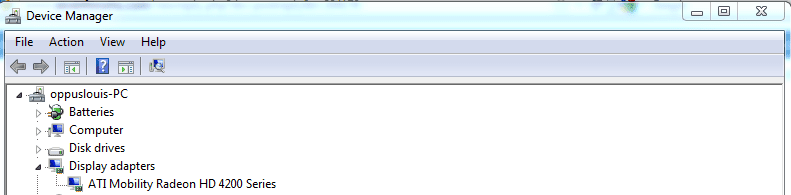
HI, I need some help on changing my graphics card over. I have almost the same problem as Maxo described but I can see my new graphics card is displayed under device manager and the status says working fine. I am trying to play WoW and I'm pretty sure that this is the probably. I know that i have to get the ATI graphics card the activate card instead of the VGA. Please help!!!
 

My Computer My Computer

At a glance

Windows 7 Home Premium 64bitAMD Athlon II X2 240 processor 2.80 GHz3GBATI Radeon HD 4200, Standard VGA
Computer Manufacturer/Model Number
DELL/ Inspiron 570
OS
Windows 7 Home Premium 64bit
CPU
AMD Athlon II X2 240 processor 2.80 GHz
Memory
3GB
Graphics Card(s)
ATI Radeon HD 4200, Standard VGA
Monitor(s) Displays
Hanns-G
Case
standard
you mean get the video to display through the graphic card instead of the main board video? had a bit of trouble of understanding what you said towards the end but is this what you mean?
 

My Computer My Computer

At a glance

Windows 10 64bitAMD Phenom II X4 925 (Deneb)(2.8GHz) OC 3.4GHzCorsair Vengeance DDR3 4GBX2 (8192MB)XFX HD 6870 1GB (OC)- 940MHz core, mem 1150MHz
Computer type
PC/Desktop
Computer Manufacturer/Model Number
custom build
OS
Windows 10 64bit
CPU
AMD Phenom II X4 925 (Deneb)(2.8GHz) OC 3.4GHz
Motherboard
M5A78L-MLX Plus
Memory
Corsair Vengeance DDR3 4GBX2 (8192MB)
Graphics Card(s)
XFX HD 6870 1GB (OC)- 940MHz core, mem 1150MHz
Monitor(s) Displays
Vizio 26' 1920x1080 / Acer 1336x768
Screen Resolution
1920x1080 60Hz /1336x768
Hard Drives
Kingston Digital 60GB SSDNow V300/500gb HDD Western Digital 7200rpm (/WD 160GB HDD 7200rpm
PSU
CORSAIR CX600 600w
Case
AZZA Orion 202 EVO
Cooling
cooler master hyper TX3 cpu cooler
Keyboard
Razer DeathStalker
Mouse
Logitech Optical Gaming Mouse G400
Antivirus
Defualt on win 10
Browser
Firefox
Other Info
cpu is overclocked in bios
Pic1-To change displays hold fn key(should be by window logo on keyboard) & press f5.Tap again to go next display option.
Pic2-If it says standard VGA instead of Radeon HD,the driver didn't install.
Go to amd drivers & support.Make sure you select the correct series GPU.
When exe open you will be prompted to download(temp file),After download is complete select install.While installation your screen will change.After install completes,select finish,& restart right after.

If it fails again,click the win logo on taskar,type msconfig,click msconfig & go to boot.
Pic3-Check safe boot & select minimal.Reinstall the driver once in safe mode.Let it reboot to safe again after install.Then go back to msconfig,boot,& uncheck safe boot.
Then restart.Go into device manager & see if it worked.
 

Attachments

  • 2.PNG
    2.PNG
    18.6 KB · Views: 86
  • 3.PNG
    3.PNG
    8.9 KB · Views: 66
  • 4.PNG
    4.PNG
    11.7 KB · Views: 68

My Computer My Computer

At a glance

window 7 64b SP1AMD P320 2.1ghzATI radeon HD 4250
Computer Manufacturer/Model Number
Acer aspire 5551-2036
OS
window 7 64b SP1
CPU
AMD P320 2.1ghz
Graphics Card(s)
ATI radeon HD 4250
Screen Resolution
1024x768 native
Hard Drives
320gb hitachi
ok so about confusion, I have no problems with display, just the fact that my active graphics card is the VGA instead of my ATI card, and i cant get it to change. I do see that in Pic-2 my ATI card. I did not try the third Pic suggestion as I'm sure its not a install problem only the fact that the VGA card is the active card and not my ATI like it needs to be. If you look at Maxo's thread on this subject, I pretty much have his same problem just that I'm using windows 7 on a desktop instead of a laptop. Please provide any input as to the kind of info you need, to solve my issue. I've never tried getting help from a forum before, so I'm sorta new, but I've exhausted all other rime and reason to solve this issue and didnt know wut else to do.
 

My Computer My Computer

At a glance

Windows 7 Home Premium 64bitAMD Athlon II X2 240 processor 2.80 GHz3GBATI Radeon HD 4200, Standard VGA
Computer Manufacturer/Model Number
DELL/ Inspiron 570
OS
Windows 7 Home Premium 64bit
CPU
AMD Athlon II X2 240 processor 2.80 GHz
Memory
3GB
Graphics Card(s)
ATI Radeon HD 4200, Standard VGA
Monitor(s) Displays
Hanns-G
Case
standard

My Computer My Computer

At a glance

Win 7 Ultimate x64FX-8350 @ 4.6 GHz so farADATA XPG V1 Series Black 8GB DDR3 1600Sapphire R9 270x Dual-X
Computer type
PC/Desktop
Computer Manufacturer/Model Number
Me
OS
Win 7 Ultimate x64
CPU
FX-8350 @ 4.6 GHz so far
Motherboard
Asus M5A97 EVO
Memory
ADATA XPG V1 Series Black 8GB DDR3 1600
Graphics Card(s)
Sapphire R9 270x Dual-X
Sound Card
Xonar DGX w/ Corsair Vengence 1300
Monitor(s) Displays
Acer S232HL Abid
Screen Resolution
1920x1080
Hard Drives
120 GB OCZ Vertex 3
500 GB Seagate 7200.12
PSU
Antec Earthwatts 650W Green
Case
Antec Three Hundred
Cooling
Cooler Master 212 EVO
Keyboard
Logitech G510
Mouse
Logitech G500s
Internet Speed
35000/3000
yes i have done that already and when i go to click on the catalyst is says that the current active gpu is not supported by this.
 

My Computer My Computer

At a glance

Windows 7 Home Premium 64bitAMD Athlon II X2 240 processor 2.80 GHz3GBATI Radeon HD 4200, Standard VGA
Computer Manufacturer/Model Number
DELL/ Inspiron 570
OS
Windows 7 Home Premium 64bit
CPU
AMD Athlon II X2 240 processor 2.80 GHz
Memory
3GB
Graphics Card(s)
ATI Radeon HD 4200, Standard VGA
Monitor(s) Displays
Hanns-G
Case
standard
Have you been into the bios and set the ATI card as the default video source?
 

My Computer My Computer

At a glance

Windows 7 Ultimate 64i7 3770k OC'd 4.6 @ 1.17v, also FX 8120 & i5 ...32 gb G.Skill Sniper DDR3 10-12-12-31 @ 2133XFX Radeon 7870 2GB DDR5
Computer type
PC/Desktop
Computer Manufacturer/Model Number
A blend of brains, brawn and dumb luck.
OS
Windows 7 Ultimate 64
CPU
i7 3770k OC'd 4.6 @ 1.17v, also FX 8120 & i5 miniITX
Motherboard
MSI P67A-GD80 b3
Memory
32 gb G.Skill Sniper DDR3 10-12-12-31 @ 2133
Graphics Card(s)
XFX Radeon 7870 2GB DDR5
Sound Card
Sound Blaster Z Series Card
Monitor(s) Displays
(2) LG LED 23" 1920 x 1080 2ms Monitors via mini d-port
Screen Resolution
1680 X 1050 p
Hard Drives
Samsung 256 gb 830 SSD sata III
(1) 1 tb WD Black
(2) 1 tb Hitachi deskmates/sata II
(2) 1 tb WD green/sata II
(2) 3 tb Seagate Barracuda
(1) 120 gb OCZ Vertex SS
(1) Drobo 5N w/5 Seagate 3tb
PSU
EVGA modular 1000G2 80% gold rating & APC 1200 RS
Case
CoolerMaster Storm Styker
Cooling
7 case fans 140mm & 120mm, NZXT Kraken X60
Keyboard
(2) Logitech Illuminated Keyboards (1) usb (1) wireless
Mouse
Logitech G700 & T-BC21 - nano nx for the laptop
Internet Speed
Basic 120mbps down
Antivirus
Trend Micro Titanium Max Security & Malwarebytes Premium
Browser
Chrome and IE 10
Other Info
5 Noctua case fans + 3 Noctua in p/p on NZXT cooler
Integrated hot swap drive bays for 2.5" Drives
(2) Lite-on dvd/cd/Blu Ray optical 22X
Integrated fan controller and led on/off
HP Officejet Pro 8630 all-n-one
Hot-swappable 3.5" hard drive bay
Netgear Nighthawk router
Asus USB 3 & sata 6 PCIe card
Vantec IDE to sata adptr./Ultra sata adptr
Lenovo L420 i5 lappy with m sata
Drobo 5N advanced NAS
Have you moved the monitor cable from the onboard port over to the added graphic cards port?
 

My Computer My Computer

At a glance

Windows 7 Pro x64AMD FX 4100 4 Core 3.6GHz AM3+16GB G.Skill RipjawsXRadeon 6850
Computer Manufacturer/Model Number
Home build
OS
Windows 7 Pro x64
CPU
AMD FX 4100 4 Core 3.6GHz AM3+
Motherboard
ASROCK 970 Extreme3
Memory
16GB G.Skill RipjawsX
Graphics Card(s)
Radeon 6850
Sound Card
ASUS Xonar D1
Monitor(s) Displays
ASUS 23" LCD
Hard Drives
SSD 120GB
WD 750GB Black series
WD 640GB Black series
PSU
700W
Case
Antec 100
Cooling
Hyper 212 Plus
Internet Speed
50MB
Have you been into the bios and set the ATI card as the default video source?
No, I havent done that yet, but i need some help with it, on how to do that.
 

My Computer My Computer

At a glance

Windows 7 Home Premium 64bitAMD Athlon II X2 240 processor 2.80 GHz3GBATI Radeon HD 4200, Standard VGA
Computer Manufacturer/Model Number
DELL/ Inspiron 570
OS
Windows 7 Home Premium 64bit
CPU
AMD Athlon II X2 240 processor 2.80 GHz
Memory
3GB
Graphics Card(s)
ATI Radeon HD 4200, Standard VGA
Monitor(s) Displays
Hanns-G
Case
standard
Normally as the system is first turned on keep hitting the Delete key and then each bios is different but you use the arrow keys, enter tab a then F10 key to save changes and hit enter to launch into the normal or modified boot sequence. Please spend time looking around and to get out of an area just hit the esc key. Write down any changes and if you have a problem just power down and power up and go back into bios and change back to previous setting of keep making your changes until satisfied. In you bios you will find a section dealing with which video source to set as primary or words to the same effect. Report back what you find. Also a good idea to grab the motherboards manual online and review it before getting into the settings. Good luck go slow, read and learn !
 

My Computer My Computer

At a glance

Windows 7 Ultimate 64i7 3770k OC'd 4.6 @ 1.17v, also FX 8120 & i5 ...32 gb G.Skill Sniper DDR3 10-12-12-31 @ 2133XFX Radeon 7870 2GB DDR5
Computer type
PC/Desktop
Computer Manufacturer/Model Number
A blend of brains, brawn and dumb luck.
OS
Windows 7 Ultimate 64
CPU
i7 3770k OC'd 4.6 @ 1.17v, also FX 8120 & i5 miniITX
Motherboard
MSI P67A-GD80 b3
Memory
32 gb G.Skill Sniper DDR3 10-12-12-31 @ 2133
Graphics Card(s)
XFX Radeon 7870 2GB DDR5
Sound Card
Sound Blaster Z Series Card
Monitor(s) Displays
(2) LG LED 23" 1920 x 1080 2ms Monitors via mini d-port
Screen Resolution
1680 X 1050 p
Hard Drives
Samsung 256 gb 830 SSD sata III
(1) 1 tb WD Black
(2) 1 tb Hitachi deskmates/sata II
(2) 1 tb WD green/sata II
(2) 3 tb Seagate Barracuda
(1) 120 gb OCZ Vertex SS
(1) Drobo 5N w/5 Seagate 3tb
PSU
EVGA modular 1000G2 80% gold rating & APC 1200 RS
Case
CoolerMaster Storm Styker
Cooling
7 case fans 140mm & 120mm, NZXT Kraken X60
Keyboard
(2) Logitech Illuminated Keyboards (1) usb (1) wireless
Mouse
Logitech G700 & T-BC21 - nano nx for the laptop
Internet Speed
Basic 120mbps down
Antivirus
Trend Micro Titanium Max Security & Malwarebytes Premium
Browser
Chrome and IE 10
Other Info
5 Noctua case fans + 3 Noctua in p/p on NZXT cooler
Integrated hot swap drive bays for 2.5" Drives
(2) Lite-on dvd/cd/Blu Ray optical 22X
Integrated fan controller and led on/off
HP Officejet Pro 8630 all-n-one
Hot-swappable 3.5" hard drive bay
Netgear Nighthawk router
Asus USB 3 & sata 6 PCIe card
Vantec IDE to sata adptr./Ultra sata adptr
Lenovo L420 i5 lappy with m sata
Drobo 5N advanced NAS
Back
Top