JavaScript is disabled. For a better experience, please enable JavaScript in your browser before proceeding.
You are using an out of date browser. It may not display this or other websites correctly.
You should upgrade or use an
alternative browser .
Changing functions in a Microsoft mouse
Hello,
Have you installed your Microsoft mouse/keyboard program?
Computer type PC/Desktop Computer Manufacturer/Model Number Home made Desktop OS Windows 10 Pro. 64/ version 1709 Windows 7 Pro/64 CPU Intel i7-6800K @ 4.3 Motherboard ASUS X-99 Deluxe II Memory Corsair Platinum 16 gig @2400 Graphics Card(s) EVGA GTX 1070 OC Monitor(s) Displays Asus 27" LED LCD/VE278Q Screen Resolution 1920-1080 or 1280-720 HDMI Hard Drives INTEL SSD 730-240 Gb Sata 3.0/ PSU EVGA Platium 1200W Case Phanteks Luxe Tempered Glass 8 fans/ one radiator Cooling XSPC/ Water Cooled CPU Keyboard Das 4 Professional Mouse Logitech M705/MX Anywhere 2-S Internet Speed 100 mbits Antivirus Microsoft Security Essentials/ Malwarebytes Premium 3.0/ SAS Browser I.E. 11 default/Firefox/ ISP Time Warner Cable/Spectrum Other Info LG BluRay Burner/
New member
Member
VIP
Thread Starter
Hi Layback Bear,
Thanks for replying. I appreciate it.
I've googled "microsoft wireless optical desktop 2000 driver".
In
this page, do you think "IntelliType 8.2 32-bit for Windows 7" is the right driver?
Reading the Readme, I'm not sure.
Regards.
It appears to be the correct one.
Computer type PC/Desktop Computer Manufacturer/Model Number Home made Desktop OS Windows 10 Pro. 64/ version 1709 Windows 7 Pro/64 CPU Intel i7-6800K @ 4.3 Motherboard ASUS X-99 Deluxe II Memory Corsair Platinum 16 gig @2400 Graphics Card(s) EVGA GTX 1070 OC Monitor(s) Displays Asus 27" LED LCD/VE278Q Screen Resolution 1920-1080 or 1280-720 HDMI Hard Drives INTEL SSD 730-240 Gb Sata 3.0/ PSU EVGA Platium 1200W Case Phanteks Luxe Tempered Glass 8 fans/ one radiator Cooling XSPC/ Water Cooled CPU Keyboard Das 4 Professional Mouse Logitech M705/MX Anywhere 2-S Internet Speed 100 mbits Antivirus Microsoft Security Essentials/ Malwarebytes Premium 3.0/ SAS Browser I.E. 11 default/Firefox/ ISP Time Warner Cable/Spectrum Other Info LG BluRay Burner/
New member
Member
VIP
Thread Starter
Thanks again Layback Bear. I appreciate your kind help.
Try this.
Reboot and then go to
Start Orb and type in
mouse and see if a program for you mouse appears in the list.
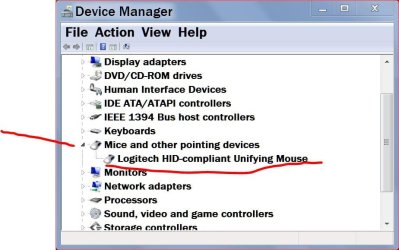
Then go to Device Manager and look (Mine indicates Logitech because that is the type of mouse I use.)
Computer type PC/Desktop Computer Manufacturer/Model Number Home made Desktop OS Windows 10 Pro. 64/ version 1709 Windows 7 Pro/64 CPU Intel i7-6800K @ 4.3 Motherboard ASUS X-99 Deluxe II Memory Corsair Platinum 16 gig @2400 Graphics Card(s) EVGA GTX 1070 OC Monitor(s) Displays Asus 27" LED LCD/VE278Q Screen Resolution 1920-1080 or 1280-720 HDMI Hard Drives INTEL SSD 730-240 Gb Sata 3.0/ PSU EVGA Platium 1200W Case Phanteks Luxe Tempered Glass 8 fans/ one radiator Cooling XSPC/ Water Cooled CPU Keyboard Das 4 Professional Mouse Logitech M705/MX Anywhere 2-S Internet Speed 100 mbits Antivirus Microsoft Security Essentials/ Malwarebytes Premium 3.0/ SAS Browser I.E. 11 default/Firefox/ ISP Time Warner Cable/Spectrum Other Info LG BluRay Burner/
New member
Member
VIP
Thread Starter
Nothing.
Computer type PC/Desktop Computer Manufacturer/Model Number Home made Desktop OS Windows 10 Pro. 64/ version 1709 Windows 7 Pro/64 CPU Intel i7-6800K @ 4.3 Motherboard ASUS X-99 Deluxe II Memory Corsair Platinum 16 gig @2400 Graphics Card(s) EVGA GTX 1070 OC Monitor(s) Displays Asus 27" LED LCD/VE278Q Screen Resolution 1920-1080 or 1280-720 HDMI Hard Drives INTEL SSD 730-240 Gb Sata 3.0/ PSU EVGA Platium 1200W Case Phanteks Luxe Tempered Glass 8 fans/ one radiator Cooling XSPC/ Water Cooled CPU Keyboard Das 4 Professional Mouse Logitech M705/MX Anywhere 2-S Internet Speed 100 mbits Antivirus Microsoft Security Essentials/ Malwarebytes Premium 3.0/ SAS Browser I.E. 11 default/Firefox/ ISP Time Warner Cable/Spectrum Other Info LG BluRay Burner/
New member
Member
VIP
Thread Starter
Allow me to thank you again. Really kind of you.
The Start Orb method I tried earlier.
I've just tried Windows Update. Nothing.
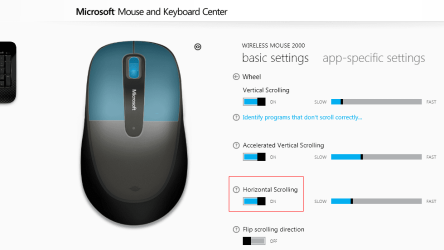
I've also installed the MouseKeyboardCenter app: there's an option to disable horizontal scrolling, but not to assign middle-click to tilting.
***
Quite late in my place. I'll retire now.
Mouse.PNG
166.8 KB
· Views: 2
It appears that your mouse doesn't have that option.
Computer type PC/Desktop Computer Manufacturer/Model Number Home made Desktop OS Windows 10 Pro. 64/ version 1709 Windows 7 Pro/64 CPU Intel i7-6800K @ 4.3 Motherboard ASUS X-99 Deluxe II Memory Corsair Platinum 16 gig @2400 Graphics Card(s) EVGA GTX 1070 OC Monitor(s) Displays Asus 27" LED LCD/VE278Q Screen Resolution 1920-1080 or 1280-720 HDMI Hard Drives INTEL SSD 730-240 Gb Sata 3.0/ PSU EVGA Platium 1200W Case Phanteks Luxe Tempered Glass 8 fans/ one radiator Cooling XSPC/ Water Cooled CPU Keyboard Das 4 Professional Mouse Logitech M705/MX Anywhere 2-S Internet Speed 100 mbits Antivirus Microsoft Security Essentials/ Malwarebytes Premium 3.0/ SAS Browser I.E. 11 default/Firefox/ ISP Time Warner Cable/Spectrum Other Info LG BluRay Burner/
New member
Member
VIP
Thread Starter
I suppose you're correct.