Changing icons on Win Explorer...

sidgallup

New member
Local time
4:23 AM
Messages
2
Hi, my OS looks exactly the way i want it except for these 3 icons, the ones marked in red...

http://i.imgur.com/mJNCZ.jpg

Any ideas on how to change them? and also where could i find black versions of them?

thanks

EDIT: Thanks Arc, added image as an attachment...
 

Attachments
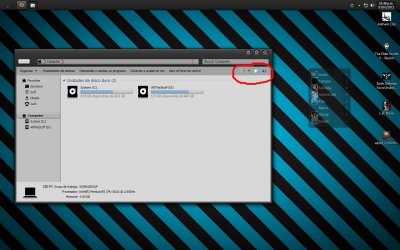
  • mJNCZ.jpg
    mJNCZ.jpg
    108.2 KB · Views: 56

My Computer

OS
Win 7 Ultimate 32 bits
Welcome aboard!
The image is not loading for me :huh: Can you post it in the forums, using the paper clip icon of the reply box ?
 

My Computer

Computer type
PC/Desktop
Computer Manufacturer/Model Number
Self Assembled
OS
Microsoft Windows 10 Pro Insider Preview 64-bit
CPU
Intel(R) Core(TM) i3-4130 CPU @ 3.40GHz
Motherboard
Gigabyte Technology Co., Ltd. B85M-D3H
Memory
Corsair Vengence 4GB x2 (8.00GB Dual-Channel DDR3 @ 798MHz)
Graphics Card(s)
2047MB GeForce GTS 450 (ZOTAC International)
Sound Card
Onboard (Realtek High Definition Audio)
Monitor(s) Displays
LG Flatron E2040T
Screen Resolution
1600x900
Hard Drives
Western Digital 1 TB
Seagate 500 GB
PSU
Corsair VS550
Case
Cooler Master K380
Cooling
Cooler Master Seidon 120V Plus
Keyboard
Logitech MK260r
Mouse
Logitech MK260r
Internet Speed
PMPL Broadband
Antivirus
Windows Defender + MBAM
Browser
Firefox
Other Info
Dell Studio 15" Laptop
  • Like
Reactions: JMH
Welcome to the Seven Forums
They are in the Icon folde in shell32.dll in C:\Windows\System32
From the Right
the help button is #24

the middle one is #s 16742,16754,16755,16756,16757,16758,16759

The one on the Left is #s 62998,62999,63000,63001,63008,63009,63010,63011
Jerry
 
Last edited:

My Computer

Computer type
Laptop
Computer Manufacturer/Model Number
Sager NP9170
OS
Win 7 Pro x64 / Win 10 Pro
CPU
Intel(R) Core(TM) i7-3630QM CPU @ 2.40GHz
Motherboard
CLEVO P170EM
Memory
12 GB
Graphics Card(s)
(1) Intel(R) HD Graphics 4000 (2) NVIDIA GeForce GTX 675M
Sound Card
(1) Realtek High Definition Audio (2) Intel(R) Display Aud
Monitor(s) Displays
17.3
Screen Resolution
1920x1080
Hard Drives
(1) Samsung 860 EVO 500GB(OS) (1) Samsung 860 EVO 500GB(Data)
Keyboard
Backlite
Antivirus
MSE, Malwarebytes Pro
Browser
Firefox
Other Info
DESKTOP: Custom-built.
OS: Win 10 Pro x64.
CASE: Rosewill R5.
CPU: Intel I5 4670K CPU @ 3.40GHz.
CPU COOLER: Cool Master Hyper 212 EVO.
MOTHERBOARD: Asus Z87-A.
MEMORY: Kingston HyperX 2x4 GB.
GPU: Nvidia Geforce 650 TI.
PSU: Corsair TX750.
DRIVES: (1) Samsung 840 120 GB SSD (2) Western Digital blue 500 GB 7200 RPM.
Thanks for the help, i've found such icons in the shell32.dll library, however i can yet modify them, i'm using Anolis Resourcer, i load the shell32, load the new icons, but when i try to save the changes it gives me an error about some "RC config" file not present... any ideas on how to fix this? or any other program that could allow me to change them? i'm on Win 7 Ultimate 32 bits by the way...
 

My Computer

OS
Win 7 Ultimate 32 bits
I will be back in the morning to help you.
Jerry
 

My Computer

Computer type
Laptop
Computer Manufacturer/Model Number
Sager NP9170
OS
Win 7 Pro x64 / Win 10 Pro
CPU
Intel(R) Core(TM) i7-3630QM CPU @ 2.40GHz
Motherboard
CLEVO P170EM
Memory
12 GB
Graphics Card(s)
(1) Intel(R) HD Graphics 4000 (2) NVIDIA GeForce GTX 675M
Sound Card
(1) Realtek High Definition Audio (2) Intel(R) Display Aud
Monitor(s) Displays
17.3
Screen Resolution
1920x1080
Hard Drives
(1) Samsung 860 EVO 500GB(OS) (1) Samsung 860 EVO 500GB(Data)
Keyboard
Backlite
Antivirus
MSE, Malwarebytes Pro
Browser
Firefox
Other Info
DESKTOP: Custom-built.
OS: Win 10 Pro x64.
CASE: Rosewill R5.
CPU: Intel I5 4670K CPU @ 3.40GHz.
CPU COOLER: Cool Master Hyper 212 EVO.
MOTHERBOARD: Asus Z87-A.
MEMORY: Kingston HyperX 2x4 GB.
GPU: Nvidia Geforce 650 TI.
PSU: Corsair TX750.
DRIVES: (1) Samsung 840 120 GB SSD (2) Western Digital blue 500 GB 7200 RPM.
Download Resource Hacker Resource Hacker scroll down until you see this that is the download button.
a.PNG

Always work on a copy of any .dll you modify so you can keep the original intact (I usually put them on the desktop).
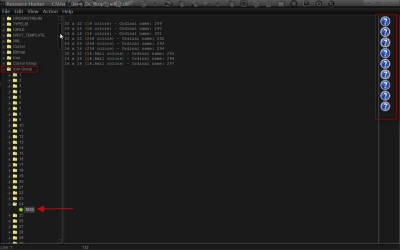
Open the shell32.dll expand Icon Group expand 24 and click on 1033 you will notice that the icon is nine layers that is 32 x 32, 24 x 24, 16 x 16, and it is repeated two more times you should try to make an icon that is the same way (if you need help with that let me know).
1.png

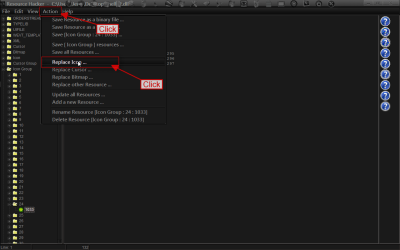
Click on Action then click on Replace Icon.
2.png

Click on Open file with new icon...
3.png

Navigator to the replacement icon and click on open.
4.png

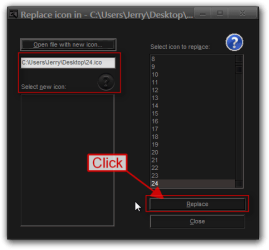
You should see the replacement icon plus where it is coming from then Click on Replace.
5.png

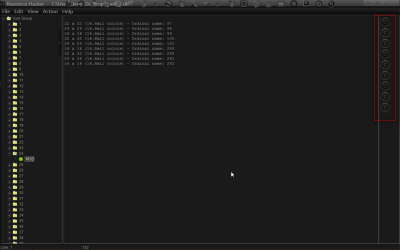
You should see the new icon in its place.
Now you need to click file and then save it will give you the new .dll and it will also keep the original renamed
6.png

I do not know if you know how to replace a .dll but if you look at Post #6 of this thread http://www.sevenforums.com/customization/179502-basic-networking-information.html#post1525656 it will show you how to take ownership give yourself permission and how to rename it and replace it.
Jerry
 

My Computer

Computer type
Laptop
Computer Manufacturer/Model Number
Sager NP9170
OS
Win 7 Pro x64 / Win 10 Pro
CPU
Intel(R) Core(TM) i7-3630QM CPU @ 2.40GHz
Motherboard
CLEVO P170EM
Memory
12 GB
Graphics Card(s)
(1) Intel(R) HD Graphics 4000 (2) NVIDIA GeForce GTX 675M
Sound Card
(1) Realtek High Definition Audio (2) Intel(R) Display Aud
Monitor(s) Displays
17.3
Screen Resolution
1920x1080
Hard Drives
(1) Samsung 860 EVO 500GB(OS) (1) Samsung 860 EVO 500GB(Data)
Keyboard
Backlite
Antivirus
MSE, Malwarebytes Pro
Browser
Firefox
Other Info
DESKTOP: Custom-built.
OS: Win 10 Pro x64.
CASE: Rosewill R5.
CPU: Intel I5 4670K CPU @ 3.40GHz.
CPU COOLER: Cool Master Hyper 212 EVO.
MOTHERBOARD: Asus Z87-A.
MEMORY: Kingston HyperX 2x4 GB.
GPU: Nvidia Geforce 650 TI.
PSU: Corsair TX750.
DRIVES: (1) Samsung 840 120 GB SSD (2) Western Digital blue 500 GB 7200 RPM.
I would suggest you to use Restorator, its easy to use. Secondly if you are trying to change those images in an installed OS you need to copy the shell32.dll to some other location and then change the images. After changing the images save it and then replace the shell32.dll by replacer.

If you are trying to change the images in an mounted wim, first take the ownership of shell32.dll and then try to edit it.
 

My Computer

OS
Windows 7 Ultimate
Back
Top