JavaScript is disabled. For a better experience, please enable JavaScript in your browser before proceeding.
You are using an out of date browser. It may not display this or other websites correctly.
You should upgrade or use an
alternative browser .
Changing Outlook inbox view
I'm using Outlook 2010. I am sure this has been answered but I do not know the terminology needed to search for the answer. Please help.
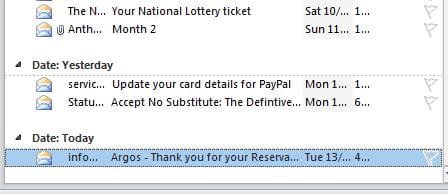
I want my inbox view to go from whats on the left to whats on the right in the below image.
Computer type PC/Desktop OS WINDOWS 7
Better Call Saul
VIP
SF Team
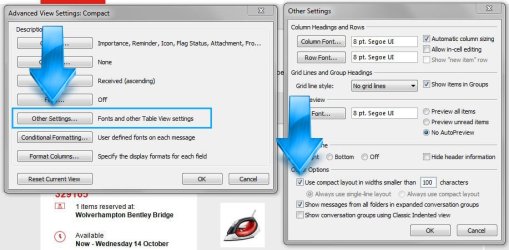
Right click on the top panel and choose
View Settings . Click on
Other Settings then under
Other Options check the
Use compact layout in widths smaller than ... box.
Checked:
Unchecked:
Computer type PC/Desktop Computer Manufacturer/Model Number Custom Build OS W7 Pro x64 SP1 | W10 Pro IP x64 | W8.1 Pro x64 VM | Linux Mint VM CPU i7-4790k @ 4GHz (4.4GHz Boost) Motherboard ASUS Sabertooth Z87 (BIOS Rev 2004) Memory 16GB DDR3 Kingston HyperX Fury @ 1600MHz CL 9-9-9-27 Graphics Card(s) EVGA GTX 980 Classified Sound Card Realtek Onboard Monitor(s) Displays Samsung S27D390 Screen Resolution 1920 x 1080 Hard Drives 240GB Intel 520 Series SSD | PSU Corsair HX850-80 Gold Modular Case Cooler Master Silencio 650 Cooling Corsair H80i w/2 x Corsair SP120 | 2 x 120mm Noctua NF-S12B Keyboard Microsoft Sidewinder X4 Mouse Gigabyte M6900 optical Internet Speed 152mb Antivirus F-Secure Browser Firefox 38.0 Other Info Backup Rig: Win 7 Pro 64-bit | AMD A10-5800k | ASUS F2A85-V Pro | 8GB Samsung DDR3 @1600MHz | 120GB Toshiba SDD | 2TB Seagate HDD | Cooler Master Silencio 550