Changing Picture Folders Display.

Scunnered

New member
Local time
5:31 PM
Messages
15
My partner has switched to Win 7 from XP and is having problems in identifying her pictures. She is partially sighted and to aid herself when opening folders she would select a memorable picture as the folder cover.

So far despite all my efforts I have been unable to find a way that when we open up the folder for this year that for the day the picture(s) were taken to select one to be the identity of the sub-folder.

Can anyone please offer guidance on how I may achieve this. Ideally if there is some way that it could be set as a universal setting this would be great. We have something in the region of 43K photos spread over 6 years. As you can appreciate there are are a large number of sub-folders needing this treatment.

Thanking you in anticipation
 

My Computer My Computer

At a glance

Windows 7 64 bit Home Premium
Computer Manufacturer/Model Number
Lenovo Thinkpad SL510
OS
Windows 7 64 bit Home Premium
Hi Scunnered and welcome to SF! :)
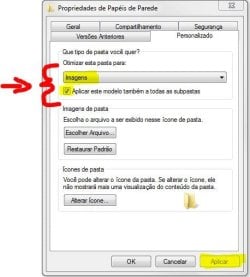
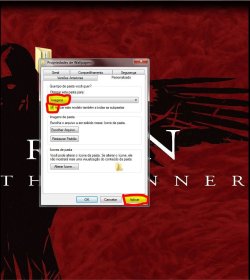
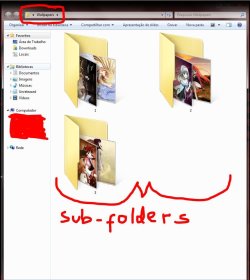
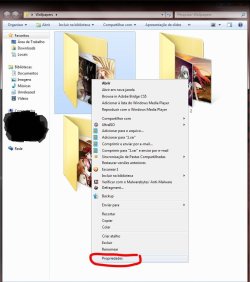
The process needs to be done in the parent folder, ie one in which all folders are contained. Right click on it and "properties". "Custom" tab. Select "Pictures " and check the box below, as shown. Click Apply. Now all sub-folders will show one of the pictures they contain. It was what you needed?! Let us know the results.
;)


Attachments

  • Capturar.JPG
    Capturar.JPG
    39.5 KB · Views: 14

My Computer My Computer

At a glance

Windows 7 Ultimate x64 SP1AMD PHENOM II X6 1090T 3.2GHz8GB G.SKILL RIPJAWS - F3-10666CL7DSAPPHIRE ATI RADEON HD 5870 VAPOR X OC
Computer Manufacturer/Model Number
WALLONN7 / LIN BLACK SERIES II
OS
Windows 7 Ultimate x64 SP1
CPU
AMD PHENOM II X6 1090T 3.2GHz
Motherboard
GIGABYTE GA-890FXA-UD7
Memory
8GB G.SKILL RIPJAWS - F3-10666CL7D
Graphics Card(s)
SAPPHIRE ATI RADEON HD 5870 VAPOR X OC
Sound Card
REALTEK DOLBY HOME THEATER
Monitor(s) Displays
LED LG W2486L
Screen Resolution
1080p
Hard Drives
SEAGATE 1TB -ST31000528AS - AHCI MODE - AS SATA
PSU
ZALMAN ZM1000-HP 1000W
Case
THERMALTAKE XASER VI VG4000SWA
Cooling
140MM x3 / 120MM x1 AIR COOLING - THERMALTAKE
Keyboard
MICROSOFT DIGITAL MEDIA KEYBOARD 3000 - USB
Mouse
MICROSOFT BASIC OPTICAL MOUSE 2.0 - USB
Internet Speed
600KBPS
Other Info
MICROSOFT XBOX 360 CONTROLLER
Many thanks for your reply. I have had a look at this but have not been able to view your example. When I right click on the folder in the pictures library the named folder Brenda opens up all the other years folders. Again right clicking does not give the example provided by you.

I do not see the images item that your thumbnail displays. Properties displays the Tabs : General, Sharing, Security and Previous Versions. It then goes on to provide the file path and details on the contents of the folder.

I would appreciate your guidance
 

My Computer My Computer

At a glance

Windows 7 64 bit Home Premium
Computer Manufacturer/Model Number
Lenovo Thinkpad SL510
OS
Windows 7 64 bit Home Premium
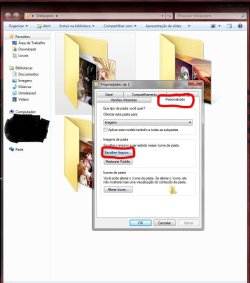
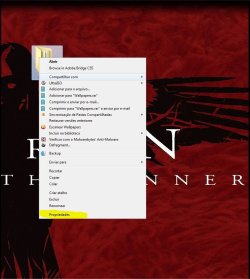
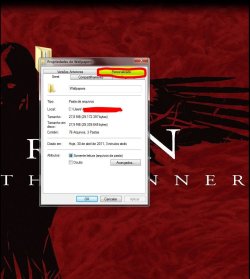
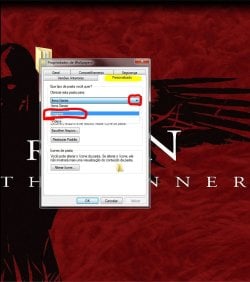
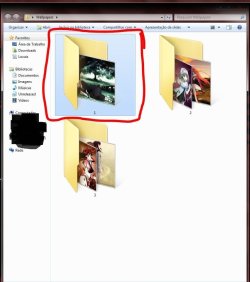
Apparently your mouse seems to be misconfigured ... Click the Windows Orb > Control Panel > Hardware and Sound > Mouse. Make sure the right mouse button is set to "right-click (Default)". If not, reconfigure it. Below is the step-by-step I did.


Attachments

  • 1.JPG
    1.JPG
    84.9 KB · Views: 23
  • 2.JPG
    2.JPG
    85.8 KB · Views: 28
  • 3.JPG
    3.JPG
    89.8 KB · Views: 26
  • 4.JPG
    4.JPG
    90.5 KB · Views: 19
  • 5.JPG
    5.JPG
    75.3 KB · Views: 17
  • 10.JPG
    10.JPG
    83.7 KB · Views: 14
  • 9.JPG
    9.JPG
    85.7 KB · Views: 22
  • 8.JPG
    8.JPG
    117.4 KB · Views: 23
  • 7.JPG
    7.JPG
    85.3 KB · Views: 31
  • 6.JPG
    6.JPG
    83 KB · Views: 24

My Computer My Computer

At a glance

Windows 7 Ultimate x64 SP1AMD PHENOM II X6 1090T 3.2GHz8GB G.SKILL RIPJAWS - F3-10666CL7DSAPPHIRE ATI RADEON HD 5870 VAPOR X OC
Computer Manufacturer/Model Number
WALLONN7 / LIN BLACK SERIES II
OS
Windows 7 Ultimate x64 SP1
CPU
AMD PHENOM II X6 1090T 3.2GHz
Motherboard
GIGABYTE GA-890FXA-UD7
Memory
8GB G.SKILL RIPJAWS - F3-10666CL7D
Graphics Card(s)
SAPPHIRE ATI RADEON HD 5870 VAPOR X OC
Sound Card
REALTEK DOLBY HOME THEATER
Monitor(s) Displays
LED LG W2486L
Screen Resolution
1080p
Hard Drives
SEAGATE 1TB -ST31000528AS - AHCI MODE - AS SATA
PSU
ZALMAN ZM1000-HP 1000W
Case
THERMALTAKE XASER VI VG4000SWA
Cooling
140MM x3 / 120MM x1 AIR COOLING - THERMALTAKE
Keyboard
MICROSOFT DIGITAL MEDIA KEYBOARD 3000 - USB
Mouse
MICROSOFT BASIC OPTICAL MOUSE 2.0 - USB
Internet Speed
600KBPS
Other Info
MICROSOFT XBOX 360 CONTROLLER
Many thanks for your reply. I have had a look at this but have not been able to view your example. When I right click on the folder in the pictures library the named folder Brenda opens up all the other years folders. Again right clicking does not give the example provided by you.

I do not see the images item that your thumbnail displays. Properties displays the Tabs : General, Sharing, Security and Previous Versions. It then goes on to provide the file path and details on the contents of the folder.

I would appreciate your guidance

Don't look in libraries. Look in Windows Explorer. You should see a customize tab if you right click.
 

My Computer My Computer

At a glance

Windows 7 Home Premium SP1, 64-bitIntel Skylake i5-6600K, not overclocked8 GB HyperX DDR4-2666 (2 x 4 GB)none; graphics are integrated on CPU
Computer type
PC/Desktop
Computer Manufacturer/Model Number
Ignatz Special; 4 speed manual gearbox; factory air conditioning; one of one
OS
Windows 7 Home Premium SP1, 64-bit
CPU
Intel Skylake i5-6600K, not overclocked
Motherboard
AsRock Z170M Extreme 4, micro ATX
Memory
8 GB HyperX DDR4-2666 (2 x 4 GB)
Graphics Card(s)
none; graphics are integrated on CPU
Sound Card
onboard: Realtek ALC1150; external: USB Behringer UF0-202
Monitor(s) Displays
Dell S2340M 23 inch IPS
Screen Resolution
1600 x 900
Hard Drives
System: Crucial MX100 series SSD, 128 GB;
Data: Samsung Spinpoint 103SJ, 1 TB;
Backup: WD Caviar Green WD30EZRX-00D8PB0, 3 TB
PSU
Rosewill SilentNight 500 watt fanless, semi-modular
Case
Antec Solo II
Cooling
Noctua NH-U12S; Noctua F12 intake, Noctua S12A exhaust
Keyboard
Microsoft 200 6JH-00001 USB
Mouse
Dell or Microsoft optical wired; USB
Antivirus
Microsoft Security Essentials and Malwarebytes Premium
Browser
Pale Moon
Other Info
All fans PWM; speeds at idle: CPU circa 500 rpm; intake circa 600 rpm; exhaust circa 600 rpm; CPU temps 27 idle and 47 C load in a warm room (27 C/81 F) when running Intel Extreme Tuning Utility stress test.
My thanks to you both for your assistance.

I am still having problems here. When Wallonn7 advises that my mouse is not set properly his guidance does not correspond with what I see in my Windows 7 Home Premium menu. I do not see any Hardware & Mouse. There is a mouse option but I don't see how to set the default as advised.

As I am unable to set the mouse as advised I suspect that the examples shown will not display as so far I have not seen exactly what has been displayed.

ignatzatsonic can you please expand on your remark. I have only come to Win 7 and am struggling badly.

Many thanks
 

My Computer My Computer

At a glance

Windows 7 64 bit Home Premium
Computer Manufacturer/Model Number
Lenovo Thinkpad SL510
OS
Windows 7 64 bit Home Premium
Right folks I am making some progress here.

Until I retired any programmes were those designed by my employer and as such the need to navigate through the various aspects of the computer were not required.

Over the weekend I was expressing my frustration with matters with a friend and he has set me right regarding windows explorer. This helped a lot as I can see better what is going on.

I have now been able to follow the examples provided by Wallonn7 and have managed to change the parent folder if my reading of the post is correct. When I open the Pictures Library there are folders for 2006, 2007, 2008, 2009, 2010 & 2011 and opening one of the years then displays a large number of sub-folders within it.

From what I can see so far is that I will have to open the year folder and follow the examples given which will let me identify the year by a memorable picture. How do I approach the sub-folder. Is it necessary to open each sub-folder to set a picture for each?

Your further guidance will be appreciated as with so many folders and sub-folders to change I could be here until next year if I have to process them individually.

Thanking you in anticipation
 

My Computer My Computer

At a glance

Windows 7 64 bit Home Premium
Computer Manufacturer/Model Number
Lenovo Thinkpad SL510
OS
Windows 7 64 bit Home Premium
Right folks I am making some progress here.

Until I retired any programmes were those designed by my employer and as such the need to navigate through the various aspects of the computer were not required.

Over the weekend I was expressing my frustration with matters with a friend and he has set me right regarding windows explorer. This helped a lot as I can see better what is going on.

I have now been able to follow the examples provided by Wallonn7 and have managed to change the parent folder if my reading of the post is correct. When I open the Pictures Library there are folders for 2006, 2007, 2008, 2009, 2010 & 2011 and opening one of the years then displays a large number of sub-folders within it.

2006, 2007, 2008, 2009, 2010 & 2011 = parent folders.

From what I can see so far is that I will have to open the year folder and follow the examples given which will let me identify the year by a memorable picture. How do I approach the sub-folder. Is it necessary to open each sub-folder to set a picture for each?
If your idea is to identify ONLY the parent folder, right click on EACH ONE and follow what I illustrated above. The same process applies to each of the sub-folders.

Your further guidance will be appreciated as with so many folders and sub-folders to change I could be here until next year if I have to process them individually.

Thanking you in anticipation
Unfortunately, as far as my knowledge and research on the subject reach, there is no simple way to what you seek. Applications available in the market do not offer this possibility ... yet. Hope that helps.

:warn::note: Cleaning programs like Ccleaner has functions that need to be disabled in order that you do not lose your work. See below in yellow.


Attachments

  • Capturar.JPG
    Capturar.JPG
    30.3 KB · Views: 1

My Computer My Computer

At a glance

Windows 7 Ultimate x64 SP1AMD PHENOM II X6 1090T 3.2GHz8GB G.SKILL RIPJAWS - F3-10666CL7DSAPPHIRE ATI RADEON HD 5870 VAPOR X OC
Computer Manufacturer/Model Number
WALLONN7 / LIN BLACK SERIES II
OS
Windows 7 Ultimate x64 SP1
CPU
AMD PHENOM II X6 1090T 3.2GHz
Motherboard
GIGABYTE GA-890FXA-UD7
Memory
8GB G.SKILL RIPJAWS - F3-10666CL7D
Graphics Card(s)
SAPPHIRE ATI RADEON HD 5870 VAPOR X OC
Sound Card
REALTEK DOLBY HOME THEATER
Monitor(s) Displays
LED LG W2486L
Screen Resolution
1080p
Hard Drives
SEAGATE 1TB -ST31000528AS - AHCI MODE - AS SATA
PSU
ZALMAN ZM1000-HP 1000W
Case
THERMALTAKE XASER VI VG4000SWA
Cooling
140MM x3 / 120MM x1 AIR COOLING - THERMALTAKE
Keyboard
MICROSOFT DIGITAL MEDIA KEYBOARD 3000 - USB
Mouse
MICROSOFT BASIC OPTICAL MOUSE 2.0 - USB
Internet Speed
600KBPS
Other Info
MICROSOFT XBOX 360 CONTROLLER
Many thanks for your kind reply. I thought that it would be too good to be true that I could effect a bulk change.

I no doubt will not have to seek anything other to while the boredom away.

Again my thanks for your kind assistance
 

My Computer My Computer

At a glance

Windows 7 64 bit Home Premium
Computer Manufacturer/Model Number
Lenovo Thinkpad SL510
OS
Windows 7 64 bit Home Premium
I suppose your problem is solved, am I right? If not, just say! ;) If yes, I ask you to click the triangle at the top right of this post and report this thread as solved.
There is nothing to thank, it was a pleasure. :cool: Come back whenever you need! :)
 

My Computer My Computer

At a glance

Windows 7 Ultimate x64 SP1AMD PHENOM II X6 1090T 3.2GHz8GB G.SKILL RIPJAWS - F3-10666CL7DSAPPHIRE ATI RADEON HD 5870 VAPOR X OC
Computer Manufacturer/Model Number
WALLONN7 / LIN BLACK SERIES II
OS
Windows 7 Ultimate x64 SP1
CPU
AMD PHENOM II X6 1090T 3.2GHz
Motherboard
GIGABYTE GA-890FXA-UD7
Memory
8GB G.SKILL RIPJAWS - F3-10666CL7D
Graphics Card(s)
SAPPHIRE ATI RADEON HD 5870 VAPOR X OC
Sound Card
REALTEK DOLBY HOME THEATER
Monitor(s) Displays
LED LG W2486L
Screen Resolution
1080p
Hard Drives
SEAGATE 1TB -ST31000528AS - AHCI MODE - AS SATA
PSU
ZALMAN ZM1000-HP 1000W
Case
THERMALTAKE XASER VI VG4000SWA
Cooling
140MM x3 / 120MM x1 AIR COOLING - THERMALTAKE
Keyboard
MICROSOFT DIGITAL MEDIA KEYBOARD 3000 - USB
Mouse
MICROSOFT BASIC OPTICAL MOUSE 2.0 - USB
Internet Speed
600KBPS
Other Info
MICROSOFT XBOX 360 CONTROLLER
Back
Top