Changing ram memory, need some input.

1ntu

New member
Local time
10:34 AM
Messages
26
Location
Sverige
I had RAM issue for about a month + now and i can't seem to understand it. I started having problems involving frequent BSOD when gaming. I have 1x4GB 1333Mhz ram stick which i used for 2 years now without any problems till the last month. When playing havier ram load games i get game crashes and some weird errors in games which then follow with BSOD and windows recovered from unexpected shutdown.

I then checked my system with BSOD viewer and i had two errors, both were kernel... and i knew something was serious so i reinstalled my system and deleted absolutely everything. New system worked the first day like charm, normal gaming feel was amazing once again.

The next day... same thing all over again but no errors in BSOD viewer this time. I talked with my friend and he told me how lucky i was that my ram lasted this long because i used single channel over 2x2GB dual channel. My build was mediocre since i didnt plan on playing on the highest setting in games. I bought 1x4GB so i could update in a future but i never did because i tought i was fine for a while now. Motherboard: https://www.msi.com/Motherboard/H61M-P20-G3.html#hero-s...

So now i have no idea if i should get 2x2GB or 1x4GB again. In my country there is no 2x2GB deals tho so i tought of getting x2 Emmi | Emmi online shop, prodaja: racunari, laptopovi, TFT monitori, netbook i notebook ra?unari, foto oprema... | Po?etna...
or
Emmi | Emmi online shop, prodaja: racunari, laptopovi, TFT monitori, netbook i notebook ra?unari, foto oprema... | Po?etna... this one.

My question now is which option will work better for my system?
I am mainly gaming on this system. If i get the 1x4GB stick i can upgrade in future but also i will not use its full 1600Mhz potential since my mobo only supports 1600Mhz for ivy bridge CPU's and mine is not. Also i have no idea when i will be upgrading again.. so thats that. Thanks for reading this long post.
 

My Computer

Computer type
PC/Desktop
Computer Manufacturer/Model Number
Custom build
OS
Windows 7 Home Basic x64
CPU
Intel Dual-Core G645 2.9GHz
Motherboard
MSI H61M-P20 (G3)
Memory
4GB 1333MHz
Graphics Card(s)
HD7770 1GB/DDR3 PowerColor
Monitor(s) Displays
Samsung
Screen Resolution
1024x768
Hard Drives
Western Digital 500GB
PSU
ThermalTake 500W
Case
Bitfenix Case
Cooling
Standard air cooling
Keyboard
SLNT green
Mouse
A4-Tech
Internet Speed
50mbps
Hello and welcome 1tnu mate first up please do this http://www.sevenforums.com/tutorials/180324-system-info-see-your-system-specs.html - very hard when we don't know what we are dealing with

The if you have indeed had blue screens please do these
http://www.sevenforums.com/tutorials/174459-dump-files-configure-windows-create-bsod.html
&
http://www.sevenforums.com/bsod-help-support/96879-blue-screen-death-bsod-posting-instructions.html

In regards to RAM generally speaking it is always best to buy RAM sticks in matched pairs if you are intending to install more than one stick.
So for example if you were to buy 8GB RAM best is 1x 8GB stick or a matched pair (a packaged set) of 4GB sticks simply because the matched pair will probably have come from the same manufacturing batch and therefore the timings and frequencies will be very close or exactly the same for each stick. Plus you need to try as far as possible to at least use the same brand for the pair if you cannot get a matched pair.
 

My Computer

Computer type
PC/Desktop
Computer Manufacturer/Model Number
Own build (new) Desk1 / Asus ROG Win 7 / Desk2 1st build
OS
Desk1 7 Home Prem / Desk2 10 Pro / Main lap Asus ROG 10 Pro 2 laptop Toshiba 7 Pro Asus P2520 7 & 10
CPU
Desk1 i5 3750K / Laptop i7 GTX 860M / Desk2 i5 2500
Motherboard
Desk1 Asus P877-V / Desk2 Gigabyte H67 UD3H / Laptop ?
Memory
Desk1 8GB (1866) / Desk2 16GB (1333) / Laptop 8Gb DDR3
Graphics Card(s)
Desk 1& 2NVidia GTX 650 & Laptops on board Intel
Sound Card
Desk 1 & 2 -XONAR DG Realtek High Def audio Laptop
Monitor(s) Displays
Desk 1 Benq HD 2450 / Desk2 Philips 24" / Laptop 17.5"
Screen Resolution
1920x1080 D1 & D2 & Laptop 1
Hard Drives
Desk1 Samsung 120GB 830 SSD
Asus ROG 256GB 850 Pro SSD
Desk2 Samsung 840 256 SSD
Toshiba 120GB EVO
PSU
Desk 1 Corsair HX 1050/ Laptop ? / Desk 2 Corsair HX 650
Case
Desk 1 Cooler HAF XM ? Toshiba laptop / Desk2 Coolermaster
Cooling
Fans on all Desk1 -2 Desk2 - all Coolermasters 5 Laptop ?
Keyboard
Desk 1 MS Sidewinder X6 Desk 2 MS Sidewinder X 4
Mouse
Desk 1&2 - Gigabyte MS 900 gamer - laptop - Logitec wireless
Internet Speed
ADSL2+
Other Info
One other Desktop (tester) and spare Toshba laptop both with SSD's
Running Kaspersky 2016 ISS on all machines config'd identically
Logitec audio stereo systems on each machine (x3)
Canon MG5250MFC
Router/modem TP-Link running WPA2SK
If you didn't overclock I see no reason to have memory failure by time.
Windows 7 includes built-in features to help you identify and diagnose problems with memory. If you suspect a computer has a memory problem that isn’t being automatically detected, you can run the Windows Memory Diagnostics utility by completing the following steps:

Click Start, type mdsched.exe in the Search box, and then press Enter.
Choose whether to restart the computer and run the tool immediately or schedule the tool to run at the next restart.
Windows Memory Diagnostics runs automatically after the computer restarts and performs a standard memory test automatically. If you want to perform fewer or more tests, press F1, use the Up and Down arrow keys to set the Test Mix as Basic, Standard, or Extended, and then press F10 to apply the desired settings and resume testing.
When testing is completed, the computer restarts automatically. You’ll see the test results when you log on.

I agree with Icit, don't mix old memory with new.
Even if it don't run on your MB at full speed, you can use DDR3 1600. It will run on at 1333 but with a lower latency. And as they are cheaper.
Best to buy a matched pair. But you can try 2x4G - RAM memorije | 'Memorija DIMM DDR3 4GB 1600MHz Kingston CL11 | Emmi online shop, prodaja: racunari, laptopovi, TFT monitori, netbook i notebook ra?unari, foto oprema...

Is your Win 7 64 bits? Win 7 32 can only deal with 3.2 G.
 

My Computers

System One System Two

  • Computer type
    PC/Desktop
    Computer Manufacturer/Model Number
    custom build
    OS
    Windows 7 HP 64
    CPU
    i5 6600K - 800MHz to 4200MHz
    Motherboard
    GA-Z170-HD3P
    Memory
    4+4G GSkill DDR4 3000
    Graphics Card(s)
    IG - Intel 530
    Monitor(s) Displays
    Samsung 226BW
    Screen Resolution
    1680x1050
    Hard Drives
    (1) -1 SM951 – 128GB M.2 AHCI PCIe SSD drive for Windows 7 and Lubuntu
    (2) -1 WD SATA 3 - 1T for Data
    (3) -1 WD SATA 3 - 1T for backup
    PSU
    Thermaltake 450W TR2 gold
    Keyboard
    Old and good Chicony mechanical keyboard
    Mouse
    Logitech mX performance - 9 buttons (had to disable some)
    Internet Speed
    500Mb/s
    Browser
    Firefox 64
    Other Info
    TinyWall firewall
  • Computer type
    Laptop
    System Manufacturer/Model Number
    Asus Q550LF
    OS
    Windows 7 Pro
    CPU
    i7-4500U 800MHz to 3.0GHz
    Motherboard
    Asus Q550LF
    Memory
    (4+4)G DDR3 1600
    Graphics Card(s)
    IG intel 4400 + NVIDIA GeForce GT 745M
    Sound Card
    Realtek
    Monitor(s) Displays
    LG Display LP156WF4-SPH1
    Screen Resolution
    1920 x 1080
    Hard Drives
    BX500 120G SSD for Windows and programs +
    1T HDD for data
    Internet Speed
    500 Mb/s
    Browser
    Firefox
    Other Info
    TinyWall firewall
Hello and welcome 1tnu mate first up please do this http://www.sevenforums.com/tutorials/180324-system-info-see-your-system-specs.html - very hard when we don't know what we are dealing with

This is my PC spec:
Mobo: MSI H61M-P20 (G3)
CPU: Intel Dual-Core G645 2.9GHz
GPU: HD7770 1GB/DDR3 PowerColor
HDD: Western Digital 500GB
RAM: 4GB 1333MHz
PSU: ThermalTake 500W
Case: Bitfenix Case
Windows 7 Home Basic 64bit

I didn't have BSOD in few days now(four to be exact). Also somehow i managed to play every game i desired without any problems today(weird). Either is ram going nuts or or something else which idk what it is.
 

My Computer

Computer type
PC/Desktop
Computer Manufacturer/Model Number
Custom build
OS
Windows 7 Home Basic x64
CPU
Intel Dual-Core G645 2.9GHz
Motherboard
MSI H61M-P20 (G3)
Memory
4GB 1333MHz
Graphics Card(s)
HD7770 1GB/DDR3 PowerColor
Monitor(s) Displays
Samsung
Screen Resolution
1024x768
Hard Drives
Western Digital 500GB
PSU
ThermalTake 500W
Case
Bitfenix Case
Cooling
Standard air cooling
Keyboard
SLNT green
Mouse
A4-Tech
Internet Speed
50mbps
If you didn't overclock I see no reason to have memory failure by time.
Windows 7 includes built-in features to help you identify and diagnose problems with memory. If you suspect a computer has a memory problem that isn’t being automatically detected, you can run the Windows Memory Diagnostics utility by completing the following steps

I used that Windows feature a week ago(found it while browsing the problem) and no errors what so ever. Tested it 2 times back then and once today.

I am going to put my memory on a test tonight with memtest86+ and see if there is errors there, since many people suggested that program for people with ram issues. Also i only have two options now when it comes to upgrading the RAM since i am not in a good financial state atm.
1) 2x DDR3 2GB 1333MHz Corsair Value CL9
2) 1x DDR3 4GB 1600MHz Kingston HyperX Savage CL9

Knowing myself i have no idea if i will be able to upgrade soon which makes 1x4GB a bit trickier. One more thing i saw many people argue about is single vs dual channel memory. Which will benefit me more with my current setup that i showed in a reply? Many people say that dual channel somehow has some slight advantage in gaming and that it is better when it comes to cooling ram memories. Which is true and which not? Thanks
 

My Computer

Computer type
PC/Desktop
Computer Manufacturer/Model Number
Custom build
OS
Windows 7 Home Basic x64
CPU
Intel Dual-Core G645 2.9GHz
Motherboard
MSI H61M-P20 (G3)
Memory
4GB 1333MHz
Graphics Card(s)
HD7770 1GB/DDR3 PowerColor
Monitor(s) Displays
Samsung
Screen Resolution
1024x768
Hard Drives
Western Digital 500GB
PSU
ThermalTake 500W
Case
Bitfenix Case
Cooling
Standard air cooling
Keyboard
SLNT green
Mouse
A4-Tech
Internet Speed
50mbps
I don't think you have a memory failure.
Do you have a temperature monitor? Is your CPU heat sink clean?

Dual channel split the info into two memory stick. You gain some speed doing it. As mentioned, you must have two two memory sticks.
 

My Computers

System One System Two

  • Computer type
    PC/Desktop
    Computer Manufacturer/Model Number
    custom build
    OS
    Windows 7 HP 64
    CPU
    i5 6600K - 800MHz to 4200MHz
    Motherboard
    GA-Z170-HD3P
    Memory
    4+4G GSkill DDR4 3000
    Graphics Card(s)
    IG - Intel 530
    Monitor(s) Displays
    Samsung 226BW
    Screen Resolution
    1680x1050
    Hard Drives
    (1) -1 SM951 – 128GB M.2 AHCI PCIe SSD drive for Windows 7 and Lubuntu
    (2) -1 WD SATA 3 - 1T for Data
    (3) -1 WD SATA 3 - 1T for backup
    PSU
    Thermaltake 450W TR2 gold
    Keyboard
    Old and good Chicony mechanical keyboard
    Mouse
    Logitech mX performance - 9 buttons (had to disable some)
    Internet Speed
    500Mb/s
    Browser
    Firefox 64
    Other Info
    TinyWall firewall
  • Computer type
    Laptop
    System Manufacturer/Model Number
    Asus Q550LF
    OS
    Windows 7 Pro
    CPU
    i7-4500U 800MHz to 3.0GHz
    Motherboard
    Asus Q550LF
    Memory
    (4+4)G DDR3 1600
    Graphics Card(s)
    IG intel 4400 + NVIDIA GeForce GT 745M
    Sound Card
    Realtek
    Monitor(s) Displays
    LG Display LP156WF4-SPH1
    Screen Resolution
    1920 x 1080
    Hard Drives
    BX500 120G SSD for Windows and programs +
    1T HDD for data
    Internet Speed
    500 Mb/s
    Browser
    Firefox
    Other Info
    TinyWall firewall

My Computer

Computer type
PC/Desktop
Computer Manufacturer/Model Number
Skylake Special #666
OS
Windows 10 Pro x64
CPU
Intel Core i7 6700K
Motherboard
Asus Sabertooth Z170 Mark 1
Memory
GSkill TridentZ RGB 16GB 3600 16-16-16-36
Graphics Card(s)
EVGA GTX 980 Ti SC x2
Sound Card
Realtek High Definition
Monitor(s) Displays
AOC G2460PG
Screen Resolution
1920 x 1080 144Hz
Hard Drives
Samsung 860 Pro 256GB, Seagate Barracuda 4TB x2
PSU
EVGA 1000 P2, EVGA White Custom Braided Cables
Case
Corsair Vengeance C70 Gunmetal Black
Cooling
Corsair H100i v2, Corsair ML120 x2, Thermal Grizzly Kryonaut
Keyboard
Logitech G910 Orion Spectrum
Mouse
Logitech G700s
Internet Speed
Verizon Fios Quantum Gateway 75/75
Antivirus
Windows Defender, Malwarebytes Free 3.8.3
Browser
Chrome
Other Info
Corsair SP120 x4, LG Blu-ray Drive, Durabrand HT-395 100 Watt Dolby Digital Amp, Corsair H2100 Wireless 7.1 Headset

My Computer

Computer type
PC/Desktop
Computer Manufacturer/Model Number
Custom build
OS
Windows 7 Home Basic x64
CPU
Intel Dual-Core G645 2.9GHz
Motherboard
MSI H61M-P20 (G3)
Memory
4GB 1333MHz
Graphics Card(s)
HD7770 1GB/DDR3 PowerColor
Monitor(s) Displays
Samsung
Screen Resolution
1024x768
Hard Drives
Western Digital 500GB
PSU
ThermalTake 500W
Case
Bitfenix Case
Cooling
Standard air cooling
Keyboard
SLNT green
Mouse
A4-Tech
Internet Speed
50mbps

My Computer

Computer type
PC/Desktop
Computer Manufacturer/Model Number
Custom build
OS
Windows 7 Home Basic x64
CPU
Intel Dual-Core G645 2.9GHz
Motherboard
MSI H61M-P20 (G3)
Memory
4GB 1333MHz
Graphics Card(s)
HD7770 1GB/DDR3 PowerColor
Monitor(s) Displays
Samsung
Screen Resolution
1024x768
Hard Drives
Western Digital 500GB
PSU
ThermalTake 500W
Case
Bitfenix Case
Cooling
Standard air cooling
Keyboard
SLNT green
Mouse
A4-Tech
Internet Speed
50mbps
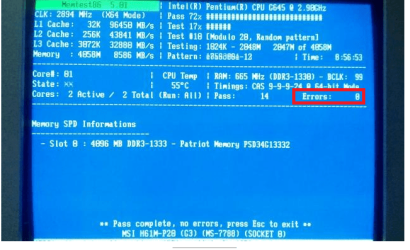
One more thing i ran memtest86+ and this was the result memtest86+ Now i am really confused.
 

My Computer

Computer type
PC/Desktop
Computer Manufacturer/Model Number
Custom build
OS
Windows 7 Home Basic x64
CPU
Intel Dual-Core G645 2.9GHz
Motherboard
MSI H61M-P20 (G3)
Memory
4GB 1333MHz
Graphics Card(s)
HD7770 1GB/DDR3 PowerColor
Monitor(s) Displays
Samsung
Screen Resolution
1024x768
Hard Drives
Western Digital 500GB
PSU
ThermalTake 500W
Case
Bitfenix Case
Cooling
Standard air cooling
Keyboard
SLNT green
Mouse
A4-Tech
Internet Speed
50mbps
I've seen your temperature monitor and memory test results.
- You don't have any memory failure.
- Your CPU temperature is high (50ºC) even without heavy work. Did you cleaned the heat sink? (use a small paint brush and a vacuum cleaner. Dont let the blades spin. Be gentle).
My opinion is that you are having very high temperatures when gaming and then you get the BSOD.
You said that you aren't having problems right now. Is your side cover open?
 

My Computers

System One System Two

  • Computer type
    PC/Desktop
    Computer Manufacturer/Model Number
    custom build
    OS
    Windows 7 HP 64
    CPU
    i5 6600K - 800MHz to 4200MHz
    Motherboard
    GA-Z170-HD3P
    Memory
    4+4G GSkill DDR4 3000
    Graphics Card(s)
    IG - Intel 530
    Monitor(s) Displays
    Samsung 226BW
    Screen Resolution
    1680x1050
    Hard Drives
    (1) -1 SM951 – 128GB M.2 AHCI PCIe SSD drive for Windows 7 and Lubuntu
    (2) -1 WD SATA 3 - 1T for Data
    (3) -1 WD SATA 3 - 1T for backup
    PSU
    Thermaltake 450W TR2 gold
    Keyboard
    Old and good Chicony mechanical keyboard
    Mouse
    Logitech mX performance - 9 buttons (had to disable some)
    Internet Speed
    500Mb/s
    Browser
    Firefox 64
    Other Info
    TinyWall firewall
  • Computer type
    Laptop
    System Manufacturer/Model Number
    Asus Q550LF
    OS
    Windows 7 Pro
    CPU
    i7-4500U 800MHz to 3.0GHz
    Motherboard
    Asus Q550LF
    Memory
    (4+4)G DDR3 1600
    Graphics Card(s)
    IG intel 4400 + NVIDIA GeForce GT 745M
    Sound Card
    Realtek
    Monitor(s) Displays
    LG Display LP156WF4-SPH1
    Screen Resolution
    1920 x 1080
    Hard Drives
    BX500 120G SSD for Windows and programs +
    1T HDD for data
    Internet Speed
    500 Mb/s
    Browser
    Firefox
    Other Info
    TinyWall firewall

Attachments

  • MEMTEST ERRORS.PNG
    MEMTEST ERRORS.PNG
    156 KB · Views: 1

My Computer

Computer type
PC/Desktop
Computer Manufacturer/Model Number
Own build (new) Desk1 / Asus ROG Win 7 / Desk2 1st build
OS
Desk1 7 Home Prem / Desk2 10 Pro / Main lap Asus ROG 10 Pro 2 laptop Toshiba 7 Pro Asus P2520 7 & 10
CPU
Desk1 i5 3750K / Laptop i7 GTX 860M / Desk2 i5 2500
Motherboard
Desk1 Asus P877-V / Desk2 Gigabyte H67 UD3H / Laptop ?
Memory
Desk1 8GB (1866) / Desk2 16GB (1333) / Laptop 8Gb DDR3
Graphics Card(s)
Desk 1& 2NVidia GTX 650 & Laptops on board Intel
Sound Card
Desk 1 & 2 -XONAR DG Realtek High Def audio Laptop
Monitor(s) Displays
Desk 1 Benq HD 2450 / Desk2 Philips 24" / Laptop 17.5"
Screen Resolution
1920x1080 D1 & D2 & Laptop 1
Hard Drives
Desk1 Samsung 120GB 830 SSD
Asus ROG 256GB 850 Pro SSD
Desk2 Samsung 840 256 SSD
Toshiba 120GB EVO
PSU
Desk 1 Corsair HX 1050/ Laptop ? / Desk 2 Corsair HX 650
Case
Desk 1 Cooler HAF XM ? Toshiba laptop / Desk2 Coolermaster
Cooling
Fans on all Desk1 -2 Desk2 - all Coolermasters 5 Laptop ?
Keyboard
Desk 1 MS Sidewinder X6 Desk 2 MS Sidewinder X 4
Mouse
Desk 1&2 - Gigabyte MS 900 gamer - laptop - Logitec wireless
Internet Speed
ADSL2+
Other Info
One other Desktop (tester) and spare Toshba laptop both with SSD's
Running Kaspersky 2016 ISS on all machines config'd identically
Logitec audio stereo systems on each machine (x3)
Canon MG5250MFC
Router/modem TP-Link running WPA2SK
- Your CPU temperature is high (50ºC) even without heavy work. Did you cleaned the heat sink? (use a small paint brush and a vacuum cleaner.
Unless you have an ESD safe vacuum cleaner, you should never use a vacuum cleaner on the inside of a PC. Doing so can generate harmful static discharge which can destroy components.
 

My Computer

Computer type
PC/Desktop
Computer Manufacturer/Model Number
Mellon Labs (custom build)
OS
Win 7 Pro x64/Win 10 Pro x64 dual boot
CPU
AMD FX 8350 Vishera @ 4200
Motherboard
ASUS M5A97 R2.0
Memory
16 GB Mushkin Blackline DDR3-2400 @ 1866 (9-10-10-10-31)
Graphics Card(s)
XFX Radeon R9 280 Double D Black Edition
Sound Card
Realtek HD Audio on MB. Sounds great.
Monitor(s) Displays
Acer 24", Acer 22"
Screen Resolution
3840 x 1080
Hard Drives
1 x Mushkin Chronos 120 GB SSD (Win 10)
1 x Samsung 850 EVO 250 GB SSD (Win 7)
1 x WD 1TB SATA Blue
1 x WD 1TB SATA Green
PSU
Corsair TX-750
Case
CoolerMaster HAF 912+
Cooling
Coolermaster Seidon 240M Liquid AIO. 6 case fans
Keyboard
Logitech G710+
Mouse
Logitech G500s
Internet Speed
Much better since I got fiber, but still way overpriced.
Antivirus
MSE, Malware Bytes for scanning
Browser
Firefox
Other Info
Corsair VOID USB headphones.

A Mellon Labs X-1 - LCD Smartie driven system status display.

Brought to you by the letter E
Yes I agree with Mellon Head and what I do with a vacuum cleaner is to place an aluminium foil strip around the suction nozzle end and add hogs hair brush bristles and run an earth lead to it - fiddly but effective. The same can be said for compressed air cans too any dust blown across a surface can still generate static charges.
For cleaning brushes I always use those cheap hogs hair artists brushes to minimise any static build up while using a brush.
Best thing is prevention and why I use fine filters made from any non synthetic material and place it over as much of the air intakes I can.
 

My Computer

Computer type
PC/Desktop
Computer Manufacturer/Model Number
Own build (new) Desk1 / Asus ROG Win 7 / Desk2 1st build
OS
Desk1 7 Home Prem / Desk2 10 Pro / Main lap Asus ROG 10 Pro 2 laptop Toshiba 7 Pro Asus P2520 7 & 10
CPU
Desk1 i5 3750K / Laptop i7 GTX 860M / Desk2 i5 2500
Motherboard
Desk1 Asus P877-V / Desk2 Gigabyte H67 UD3H / Laptop ?
Memory
Desk1 8GB (1866) / Desk2 16GB (1333) / Laptop 8Gb DDR3
Graphics Card(s)
Desk 1& 2NVidia GTX 650 & Laptops on board Intel
Sound Card
Desk 1 & 2 -XONAR DG Realtek High Def audio Laptop
Monitor(s) Displays
Desk 1 Benq HD 2450 / Desk2 Philips 24" / Laptop 17.5"
Screen Resolution
1920x1080 D1 & D2 & Laptop 1
Hard Drives
Desk1 Samsung 120GB 830 SSD
Asus ROG 256GB 850 Pro SSD
Desk2 Samsung 840 256 SSD
Toshiba 120GB EVO
PSU
Desk 1 Corsair HX 1050/ Laptop ? / Desk 2 Corsair HX 650
Case
Desk 1 Cooler HAF XM ? Toshiba laptop / Desk2 Coolermaster
Cooling
Fans on all Desk1 -2 Desk2 - all Coolermasters 5 Laptop ?
Keyboard
Desk 1 MS Sidewinder X6 Desk 2 MS Sidewinder X 4
Mouse
Desk 1&2 - Gigabyte MS 900 gamer - laptop - Logitec wireless
Internet Speed
ADSL2+
Other Info
One other Desktop (tester) and spare Toshba laptop both with SSD's
Running Kaspersky 2016 ISS on all machines config'd identically
Logitec audio stereo systems on each machine (x3)
Canon MG5250MFC
Router/modem TP-Link running WPA2SK
I've seen your temperature monitor and memory test results.
- You don't have any memory failure.
- Your CPU temperature is high (50ºC) even without heavy work. Did you cleaned the heat sink? (use a small paint brush and a vacuum cleaner. Dont let the blades spin. Be gentle).
My opinion is that you are having very high temperatures when gaming and then you get the BSOD.
You said that you aren't having problems right now. Is your side cover open?

Yeah i cleaned the heatsink. Thats right i don't have any issues now which is good but still very confusing to me how it can be so consistent in happening and now it stopped happening all together. Side cover is closed and should i maybe go and get a new thermal paste and apply it on my CPU chip?
 

My Computer

Computer type
PC/Desktop
Computer Manufacturer/Model Number
Custom build
OS
Windows 7 Home Basic x64
CPU
Intel Dual-Core G645 2.9GHz
Motherboard
MSI H61M-P20 (G3)
Memory
4GB 1333MHz
Graphics Card(s)
HD7770 1GB/DDR3 PowerColor
Monitor(s) Displays
Samsung
Screen Resolution
1024x768
Hard Drives
Western Digital 500GB
PSU
ThermalTake 500W
Case
Bitfenix Case
Cooling
Standard air cooling
Keyboard
SLNT green
Mouse
A4-Tech
Internet Speed
50mbps

My Computer

Computer type
PC/Desktop
Computer Manufacturer/Model Number
Custom build
OS
Windows 7 Home Basic x64
CPU
Intel Dual-Core G645 2.9GHz
Motherboard
MSI H61M-P20 (G3)
Memory
4GB 1333MHz
Graphics Card(s)
HD7770 1GB/DDR3 PowerColor
Monitor(s) Displays
Samsung
Screen Resolution
1024x768
Hard Drives
Western Digital 500GB
PSU
ThermalTake 500W
Case
Bitfenix Case
Cooling
Standard air cooling
Keyboard
SLNT green
Mouse
A4-Tech
Internet Speed
50mbps
ICIT2LOL and Mellon head ill clean it again with paint brush and check if the temps dropped.
 

My Computer

Computer type
PC/Desktop
Computer Manufacturer/Model Number
Custom build
OS
Windows 7 Home Basic x64
CPU
Intel Dual-Core G645 2.9GHz
Motherboard
MSI H61M-P20 (G3)
Memory
4GB 1333MHz
Graphics Card(s)
HD7770 1GB/DDR3 PowerColor
Monitor(s) Displays
Samsung
Screen Resolution
1024x768
Hard Drives
Western Digital 500GB
PSU
ThermalTake 500W
Case
Bitfenix Case
Cooling
Standard air cooling
Keyboard
SLNT green
Mouse
A4-Tech
Internet Speed
50mbps

Attachments

  • ERROR X.PNG
    ERROR X.PNG
    112.4 KB · Views: 10

My Computer

Computer type
PC/Desktop
Computer Manufacturer/Model Number
Own build (new) Desk1 / Asus ROG Win 7 / Desk2 1st build
OS
Desk1 7 Home Prem / Desk2 10 Pro / Main lap Asus ROG 10 Pro 2 laptop Toshiba 7 Pro Asus P2520 7 & 10
CPU
Desk1 i5 3750K / Laptop i7 GTX 860M / Desk2 i5 2500
Motherboard
Desk1 Asus P877-V / Desk2 Gigabyte H67 UD3H / Laptop ?
Memory
Desk1 8GB (1866) / Desk2 16GB (1333) / Laptop 8Gb DDR3
Graphics Card(s)
Desk 1& 2NVidia GTX 650 & Laptops on board Intel
Sound Card
Desk 1 & 2 -XONAR DG Realtek High Def audio Laptop
Monitor(s) Displays
Desk 1 Benq HD 2450 / Desk2 Philips 24" / Laptop 17.5"
Screen Resolution
1920x1080 D1 & D2 & Laptop 1
Hard Drives
Desk1 Samsung 120GB 830 SSD
Asus ROG 256GB 850 Pro SSD
Desk2 Samsung 840 256 SSD
Toshiba 120GB EVO
PSU
Desk 1 Corsair HX 1050/ Laptop ? / Desk 2 Corsair HX 650
Case
Desk 1 Cooler HAF XM ? Toshiba laptop / Desk2 Coolermaster
Cooling
Fans on all Desk1 -2 Desk2 - all Coolermasters 5 Laptop ?
Keyboard
Desk 1 MS Sidewinder X6 Desk 2 MS Sidewinder X 4
Mouse
Desk 1&2 - Gigabyte MS 900 gamer - laptop - Logitec wireless
Internet Speed
ADSL2+
Other Info
One other Desktop (tester) and spare Toshba laptop both with SSD's
Running Kaspersky 2016 ISS on all machines config'd identically
Logitec audio stereo systems on each machine (x3)
Canon MG5250MFC
Router/modem TP-Link running WPA2SK
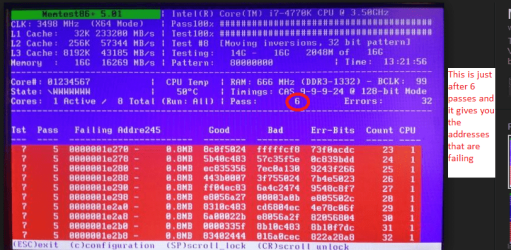
That memtest screen looks very odd to me as errors are usually shown in red see pic and there is usually not much CPU info on the screen.

So I am just wondering where you got the memtest from see this http://www.sevenforums.com/tutorials/105647-ram-test-memtest86.html

My memtest86+ showed 0 errors, what do you mean?
Only that in your screen shot there were errors mentioned see pic

That's a zero not an eight but you have to look closely to pick it up. ;) Check it against some of the other characters in the screen shot (the Memory figure of 8586 for example) and the difference become more apparent.
 
Last edited:

My Computer

Computer type
PC/Desktop
Computer Manufacturer/Model Number
Custom Build
OS
Windows 7 64bit
CPU
Intel(R) Core(TM) i7-4770K CPU @ 3.50GHz
Motherboard
Gigabyte Technology Co., Ltd. Z87-DS3H
Memory
Corsair XMS3 16GB kit (2x8GB) DDR3 1333MHz Unbuffered CL9 DI
Graphics Card(s)
(1) Intel(R) HD Graphics 4600 (2) NVIDIA GeForce GT 640
Hard Drives
(1) Samsung SSD 840 EVO 250G SCSI Disk Device (2) Samsung SSD 850 EVO 250G SCSI Disk Device (3) WDC WD10EZEX-00KUWA0 SCSI Disk Device
Antivirus
MSE
Browser
Pale Moon
Changing thermal paste wont help.
As you already have Open-hardware-monitor, play your game and then check the max temperature. If it gets above 85ºC, change your heat sink with a better one.
 
Last edited:

My Computers

System One System Two

  • Computer type
    PC/Desktop
    Computer Manufacturer/Model Number
    custom build
    OS
    Windows 7 HP 64
    CPU
    i5 6600K - 800MHz to 4200MHz
    Motherboard
    GA-Z170-HD3P
    Memory
    4+4G GSkill DDR4 3000
    Graphics Card(s)
    IG - Intel 530
    Monitor(s) Displays
    Samsung 226BW
    Screen Resolution
    1680x1050
    Hard Drives
    (1) -1 SM951 – 128GB M.2 AHCI PCIe SSD drive for Windows 7 and Lubuntu
    (2) -1 WD SATA 3 - 1T for Data
    (3) -1 WD SATA 3 - 1T for backup
    PSU
    Thermaltake 450W TR2 gold
    Keyboard
    Old and good Chicony mechanical keyboard
    Mouse
    Logitech mX performance - 9 buttons (had to disable some)
    Internet Speed
    500Mb/s
    Browser
    Firefox 64
    Other Info
    TinyWall firewall
  • Computer type
    Laptop
    System Manufacturer/Model Number
    Asus Q550LF
    OS
    Windows 7 Pro
    CPU
    i7-4500U 800MHz to 3.0GHz
    Motherboard
    Asus Q550LF
    Memory
    (4+4)G DDR3 1600
    Graphics Card(s)
    IG intel 4400 + NVIDIA GeForce GT 745M
    Sound Card
    Realtek
    Monitor(s) Displays
    LG Display LP156WF4-SPH1
    Screen Resolution
    1920 x 1080
    Hard Drives
    BX500 120G SSD for Windows and programs +
    1T HDD for data
    Internet Speed
    500 Mb/s
    Browser
    Firefox
    Other Info
    TinyWall firewall
Back
Top