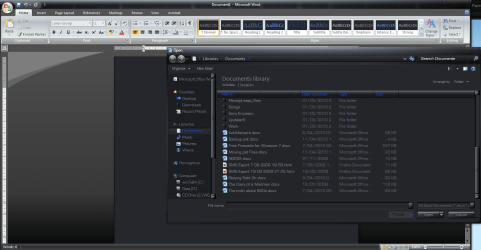
Changing the file types displayed

andysharps

New member
Local time
9:27 PM
Messages
3
Hi,

Can anybody help me with the following.

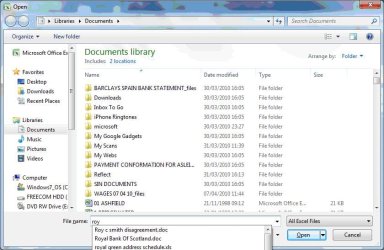
In Excel 2007 on Windows 7 if you click on the office button & then open, the window opens, the file types drop down in the bottom right hand corner is set to ‘all excel files’ & in the list of files in the main window only Excel files are displayed.

If you start typing a file name in the file name field at the bottom, all types of files that match the file name are displayed, you can see .docs are listed with .xls , Is it possible to change this so only excel files are displayed in Excel & only Word files in Word?


I have attached a screen shot in case the above is not very clear.


Thanks for any help.


Andy


Attachments
  • office 2007.JPG
    office 2007.JPG
    67.8 KB · Views: 7

My Computer

OS
XP
Try deleting normal.dot: c:\%username%\AppData\Roaming\Microsoft\Templates
 

My Computer

Computer Manufacturer/Model Number
tw33k
OS
Windows 7 Ultimate (x64) SP1
CPU
Intel 3770k 4.6GHz
Motherboard
ASUS Maximus V Formula
Memory
8GB (2x 4GB) Crucial Ballistix
Graphics Card(s)
Sapphire 7950 (1060/1600)
Sound Card
On Board Realtek HD Audio
Monitor(s) Displays
27" Acer B273HU (via HDMI)
Screen Resolution
2048 x 1152
Hard Drives
Crucial M4 128GB
2TB WD Black
1TB Samsung F3 SATA
1TB WD Elite External
2TB WD USB 3.0
PSU
Corsair AX750 Gold
Case
Corsair Obsidian 800DW
Cooling
Corsair H100 (2x AP-121/2x UK-3000 push/pull)
Keyboard
Microsoft Wireless 5000
Mouse
Microsoft Wireless 5000
Internet Speed
5mb/s
Other Info
Logitech z-2300 2.1 speakers
Lamptron FC-5 v2
Hello Andysharps Welcome to SF !!

I guess it some kind of known issue. I just tested it in my Excel it was happening the same. Anyway i'll do some research on it.

Hope this helps,
Captain
 

My Computer

Computer Manufacturer/Model Number
Samsung NP550P5C-S02IN
OS
Windows 7 Ultimate - 64-bit | Windows 8 Pro - 64-bit
CPU
Intel® Core™ i7 Processor 3,610QM (2.30Hz, 6MB L3 Cach
Memory
8 GB
Graphics Card(s)
NVIDIA® GeForce® GT 650M 2GB Graphics, Optimus™ techno
Sound Card
SoundAlive™ JBL 3 Speakers (With sub-Woofer)
Monitor(s) Displays
39.62cm (15.6) SuperBright 300nit HD+ LED Display
Screen Resolution
1,600 x 900, Anti-Reflective
Hard Drives
1TB S-ATA II Hard Drive (5,400RPM)
If I open Word, I only see word docs. If I open Excel, I only see Excel sheets. Delete normal.dot

word.PNG

see...no spreadsheets etc
 

My Computer

Computer Manufacturer/Model Number
tw33k
OS
Windows 7 Ultimate (x64) SP1
CPU
Intel 3770k 4.6GHz
Motherboard
ASUS Maximus V Formula
Memory
8GB (2x 4GB) Crucial Ballistix
Graphics Card(s)
Sapphire 7950 (1060/1600)
Sound Card
On Board Realtek HD Audio
Monitor(s) Displays
27" Acer B273HU (via HDMI)
Screen Resolution
2048 x 1152
Hard Drives
Crucial M4 128GB
2TB WD Black
1TB Samsung F3 SATA
1TB WD Elite External
2TB WD USB 3.0
PSU
Corsair AX750 Gold
Case
Corsair Obsidian 800DW
Cooling
Corsair H100 (2x AP-121/2x UK-3000 push/pull)
Keyboard
Microsoft Wireless 5000
Mouse
Microsoft Wireless 5000
Internet Speed
5mb/s
Other Info
Logitech z-2300 2.1 speakers
Lamptron FC-5 v2
Hello Tw33k,

Can I know why we are deleting Normal.dot ?? Because if i understand correctly Normal.dot is Word reference and for Excel we don't have one, it saves the Macros Internally. But Yes we can create one under C:\Program Files\Microsoft Office\Office\XLSTART\ so it will open whatever customized one we created there upon start.

Hope this helps,
Captain
 

My Computer

Computer Manufacturer/Model Number
Samsung NP550P5C-S02IN
OS
Windows 7 Ultimate - 64-bit | Windows 8 Pro - 64-bit
CPU
Intel® Core™ i7 Processor 3,610QM (2.30Hz, 6MB L3 Cach
Memory
8 GB
Graphics Card(s)
NVIDIA® GeForce® GT 650M 2GB Graphics, Optimus™ techno
Sound Card
SoundAlive™ JBL 3 Speakers (With sub-Woofer)
Monitor(s) Displays
39.62cm (15.6) SuperBright 300nit HD+ LED Display
Screen Resolution
1,600 x 900, Anti-Reflective
Hard Drives
1TB S-ATA II Hard Drive (5,400RPM)
OK, I'm on site later today I will try that & post my findings.
 

My Computer

OS
XP
I tried deleting normal.dot but unfortunately it didn't make any difference.

tw33k, the problem isn't just displaying the documents when you go 'open' & a list of documents is displayed, at that point only word or excel files are displayed.

It is when you start typing a file name in the 'file name' field then the list of documents in the main window changes from just word docs in word or just excel docs in excel to a mixture of document types that match the name being typed.

Hope that's' clear.

Andy
 

My Computer

OS
XP
Back
Top