Changing the installing username?

drfsupercenter

New member
Power User
Local time
6:42 PM
Messages
198
OK, so I just installed Windows 7 Professional (from MSDNAA) earlier today.

I've gotten a lot of it customized, like adding the Quick Launch etc. But one thing I'm not sure about.

I specifically put in Danny as my account name, and that's what it shows in the Start menu. But yet, when I install any program that asks for the user name and business name, it says "Microsoft" in both of those fields.

Can that be changed so it says Danny and something like Home?
 

My Computer

Computer Manufacturer/Model Number
MSI
OS
Windows 7 Ultimate and Ubuntu 9.04
CPU
Intel Core 2 Quad
Memory
4GB DDR3 RAM
Graphics Card(s)
NVIDIA GTS 160M (1GB GPU)
Sound Card
Realtek HD Audio
Screen Resolution
1680x1050
Hard Drives
500GB SATA
yes you can change it with a registry hack

then you go Help > About Windows and there it is
 

Attachments

My Computer

Computer Manufacturer/Model Number
Too many to list.
OS
XP, Seven, 2008R2
CPU
AMD, Intel, VIA
Motherboard
Various
Memory
Corsair, Kingston, etc.
Graphics Card(s)
ATI, NVIDIA
Monitor(s) Displays
Samsung
Hard Drives
Maxtor, Western Digital
Keyboard
qwerty
Internet Speed
22 Mb/s @ home, 1 Gb/s @ server
Other Info
All of my systems still run fastest on XP 32-bit for the most part. Win7 is fun to play with, but I still prefer XP for raw speed, security, and functionality.
Oh cool, thanks!

Did you have to set that yourself though? It still doesn't let me edit it, so I'm just curious.

And any idea why the defaults are Microsoft in those fields? The setup in Vista was basically the same as Windows 7, but that did have my name there instead of Microsoft...
 

My Computer

Computer Manufacturer/Model Number
MSI
OS
Windows 7 Ultimate and Ubuntu 9.04
CPU
Intel Core 2 Quad
Memory
4GB DDR3 RAM
Graphics Card(s)
NVIDIA GTS 160M (1GB GPU)
Sound Card
Realtek HD Audio
Screen Resolution
1680x1050
Hard Drives
500GB SATA
Oh cool, thanks!

Did you have to set that yourself though? It still doesn't let me edit it, so I'm just curious.

And any idea why the defaults are Microsoft in those fields? The setup in Vista was basically the same as Windows 7, but that did have my name there instead of Microsoft...

Probably have to run it as administrator. (rightclick, run as...)

greetz
 

My Computer

OS
Win7 Build 7600 x86
CPU
Pentium II 300MHz
Motherboard
Asus
Memory
32mb EDO RAM
Graphics Card(s)
Diamond Viper
Sound Card
Soundblaster 16
Monitor(s) Displays
14" AOC CRT 16K color
Screen Resolution
800x600
Hard Drives
300mb Quantum fireball
PSU
110 Watts
Cooling
Passive
Keyboard
Trust Ergonomic
Mouse
Generic
Internet Speed
256K u 128K d
Wait, what?

Run what as an administrator? All I did was do Help - About Windows (took me a while to figure out how to make the menu bar show up...), but those fields are still static. Sure, I can change them if I wanted to in each installer, I was just wondering why they both show as Microsoft when you do a fresh install.
 

My Computer

Computer Manufacturer/Model Number
MSI
OS
Windows 7 Ultimate and Ubuntu 9.04
CPU
Intel Core 2 Quad
Memory
4GB DDR3 RAM
Graphics Card(s)
NVIDIA GTS 160M (1GB GPU)
Sound Card
Realtek HD Audio
Screen Resolution
1680x1050
Hard Drives
500GB SATA
Wait, what?

Run what as an administrator? All I did was do Help - About Windows (took me a while to figure out how to make the menu bar show up...), but those fields are still static. Sure, I can change them if I wanted to in each installer, I was just wondering why they both show as Microsoft when you do a fresh install.

Hi,

sup3rsprt has attached a zip file with his post.

You should download it, unzip it and run it.

After that you can check the names again.

good luck
 

My Computer

OS
Win7 Build 7600 x86
CPU
Pentium II 300MHz
Motherboard
Asus
Memory
32mb EDO RAM
Graphics Card(s)
Diamond Viper
Sound Card
Soundblaster 16
Monitor(s) Displays
14" AOC CRT 16K color
Screen Resolution
800x600
Hard Drives
300mb Quantum fireball
PSU
110 Watts
Cooling
Passive
Keyboard
Trust Ergonomic
Mouse
Generic
Internet Speed
256K u 128K d
I did.

I was just curious if that registry key was made specifically with my name, or if it auto-detects it from my username. Because previous versions of Windows auto-detected it from the user's profile name.
 

My Computer

Computer Manufacturer/Model Number
MSI
OS
Windows 7 Ultimate and Ubuntu 9.04
CPU
Intel Core 2 Quad
Memory
4GB DDR3 RAM
Graphics Card(s)
NVIDIA GTS 160M (1GB GPU)
Sound Card
Realtek HD Audio
Screen Resolution
1680x1050
Hard Drives
500GB SATA
I did.

I was just curious if that registry key was made specifically with my name, or if it auto-detects it from my username. Because previous versions of Windows auto-detected it from the user's profile name.

Sorry, don't know the particulars of that reg key.

sup3rsprt?
 

My Computer

OS
Win7 Build 7600 x86
CPU
Pentium II 300MHz
Motherboard
Asus
Memory
32mb EDO RAM
Graphics Card(s)
Diamond Viper
Sound Card
Soundblaster 16
Monitor(s) Displays
14" AOC CRT 16K color
Screen Resolution
800x600
Hard Drives
300mb Quantum fireball
PSU
110 Watts
Cooling
Passive
Keyboard
Trust Ergonomic
Mouse
Generic
Internet Speed
256K u 128K d
I did.

I was just curious if that registry key was made specifically with my name, or if it auto-detects it from my username. Because previous versions of Windows auto-detected it from the user's profile name.

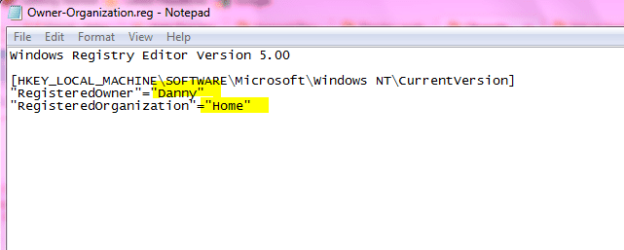
Yes that registry key was made with your name. It will not auto detect anything, it will just add the information with it.

Capture.PNG

The above is the content of that reg file.

Was your problem solved?
 

My Computer

Computer Manufacturer/Model Number
wipro
OS
windows 7
CPU
wipro
Motherboard
intel
Memory
8 gb
Hard Drives
580 gb
Yeah, it solved my problem, thanks!
 

My Computer

Computer Manufacturer/Model Number
MSI
OS
Windows 7 Ultimate and Ubuntu 9.04
CPU
Intel Core 2 Quad
Memory
4GB DDR3 RAM
Graphics Card(s)
NVIDIA GTS 160M (1GB GPU)
Sound Card
Realtek HD Audio
Screen Resolution
1680x1050
Hard Drives
500GB SATA
Good to hear that :)
 

My Computer

Computer Manufacturer/Model Number
wipro
OS
windows 7
CPU
wipro
Motherboard
intel
Memory
8 gb
Hard Drives
580 gb
Back
Top