Changing the "System" Drive to C:

RiGu

New member
Local time
5:19 PM
Messages
3
Hello,

What would be the easiest way to change my "System" - drive to C: ?

When I look at Disk Management the (Disk 0) WIN7 Drive (C:) says (Boot, Page File, Crash Dump, Primary Partition) but not System.

the (Disk 1) (System) drive is F:

How could I change it to the (Disk 0) C: drive ?


Kind Regards,
Riku
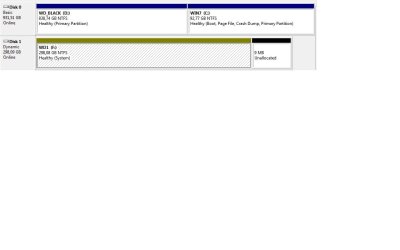
drive.jpg
 

My Computer

OS
Windows 7 Ultimate 64bit
Download and install Easybcd 2.0 on 7.

[You may not host or mirror these files anywhere! EasyBCD 2.0 Beta Builds - The NeoSmart Forums ]

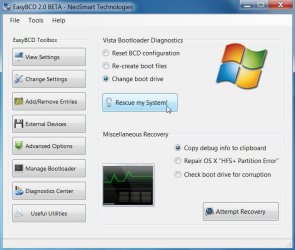
Click Useful Utilities.Dot Change Boot Drive. Click Rescue My System.

EASY-CHANGE - BOOTDRIVE-1-2010-01-02_024515.jpg

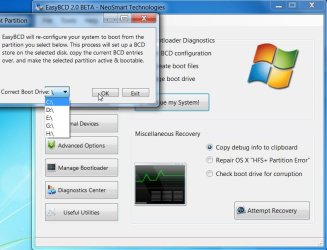
In the drop down select C. Then Click OK.

EASY-CHANGE-BOOTDRIVE-2-2010-01-02_024818.jpg

Change Bios boot order so Disk 0 is first in HD boot order ( or swap the Sata cables)

EASY-CHANGE-BOOTDRIVE-3-2010-01-02 02 58 00.jpg
 

My Computers

System One System Two

  • Computer type
    PC/Desktop
    OS
    7 X64
    CPU
    i5 8400
    Motherboard
    gigabyte b365m ds3h
    Memory
    2x8gb 3200mhz
    Hard Drives
    various
    PSU
    pure power 11 400w cm
    Case
    Coolermaster
    Cooling
    cryorig m9i
  • Computer type
    PC/Desktop
    OS
    7x64
    CPU
    g5400
    Motherboard
    ga b365m ds3h
    Memory
    8gb ddr4 2400
    PSU
    xfx pro 450w
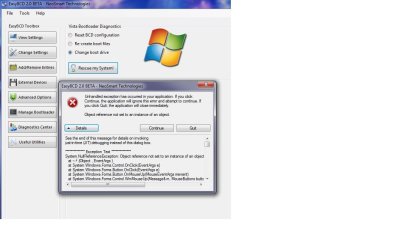
Thanks for the tip SIW2, but the program you recommended doesn't work.

Always gives the same error message, even in safe mode.

error.jpg
 

My Computer

OS
Windows 7 Ultimate 64bit
I asked about changing the drive letter, about a month ago, as Win 7 installed on my Drive "E". From the discussion on the subject the only way would be to do a clean reinstall and ensure that the drive you want to install the OS on is (temporarily) the only drive installed. That will force Win 7 to install on the "C" drive.
 

My Computer

Computer type
PC/Desktop
Computer Manufacturer/Model Number
My Own Build
OS
Windows 10 64 bit
CPU
Intel i7 6700K
Motherboard
ASUS ROG Maximus VIII Hero
Memory
16GB Corsair Dominator
Graphics Card(s)
Intel CPU Graphics
Sound Card
RealTek
Monitor(s) Displays
27" Dell S2719dgf
Screen Resolution
2560X1440
Hard Drives
1 TB Samsung 850 EVO SSD for Win 10 Pro
500GB Samsung 850 EVO SSD for Win 10 Insider
2 TB drive for backup
PSU
EVGA Supernova 750G2
Case
BeQuiet Silent Base 600
Cooling
Deepcool Captain 120EX
Keyboard
Microsoft Wireless 2000
Mouse
Microsoft wireless
Internet Speed
100 MB/sec (Cable)
Antivirus
Microsoft Defender and Malwarebytes
Browser
Edge/Firefox
Other Info
Cakewalk (Sonar) by BandLab and Studio One 4.1 Pro recording studio software. MOTU 896Mk3 Hybrid recording interface, Frontier Tranzport wireless control unit, Behringer X-Touch Control Surface.
Five USB connected optical drives for CD Audio production using Nero BurningROM
That's interesting - it might be having trouble with the Dynamic Disk.

You will have to do it manually .

It's pretty easy:

Open Easybcd, click Useful Utilities, then click Easybcd Power Console.

A command window opens.

Type: ( press Enter after each line )

bcdboot c:\windows /s c:

bootsect /nt60 c: /mbr

Then close power console and easybcd.

Open an elevated command and type: (press Enter after each line)

Diskpart

sel vol c

act

exi.

Then close command window.

Go into bios and set the 7 HD first in bios HD boot order.Or swap the cables leading from the mobo to the hard drives.

Thanks for the tip SIW2, but the program you recommended doesn't work.

Always gives the same error message, even in safe mode.

View attachment 45213
 

My Computers

System One System Two

  • Computer type
    PC/Desktop
    OS
    7 X64
    CPU
    i5 8400
    Motherboard
    gigabyte b365m ds3h
    Memory
    2x8gb 3200mhz
    Hard Drives
    various
    PSU
    pure power 11 400w cm
    Case
    Coolermaster
    Cooling
    cryorig m9i
  • Computer type
    PC/Desktop
    OS
    7x64
    CPU
    g5400
    Motherboard
    ga b365m ds3h
    Memory
    8gb ddr4 2400
    PSU
    xfx pro 450w

My Computers

System One System Two

  • Computer type
    PC/Desktop
    OS
    7 X64
    CPU
    i5 8400
    Motherboard
    gigabyte b365m ds3h
    Memory
    2x8gb 3200mhz
    Hard Drives
    various
    PSU
    pure power 11 400w cm
    Case
    Coolermaster
    Cooling
    cryorig m9i
  • Computer type
    PC/Desktop
    OS
    7x64
    CPU
    g5400
    Motherboard
    ga b365m ds3h
    Memory
    8gb ddr4 2400
    PSU
    xfx pro 450w
Back
Top