
Changing the system drive.

lewis

New member
Local time
4:31 PM
Messages
48
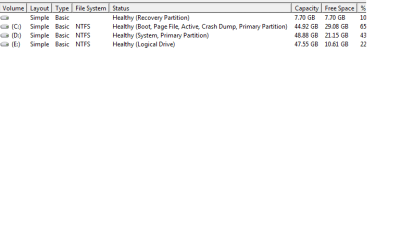
Please view the attachment.

I have 3 hard drives on my laptop, i have vista on one, seven on the other and one with no OS on. After buying and installing seven today on a clear hard drive, and transfering everything of vista's hard drive onto my seven one, it was time to format vista.

Windows will not let me do this because of the dual boot setup, and the vista drive being shown as the system drive (see screenshot) can someone tell me how to change the system drive, so i can format my vista hard drive which isnt needed anymore.
 

Attachments
  • Untitled.png
    Untitled.png
    4.7 KB · Views: 967

My Computer

OS
Windows 7 Ultimate
Please view the attachment.

I have 3 hard drives on my laptop, i have vista on one, seven on the other and one with no OS on. After buying and installing seven today on a clear hard drive, and transfering everything of vista's hard drive onto my seven one, it was time to format vista.

Windows will not let me do this because of the dual boot setup, and the vista drive being shown as the system drive (see screenshot) can someone tell me how to change the system drive, so i can format my vista hard drive which isnt needed anymore.

Lewis

I think you are saying you want to change the dual boot menu, and delete vista am I correct?
 

My Computer

Computer Manufacturer/Model Number
HP Pavillion dv-7 1005 Tx
OS
Win 8 Release candidate 8400
CPU
[email protected]
Memory
4 gigs
Graphics Card(s)
Nvidia 9600M
Sound Card
HD built-in
Monitor(s) Displays
17" Wxga
Screen Resolution
1440x900
Cooling
none
Internet Speed
45Mb down 5Mb up
Please view the attachment.

I have 3 hard drives on my laptop, i have vista on one, seven on the other and one with no OS on. After buying and installing seven today on a clear hard drive, and transfering everything of vista's hard drive onto my seven one, it was time to format vista.

Windows will not let me do this because of the dual boot setup, and the vista drive being shown as the system drive (see screenshot) can someone tell me how to change the system drive, so i can format my vista hard drive which isnt needed anymore.

Lewis

I think you are saying you want to change the dual boot menu, and delete vista am I correct?

Yes, could you briefly explain the process please.
 

My Computer

OS
Windows 7 Ultimate
Basically you need to pass the active flag from Vista to Windows 7, then reboot and if necessary boot into Win7 installer Repair console to run Startup repair.

You can also unplug the Vista drive and run Startup repair to get Win7 to boot, then plug in the Vista drive and reformat it.
 
Please view the attachment.

I have 3 hard drives on my laptop, i have vista on one, seven on the other and one with no OS on. After buying and installing seven today on a clear hard drive, and transfering everything of vista's hard drive onto my seven one, it was time to format vista.

Windows will not let me do this because of the dual boot setup, and the vista drive being shown as the system drive (see screenshot) can someone tell me how to change the system drive, so i can format my vista hard drive which isnt needed anymore.

Lewis

I think you are saying you want to change the dual boot menu, and delete vista am I correct?

Yes, could you briefly explain the process please.


I am assuming you have vista as the first partition (on the left). IN that partition are the boot files. They are in the root of the drive and in a hidden folder called boot. Those are going to need to be moved over to the win 7 directory.

You are going to need to use a tool like BCDedit to change the pointers . Instructions for using BCDedit are here http://www.sevenforums.com/tutorials/2676-bcdedit-how-use.html?ltr=B

DONT REBOOT DURING THIS. MAKE SURE YOU HAVE WIN 7 DVD.

You move the boot folder and files into the win 7 root.
then you edit the loader with BCDedit
When all of the above is done you reboot and it should boot directly into win 7.

Thats the process. let us know if you need help with any of this

Ken
 
Last edited:

My Computer

Computer Manufacturer/Model Number
HP Pavillion dv-7 1005 Tx
OS
Win 8 Release candidate 8400
CPU
[email protected]
Memory
4 gigs
Graphics Card(s)
Nvidia 9600M
Sound Card
HD built-in
Monitor(s) Displays
17" Wxga
Screen Resolution
1440x900
Cooling
none
Internet Speed
45Mb down 5Mb up
Back
Top