Changing the System Partition

EricDallal

New member
Local time
5:33 PM
Messages
10
I would like to delete the partition that is currently the system partition. As I understand it, this will make it impossible to start windows. As such, I would first like to change the System partition to the same partition that contains the operating system. I have read about the fixboot command which should theoretically accomplish this. However, I do not have a Windows recovery disk with my computer. Is there some way that I can run this command without a Windows recovery/installation disk?

Alternatively, could I erase the contents of the partition and then shrink to a small amount (say, 1MB) without impairing my ability to boot in Windows?
 

My Computer

OS
Windows 7 Home Standard 64bit
Hi there
The EASIEST way to do this is to get hold of some decent backup software like acronis where you can IMAGE the existing OS partition to say an external HDD.

You can also create bootable recovery media so you can boot from say the CD and it will restore your image on to a (re-sized if required) partition.

However you have to be careful here since the OS partition will have to be set to ACTIVE (not PRIMARY) and on first boot it WILL BSOD so without a Windows recovery disk you are totally hosed up.

That's why I say Computers should ALWAYS BE SOLD WITH A SEPARATE OS INSTALL DISK even if Windows (and a lot of other bloatware is pre-installed on it --you've PAID for the Windows Licence.)

Otherwise you will have to re-format your disk and do a comlete fresh install of a Brand new windows system.

Without the Windows install disk you really are up against it if you need to do a system repair on boot -- messing about with partitions often requires this tool.

Cheers
jimbo
 

My Computer

Computer type
PC/Desktop
Computer Manufacturer/Model Number
Custom built, several laptops HP/ASUS
OS
Linux CENTOS 7 / various Windows OS'es and servers
CPU
Intel i7 Intel i5
Memory
8GB, 16GB
Graphics Card(s)
On Motherboard
Sound Card
Realtek HD audio
Monitor(s) Displays
Apple Cinema display, Samsung LCD
Screen Resolution
1920 X 1080
Hard Drives
4 X 1TB SATA
Mouse
Toshiba wireless laser
Internet Speed
> 20MB up
Thanks for the advice. Actually, the OS partition is (oddly enough) different from the System partition:

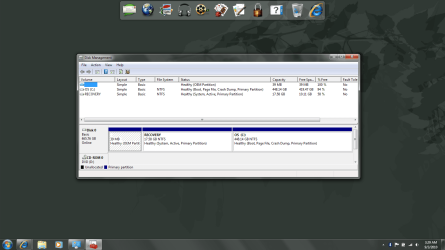
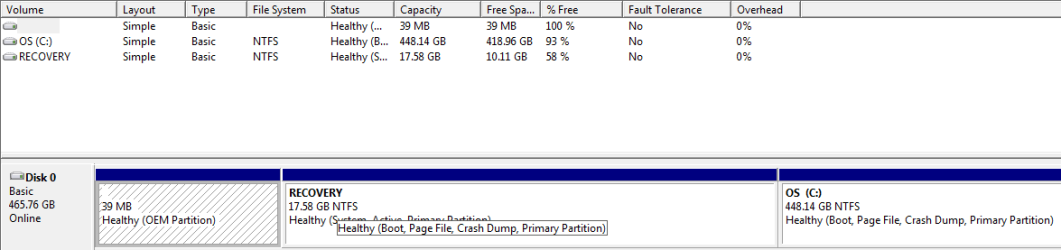
There are three partitions (see pic):
1st partition: unnamed - OEM Partition
2nd partition: OS ( C: ) - Boot, Page File, Crash Dump, Primary Partition
3rd partition: RECOVERY - System, Active, Primary Partition

It is this third partition that I would like to either delete or erase and shrink to a small size.

Note: There isn't actually a space between the brackets and the "C:". I put them there so that it doesn't show up as a smiley face.
 

Attachments

  • Scrn.png
    Scrn.png
    326.3 KB · Views: 59
Last edited:

My Computer

OS
Windows 7 Home Standard 64bit
If the System partition is also the Recovery partition, then before deleting it and recovering the System MBR and HD space into Win7, make your Recovery Disks so you have a path back to Factory Condition.

Download and burn a WIn7 Repair CD from this link: http://www.sevenforums.com/tutorials/2083-system-repair-disc-create.html

Follow the steps in Option Two in this excellent tutorial to recover the System MBR and deleted partition space into Win7: http://www.sevenforums.com/tutorials/93322-partition-wizard-use-bootable-cd.html

If you post back a screenshot of your full Disk Management drive map, using Snipping Tool in Start Menu, we can advise you with fuller certainty.
 
Thanks!

If you post back a screenshot of your full Disk Management drive map, using Snipping Tool in Start Menu, we can advise you with fuller certainty.

How do I do that?
 

My Computer

OS
Windows 7 Home Standard 64bit
Type Disk Management in Start Search box,
click result at top,
expand it to full size,
type Snipping TOol in Start box,
choose a New Rectangular Snip,
draw a box around the active DIsks drive map and full listings box,
Save to desktop.
Attach using Paper clip in reply box.
 
Here is the picture.
 

Attachments

  • Capture.PNG
    Capture.PNG
    23.3 KB · Views: 40

My Computer

OS
Windows 7 Home Standard 64bit
Why do you want to get rid of Recovery Partition?

Have you made the Recovery Disks?

If you don't have the Recovery Disks then I would make them or keep the Recovery Partition to be run from boot if you ever need to recover to Factory Condition.

Have you installed Win7 on a Vista computer? If so, you have probably lost the links to the Factory Utilities stored in the first partition. You can in that case also consider recovering that space.

But if this is factory Win7 computer then until you want to clean reinstall with a Win7 installer, you should keep the OEM partition utilities intact and only delete the Recovery partition if you have made the disks, or dont' plan to use them to recover because you plan to clean reinstall with a Win7 DVD you otherwise obtain.

It's late, I hope I explained it ok. It's an important disclaimer. Ask any questions back and don't jump until you think it through.

Option Two in the tutorial posted will work fine to delete Recovery (instead of 100mb) and recover the System MBR and disk space into Win7. Be sure to run Startup Repair three times from the Repair CD.
 
Hello EricDallal, welcome to Seven Forums!


If you want to do a very thorough job of it, do a wipe of the partition(s) first, then delete them, have a look at Option Three of that same tutorial that Greg linked.
 

My Computer

Computer Manufacturer/Model Number
* BFK Customs *
OS
W 7 64-bit Ultimate
CPU
Intel Q9550 Yorkfield
Motherboard
ASUS P5Q Pro
Memory
8GB Dominator 8500C5D
Graphics Card(s)
ATI : XFX 5870
Sound Card
Realtek HD Audio 7-1
Monitor(s) Displays
1x 47" LCD HDMI & 3x 26" LCD HDMI
Screen Resolution
1920x1080P & 1920x1200
Hard Drives
1x 80GB Intel X25-M G2 SSD : 1x 500GB & 1x 640GB WD Caviar Black(s)
PSU
Corsair 620HX
Case
Cooler Master RC-690
Cooling
Tuniq Tower 120, 2x 140mm and 3x 120mm case fans
Keyboard
Microsoft 500
Mouse
Razer Diamondback 3G
Internet Speed
14 Mb/s
Other Info
1x Koutech 3Gb/s SATA HDD Hot Swap Rack
Back
Top