Changing the taskbars colour completely?

VirtualPenguin

New member
Local time
11:25 PM
Messages
7
Hi, I'm new here :)
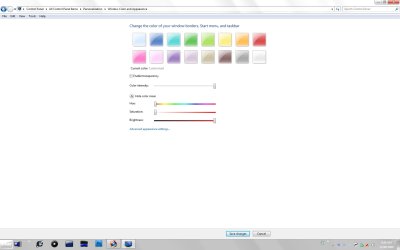
I'm currently using a modified for dual screen version of: Knife by *Mikeinel on deviantART as my wallpaper, because of that I want an completely or atleast mostly white taskbar, but Windows won't do that :cry:, this is my best result, which have a lot of blue in both ends, which just doesn't look good. (Don't mind the black border, my screens are different sizes :p)
 

My Computer

Computer Manufacturer/Model Number
Self build
OS
Windows 7 Professional x86 (RTM)
CPU
Intel E8400 @ 3.00 GHz
Motherboard
Intel DX38BT
Memory
2x1GB DDR3 Patriot 1333Mhz
Graphics Card(s)
Nvidia GeForce 9800 GTX 1GB
Hard Drives
Samsung F1 750 GB 32 MB buffer 7200 rpm
PSU
Corsair TX650W
Hi, I'm new here :)
I'm currently using a modified for dual screen version of: Knife by *Mikeinel on deviantART as my wallpaper, because of that I want an completely or atleast mostly white taskbar, but Windows won't do that :cry:, this is my best result, which have a lot of blue in both ends, which just doesn't look good. (Don't mind the black border, my screens are different sizes :p)

This as white as I can get it, I don't think your going to get much better unless you get a modified theme.

2009-08-22_092625.jpg
 

My Computer

Computer Manufacturer/Model Number
Home Brew
OS
Windows 7 Ultimate Vista Ultimate x64
CPU
Core 2 Duo E8500 3.16Ghz @ 3.8Ghz
Motherboard
eVGA 750i FTW
Memory
2x2Gigs Patriot PC2-6400 LL
Graphics Card(s)
Inno3D GeForce GTX260 216 SP
Monitor(s) Displays
ASUS VW222U 22" 2ms Response time
Screen Resolution
1680x1050
Hard Drives
SATA 150GB
SATA II 250GB
USB IDE 750GB Ext.
PSU
HYTEC 600W & Thermaltake 650W Toughpower Power Exp
Case
Thermaltake Armor LCS (Liquid Cooling System)
Cooling
Liquid Cooling System
Keyboard
Logitech G15 Gaming Keyboard
Mouse
Logitech G9 Gaming Mouse
That is pretty much what I have, although I have transparency enabled, it doesn't do a difference though... How would I go about it with a modified theme?
 

My Computer

Computer Manufacturer/Model Number
Self build
OS
Windows 7 Professional x86 (RTM)
CPU
Intel E8400 @ 3.00 GHz
Motherboard
Intel DX38BT
Memory
2x1GB DDR3 Patriot 1333Mhz
Graphics Card(s)
Nvidia GeForce 9800 GTX 1GB
Hard Drives
Samsung F1 750 GB 32 MB buffer 7200 rpm
PSU
Corsair TX650W
Hi, I'm new here :)
I'm currently using a modified for dual screen version of: Knife by *Mikeinel on deviantART as my wallpaper, because of that I want an completely or atleast mostly white taskbar, but Windows won't do that :cry:, this is my best result, which have a lot of blue in both ends, which just doesn't look good. (Don't mind the black border, my screens are different sizes :p)

Have you tried Garbanzo's 'AeroPlain' found on DA.. It say's for dark theme's but the complete opposite should work too. Otherwise it means resource editing the '.msstyles' files for that certain theme.

AeroPlain for Windows 7 by ~garbanzox on deviantART
 

My Computer

Computer Manufacturer/Model Number
Self Built
OS
XP Pro SP3 x86/Vista SP2 x64/Win7 x64 Triple-boot
CPU
AMD64 X2 AM2 5000+
Motherboard
Asus MSN-X Plus
Memory
Corsair TWX 2Gb (2x1Gb) DDR2 800Mhz
Graphics Card(s)
PCI-X 2.0 Inno3D (NVidia) 9500GT 1Gb DDR2
Sound Card
Onboard Realtec ALC662-GR
Monitor(s) Displays
Relisys 17' CRT (model unknown)
Screen Resolution
1024x768
Hard Drives
750Gb Samsung 7200-3Gb/s 32Mb Cache SATA
PSU
500W
Cooling
Standard AMD CPU Fan, One side, front and rear case fan.
Keyboard
Microsoft Multimedia Keyboard
Mouse
Samsung Optical
Internet Speed
10M
I give up... I'm just using a red theme now, which looks much better, so everything's good, it's probably made that way so that you can easily read the clock etc :p
Thanks for the help anyway
 

My Computer

Computer Manufacturer/Model Number
Self build
OS
Windows 7 Professional x86 (RTM)
CPU
Intel E8400 @ 3.00 GHz
Motherboard
Intel DX38BT
Memory
2x1GB DDR3 Patriot 1333Mhz
Graphics Card(s)
Nvidia GeForce 9800 GTX 1GB
Hard Drives
Samsung F1 750 GB 32 MB buffer 7200 rpm
PSU
Corsair TX650W
Back
Top