Changing the Time Rotating Wallpaper Changes?

Jabberwocky

New member
Local time
8:59 AM
Messages
1
How do you change the time of day Windows changes the background with custom themes?

Right now it changes at like 6PM, so I see a new one in the evening, then I see it again the next day until it rotates again. I'd prefer it to change at like 4AM so I see one a day.
 

My Computer

Computer Manufacturer/Model Number
Custom
OS
Windows 7 Ultimate 32-Bit
CPU
AMD Athlon II X2 250 3.0 GHz
Motherboard
GIGABYTE GA-MA78LM-S2H
Memory
Kingston HyperX 2GB
Graphics Card(s)
XFX Radeon HD 5770 1GB
Sound Card
On-Board Audio
Monitor(s) Displays
Acer 20" Widescreen
Hard Drives
250GB SATA HDDs x3
PSU
Corsair 650TX 650W
Case
Antec 300
Cooling
120MM Fans x3 - 140MM Fan x1
Keyboard
Logitech Illuminated Keyboard
Mouse
Microsoft Wireless Optical Mouse
Internet Speed
15 Mbps

My Computer

Computer Manufacturer/Model Number
HP, Dell, Gateway, Toshiba - 4 laptops and 2 desktops
OS
Vista, Windows7, Mint Mate, Zorin, Windows 8
CPU
from 1.6GHz Duo to i7
Monitor(s) Displays
2x HP w2207
Hard Drives
5x HDD, 7x SSD, 12x Externals
Keyboard
with trackball - no mices
Mouse
Trackball mice
Internet Speed
DSL 6000
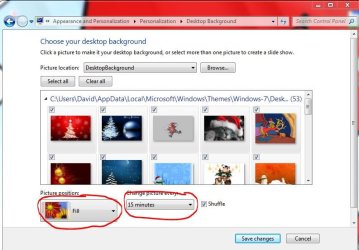
Windows 7 has a Picture/wallpaper rotation build in, no need to install another program just right click on the desktop and go to personalize, pick your wallies, determine how they should be shown and click on Desktop Background on the bottom
Capture.JPG

You can set them to 6hrs or 12 hrs or even once a day (it always calculates from the time you press Save fo that screen ;)
-DG
 

My Computer

Computer Manufacturer/Model Number
HP m8000n
OS
Windows 7 Ultimate x86
CPU
DualCore AMD Athlon 64 X2, 2600 MHz 5200+
Motherboard
Asus M2N68-LA (Narra)
Memory
Samsung 2GB DDR2
Graphics Card(s)
Onboard NVIDIA GeForce 6150SE nForce 430
Sound Card
Onboard nVIDIA nForce 6100-430 (MCP61P)
Monitor(s) Displays
Westinghouse 19" LED
Screen Resolution
1280x1024
Hard Drives
SATA II Seagate Barracuda 500GB
USB II WD Elements 500GB
USB II WD My Book 1TB
USB II WD My Book 2TB
PSU
Stock (HP)
Case
Stock (HP)
Cooling
Stock
Keyboard
Logitech Classic KB 200
Mouse
Standard HP opticle USB mouse
Windows 7 has a Picture/wallpaper rotation build in, no need to install another program just right click on the desktop and go to personalize, pick your wallies, determine how they should be shown and click on Desktop Background on the bottom
View attachment 122697

You can set them to 6hrs or 12 hrs or even once a day (it always calculates from the time you press Save fo that screen ;)
-DG
Right, but he wants the background to change at 4AM - how do you do that.
 

My Computer

Computer Manufacturer/Model Number
HP, Dell, Gateway, Toshiba - 4 laptops and 2 desktops
OS
Vista, Windows7, Mint Mate, Zorin, Windows 8
CPU
from 1.6GHz Duo to i7
Monitor(s) Displays
2x HP w2207
Hard Drives
5x HDD, 7x SSD, 12x Externals
Keyboard
with trackball - no mices
Mouse
Trackball mice
Internet Speed
DSL 6000
Windows 7 has a Picture/wallpaper rotation build in, no need to install another program just right click on the desktop and go to personalize, pick your wallies, determine how they should be shown and click on Desktop Background on the bottom
View attachment 122697

You can set them to 6hrs or 12 hrs or even once a day (it always calculates from the time you press Save fo that screen ;)
-DG
Right, but he wants the background to change at 4AM - how do you do that.

WHS,

Get up at 3:59 am and change it then go back to bed!:o
 

My Computer

Computer Manufacturer/Model Number
HP M9077c
OS
Windows 7 Home Premium 64bit
CPU
Intel(R)Core(TM)2 quad [email protected] 2.39GHz
Motherboard
ASUSeK
Memory
6GB DDR2 6400
Graphics Card(s)
GeForce 8500/512MB
Sound Card
Realtek High Def Audio
Monitor(s) Displays
HP w2408 LCD 24" widescreen
Screen Resolution
1920x1200
Cooling
6 pack of Bud
Keyboard
MS wireless Inteli
Mouse
MS wireless Inteli
Either set it to once a day and save that setting at 4am or set it to say 12 hrs at 6pm.
I was under the impression, for the TS it was more important, to have a new picture in the morning than have it change at 4am sharp ;)

-DG
 

My Computer

Computer Manufacturer/Model Number
HP m8000n
OS
Windows 7 Ultimate x86
CPU
DualCore AMD Athlon 64 X2, 2600 MHz 5200+
Motherboard
Asus M2N68-LA (Narra)
Memory
Samsung 2GB DDR2
Graphics Card(s)
Onboard NVIDIA GeForce 6150SE nForce 430
Sound Card
Onboard nVIDIA nForce 6100-430 (MCP61P)
Monitor(s) Displays
Westinghouse 19" LED
Screen Resolution
1280x1024
Hard Drives
SATA II Seagate Barracuda 500GB
USB II WD Elements 500GB
USB II WD My Book 1TB
USB II WD My Book 2TB
PSU
Stock (HP)
Case
Stock (HP)
Cooling
Stock
Keyboard
Logitech Classic KB 200
Mouse
Standard HP opticle USB mouse
Either set it to once a day and save that setting at 4am or set it to say 12 hrs at 6pm.
I was under the impression, for the TS it was more important, to have a new picture in the morning than have it change at 4am sharp ;)

-DG
I do not think this is going to work. i have been trying to "fool" it on the shorter time intervals. But it always goes back to its defaults (the intervals you set).
 

My Computer

Computer Manufacturer/Model Number
HP, Dell, Gateway, Toshiba - 4 laptops and 2 desktops
OS
Vista, Windows7, Mint Mate, Zorin, Windows 8
CPU
from 1.6GHz Duo to i7
Monitor(s) Displays
2x HP w2207
Hard Drives
5x HDD, 7x SSD, 12x Externals
Keyboard
with trackball - no mices
Mouse
Trackball mice
Internet Speed
DSL 6000
Right it observes the intervals I set going from the time I set them.
Basically it should be sufficient if you at the time you desire just make a right click on the desktop and click "Next Desk Top Background" because that resets the timer ;)
Which means in turn if you switch any background manually during the day, the time you had set up before was reset as well !
It doesn't matter much to me because I have it set for 15 mins anyway (so I can see all my wallpapers in under a year)
If I go on saving wallies like that I soon have to set it to 10 seconds
:roflmao::roflmao:

-DG
 

My Computer

Computer Manufacturer/Model Number
HP m8000n
OS
Windows 7 Ultimate x86
CPU
DualCore AMD Athlon 64 X2, 2600 MHz 5200+
Motherboard
Asus M2N68-LA (Narra)
Memory
Samsung 2GB DDR2
Graphics Card(s)
Onboard NVIDIA GeForce 6150SE nForce 430
Sound Card
Onboard nVIDIA nForce 6100-430 (MCP61P)
Monitor(s) Displays
Westinghouse 19" LED
Screen Resolution
1280x1024
Hard Drives
SATA II Seagate Barracuda 500GB
USB II WD Elements 500GB
USB II WD My Book 1TB
USB II WD My Book 2TB
PSU
Stock (HP)
Case
Stock (HP)
Cooling
Stock
Keyboard
Logitech Classic KB 200
Mouse
Standard HP opticle USB mouse
SDG, I agree with you. It is a bit of a strange requirement. But I am sure the OP has his reasons. I set mine to 10 minutes and I have a big picture file. if I set it to 1 day, I would see each picture only once in summer and once in winter. :D
 

My Computer

Computer Manufacturer/Model Number
HP, Dell, Gateway, Toshiba - 4 laptops and 2 desktops
OS
Vista, Windows7, Mint Mate, Zorin, Windows 8
CPU
from 1.6GHz Duo to i7
Monitor(s) Displays
2x HP w2207
Hard Drives
5x HDD, 7x SSD, 12x Externals
Keyboard
with trackball - no mices
Mouse
Trackball mice
Internet Speed
DSL 6000
LOL that's right...well we have given him options and showed what's possible.
The final decision lies of course with the OP/TS.

-DG
 

My Computer

Computer Manufacturer/Model Number
HP m8000n
OS
Windows 7 Ultimate x86
CPU
DualCore AMD Athlon 64 X2, 2600 MHz 5200+
Motherboard
Asus M2N68-LA (Narra)
Memory
Samsung 2GB DDR2
Graphics Card(s)
Onboard NVIDIA GeForce 6150SE nForce 430
Sound Card
Onboard nVIDIA nForce 6100-430 (MCP61P)
Monitor(s) Displays
Westinghouse 19" LED
Screen Resolution
1280x1024
Hard Drives
SATA II Seagate Barracuda 500GB
USB II WD Elements 500GB
USB II WD My Book 1TB
USB II WD My Book 2TB
PSU
Stock (HP)
Case
Stock (HP)
Cooling
Stock
Keyboard
Logitech Classic KB 200
Mouse
Standard HP opticle USB mouse
A-hum...
I have ~80000; divided by 365 = 219.17 years
I'm pretty healthy, but... :sarc:
 

My Computer

Computer Manufacturer/Model Number
OEM - Me
OS
Windows 7 Home Premium x64
CPU
AMD Phenom II X6 1600T
Motherboard
GigaByte GZ-990FXA-UD3
Memory
16GB PC3-10700 (1342MHz)
Graphics Card(s)
ATI Radeon 5770 HD (x2) CrossFire
Sound Card
On-board RealTek chipset
Monitor(s) Displays
3x Hanns-G 1920x1080 Monitors
Screen Resolution
3x Hanns-G 1920x1080 Monitors
Hard Drives
Intel 25-V SSD 40GB: 218 MB/s AT: 0.1ms
Intel X-25M SSD 80GB: 230MB/s AT: 0.1ms
Seagate 750GB: 133 MB/s AT: 13ms (perpendicular storage)
Buffalo HD-PCTU3 1TB External drive
PSU
OCZ Stealth X Stream 750W
Case
Cheap (unknown)
Cooling
Stock
Keyboard
HP USB
Mouse
LogiTech USB
Internet Speed
1.5 Mbps - Slow - At the tail-end of a rural network
Other Info
Printer: Epson Stylus C-84
Scanner: HP 3500C Flatbed
DVD-RW: Plextor
DVD-ROM: Unknown
WEI: 7.4
:what::what:80.000 WOW...so YOU are the Internet Wallpaper Pic Dump ??
Set it to 10 seconds and you'll get through in roughly 9.5 Days
with a 30 seconds setting you still cycle through them every month (27.7 days..always provided your comp runs 24/7)

:thumbsup::roflmao:
 

My Computer

Computer Manufacturer/Model Number
HP m8000n
OS
Windows 7 Ultimate x86
CPU
DualCore AMD Athlon 64 X2, 2600 MHz 5200+
Motherboard
Asus M2N68-LA (Narra)
Memory
Samsung 2GB DDR2
Graphics Card(s)
Onboard NVIDIA GeForce 6150SE nForce 430
Sound Card
Onboard nVIDIA nForce 6100-430 (MCP61P)
Monitor(s) Displays
Westinghouse 19" LED
Screen Resolution
1280x1024
Hard Drives
SATA II Seagate Barracuda 500GB
USB II WD Elements 500GB
USB II WD My Book 1TB
USB II WD My Book 2TB
PSU
Stock (HP)
Case
Stock (HP)
Cooling
Stock
Keyboard
Logitech Classic KB 200
Mouse
Standard HP opticle USB mouse
Back
Top