JavaScript is disabled. For a better experience, please enable JavaScript in your browser before proceeding.
You are using an out of date browser. It may not display this or other websites correctly.
You should upgrade or use an
alternative browser .
Changing the Window & Taskbar Color without aero??
hey, i put windows 7 on this older pc i have. its 32 bit ultimate. the pc has a p4 2.4ghz 512ram and a 128mb radeon 9200 which is dx8 so no aero. since this is my older and secondary pc im not concerned with aero on this cuz i know it will hinder performace. all i want to do is change the window and taskbar default color from the default sky blue. i know it can be changed with using high contrast theme but then that changes everything else. is there anyway with out aero just to change the color?
OS Windows 7 Ultimate 64bit CPU AMD Phenom II X4 945 @3.0ghz Motherboard Asrock Memory 4gb kingston hyperX Graphics Card(s) 1gb Radeon HD 5670
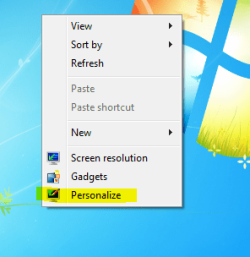
Try this.
:ar:
When you get to the last screen, click on the parts you want to change in the box, and change the color to what you want.
Computer Manufacturer/Model Number Custom OS Windows 7 Professional x64 CPU Intel i7 2600K OC'd @ 4620 MHz Motherboard Asus P8Z68-V Pro Memory 16GB GSkill Sniper 2133 Mhz (4x4GB) Graphics Card(s) EVGA GeForce GTX 480 SuperClocked+ Sound Card Realtek High Definition Audio Monitor(s) Displays 2x Acer S273HLbmii 27" Screen Resolution 2 x 1920x1080 Hard Drives 64GB Crucial M4 SSD PSU Corsair HW Series 750w (modular) Case Cooler Master HAF 932 Advanced Blue Edition Cooling CM Hyper 212+ CPU cooler, 3x 230mm + 1x 140mm case fans Keyboard Logitech MK320 (wireless) Mouse Logitech MK320 (wireless) Internet Speed 30 Mb/s : 2 Mb/s
i tried that already plenty of times ive changed things but nothing works
OS Windows 7 Ultimate 64bit CPU AMD Phenom II X4 945 @3.0ghz Motherboard Asrock Memory 4gb kingston hyperX Graphics Card(s) 1gb Radeon HD 5670
OS Windows 7 Ultimate 64bit CPU AMD Phenom II X4 945 @3.0ghz Motherboard Asrock Memory 4gb kingston hyperX Graphics Card(s) 1gb Radeon HD 5670
Sadly to say, there is no way (yet, hopefully) to change the taskbar color without Aero. I've tried numerous times, and each time it has failed.
Computer type PC/Desktop Computer Manufacturer/Model Number Custom built OS Windows 8 Pro 64-bit CPU Intel Core i7 950 @4.4GHz Motherboard EVGA 131-GT-E767 Memory 12GB DDR3 1333MHz @1400 (9-9-9-24) Graphics Card(s) 2x AMD Radeon HD 6770 Sound Card Sound Blaster Audigy Monitor(s) Displays Acer S231HL + Acer E19T5W Screen Resolution 1920x1080 + 1440x900 Hard Drives 128GB Samsung 840 Pro PSU Corsair GS800 Case Custom-made Cooling CM Hyper212+, lots of fans Keyboard NMB RT8255C+ Mouse Func MS-3 Internet Speed 30/1.5 Antivirus Microsoft Security Essentials/Spybot SD/Malwarebytes Browser Google Chrome Other Info Onkyo TX-27 receiver & two Realistic Optimus T100s.
Is there any solution changing the basic taskbar color ?
If you can't change the Taskbar color, would changing the Taskbar font's color, style and size help you a little?
Computer Manufacturer/Model Number HP Pavillion dv5t (generation 1) OS Vista 64 bit and 32 bit (SP2) CPU Intel(R) Core(TM)2 Duo Processor T9400 (2.53 GHz Memory 4GB DDR2 System Memory (2 Dimm) Graphics Card(s) 512 MB NVIDIA GeForce 9600M GT Monitor(s) Displays 15.4" diagonal WSXGA+ High-Definition HP BrightView Widescre Screen Resolution 1680 x 1050 Hard Drives 320GB 5400RPM SATA Hard Drive with HP ProtectSmart Hard Drive Protection Keyboard Built-in HP Mouse Built in - Synaptics TouchPad V6.5 on PS/2 Port Internet Speed Max Other Info ~ Intel Next-Gen Wireless-N Mini-card w/Bluetooth ~ Blu-Ray ROM DVD+/-R/RW ~ Integ. HDTV Hybrid Tuner ~ 12 Cell Battery ~ MS Office (Home Premium) 2007 ~