
Hi all,
I installed Windows 7 and ended up with a default user (AxeL) with Administrative privileges.
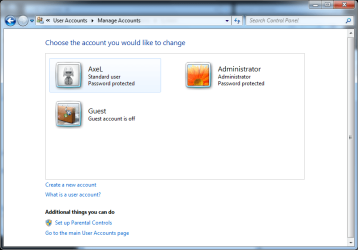
Now I enabled the default Administrator account and lowered the privileges of my user AxeL (see Accounts.png).
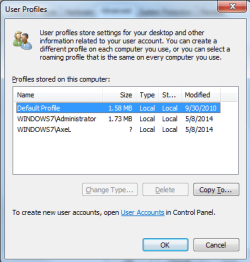
If I open the User Profiles Pane in Control Panel -> System -> Advanced System Settings the size of the user account is unknown (see Profiles.png).
If I switch back the user Axel to Administrators everything works and I can see the right size in the User Profiles Pane.
Does anyone have a clue on this?
I've tried also Vista and 8 and they all seems affected.
Thanks
I installed Windows 7 and ended up with a default user (AxeL) with Administrative privileges.
Now I enabled the default Administrator account and lowered the privileges of my user AxeL (see Accounts.png).
If I open the User Profiles Pane in Control Panel -> System -> Advanced System Settings the size of the user account is unknown (see Profiles.png).
If I switch back the user Axel to Administrators everything works and I can see the right size in the User Profiles Pane.
Does anyone have a clue on this?
I've tried also Vista and 8 and they all seems affected.
Thanks
Attachments
My Computer
At a glance
Windows 7 Ultimate
- Computer type
- PC/Desktop
- OS
- Windows 7 Ultimate
