Changing Win+E behavior back to showing Libraries?

laxu

New member
Local time
12:40 AM
Messages
19
To me the My Computer view is pretty useless since I have all that I need in the libraries. Thus it would be nice if I could configure Win+E to open the libraries view, like it did in build 7000.

Is there any way to change this behavior? I'm using build 7057.
 

My Computer

OS
Windows 7
I don't think you can change the built-in Windows+X combinations, but I'll look it up.

Meanwhil, the easiest approach I can think of is to make another key combination:

1. Create a new shortcut on your hard drive, e.g. under c:\windows

2. Enter this path at the shorcut's path:
C:\Windows\explorer.exe shell:libraries

3. Focus at the shortcut key tab and press Ctrl+Alt+E.

4. Press OK.

At least now you can open libraries pressing Ctrl+Alt+E.
That's the closest approach I could think of.
 

My Computer

Computer Manufacturer/Model Number
ENIAC
OS
Windows 7 RC 7100 32bit/64bit
CPU
Intel Core2Duo E4500 2.20 GHz
Motherboard
ASUS P5LD2-X/1333
Memory
2x1GB Kinsgston DDR2 800MHz
Graphics Card(s)
Nvidia 8500GT
Sound Card
Onboard High Definition Audio Device
Monitor(s) Displays
Sony Bravia 42"
Case
LINKW 2222
Cooling
Standard Intel
Keyboard
Some cheap one
Mouse
Microsoft Intellimouse something
Internet Speed
24MBps ADSL
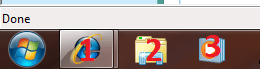
Another approach is to press Winkey + 2 .

Winkey + a number, opens the pinned items on your taskbar , numbered from left to right.

So if you have IE8 icon pinned first, Winkey + 1 opens IE8.
If you have Libraries second, Winkey + 2 opens Libraries etc.

This approach opens Libraries, not My Computer.

Hope it helps.
 

Attachments

  • Untitled.png
    Untitled.png
    5.4 KB · Views: 326

My Computer

Computer Manufacturer/Model Number
ENIAC
OS
Windows 7 RC 7100 32bit/64bit
CPU
Intel Core2Duo E4500 2.20 GHz
Motherboard
ASUS P5LD2-X/1333
Memory
2x1GB Kinsgston DDR2 800MHz
Graphics Card(s)
Nvidia 8500GT
Sound Card
Onboard High Definition Audio Device
Monitor(s) Displays
Sony Bravia 42"
Case
LINKW 2222
Cooling
Standard Intel
Keyboard
Some cheap one
Mouse
Microsoft Intellimouse something
Internet Speed
24MBps ADSL

My Computer

Computer Manufacturer/Model Number
ENIAC
OS
Windows 7 RC 7100 32bit/64bit
CPU
Intel Core2Duo E4500 2.20 GHz
Motherboard
ASUS P5LD2-X/1333
Memory
2x1GB Kinsgston DDR2 800MHz
Graphics Card(s)
Nvidia 8500GT
Sound Card
Onboard High Definition Audio Device
Monitor(s) Displays
Sony Bravia 42"
Case
LINKW 2222
Cooling
Standard Intel
Keyboard
Some cheap one
Mouse
Microsoft Intellimouse something
Internet Speed
24MBps ADSL
Back
Top