Changing windows 7 home basic edition themes

amiel

New member
Local time
11:17 AM
Messages
3
Hi everyone..
I just bought a laptop with a Windows 7 Home Basic Edition OS installed on it..
I just want to know how can i customize my themes..
I found some themes on the internet..and i didnt know how can i apply it to my laptop..

i need some help please guys :rolleyes:
 

My Computer

OS
Windows 7 Home Basic Edition

My Computer

Computer type
PC/Desktop
Computer Manufacturer/Model Number
Self Built
OS
Win 10 Pro x64
CPU
Intel I5-2500K @3.3GHz
Motherboard
Asrock P67 Extreme4
Memory
16GB G.Skill Ripjaws X (4x4GB)
Graphics Card(s)
EVGA GeForce 750 Ti SC 2GB
Sound Card
ASUS Xonar DG 5.1 Channels 24-bit 96KHz PCI Interface Sound
Monitor(s) Displays
auria eq2367
Screen Resolution
1920 x 1080
Hard Drives
250GB Samsung 850 EVO SSD
1TB WD Blue
1TB Hitachi
PSU
SeaSonic X 650W 80 Plus Gold
Case
Corsair Obsidian 750D
Cooling
Corsair H60, Three 140mm case fans
Keyboard
Logitech Wireless Keyboard K520
Mouse
Logitech Wireless Mouse M310
Internet Speed
Wave Broadband ~ 100 dn 5 up
Antivirus
Windows Defender, Malwarebytes Premium
Browser
Edge, IE11, Chrome
Other Info
Laptop specs: HP g7-1365dx /
CPU: AMD A6-3420M APU with Radeon(tm) HD Graphics /
RAM: Crucial 8Gb (2x4Gb) /
SSD: Crucial M4-CT128M4SSD2 ATA Device/ FW 000F /
GFX: AMD Radeon HD 6520G /
OS: Windows 10 Pro x64
thanks derekimo for the links..
but sir..i tried using the patcher given..but it does nothing ..
i still can change my themes ..i still can use the themes that i have downloaded from the internet..
is there any other way?or can you please give me the procedures so i could apply those themes on my laptop..

thanks in advance sir..
 

My Computer

OS
Windows 7 Home Basic Edition
The point I was trying to show in all those links, was that it didn't work.

Unless someone else using home basic comes along and explains how they

did it, I don't see this working for you. You can either upgrade to home premium

or try to find a third party program that will work.

Here's a tutorial that may be of some help to you,

http://www.sevenforums.com/tutorials/53651-aero-enable-unsupported-editions-windows-7-a.html

What themes are you trying to use anyway?
 

My Computer

Computer type
PC/Desktop
Computer Manufacturer/Model Number
Self Built
OS
Win 10 Pro x64
CPU
Intel I5-2500K @3.3GHz
Motherboard
Asrock P67 Extreme4
Memory
16GB G.Skill Ripjaws X (4x4GB)
Graphics Card(s)
EVGA GeForce 750 Ti SC 2GB
Sound Card
ASUS Xonar DG 5.1 Channels 24-bit 96KHz PCI Interface Sound
Monitor(s) Displays
auria eq2367
Screen Resolution
1920 x 1080
Hard Drives
250GB Samsung 850 EVO SSD
1TB WD Blue
1TB Hitachi
PSU
SeaSonic X 650W 80 Plus Gold
Case
Corsair Obsidian 750D
Cooling
Corsair H60, Three 140mm case fans
Keyboard
Logitech Wireless Keyboard K520
Mouse
Logitech Wireless Mouse M310
Internet Speed
Wave Broadband ~ 100 dn 5 up
Antivirus
Windows Defender, Malwarebytes Premium
Browser
Edge, IE11, Chrome
Other Info
Laptop specs: HP g7-1365dx /
CPU: AMD A6-3420M APU with Radeon(tm) HD Graphics /
RAM: Crucial 8Gb (2x4Gb) /
SSD: Crucial M4-CT128M4SSD2 ATA Device/ FW 000F /
GFX: AMD Radeon HD 6520G /
OS: Windows 10 Pro x64
ahh.. i get it sir..tnx tnx :)
but sir..i tried what's stated in the latter link u gave..
and the Windows 7 Upgrade Advisor says that my hardware meets all the requirements..and it passed all the checkpoints..so i proceed with the download of the aero enabler..

i used it and now i dont know where to go ..
please sir ..guide me..
tnx tnx

by the way..here's the theme that i want to apply to my laptop
dESATURATED Theme for Windows 7

thank you soo much sir..ur help is very much appreciated :)
 

My Computer

OS
Windows 7 Home Basic Edition
ahh.. i get it sir..tnx tnx :)
but sir..i tried what's stated in the latter link u gave..
and the Windows 7 Upgrade Advisor says that my hardware meets all the requirements..and it passed all the checkpoints..so i proceed with the download of the aero enabler..

i used it and now i dont know where to go ..
please sir ..guide me..
tnx tnx

by the way..here's the theme that i want to apply to my laptop
dESATURATED Theme for Windows 7

thank you soo much sir..ur help is very much appreciated :)

Amiel

Derek, and I are trying to tell you it will not work with your version of windows. PERIOD. You can get it to work by upgrading to Home Premium, or higher.


My Computer

Computer Manufacturer/Model Number
HP Pavillion dv-7 1005 Tx
OS
Win 8 Release candidate 8400
CPU
[email protected]
Memory
4 gigs
Graphics Card(s)
Nvidia 9600M
Sound Card
HD built-in
Monitor(s) Displays
17" Wxga
Screen Resolution
1440x900
Cooling
none
Internet Speed
45Mb down 5Mb up
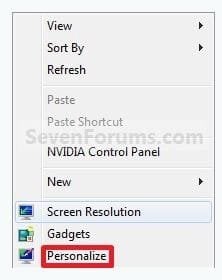
When you right click on your desktop do you get a context menu like this
personalize.JPG
If not, I don't see how you are going to change themes.

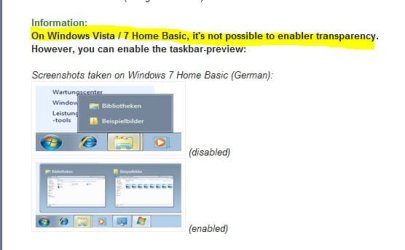
That's why it's called basic, even the tool in that tutorial says this
home basic.JPG
There might be something out there that that claims to let you change themes

but your best bet would be to use anytime upgrade to home premium.

Sorry I can't be more help to you.
 

My Computer

Computer type
PC/Desktop
Computer Manufacturer/Model Number
Self Built
OS
Win 10 Pro x64
CPU
Intel I5-2500K @3.3GHz
Motherboard
Asrock P67 Extreme4
Memory
16GB G.Skill Ripjaws X (4x4GB)
Graphics Card(s)
EVGA GeForce 750 Ti SC 2GB
Sound Card
ASUS Xonar DG 5.1 Channels 24-bit 96KHz PCI Interface Sound
Monitor(s) Displays
auria eq2367
Screen Resolution
1920 x 1080
Hard Drives
250GB Samsung 850 EVO SSD
1TB WD Blue
1TB Hitachi
PSU
SeaSonic X 650W 80 Plus Gold
Case
Corsair Obsidian 750D
Cooling
Corsair H60, Three 140mm case fans
Keyboard
Logitech Wireless Keyboard K520
Mouse
Logitech Wireless Mouse M310
Internet Speed
Wave Broadband ~ 100 dn 5 up
Antivirus
Windows Defender, Malwarebytes Premium
Browser
Edge, IE11, Chrome
Other Info
Laptop specs: HP g7-1365dx /
CPU: AMD A6-3420M APU with Radeon(tm) HD Graphics /
RAM: Crucial 8Gb (2x4Gb) /
SSD: Crucial M4-CT128M4SSD2 ATA Device/ FW 000F /
GFX: AMD Radeon HD 6520G /
OS: Windows 10 Pro x64
You can lead a horse to water, but that don't make it a duck! ;)
 

My Computer

Computer type
PC/Desktop
Computer Manufacturer/Model Number
LENOVO K450 @3.0GHZ
OS
64-bit Windows 8.1 Pro
CPU
Core(TM) i5 CPU 4330 Haswell @ 3.20GHz
Motherboard
LENOVO
Memory
12.00 GB
Graphics Card(s)
Intel(R) HD Graphics
Sound Card
Intel HD integtrated
Monitor(s) Displays
HP 25' ISP Monitor
Screen Resolution
1900/1020
Hard Drives
(1) ST1000DM003-1CH162 (2) Generic STORAGE DEVICE USB Device (3) Generic STORAGE DEVICE USB Device
Internet Speed
100mb down/10mb up
Back
Top