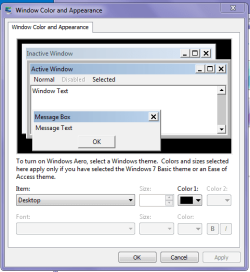
The original system color palette was with white background and black text. As I have difficulty in working with that color combination - my eyes are getting strained - I want to set background color as black and text color as white. When I tried that using the "Personalization -> Windows Color -> Advanced Option" link, I found that many other colors also got changed - especially, the Message background, Message Text, Control Buttons and their text - in such a way that the all were set to same or very closely similar colors making it impossible for me to read the text. How can I change this back? The reverse operation through the same link didn't help.
Friends, please help me.
Many thanks to all who will provide me a working help.
- - arasan77
Friends, please help me.
Many thanks to all who will provide me a working help.
- - arasan77
My Computer
At a glance
Windows 7 Home Premium 32 bit version
- Computer type
- Laptop
- Computer Manufacturer/Model Number
- HP
- OS
- Windows 7 Home Premium 32 bit version
- Browser
- Google Chrome