Character length in a cell or cells

synth

New member
Member
VIP
Local time
9:42 AM
Messages
100
Hi guys, just wanted to ask if any of you can help me out in excel. Basically what I wanna do is, if I copied a text or a sentence and I would want to paste it on a cell, i'd like the cell to remove any characters if it is over than 40 excluding spaces.

Any kind of help/advice would be appreciated
 

My Computer My Computer

OS
Windows 7 Ultimate x64

My Computer My Computer

Computer type
PC/Desktop
Computer Manufacturer/Model Number
Self built using existing case
OS
Windows 7 Home Premium 64 bit sp1
CPU
Intel i5 3570 3.4Ghz Ivy Bridge SKT 1155 quad core
Motherboard
Gigabyte Z77-HD3 SKT 1155 2xSata 3, 4x USB 3.0
Memory
G-Skill Rip Jaws 16Gb (8x2) DDR3 -1600 PC3 12800 CL 10 red
Graphics Card(s)
Gigabyte NVIDIA GT610 1Gb DDR3 810/1200 PCI-E 2.0 Silent
Sound Card
NVIDIA High Definition & Realtech High Definition Audio
Monitor(s) Displays
2 x Philips 226V4L 16:9 aspect ratio
Screen Resolution
1920 x 1080 HD
Hard Drives
Samsung 840 Pro 256gb SSD, SATA 3.
Hitachi Touro Portable 1tb, USB 3.0 HDD used for image b/ups.
PSU
Corsair VS450
Case
Codeng
Cooling
PSU fan & CPU fan
Keyboard
Logitech
Mouse
Logitech Wireless trackball M570
Internet Speed
Wireless 3G. 3mg down & 550kb up.
Antivirus
Bitdefender Internet Security 2020
Browser
Opera (Current Version) & Firefox
Other Info
MS Office 2013 Pro. Davis weather station software. MGE Nova 600 avr UPS.

Thanks for this, but this isn't exactly what I'm looking for. What I'm trying to do is, like whenever I paste some words or sentences, I need a function or formula that will automatically adjust the characters to less than 40 for example, when I paste the set of words on that specific cell or range of cells. Is this even possible?
 

My Computer My Computer

OS
Windows 7 Ultimate x64
While it might be possible to create a macro for doing that I can't see how it would be of use to you. If for example you have a sentence of 100 words in it & you only use 40 of them, then surely the meaning of the text is lost.

Perhaps as a work around you might just be able to copy a small section of the text & paste that, instead of the whole lot.
 

My Computer My Computer

Computer type
PC/Desktop
Computer Manufacturer/Model Number
Self built using existing case
OS
Windows 7 Home Premium 64 bit sp1
CPU
Intel i5 3570 3.4Ghz Ivy Bridge SKT 1155 quad core
Motherboard
Gigabyte Z77-HD3 SKT 1155 2xSata 3, 4x USB 3.0
Memory
G-Skill Rip Jaws 16Gb (8x2) DDR3 -1600 PC3 12800 CL 10 red
Graphics Card(s)
Gigabyte NVIDIA GT610 1Gb DDR3 810/1200 PCI-E 2.0 Silent
Sound Card
NVIDIA High Definition & Realtech High Definition Audio
Monitor(s) Displays
2 x Philips 226V4L 16:9 aspect ratio
Screen Resolution
1920 x 1080 HD
Hard Drives
Samsung 840 Pro 256gb SSD, SATA 3.
Hitachi Touro Portable 1tb, USB 3.0 HDD used for image b/ups.
PSU
Corsair VS450
Case
Codeng
Cooling
PSU fan & CPU fan
Keyboard
Logitech
Mouse
Logitech Wireless trackball M570
Internet Speed
Wireless 3G. 3mg down & 550kb up.
Antivirus
Bitdefender Internet Security 2020
Browser
Opera (Current Version) & Firefox
Other Info
MS Office 2013 Pro. Davis weather station software. MGE Nova 600 avr UPS.
Excel Add In

Well when you copy and paste it's windows clipboard that contains the data. I don't think that you can easily limit the amount of data that can be copied to the clipboard and even if you could it would be very hard to make it work in a way that it recognizes that you're copying data into Excel and limits the string length accordingly.

If you use an add in for Excel:

ASAP Utilities for Excel - Text » Delete all after a given number of characters... - ASAP Utilities, description of our Excel tools (English)

Take a look at the first two screenshots here:

ASAP Utilities for Excel - Descriptions of all tools in ASAP Utilities (English)

The first one shows the toolbar and the "Text" icon.

The second one shows the ASAP Utilities "Menu" button.

You can highlight a cell or range of cells and run a text utility like the one in the first link to remove characters after whatever string length you specify.

I think Ranger4 gave you a decent answer but as far as I can work out you'd need to paste the data then modify it.

Note: I don't have MS Office on my home computer but I do use ASAP Utilities on my work machine so cannot post specific instructions or screenshots.
 

My Computer My Computer

Computer type
Laptop
Computer Manufacturer/Model Number
ASUS
OS
Microsoft Windows 7 Home Premium 64-bit 7601 Multiprocessor Free Service Pack 1
CPU
AMD C-60 APU with Radeon(tm) HD Graphics
Motherboard
ASUSTeK COMPUTER INC. X501U
Memory
4.00 GB
Graphics Card(s)
AMD Radeon HD 6290 Graphics
Sound Card
(1) AMD High Definition Audio Device (2) Realtek High Defi
Screen Resolution
1366 x 768 x 32 bits (4294967296 colors) @ 60 Hz
Hard Drives
Hitachi HTS545050A7E380 SATA Disk Device
Antivirus
Comodo CIS & FW, SecureAplus App Whitelisting, Threatfire
Browser
Cyberfox 64bit, Opera 64bit, Airfox
Other Info
Spy-The-Spy, HitmanPro.Alert, Norton Connect Safe, MJRegWatcher, BitDefender TrafficLight, Voodoo Shield, Zemana AntiMalware
Solution

Hi guys, just wanted to ask if any of you can help me out in excel. Basically what I wanna do is, if I copied a text or a sentence and I would want to paste it on a cell, i'd like the cell to remove any characters if it is over than 40 excluding spaces.

Any kind of help/advice would be appreciated

I've managed to try the suggestion that I posted earlier and it works.

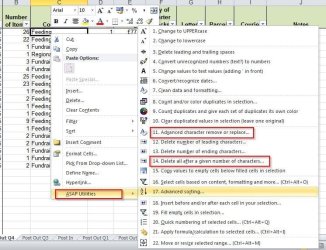
Screenshot:

ASAP 1.jpg

Paste the text into your spreadsheet. Highlight a cell or multiple cells - you know how to do that, right?

Open the text manipulation utility list in ASAP Utilities.

Select number 11 and replace all spaces in your selection with a unique character or symbol.

Select number 14 and trim the cell length.

Select number 11 and replace the unique character or symbol you chose with spaces.

You might get a better response and maybe someone could write a script if you explained how this is useful or the reasoning behind it.
 

My Computer My Computer

Computer type
Laptop
Computer Manufacturer/Model Number
ASUS
OS
Microsoft Windows 7 Home Premium 64-bit 7601 Multiprocessor Free Service Pack 1
CPU
AMD C-60 APU with Radeon(tm) HD Graphics
Motherboard
ASUSTeK COMPUTER INC. X501U
Memory
4.00 GB
Graphics Card(s)
AMD Radeon HD 6290 Graphics
Sound Card
(1) AMD High Definition Audio Device (2) Realtek High Defi
Screen Resolution
1366 x 768 x 32 bits (4294967296 colors) @ 60 Hz
Hard Drives
Hitachi HTS545050A7E380 SATA Disk Device
Antivirus
Comodo CIS & FW, SecureAplus App Whitelisting, Threatfire
Browser
Cyberfox 64bit, Opera 64bit, Airfox
Other Info
Spy-The-Spy, HitmanPro.Alert, Norton Connect Safe, MJRegWatcher, BitDefender TrafficLight, Voodoo Shield, Zemana AntiMalware
Back
Top