Hi, I'm running Windows 7 with an ATI 4870HD... I also have a Asus sound card which needs one of the outputs of the 4870 to combine video with sound and output to my AV. For some reason I cant get a decent picture quality on either my LCD or monitor whilst running through my Sony AV.
So I want to stick a second graphics card in to run my second monitor off.
My AGP slot is taken by the 4870, but I have a couple of remaining PCI slots
(Three 32-bit PCI v2.3 master PCI bus slots)
Can anyone suggest a suitable card that will either use the same drivers as my 4870 (catalyst v10) or one that will use different drivers that wont conflict with the ATI and run on Windows 7.
I only need it to run my main monitor.. games, films etc will run on my LCD TV
Thanks.
would help a lot (make and model numbers as well if you can). Would also help to know the model numbers of the AV and TV, as well as what connections are being used.
P.S. Your HD 4870 is more than capable of sending audio on its own when using a HDMI connection. Also you don't need a second video card for a second monitor as again your current card is more than capable of running 2 displays.
Hi Stormy, thanks I have filled out the form.
I could never get the audio out to work from the ATI, despite trying various drivers it just didn't want to play ball... so I went with the Asus sound card.
I currently use two monitors driven by the ATI, but one of them has to go through my SONY STR dh800 AV amp... but the picture quality is poor on the monitor I am driving from it.
I have tried a vast array of setting in windows display panel and Catalyst control centre to no avail. Windows recognises the monitor as AVAMP... and gives a poor picture resolution with limited options. I guess it has something to do with EDID or something.
As I said My asus requires that one of the ATIs graphics ports is connected to it so it can mix video with audio and then send that to my Amp.
My plan is to effectively have a third monitor output from my PC and run my monitor off that... and that is why I am thinking of installing a second card.
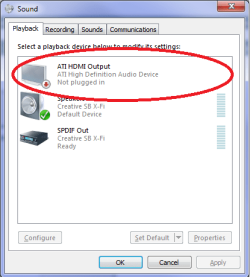
Did you remember to set the ATI HDMI Audio as the default?
only works when not connected to the sound card. The ATI HD cards all have a Realtek audio chip on them, to allow for passing audio over HDMI, and the driver for it gets installed when you install the video driver.
If you haven't might be a good idea to take a look around on the Asus forums (there are two others, as there is 3 models of that card),
Yes I have the latest ati drivers...also tried with onboard audio off. The ati audio device was always disabled so I couldn't select it as default. I have been to both the forums you suggest but found no one with similar problems...just advice telling me that the edid from my monitor is not getting to my pc...my pc sees my amp as the monitor so defaults to messed up resolutions which aren't correct for my monitor and can't be altered sufficiently. So I have decided to try a second graphics card to resolve my problem
No. For what it's worth the HDMI driver gets updated to the latest (or the one previous depending on when the ATI driver got set to Microsoft to be WHQL'ed) when you update to the latest Catalyst Suite.
If it is a EDID issue, then a second card is unlikely to fix it. Don't know if it will help or not, but have you connected to the TV directly so that the correct resolution can be set; then move the connection back to the amp.
Yes I have the latest ati drivers...also tried with onboard audio off. The ati audio device was always disabled so I couldn't select it as default. I have been to both the forums you suggest but found no one with similar problems...just advice telling me that the edid from my monitor is not getting to my pc...my pc sees my amp as the monitor so defaults to messed up resolutions which aren't correct for my monitor and can't be altered sufficiently. So I have decided to try a second graphics card to resolve my problem
Its only an EDID issue if my monitor is receiving its signal through the Amp... when the monitor is connected directly to the pc the EDID is fine and the picture is shown in the correct resolutions for my monitor. Thats why I believe a second video card will remedy my problem. With Two (direct from PC) outputs to my monitor and TV... and a third output of video (from the second card) and audio (from my sound card) to my receiver (though the video will not be sent on to a screen). The asus sound card will only send audio when mixed with a video signal.
As I said I couldn't get the 4870 to output audio... and to be honest I'm not that bothered in getting it working either as I have a nice HDMI sound card now and as sound quality is important to me its probably a better option that using the chip on the ATI card.
I just wanted some advice on a cheap Graphics card which has a PCI (not express or AGP) connection.
Thanks... I don't really need anything decent as I will be running my two monitors off my 4870.... I just need another video out to combine with my sound card... that will only be connected to my Amp... no monitor.
If I went with something like a Radeon 7000 or 9250 would that work on a Windows 7 machine?
I have the latest ATI drivers, but not sure if they would work with a card like that. I looked at a low range ATI HD card (which would definitely be compatible with my drivers) but I dont have a second AGP port so thats why it needs to be PCI.
If you have a decent computer repair shop nearby it might not hurt to go down and ask them what they have laying around cheap and/or used. When I worked in that field we would sometimes just give people stuff that was well off the cutting edge. There was usually a pile of parts from obsolete or abandoned rigs we couldn't use and it saved us the trouble of dusting them off in the $5 bin.
My Computer
Computer Manufacturer/Model Number
Self
OS
Main - Windows 7 Pro SP1 64-Bit; 2nd - Windows Server 2008 R2
CPU
Main - Core i7 2600K; 2nd - Core i7 920
Motherboard
Main - Asus P8Z68-V Pro/Gen3; 2nd - Gigabyte GA-EX58-UDR3
Memory
Main - 16GB Corsair Vengeance; 2nd - 12GB Corsair Vengeance
OP said "My AGP slot is taken by the 4870"
(Don't you mean 4670?? They never went any higher for AGP slots )
So OP has an AGP card! 99% do NOT support sound thru hdmi for starters!
Only one I know of is Artic something or other uber expensive AGP card.
I have an AGP 4670 (DVi-Hdmi converter) HDMi cable running thru to a 7.1 Yamaha amp with pass-thru to a Samsung T260 Computer Monitor. Vision ONLY 1080P 60hz!
Sound goes thru a digi/optical cable from motherboard to input on surround Amp. (You could also use SPdif digi connection Motherboard > AMP for sound)
The EDID is NOT seen by Win 7 either!
You have to permanently set the monitor model/hz in >Screen Resolution>Display>Advanced settings>monitor> (look for your digital display driver.load)!
It will give you an option to fix @ 60hz 1080P if supported by your monitor.
My Computer
Computer type
PC/Desktop
Computer Manufacturer/Model Number
D.I.Y.
OS
WIN7 Ultimate 64bit
CPU
AMD FX8150/Trinity A10-5700
Motherboard
Asus Sabertooth v.1 /Asus F2A85-M Pro
Memory
G-Skill 2400 x2 @ 1866 (both pc's)
Graphics Card(s)
Sapphire (factory OC version) AMD 7770
Sound Card
onboard
Monitor(s) Displays
T260 Samsung
Screen Resolution
1920x1080
Hard Drives
Western Digital Sata 2TB/1TB Caviar Blacks
Buffalo 1TB usb (excellent drive)
PSU
Be-Quiet 700W E-9/Be-Quiet 550W E-9(E-9 = built by FSP)




 )
)