Cheat sheet: What you need to know about 802.11ac

Borg 386

ADHD Senior Member
Guru
Gold Member
VIP
Local time
4:05 PM
Messages
5,489
Location
In a house with a cat trying to kill me
The newest wireless networking protocol is 802.11ac, due to be ratified sometime in 2013. Michael Kassner does the research and tells you what you need to know.

Wi-Fi junkies, people addicted to streaming content, and Ethernet-cable haters are excited. There’s a new Wi-Fi protocol in town, and vendors are starting to push products based on the new standard out the door. It seems like a good time to meet 802.11ac, and see what all the excitement’s about.
Cheat sheet: What you need to know about 802.11ac | TechRepublic
 

My Computer My Computer

At a glance

Win 7 32 Home Premium, Win 7 64 Pro, Win 8.1,...Intel Core 2 Duo 2.93GHzNot much with my ADHDATI Radeon HD 4350
Computer type
PC/Desktop
Computer Manufacturer/Model Number
Dell Hell oh Well
OS
Win 7 32 Home Premium, Win 7 64 Pro, Win 8.1, Win 10
CPU
Intel Core 2 Duo 2.93GHz
Memory
Not much with my ADHD
Graphics Card(s)
ATI Radeon HD 4350
Monitor(s) Displays
24" HDTV/Monitor
Screen Resolution
Blurry after a Scotch or 2
Hard Drives
1 HDD 250 GB, 1 HDD 1 TB, 3 - 1 TB Externals
Case
Don't get on my case...man :D
Cooling
I have an Air Conditioner & Diet Pepsi
Keyboard
Saitek Cyborg
Mouse
10 yr old MS optical mouse that still works
Internet Speed
Never fast enough
Antivirus
Various
Browser
Various
I believe I saw somewhere a day or two ago that 802.11ac was recently ratified.
 

My Computer My Computer

At a glance

Win 7 Ultimate 64 bitIntel i7-3930KKingston HyperX Genesis 32GB Kit (8x4GB Modul...MSI R7850 Twin Frozr 2GD5/OC Radeon HD 7850 2...
Computer type
PC/Desktop
Computer Manufacturer/Model Number
Custom Build
OS
Win 7 Ultimate 64 bit
CPU
Intel i7-3930K
Motherboard
ASUS P9X79 WS
Memory
Kingston HyperX Genesis 32GB Kit (8x4GB Modules) 1600MHz DDR
Graphics Card(s)
MSI R7850 Twin Frozr 2GD5/OC Radeon HD 7850 2GB 256-bit GDDR
Sound Card
Asus Xonar Essence STX
Monitor(s) Displays
3x Asus VG248QE 24", Vizio 32" TV
Screen Resolution
1920 x 1080, ?
Hard Drives
Samsung 128GB 840 Pro SSD (1),
Samsung 4TB 850 EVO SSDs (4)
Samsung 4TB 850 EVO SSDs (16) external backup drives used in 2.5" hot swap bays in the computer.
PSU
Corsair HX750w
Case
Antec Two Hundred v2 (modified)
Cooling
Cooler Master GeminII S524 120mm (fan replaced with a 140mm)
Keyboard
Logitech G510s
Mouse
Logitech M525 (two in use)
Internet Speed
=< 32Mbps down, 8Mbps up
Antivirus
AVAST!, MBAM, SAS, Spybot S&D (all but MBAM free) Glary Util
Browser
IE11
Other Info
LSI 9211-8i HBA card (8 SATA III ports), 2.5" & 3.5" Hot Swap Bays, HooToo HT-CR001 PCI-E to USB 3.0 Internal Hub + 6 Slot Card Reader, and LG Model CH12LS28 BD-ROM Optical Drive. Also, ScanSnap S1500 ADF duplexing scanner, Canon 9000F flat bed scanner, Corsair SP2500 2.1 speakers, Samsung CLP 415nw laser color printer, Cyberpower PP2200SW UPS
With reading this i'll have to update my Router :(

I still use a Linksys Wireless G and it runs like a champ ,They never said anything if the older routers still work with the new Standard

They were mentioned and pictured but not known if they still can be used
 

My Computer My Computer

At a glance

Windows 10 Home Premium 64bit sp1Intel I7-6700K @ 4.6 Ghz 1.344 volts everyday OC32GB G-Skill TridentZ 3200mhz 16-18-18-38 DDR4Sli Gigabyte Windforce GTX 980 G1
Computer type
PC/Desktop
Computer Manufacturer/Model Number
CoreI7-6700K MrFingerIII Special Builds
OS
Windows 10 Home Premium 64bit sp1
CPU
Intel I7-6700K @ 4.6 Ghz 1.344 volts everyday OC
Motherboard
Asrock Fatality K6 Z170 Socket 1151
Memory
32GB G-Skill TridentZ 3200mhz 16-18-18-38 DDR4
Graphics Card(s)
Sli Gigabyte Windforce GTX 980 G1
Sound Card
AC97 Creative Rage Tactic 3D Headphones Bluetooth
Monitor(s) Displays
27" Asus ROG Swift PG278Q G-Sync 48" Vizio Smart HD TV
Screen Resolution
2560x1440p 27"- 48" Currently Gaming at 2560x1440p Res 2K
Hard Drives
250GB Samsung Evo840SSD Seagate baracuda 500 GB WD Mybook 500Gb 1TB Seagate Barracuda
PSU
HX1050w Corsair Silver 80plus certified crosfire/sli
Case
Enthod Pro Full Tower
Cooling
Corsair H110i GT 280 mm High Performance WaterBlock
Keyboard
Logitech wireless keyboard
Mouse
Logitech wireless mouse
Internet Speed
Cox Cable 100+ mb
Antivirus
WebRoot Spysweeper with Antivirus
Browser
IE-10, Chrome, Opera
Other Info
My Other Rig is a AMD FX8320E @4.6Ghz 16GB Ballistic Sport Ram
Mobo Asrock Fatality 990FX 120GB OCZ SSD 1TB Seagate Barracuda Corsair H75 Cooling PSU Corsair CX750
GPU GTX Gigabyte 970G1
With reading this i'll have to update my Router :(

I still use a Linksys Wireless G and it runs like a champ ,They never said anything if the older routers still work with the new Standard

They were mentioned and pictured but not known if they still can be used

Older routers will be compatible; they just won't run at the same speeds or number of channels as AC. As long as you are happy with your setup, there is no need to change anything. The few AC routers and USB adapters I've seen haven't been getting the greatest reviews and are overpriced. Now that AC is ratified (I think it is, anyway), more manufacturers will jump on the bandwagon (pun intended) and the competition will bring prices down.

Something I read somewhere that wasn't in the article is that AC USB adapters will not be able to achieve full AC speeds on USB 2.0; it will take USB 3.0 to get those speeds. The only two USN 3.0 adapters I've seen so far haven't been going much faster than the USB 2.0 ones (according to user reviews) so, again, it would be better to wait for competition to force improvements.

Keep in mind what the article said about the biggest bottleneck will be your ISP. I need to upgrade my modem, router, and adapter but my ISP is pokey enough, I wouldn't gain much upgrading to AC. For internet only, just upgrading to faster N standard hardware might give me an improvement. Where I would gain most from AC is the ability to stream HD video to more than one TV. I don't need that yet (and won't anytime soon) so I'm just going to wait awhile. I'm in no rush.
 

My Computer My Computer

At a glance

Win 7 Ultimate 64 bitIntel i7-3930KKingston HyperX Genesis 32GB Kit (8x4GB Modul...MSI R7850 Twin Frozr 2GD5/OC Radeon HD 7850 2...
Computer type
PC/Desktop
Computer Manufacturer/Model Number
Custom Build
OS
Win 7 Ultimate 64 bit
CPU
Intel i7-3930K
Motherboard
ASUS P9X79 WS
Memory
Kingston HyperX Genesis 32GB Kit (8x4GB Modules) 1600MHz DDR
Graphics Card(s)
MSI R7850 Twin Frozr 2GD5/OC Radeon HD 7850 2GB 256-bit GDDR
Sound Card
Asus Xonar Essence STX
Monitor(s) Displays
3x Asus VG248QE 24", Vizio 32" TV
Screen Resolution
1920 x 1080, ?
Hard Drives
Samsung 128GB 840 Pro SSD (1),
Samsung 4TB 850 EVO SSDs (4)
Samsung 4TB 850 EVO SSDs (16) external backup drives used in 2.5" hot swap bays in the computer.
PSU
Corsair HX750w
Case
Antec Two Hundred v2 (modified)
Cooling
Cooler Master GeminII S524 120mm (fan replaced with a 140mm)
Keyboard
Logitech G510s
Mouse
Logitech M525 (two in use)
Internet Speed
=< 32Mbps down, 8Mbps up
Antivirus
AVAST!, MBAM, SAS, Spybot S&D (all but MBAM free) Glary Util
Browser
IE11
Other Info
LSI 9211-8i HBA card (8 SATA III ports), 2.5" & 3.5" Hot Swap Bays, HooToo HT-CR001 PCI-E to USB 3.0 Internal Hub + 6 Slot Card Reader, and LG Model CH12LS28 BD-ROM Optical Drive. Also, ScanSnap S1500 ADF duplexing scanner, Canon 9000F flat bed scanner, Corsair SP2500 2.1 speakers, Samsung CLP 415nw laser color printer, Cyberpower PP2200SW UPS
The ISP doesn't hold it back at all, or I should say, you can't change the ISP speed therefore The speeds you can obtain on the LAN using this new wireless technology is what matters.

I'm already running the Asus AC66U router with the Asus PCI-e AC 1750 dual band adaptor which run best on the 5Ghz band.

This hardware was made to work together for the maximum wireless speed. It's listed to 1.3GB speeds plus another 450Mbps for the 2.4Ghz band. The problem with the 5Ghz band is that it doesn't go through walls nearly as well as the 2.4Ghz frequency. Still without obstructions the 5Ghz band can easily cover a 5-10 thousand sq. foot office or a very large outdoor area with ease.

This was all tested at Tom's PC and had the highest signal strength and wireless speed of any router+NIC combo they ever tested, this was on both the 2.4 and the 5Ghz bands. It also received a special certification from Tom's for outstanding hardware.

What it amounts to is that with old standard 802.11n you would have a slower LAN speed compared to a wired connection because the max was 300-450Mbps, this is less than half of standard 1GB Ethernet LAN connection. This slower wireless LAN speed is what holds back the ISP speed test.

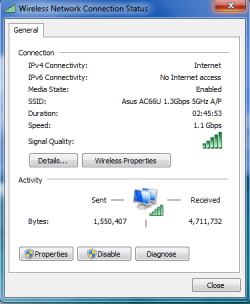
Now with 802.11ac you may have close to a 1.3GB wireless connection speed which means the wireless is no longer the bottle neck. This means you can now obtain full ISP speeds without the usual wireless bottleneck that you used to have, mine is like 30Mbps download, and now wired or wireless makes no difference, they both run at 30Mbps.

And in case anyone is wondering if you really can obtain a faster wireless speed than you can on 1GB Ethernet,...:geek:
 

Attachments

  • 1.1Gbps.PNG
    1.1Gbps.PNG
    13.4 KB · Views: 2
Last edited:

My Computer My Computer

At a glance

Windows 7 Ult, Windows 8.1 Pro,Q9650-4.275GHz, E8600 4.5GHz, E6750-3.8GHzG.Skill PC2 9600 1200Mhz 5 5 5 15 2TGTX480
Computer type
PC/Desktop
Computer Manufacturer/Model Number
Home built
OS
Windows 7 Ult, Windows 8.1 Pro,
CPU
Q9650-4.275GHz, E8600 4.5GHz, E6750-3.8GHz
Motherboard
Evga 780i FTW
Memory
G.Skill PC2 9600 1200Mhz 5 5 5 15 2T
Graphics Card(s)
GTX480
Sound Card
Asus Xonar D2
Monitor(s) Displays
HannsG
Screen Resolution
1680X1050
Hard Drives
GSkill Phoenix Pro 120GB SSD
PSU
ThermalTake Toughpower 1000Watt modular
Case
ThermalTake XaserV
Cooling
Xigmatek S1283
Keyboard
Logitech G15
Mouse
Logitech G9
Internet Speed
T1
It still doesn't matter how fast your equipment is; your actual internet speed is still dependent on how fast your ISP delivers it.
 

My Computer My Computer

At a glance

Win 7 Ultimate 64 bitIntel i7-3930KKingston HyperX Genesis 32GB Kit (8x4GB Modul...MSI R7850 Twin Frozr 2GD5/OC Radeon HD 7850 2...
Computer type
PC/Desktop
Computer Manufacturer/Model Number
Custom Build
OS
Win 7 Ultimate 64 bit
CPU
Intel i7-3930K
Motherboard
ASUS P9X79 WS
Memory
Kingston HyperX Genesis 32GB Kit (8x4GB Modules) 1600MHz DDR
Graphics Card(s)
MSI R7850 Twin Frozr 2GD5/OC Radeon HD 7850 2GB 256-bit GDDR
Sound Card
Asus Xonar Essence STX
Monitor(s) Displays
3x Asus VG248QE 24", Vizio 32" TV
Screen Resolution
1920 x 1080, ?
Hard Drives
Samsung 128GB 840 Pro SSD (1),
Samsung 4TB 850 EVO SSDs (4)
Samsung 4TB 850 EVO SSDs (16) external backup drives used in 2.5" hot swap bays in the computer.
PSU
Corsair HX750w
Case
Antec Two Hundred v2 (modified)
Cooling
Cooler Master GeminII S524 120mm (fan replaced with a 140mm)
Keyboard
Logitech G510s
Mouse
Logitech M525 (two in use)
Internet Speed
=< 32Mbps down, 8Mbps up
Antivirus
AVAST!, MBAM, SAS, Spybot S&D (all but MBAM free) Glary Util
Browser
IE11
Other Info
LSI 9211-8i HBA card (8 SATA III ports), 2.5" & 3.5" Hot Swap Bays, HooToo HT-CR001 PCI-E to USB 3.0 Internal Hub + 6 Slot Card Reader, and LG Model CH12LS28 BD-ROM Optical Drive. Also, ScanSnap S1500 ADF duplexing scanner, Canon 9000F flat bed scanner, Corsair SP2500 2.1 speakers, Samsung CLP 415nw laser color printer, Cyberpower PP2200SW UPS
It still doesn't matter how fast your equipment is; your actual internet speed is still dependent on how fast your ISP delivers it.

You are actually quite incorrect because the old standard 802.11n wireless is, or was in fact a bottle neck for the base ISP speed.

But we can make the wireless faster using the new 802.11ac correct?

More than double the old standard and in most cases triple what it used to be.

And if we tested the ISP speed through a wireless connection using the old wireless standard we would see a major slow down compared to the wired connection won't we? > Yes we would.

In fact I tested the ISP speed difference before and after moving up to the newer 802.11ac. Testing through my old wireless the ISP speed test was 13Mbps, with the new 802.11ac this is now 35Mbps the same as my wired connection. The LAN connection speed went from 300Mbps to 1.1GB.

And when we move files on our LAN through this new wireless standard we notice that it's now just as fast as using a 1GB wired connection.

We also notice that streaming or downloading content from the internet is now working just as fast as a wired connection which didn't use to be the case did it?

In fact both my LAN connection speeds and my ISP speeds through wireless have nearly tripled using this new standard. :geek:
 

My Computer My Computer

At a glance

Windows 7 Ult, Windows 8.1 Pro,Q9650-4.275GHz, E8600 4.5GHz, E6750-3.8GHzG.Skill PC2 9600 1200Mhz 5 5 5 15 2TGTX480
Computer type
PC/Desktop
Computer Manufacturer/Model Number
Home built
OS
Windows 7 Ult, Windows 8.1 Pro,
CPU
Q9650-4.275GHz, E8600 4.5GHz, E6750-3.8GHz
Motherboard
Evga 780i FTW
Memory
G.Skill PC2 9600 1200Mhz 5 5 5 15 2T
Graphics Card(s)
GTX480
Sound Card
Asus Xonar D2
Monitor(s) Displays
HannsG
Screen Resolution
1680X1050
Hard Drives
GSkill Phoenix Pro 120GB SSD
PSU
ThermalTake Toughpower 1000Watt modular
Case
ThermalTake XaserV
Cooling
Xigmatek S1283
Keyboard
Logitech G15
Mouse
Logitech G9
Internet Speed
T1
It still doesn't matter how fast your equipment is; your actual internet speed is still dependent on how fast your ISP delivers it.

You are actually quite incorrect.

Unfortunately we don't have any way to change that ISP speed do we?

But we can make the wireless faster using the new 802.11ac correct?

More than double the old standard.

And if we tested the ISP speed through a wireless connection using the old wireless standard we would see a major slow down compared to the wired connection won't we? "Yes we would I have tested this quite completely."

And because the new 802.11ac can actually be faster than a wired connection we no longer see the slower ISP speeds when using a wireless connection do we? As mentioned earlier I have tested this.

In fact I tested the ISP speed difference before and after moving up to the newer 802.11ac, ISP speed test before was 15Mbps, this is now 30Mbps, the same as my wired connection. The LAN connection went from 300Mbps to 1.1GB.

And when we move files on our LAN through this new wireless standard we notice that it's now just as fast as using a 1GB wired connection.

We also notice that streaming content from the internet is now working just as fast as a wired connection which didn't use to be the case did it?

In fact both my LAN connection speeds and my ISP speeds have more than doubled using this new standard. :geek:

Actually, I am not incorrect. First, I was referring only to internet connections when referring to bottlenecks. And not everyone has the fast internet connection that apparently you do. It doesn't matter how fast your equipment is if your ISP delivers at a slower speed. If on cable internet (keep in mind not everyone gets their internet from cable; many are on DSL, satellite, cell connection, etc. all of which are slower than most cable connections, often much slower), actual speed depends on how many people are sharing the cable at any one time, the quality of the delivery system (fiberglass opposed to coax), and the distance from the hub. Where I live, even though Cox recently announced faster speeds, it is still throttled by ancient cables (some of it is even laying above ground and has multiple slices), long runs, and too many people on the same cable run. Most people get way slower speed than advertised. So again, if your ISP is delivering slow internet, there is no way your hardware will make it any faster than what you are receiving.

As for the rest, unless one needs the faster speed now, it would be wiser to wait until the prices come down and the actual speeds are even better than they are right now (which is what I'm going to do). Keep in mind the ac, n, g, etc. ratings are listed as up to such and such speed. A manufacturer can call their hardware as being ac, g, n, whatever as long as it is compatible with equipment running that standard and works on the specified bands. It doesn't necessarily mean it actually will run at the highest speed of the standard. The best performing n standard equipment can still come close the currently best AC equipment for much less money. Also keep in mind the OP was happy with his current performance and was only concerned he would be forced to upgrade to the new standard.
 

My Computer My Computer

At a glance

Win 7 Ultimate 64 bitIntel i7-3930KKingston HyperX Genesis 32GB Kit (8x4GB Modul...MSI R7850 Twin Frozr 2GD5/OC Radeon HD 7850 2...
Computer type
PC/Desktop
Computer Manufacturer/Model Number
Custom Build
OS
Win 7 Ultimate 64 bit
CPU
Intel i7-3930K
Motherboard
ASUS P9X79 WS
Memory
Kingston HyperX Genesis 32GB Kit (8x4GB Modules) 1600MHz DDR
Graphics Card(s)
MSI R7850 Twin Frozr 2GD5/OC Radeon HD 7850 2GB 256-bit GDDR
Sound Card
Asus Xonar Essence STX
Monitor(s) Displays
3x Asus VG248QE 24", Vizio 32" TV
Screen Resolution
1920 x 1080, ?
Hard Drives
Samsung 128GB 840 Pro SSD (1),
Samsung 4TB 850 EVO SSDs (4)
Samsung 4TB 850 EVO SSDs (16) external backup drives used in 2.5" hot swap bays in the computer.
PSU
Corsair HX750w
Case
Antec Two Hundred v2 (modified)
Cooling
Cooler Master GeminII S524 120mm (fan replaced with a 140mm)
Keyboard
Logitech G510s
Mouse
Logitech M525 (two in use)
Internet Speed
=< 32Mbps down, 8Mbps up
Antivirus
AVAST!, MBAM, SAS, Spybot S&D (all but MBAM free) Glary Util
Browser
IE11
Other Info
LSI 9211-8i HBA card (8 SATA III ports), 2.5" & 3.5" Hot Swap Bays, HooToo HT-CR001 PCI-E to USB 3.0 Internal Hub + 6 Slot Card Reader, and LG Model CH12LS28 BD-ROM Optical Drive. Also, ScanSnap S1500 ADF duplexing scanner, Canon 9000F flat bed scanner, Corsair SP2500 2.1 speakers, Samsung CLP 415nw laser color printer, Cyberpower PP2200SW UPS
Referring to internet connections, or the ISP speed test, so was I. And I knew you were trying to explain that this new standard won't make any difference with the ISP speeds but that simply is not the case and I explained why.

Also remember that the firmware for this new wireless standard will be amended many times as the new standard is improved, so the firmware will keep the hardware up to date. There are already third party firmware's available for my Asus AC66U router. Maybe you should read the review about the Asus router from Tom's. http://www.tomshardware.com/reviews/wi-fi-802.11ac-router,3386-7.html

Maybe I misread your statement but this new wireless standard does in fact make the ISP speed test equal to a wired connection where before that simply was not the case, make no mistake, this does in fact make the ISP speed through a wireless connection just as fast as wired.

Not to mention the superior file transfer rates and LAN streaming potential of this new standard.

I'm well aware that that actual speeds are lower than what Windows says they are but that is a completely different subject.
 

My Computer My Computer

At a glance

Windows 7 Ult, Windows 8.1 Pro,Q9650-4.275GHz, E8600 4.5GHz, E6750-3.8GHzG.Skill PC2 9600 1200Mhz 5 5 5 15 2TGTX480
Computer type
PC/Desktop
Computer Manufacturer/Model Number
Home built
OS
Windows 7 Ult, Windows 8.1 Pro,
CPU
Q9650-4.275GHz, E8600 4.5GHz, E6750-3.8GHz
Motherboard
Evga 780i FTW
Memory
G.Skill PC2 9600 1200Mhz 5 5 5 15 2T
Graphics Card(s)
GTX480
Sound Card
Asus Xonar D2
Monitor(s) Displays
HannsG
Screen Resolution
1680X1050
Hard Drives
GSkill Phoenix Pro 120GB SSD
PSU
ThermalTake Toughpower 1000Watt modular
Case
ThermalTake XaserV
Cooling
Xigmatek S1283
Keyboard
Logitech G15
Mouse
Logitech G9
Internet Speed
T1
Referring to internet connections, or the ISP speed test, so was I. And I knew you were trying to explain that this new standard won't make any difference with the ISP speeds but that simply is not the case and I explained why.

Also remember that the firmware for this new wireless standard will be amended many times as the new standard is improved, so the firmware will keep the hardware up to date. There are already third party firmware's available for my Asus AC66U router. Maybe you should read the review about the Asus router from Tom's. AirLive N450R And Asus RT-AC66U - Gigabit Wireless? Five 802.11ac Routers, Benchmarked

Maybe I misread your statement but this new wireless standard does in fact make the ISP speed test equal to a wired connection where before that simply was not the case, make no mistake, this does in fact make the ISP speed through a wireless connection just as fast as wired.

Not to mention the superior file transfer rates and LAN streaming potential of this new standard.

I'm well aware that that actual speeds are lower than what Windows says they are but that is a completely different subject.

Your computer may say its faster but simply CANNOT make an ISP (Internet Service Provider) connection faster with your own hardware. Your internet speeds can never be faster than what the ISP delivers. Did you even read the article that Borg linked? Especially the last paragraph:

I have been checking out the forums and early reactions seem mixed. That might be indicative of the sensitivity of each user’s situation and physical surroundings when considering how well 802.11ac devices perform. Other than my coverage-area concern, my only other thought: there will always be a bottleneck. And unless you are one of the fortunate connected to Google Fiber, the Internet connection will be it.
 

My Computer My Computer

At a glance

Win 7 Ultimate 64 bitIntel i7-3930KKingston HyperX Genesis 32GB Kit (8x4GB Modul...MSI R7850 Twin Frozr 2GD5/OC Radeon HD 7850 2...
Computer type
PC/Desktop
Computer Manufacturer/Model Number
Custom Build
OS
Win 7 Ultimate 64 bit
CPU
Intel i7-3930K
Motherboard
ASUS P9X79 WS
Memory
Kingston HyperX Genesis 32GB Kit (8x4GB Modules) 1600MHz DDR
Graphics Card(s)
MSI R7850 Twin Frozr 2GD5/OC Radeon HD 7850 2GB 256-bit GDDR
Sound Card
Asus Xonar Essence STX
Monitor(s) Displays
3x Asus VG248QE 24", Vizio 32" TV
Screen Resolution
1920 x 1080, ?
Hard Drives
Samsung 128GB 840 Pro SSD (1),
Samsung 4TB 850 EVO SSDs (4)
Samsung 4TB 850 EVO SSDs (16) external backup drives used in 2.5" hot swap bays in the computer.
PSU
Corsair HX750w
Case
Antec Two Hundred v2 (modified)
Cooling
Cooler Master GeminII S524 120mm (fan replaced with a 140mm)
Keyboard
Logitech G510s
Mouse
Logitech M525 (two in use)
Internet Speed
=< 32Mbps down, 8Mbps up
Antivirus
AVAST!, MBAM, SAS, Spybot S&D (all but MBAM free) Glary Util
Browser
IE11
Other Info
LSI 9211-8i HBA card (8 SATA III ports), 2.5" & 3.5" Hot Swap Bays, HooToo HT-CR001 PCI-E to USB 3.0 Internal Hub + 6 Slot Card Reader, and LG Model CH12LS28 BD-ROM Optical Drive. Also, ScanSnap S1500 ADF duplexing scanner, Canon 9000F flat bed scanner, Corsair SP2500 2.1 speakers, Samsung CLP 415nw laser color printer, Cyberpower PP2200SW UPS
Back
Top