Solved Check access permissions when installing new software

Sirlordford

New member
Local time
2:12 PM
Messages
4
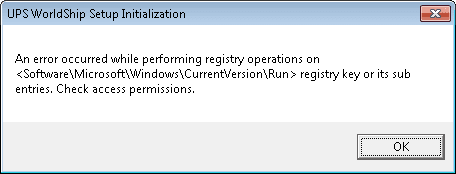
I am trying to install the new UPS Worldship software and at a certain point I get this dialog box:

An error occurred while performing registry operations on <Software\Microsoft\CurrentVersion\Run> registry key or its sub entries. Check access permissions.

UPS won't help because they say it's a MS issue. I have full permission control over the folder and computer as an administrator. Win7 Pro is my OS. Can anyone recommend a place to start?
 

My Computer

Computer type
PC/Desktop
Computer Manufacturer/Model Number
Gatelway
OS
Win 7 Pro 64bit
CPU
AMD 1065T
Memory
8 GB
Antivirus
Avast Free
Browser
Pale Moon, Chrome, Opera
Hello Sirlordford, and welcome to Seven Forums.

Right click on the UPS program installation file, and click on Run as administrator to see if it may be able to finish installing afterwards.

Hope this helps, :)
Shawn
 

My Computer

Computer type
PC/Desktop
Computer Manufacturer/Model Number
Self built custom
OS
64-bit Windows 11 Pro for Workstations
CPU
Intel i7-8700K OC'd to 5 GHz
Motherboard
ASUS ROG Maximus XI Formula Z390
Memory
64 GB (4x16GB) G.SKILL TridentZ RGB DDR4 3600 MHz
Graphics Card(s)
ASUS ROG-STRIX-GTX1080TI-O11G-GAMING
Sound Card
Integrated
Monitor(s) Displays
2 x Samsung Odyssey G7 27"
Screen Resolution
2560x1440
Hard Drives
1TB Samsung 990 PRO M.2,
4TB Samsung 990 PRO PRO M.2,
TerraMaster F8 SSD Plus NAS
PSU
Seasonic Prime Titanium 850W
Case
Thermaltake Core P3
Cooling
Corsair Hydro H115i
Keyboard
Logitech wireless K800
Mouse
Logitech MX Master 4
Internet Speed
2 Gb/s Download and 100 Mb/s Upload
Antivirus
Malwarebyte Anti-Malware Premium
Browser
Google Chrome
Other Info
Logitech Z625 speaker system,
Logitech BRIO 4K Pro webcam,
HP Color LaserJet Pro MFP M477fdn,
APC SMART-UPS RT 1000 XL - SURT1000XLI,
Galaxy S23 Plus phone
Thank you for the welcome. I was hopeful but the same dialog box popped up.
 

My Computer

Computer type
PC/Desktop
Computer Manufacturer/Model Number
Gatelway
OS
Win 7 Pro 64bit
CPU
AMD 1065T
Memory
8 GB
Antivirus
Avast Free
Browser
Pale Moon, Chrome, Opera
In that case, double check using step 3 in OPTION THREE of the tutorial below to make sure that you have ownership and "full control" permission of the registry key and it's subkeys in the error message to see if you are able to install the UPS program afterwards.

Take Ownership of file
 

My Computer

Computer type
PC/Desktop
Computer Manufacturer/Model Number
Self built custom
OS
64-bit Windows 11 Pro for Workstations
CPU
Intel i7-8700K OC'd to 5 GHz
Motherboard
ASUS ROG Maximus XI Formula Z390
Memory
64 GB (4x16GB) G.SKILL TridentZ RGB DDR4 3600 MHz
Graphics Card(s)
ASUS ROG-STRIX-GTX1080TI-O11G-GAMING
Sound Card
Integrated
Monitor(s) Displays
2 x Samsung Odyssey G7 27"
Screen Resolution
2560x1440
Hard Drives
1TB Samsung 990 PRO M.2,
4TB Samsung 990 PRO PRO M.2,
TerraMaster F8 SSD Plus NAS
PSU
Seasonic Prime Titanium 850W
Case
Thermaltake Core P3
Cooling
Corsair Hydro H115i
Keyboard
Logitech wireless K800
Mouse
Logitech MX Master 4
Internet Speed
2 Gb/s Download and 100 Mb/s Upload
Antivirus
Malwarebyte Anti-Malware Premium
Browser
Google Chrome
Other Info
Logitech Z625 speaker system,
Logitech BRIO 4K Pro webcam,
HP Color LaserJet Pro MFP M477fdn,
APC SMART-UPS RT 1000 XL - SURT1000XLI,
Galaxy S23 Plus phone
I'll give it a whirl. How do I know which Reg keys to check?
 

My Computer

Computer type
PC/Desktop
Computer Manufacturer/Model Number
Gatelway
OS
Win 7 Pro 64bit
CPU
AMD 1065T
Memory
8 GB
Antivirus
Avast Free
Browser
Pale Moon, Chrome, Opera
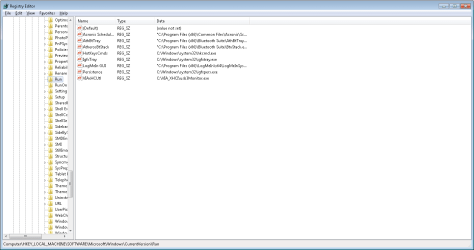
With the error message saying "Software\Microsoft\CurrentVersion\Run", it should be the registry key below.

HKEY_LOCAL_MACHINE\SOFTWARE\Microsoft\Windows\CurrentVersion\Run

This key is used to have the program run at startup if it adds a string value with a path to the program's .exe file.

2165d1231220125-startup-programs-change-all_users_reg_run.jpg
 

My Computer

Computer type
PC/Desktop
Computer Manufacturer/Model Number
Self built custom
OS
64-bit Windows 11 Pro for Workstations
CPU
Intel i7-8700K OC'd to 5 GHz
Motherboard
ASUS ROG Maximus XI Formula Z390
Memory
64 GB (4x16GB) G.SKILL TridentZ RGB DDR4 3600 MHz
Graphics Card(s)
ASUS ROG-STRIX-GTX1080TI-O11G-GAMING
Sound Card
Integrated
Monitor(s) Displays
2 x Samsung Odyssey G7 27"
Screen Resolution
2560x1440
Hard Drives
1TB Samsung 990 PRO M.2,
4TB Samsung 990 PRO PRO M.2,
TerraMaster F8 SSD Plus NAS
PSU
Seasonic Prime Titanium 850W
Case
Thermaltake Core P3
Cooling
Corsair Hydro H115i
Keyboard
Logitech wireless K800
Mouse
Logitech MX Master 4
Internet Speed
2 Gb/s Download and 100 Mb/s Upload
Antivirus
Malwarebyte Anti-Malware Premium
Browser
Google Chrome
Other Info
Logitech Z625 speaker system,
Logitech BRIO 4K Pro webcam,
HP Color LaserJet Pro MFP M477fdn,
APC SMART-UPS RT 1000 XL - SURT1000XLI,
Galaxy S23 Plus phone
Brilliant Brink! It worked like a charm. Thank you very much and happy holidays.
 

My Computer

Computer type
PC/Desktop
Computer Manufacturer/Model Number
Gatelway
OS
Win 7 Pro 64bit
CPU
AMD 1065T
Memory
8 GB
Antivirus
Avast Free
Browser
Pale Moon, Chrome, Opera
You're most welcome. I hope you have a happy holidays as well. :)
 

My Computer

Computer type
PC/Desktop
Computer Manufacturer/Model Number
Self built custom
OS
64-bit Windows 11 Pro for Workstations
CPU
Intel i7-8700K OC'd to 5 GHz
Motherboard
ASUS ROG Maximus XI Formula Z390
Memory
64 GB (4x16GB) G.SKILL TridentZ RGB DDR4 3600 MHz
Graphics Card(s)
ASUS ROG-STRIX-GTX1080TI-O11G-GAMING
Sound Card
Integrated
Monitor(s) Displays
2 x Samsung Odyssey G7 27"
Screen Resolution
2560x1440
Hard Drives
1TB Samsung 990 PRO M.2,
4TB Samsung 990 PRO PRO M.2,
TerraMaster F8 SSD Plus NAS
PSU
Seasonic Prime Titanium 850W
Case
Thermaltake Core P3
Cooling
Corsair Hydro H115i
Keyboard
Logitech wireless K800
Mouse
Logitech MX Master 4
Internet Speed
2 Gb/s Download and 100 Mb/s Upload
Antivirus
Malwarebyte Anti-Malware Premium
Browser
Google Chrome
Other Info
Logitech Z625 speaker system,
Logitech BRIO 4K Pro webcam,
HP Color LaserJet Pro MFP M477fdn,
APC SMART-UPS RT 1000 XL - SURT1000XLI,
Galaxy S23 Plus phone
f.y.i. - A friend of mine just had this same problem on his Win 7 Pro laptop. This thread was VERY helpful. Thank you.
 

My Computer

Computer Manufacturer/Model Number
Homebuild
OS
Win 7
CPU
AMD Phenom 2 X3 720 2.8 GHz (Overclocked to 3.4 GHz)
Motherboard
Gigabyte GA-MA790XT-UD4P (F6 Bios)
Memory
OCZ Platinum 4GB 240-Pin DDR3 SDRAM DDR3 1600
Graphics Card(s)
HIS ATI 5850
Sound Card
Onboard Realtek
Monitor(s) Displays
Dell E228 WFP
Hard Drives
C: Segate 1GB ST31000528AS
D: Segate 500GB ST3500630AS
PSU
OCZ 700 Watt
Case
Entec Midtower
Cooling
XIGMATEK HDT-S1283 120mm Rifle CPU Cooler
I am having the same issue.

I downloaded the newest version of Worldship a few days ago to install on my office PC (clean install for the first time). I ran the EXE which first extracts the files to my hard drive and that went fine. As soon as that was finished and the main setup.exe file ran from the extracted files, I get the same registry keymessage and I can't go any further. Tried "Run as Administrator" and same thing. I tried it on my home PC and it went through fine so it doesn't seem to be anything with the downloaded file.

The PC is a self-built machine. I5-3570K, 8GB DDR3, 256GB SSD, 1TB HDD, Win 7 Pro. It is only about 6 months old and a clean install of Windows, Office and a few other programs and never any other issues installing anything.

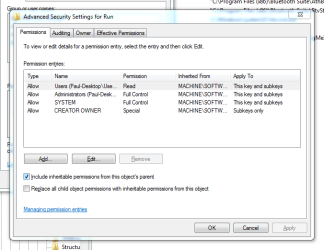
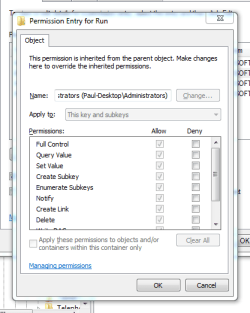
Unless there is something I'm missing with the permissions screen, it looks like all the permissions are set ok and I should have full control to the key. Besides, there are a bunch of other programs with sub-keys there and they all installed with no problems. If anyone has any other ideas any help would be greatly appreciated.
 

Attachments

  • Screenshot - 1_23_2014 , 12_00_39 AM.png
    Screenshot - 1_23_2014 , 12_00_39 AM.png
    2.2 KB · Views: 17
  • Screenshot - 1_23_2014 , 2_47_43 AM.png
    Screenshot - 1_23_2014 , 2_47_43 AM.png
    16.6 KB · Views: 2

My Computer

Computer type
PC/Desktop
OS
Win 7 pro 64 bit
Hello Happy4ya, and welcome to Seven Forums.

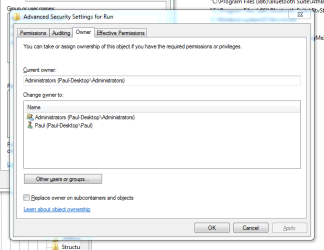
Please go ahead and post some screenshots showing your permissions and ownership settings for the Run key below to see if anything may stand out. :)

HKEY_LOCAL_MACHINE\SOFTWARE\Microsoft\Windows\CurrentVersion\Run
 

My Computer

Computer type
PC/Desktop
Computer Manufacturer/Model Number
Self built custom
OS
64-bit Windows 11 Pro for Workstations
CPU
Intel i7-8700K OC'd to 5 GHz
Motherboard
ASUS ROG Maximus XI Formula Z390
Memory
64 GB (4x16GB) G.SKILL TridentZ RGB DDR4 3600 MHz
Graphics Card(s)
ASUS ROG-STRIX-GTX1080TI-O11G-GAMING
Sound Card
Integrated
Monitor(s) Displays
2 x Samsung Odyssey G7 27"
Screen Resolution
2560x1440
Hard Drives
1TB Samsung 990 PRO M.2,
4TB Samsung 990 PRO PRO M.2,
TerraMaster F8 SSD Plus NAS
PSU
Seasonic Prime Titanium 850W
Case
Thermaltake Core P3
Cooling
Corsair Hydro H115i
Keyboard
Logitech wireless K800
Mouse
Logitech MX Master 4
Internet Speed
2 Gb/s Download and 100 Mb/s Upload
Antivirus
Malwarebyte Anti-Malware Premium
Browser
Google Chrome
Other Info
Logitech Z625 speaker system,
Logitech BRIO 4K Pro webcam,
HP Color LaserJet Pro MFP M477fdn,
APC SMART-UPS RT 1000 XL - SURT1000XLI,
Galaxy S23 Plus phone
Here you go.

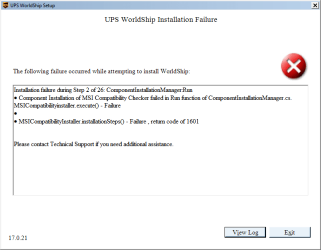
In case this helps, I just rebooted into safe mode with networking and logged in under my same account and ran the Worldship program and it started up and attempted to start installing and then crashed with an error (see screenshot). Most likely something disabled due to being in safe mode. But it did start the program without giving me any access restriction problems.

I also just checked the permissions against my home system which is set up pretty much identical and everything was exactly the same as this. Wondering if something is just corrupt.
 

Attachments

  • Screenshot - 1_24_2014 , 1_40_18 PM.png
    Screenshot - 1_24_2014 , 1_40_18 PM.png
    19.4 KB · Views: 11
  • Screenshot - 1_24_2014 , 1_41_03 PM.png
    Screenshot - 1_24_2014 , 1_41_03 PM.png
    16.8 KB · Views: 11
  • Screenshot - 1_24_2014 , 1_41_53 PM.png
    Screenshot - 1_24_2014 , 1_41_53 PM.png
    15.4 KB · Views: 11
  • Screenshot - 1_24_2014 , 1_08_48 PM.png
    Screenshot - 1_24_2014 , 1_08_48 PM.png
    12.9 KB · Views: 0

My Computer

Computer type
PC/Desktop
OS
Win 7 pro 64 bit
I don't see anything wrong with your settings, but you might see if setting the "Users" group to have "Full Control" in permissions as well may help.

If that still doesn't help, then you might also see if you may be able to install it while logged in to the built-in Administrator account.
 

My Computer

Computer type
PC/Desktop
Computer Manufacturer/Model Number
Self built custom
OS
64-bit Windows 11 Pro for Workstations
CPU
Intel i7-8700K OC'd to 5 GHz
Motherboard
ASUS ROG Maximus XI Formula Z390
Memory
64 GB (4x16GB) G.SKILL TridentZ RGB DDR4 3600 MHz
Graphics Card(s)
ASUS ROG-STRIX-GTX1080TI-O11G-GAMING
Sound Card
Integrated
Monitor(s) Displays
2 x Samsung Odyssey G7 27"
Screen Resolution
2560x1440
Hard Drives
1TB Samsung 990 PRO M.2,
4TB Samsung 990 PRO PRO M.2,
TerraMaster F8 SSD Plus NAS
PSU
Seasonic Prime Titanium 850W
Case
Thermaltake Core P3
Cooling
Corsair Hydro H115i
Keyboard
Logitech wireless K800
Mouse
Logitech MX Master 4
Internet Speed
2 Gb/s Download and 100 Mb/s Upload
Antivirus
Malwarebyte Anti-Malware Premium
Browser
Google Chrome
Other Info
Logitech Z625 speaker system,
Logitech BRIO 4K Pro webcam,
HP Color LaserJet Pro MFP M477fdn,
APC SMART-UPS RT 1000 XL - SURT1000XLI,
Galaxy S23 Plus phone
I don't see anything wrong with your settings, but you might see if setting the "Users" group to have "Full Control" in permissions as well may help.

If that still doesn't help, then you might also see if you may be able to install it while logged in to the built-in Administrator account.
I will try giving Users full control and see what happens.

I was searching around before and found the info on the hidden administrator account and enabled and tried that. Same problem.

Thanks for the suggestions.
 

My Computer

Computer type
PC/Desktop
OS
Win 7 pro 64 bit
Any other ideas? It seems like I should have full control of everything but it still gives me that error. Wondering if something is just corrupt in Windows since it lets the installation start in safe mode but not in regular mode. I also created a new administrator account and tried from it but got the same thing.
 

My Computer

Computer type
PC/Desktop
OS
Win 7 pro 64 bit
If you like, a repair install should be able to sort this for you without losing anything other than time. :(
 

My Computer

Computer type
PC/Desktop
Computer Manufacturer/Model Number
Self built custom
OS
64-bit Windows 11 Pro for Workstations
CPU
Intel i7-8700K OC'd to 5 GHz
Motherboard
ASUS ROG Maximus XI Formula Z390
Memory
64 GB (4x16GB) G.SKILL TridentZ RGB DDR4 3600 MHz
Graphics Card(s)
ASUS ROG-STRIX-GTX1080TI-O11G-GAMING
Sound Card
Integrated
Monitor(s) Displays
2 x Samsung Odyssey G7 27"
Screen Resolution
2560x1440
Hard Drives
1TB Samsung 990 PRO M.2,
4TB Samsung 990 PRO PRO M.2,
TerraMaster F8 SSD Plus NAS
PSU
Seasonic Prime Titanium 850W
Case
Thermaltake Core P3
Cooling
Corsair Hydro H115i
Keyboard
Logitech wireless K800
Mouse
Logitech MX Master 4
Internet Speed
2 Gb/s Download and 100 Mb/s Upload
Antivirus
Malwarebyte Anti-Malware Premium
Browser
Google Chrome
Other Info
Logitech Z625 speaker system,
Logitech BRIO 4K Pro webcam,
HP Color LaserJet Pro MFP M477fdn,
APC SMART-UPS RT 1000 XL - SURT1000XLI,
Galaxy S23 Plus phone
I found the cause and the solution for this problem!

I recently had this issue on a work computer and me and another IT guy from my job figured it out last night. We were getting the same issue installing the UPS Worldship update software. It kept saying check permissions from the run key in the registry. We tried every which way to change permissions to no avail. Then it dawned on me that the registry key that it was referring to probably wasn't the one we were modifying. Here's what I ended up doing. I backed up the HKEY_LOCAL_MACHINE\SOFTWARE\Microsoft\Windows\CurrentVersion\Run and then deleted the key. We tried running the UPS software again got the same error. Since we deleted the key, the UPS install should have recreated the key but it didn't. Run can also be found in HKEY_Current_User\SOFTWARE\Microsoft\Windows\CurrentVersion\Run, so we backed up and deleted that key as well. We got the same error on the UPS install. This told me it definitely wasn't from those two registry keys. I searched for currentversion in the registry and found yet another registry key with run. HKEY_LOCAL_MACHINE\SOFTWARE\Wow6432Node\Microsoft\Windows\CurrentVersion\Run. I tried to backup and delete this key and got permission errors!! Now we were getting somewhere! I tried updating permissions and got save errors. Finally I tried deleting each key value listed under run. Everything deleted except... wait for it..... AVAST!!!! AVAST antivirus was causing the problem. Even temporarily disabling Avast still wouldn't allow the install. Then it dawned on me that I had this same issue installing Canon printer driver software on my Father in-laws laptop. Worked fine on my mother in-laws laptop but not on his. They have the exact same laptop, software, configuration and Avast version but it wouldn't work on his.

Solution... Uninstall Avast. Install UPS software. Reinstall Avast! After doing this you shouldn't have any problems. I don't know how avast gets hosed up in the registry but an uninstall will fix it. If you're not using avast check the Wow6432 key in the registry, back it up and remove each key under the run until you find the problem. Remove that program and then install UPS! You can always restore your backup registry by just double clicking on the backup.

To back up a registry key, Right click on the key, and click export. Designate a location to save it and you're done.

HTH

Mark W.
 

My Computer

Computer type
PC/Desktop
OS
Windows 8 64bit
Back
Top