Check for updates stopped working

SevenOfNine

New member
Member
Local time
7:18 AM
Messages
83
I've got a Windows 7 SP1 machine that is no longer notifying me of Windows updates.

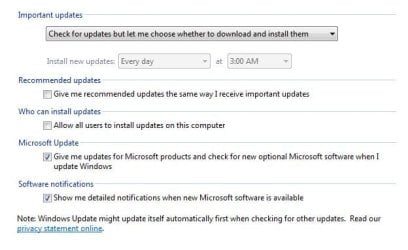
It is set to "Check for updates but let me choose whether to download an install them".

Until a few months ago, it always issued the appropriate notifications. Then it just stopped.

If I manually check for updates, it works fine, but I want to receive notifications for updates.

I've resorted to manually checking for updates every day. Based on the content of some of these "important" updates (which are really just ads for Windows 10), I no longer trust MS, and thus I do not want automatic updates.

I tried momentarily selecting "Never check for updates." and then re-enabling "Check for updates but let me choose whether to download an install them", but that did not help.

How can I fix this?
 

My Computer

Computer type
PC/Desktop
OS
Windows 7 64-bit
Hmmm... nobody else having this issue?
 

My Computer

Computer type
PC/Desktop
OS
Windows 7 64-bit
run a system file check, post the results.

in command prompt type sfc /scannow then hit enter

My settings, Updates should only be coming out on Tuesdays anyway, so you should be making manual checks the rest of the time anyway.

Manual is better anyway, it takes 5 seconds to check. (It`s no big deal)
 

Attachments

  • Capture.JPG
    Capture.JPG
    37.3 KB · Views: 38

My Computer

Computer type
PC/Desktop
Computer Manufacturer/Model Number
Skylake Special #666
OS
Windows 10 Pro x64
CPU
Intel Core i7 6700K
Motherboard
Asus Sabertooth Z170 Mark 1
Memory
GSkill TridentZ RGB 16GB 3600 16-16-16-36
Graphics Card(s)
EVGA GTX 980 Ti SC x2
Sound Card
Realtek High Definition
Monitor(s) Displays
AOC G2460PG
Screen Resolution
1920 x 1080 144Hz
Hard Drives
Samsung 860 Pro 256GB, Seagate Barracuda 4TB x2
PSU
EVGA 1000 P2, EVGA White Custom Braided Cables
Case
Corsair Vengeance C70 Gunmetal Black
Cooling
Corsair H100i v2, Corsair ML120 x2, Thermal Grizzly Kryonaut
Keyboard
Logitech G910 Orion Spectrum
Mouse
Logitech G700s
Internet Speed
Verizon Fios Quantum Gateway 75/75
Antivirus
Windows Defender, Malwarebytes Free 3.8.3
Browser
Chrome
Other Info
Corsair SP120 x4, LG Blu-ray Drive, Durabrand HT-395 100 Watt Dolby Digital Amp, Corsair H2100 Wireless 7.1 Headset
run a system file check, post the results.

in command prompt type sfc /scannow then hit enter

My settings, Updates should only be coming out on Tuesdays anyway, so you should be making manual checks the rest of the time anyway.

Manual is better anyway, it takes 5 seconds to check. (It`s no big deal)

Here are the results:

Code:
sfc /scannow

Beginning system scan.  This process will take some time.

Beginning verification phase of system scan.
Verification 100% complete.

Windows Resource Protection did not find any integrity violations.

I agree that manual is better, in that it affords much more flexibility. Especially with Microsoft issuing updates to promote Windows 10.

What is not happening, however, is notifications when updates are available. I put patch Tuesday on my calendar to remind me to perform manual updates on that date every month, but out-of-cycle critical updates can happen at any time.
 

My Computer

Computer type
PC/Desktop
OS
Windows 7 64-bit
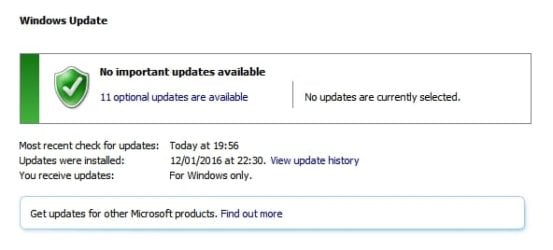
Yes lots of users no longer get notifications when new updates are available. Personally I check WU results every day. Any new updates still show up in the window.

WU.jpg

There are hardly ever out of cycle updates but if any are released details are posted here as well as other sites.

I check every patch tuesday too.

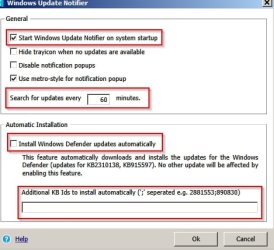
If you want a third party app that will give you notifications check: Windows Update Notifier

It's portable and doesn't need to be installed. It can be set to start with windows.

Windows Update Notifier.jpg

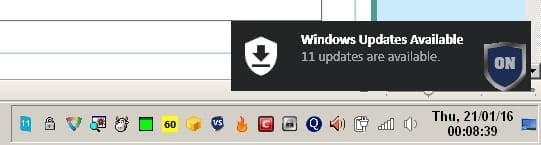
You get a notification of updates.

Windows Update Notifier 2.jpg

If it shows that updates are available it is still better to use Windows Updates to choose which ones to download and install.

Personally I find it really easy to click on Start> All Programs> Windows Updates on a daily basis.
 

My Computer

Computer type
Laptop
Computer Manufacturer/Model Number
ASUS
OS
Microsoft Windows 7 Home Premium 64-bit 7601 Multiprocessor Free Service Pack 1
CPU
AMD C-60 APU with Radeon(tm) HD Graphics
Motherboard
ASUSTeK COMPUTER INC. X501U
Memory
4.00 GB
Graphics Card(s)
AMD Radeon HD 6290 Graphics
Sound Card
(1) AMD High Definition Audio Device (2) Realtek High Defi
Screen Resolution
1366 x 768 x 32 bits (4294967296 colors) @ 60 Hz
Hard Drives
Hitachi HTS545050A7E380 SATA Disk Device
Antivirus
Comodo CIS & FW, SecureAplus App Whitelisting, Threatfire
Browser
Cyberfox 64bit, Opera 64bit, Airfox
Other Info
Spy-The-Spy, HitmanPro.Alert, Norton Connect Safe, MJRegWatcher, BitDefender TrafficLight, Voodoo Shield, Zemana AntiMalware
Yes lots of users no longer get notifications when new updates are available.

Thanks for that info. I had no idea that was the case. The lack of "me too" responses to this thread made me think it was not a typical experience. I'm curious, how did you come to learn that many users are no longer getting notifications of Windows updates? Are there any articles written about this?

Personally I check WU results every day. Any new updates still show up in the window.

That's what I was doing too. I might have to go back to doing it. Sometimes the checks take a minute or two, sometimes longer. I figured that if I check 300 days out of the year, and it takes only 1 minute per check, that's 300 minutes, or 5 hours of my life I am wasting every year. Not really in line with my values.

On the other hand, dealing with a problem caused by not installing an update will likely take much more than 5 hours!

What would be best is if WU just worked like it always did: providing a notification when there are updates to install.

If you want a third party app that will give you notifications check: Windows Update Notifier.
...
It's portable and doesn't need to be installed. It can be set to start with windows...
... If it shows that updates are available it is still better to use Windows Updates to choose which ones to download and install...

That shouldn't be needed for Windows 7, but all the same, I greatly appreciate you letting me know about that tool. :) It looks excellent.

If there is no way to fix Windows Update in Windows 7, that tool might be the best solution. I'm surprised there is no way to fix Windows Update, given that hundreds of millions of people rely on it. Or maybe there is, and we just don't know how... yet.
 

My Computer

Computer type
PC/Desktop
OS
Windows 7 64-bit
The way I know about it is because there have been a lot of posts on the issue in the Windows Updates thread in this forum. Also I have the same problem along with a few other experienced members but as Windows Updates is working perfectly for me other than the notification issue I have no desire to try fixing it. I spent around a month fixing other problems with Windows Update resorting to a complete removal and reinstallation of Windows Updates from scratch.

[EDIT]

Google Search:

windows update notifications not working site:www.sevenforums.com
 
Last edited:

My Computer

Computer type
Laptop
Computer Manufacturer/Model Number
ASUS
OS
Microsoft Windows 7 Home Premium 64-bit 7601 Multiprocessor Free Service Pack 1
CPU
AMD C-60 APU with Radeon(tm) HD Graphics
Motherboard
ASUSTeK COMPUTER INC. X501U
Memory
4.00 GB
Graphics Card(s)
AMD Radeon HD 6290 Graphics
Sound Card
(1) AMD High Definition Audio Device (2) Realtek High Defi
Screen Resolution
1366 x 768 x 32 bits (4294967296 colors) @ 60 Hz
Hard Drives
Hitachi HTS545050A7E380 SATA Disk Device
Antivirus
Comodo CIS & FW, SecureAplus App Whitelisting, Threatfire
Browser
Cyberfox 64bit, Opera 64bit, Airfox
Other Info
Spy-The-Spy, HitmanPro.Alert, Norton Connect Safe, MJRegWatcher, BitDefender TrafficLight, Voodoo Shield, Zemana AntiMalware
If keeping my systems up to date isn't worth 5 hours a year then I need a new hobby.
If one needs the computer for work and can't spend 5 hours a year to keep a system up to date then one needs a different job where computers are not used.
 

My Computer

Computer type
PC/Desktop
Computer Manufacturer/Model Number
Home made Desktop
OS
Windows 10 Pro. 64/ version 1709 Windows 7 Pro/64
CPU
Intel i7-6800K @ 4.3
Motherboard
ASUS X-99 Deluxe II
Memory
Corsair Platinum 16 gig @2400
Graphics Card(s)
EVGA GTX 1070 OC
Monitor(s) Displays
Asus 27" LED LCD/VE278Q
Screen Resolution
1920-1080 or 1280-720 HDMI
Hard Drives
INTEL SSD 730-240 Gb Sata 3.0/
PSU
EVGA Platium 1200W
Case
Phanteks Luxe Tempered Glass 8 fans/ one radiator
Cooling
XSPC/ Water Cooled CPU
Keyboard
Das 4 Professional
Mouse
Logitech M705/MX Anywhere 2-S
Internet Speed
100 mbits
Antivirus
Microsoft Security Essentials/ Malwarebytes Premium 3.0/ SAS
Browser
I.E. 11 default/Firefox/ ISP Time Warner Cable/Spectrum
Other Info
LG BluRay Burner/
Sound system-KLipsch-THX/
Icy Dock ssd Hot Swap bays.
If keeping my systems up to date isn't worth 5 hours a year then I need a new hobby.
If one needs the computer for work and can't spend 5 hours a year to keep a system up to date then one needs a different job where computers are not used.

LOL... That came out out of left field. I'm not sure that's a fair assessment or accurate representation. Wasting 5 *extra* hours a year is what was mentioned, not a lack of willingness to spend 5 hours per year performing maintenance. Heck, I spent more than 7 hours just today performing maintenance, and it's only January.
 

My Computer

Computer type
PC/Desktop
OS
Windows 7 64-bit
The way I know about it is because there have been a lot of posts on the issue in the Windows Updates thread in this forum. Also I have the same problem along with a few other experienced members but as Windows Updates is working perfectly for me other than the notification issue I have no desire to try fixing it. I spent around a month fixing other problems with Windows Update resorting to a complete removal and reinstallation of Windows Updates from scratch.

Yes, Windows Update sure can have it's issues. I've heard of people having to wait 20+ hours for it to finish it's scan.

I wonder if the lack of Windows Updates notifications has anything to do with refusal to install updates that are really just Windows 10 promotions.

If someone has a fix to allow Windows Update notifications to work, this will be a great thread in which to post the solution.
 

My Computer

Computer type
PC/Desktop
OS
Windows 7 64-bit
...Based on the content of some of these "important" updates (which are really just ads for Windows 10), I no longer trust MS, and thus I do not want automatic updates....
If you don't want the telemetry updates, then you won't want the automatic setting. If you don't mind the telemetry, then you can go back to using the automatic settings. There are ways to prevent W10 from installing.

The long scan/search time that some users are seeing is usually because they do not have the latest Windows Update Client installed. It seems that something has changed on Microsoft's end and users will probably get long scan times if they insist on sticking with old versions of the Windows Update Client.

That said, it would be nice to see a solution to the lack of WU notifications that several forum members are reporting.
 

My Computer

Computer type
Laptop
Computer Manufacturer/Model Number
Employer provided Dell Latitude
OS
W7 Pro SP1 64bit
CPU
i7
Memory
8GB
Graphics Card(s)
Intel HD Graphics
Hard Drives
crappy SSD
Antivirus
Employer mandated Symantec Endpoint Protection
Browser
Pale Moon 64bit, IE11 64bit & Chrome 64bit
If keeping my systems up to date isn't worth 5 hours a year then I need a new hobby.
If one needs the computer for work and can't spend 5 hours a year to keep a system up to date then one needs a different job where computers are not used.

LOL... That came out out of left field. I'm not sure that's a fair assessment or accurate representation. Wasting 5 *extra* hours a year is what was mentioned, not a lack of willingness to spend 5 hours per year performing maintenance. Heck, I spent more than 7 hours just today performing maintenance, and it's only January.

I was just going by your post #6

That's what I was doing too. I might have to go back to doing it. Sometimes the checks take a minute or two, sometimes longer. I figured that if I check 300 days out of the year, and it takes only 1 minute per check, that's 300 minutes, or 5 hours of my life I am wasting every year. Not really in line with my values.
 

My Computer

Computer type
PC/Desktop
Computer Manufacturer/Model Number
Home made Desktop
OS
Windows 10 Pro. 64/ version 1709 Windows 7 Pro/64
CPU
Intel i7-6800K @ 4.3
Motherboard
ASUS X-99 Deluxe II
Memory
Corsair Platinum 16 gig @2400
Graphics Card(s)
EVGA GTX 1070 OC
Monitor(s) Displays
Asus 27" LED LCD/VE278Q
Screen Resolution
1920-1080 or 1280-720 HDMI
Hard Drives
INTEL SSD 730-240 Gb Sata 3.0/
PSU
EVGA Platium 1200W
Case
Phanteks Luxe Tempered Glass 8 fans/ one radiator
Cooling
XSPC/ Water Cooled CPU
Keyboard
Das 4 Professional
Mouse
Logitech M705/MX Anywhere 2-S
Internet Speed
100 mbits
Antivirus
Microsoft Security Essentials/ Malwarebytes Premium 3.0/ SAS
Browser
I.E. 11 default/Firefox/ ISP Time Warner Cable/Spectrum
Other Info
LG BluRay Burner/
Sound system-KLipsch-THX/
Icy Dock ssd Hot Swap bays.
...it would be nice to see a solution to the lack of WU notifications that several forum members are reporting.

+1

A third-party solution was presented above that might be an okay workaround (I haven't had time to try it yet). It would be better if Windows Update just worked as it used to (providing notifications when new updates were available). Maybe someone will figure it out. Maybe even Microsoft will figure it out, but that's a longshot. :p
 

My Computer

Computer type
PC/Desktop
OS
Windows 7 64-bit
Back
Top