Solved Checking for Updates....

D3LL

New member
Pro User
VIP
Local time
4:26 AM
Messages
568
Location
United Kingdom
I've just completed a fresh install of Windows 7 Ultimate 32Bit however upon Checking for new updates its just stuck saying 'Checking for new updates' for a good few hours.

I am on a fast fibre connection and have completed all the steps from this tutorial with no luck http://www.sevenforums.com/tutorials/91738-windows-update-reset.html

Help please?!
 

My Computer

Computer type
PC/Desktop
Computer Manufacturer/Model Number
Me :D
OS
Windows 7
CPU
AMD X6 1090T 4.02Ghz
Motherboard
ASUS Crosshair IV Formula
Memory
16.00GB
Graphics Card(s)
Nvidia Geforce 470
Sound Card
ASUS Xonar DX
Monitor(s) Displays
Dell 24" Monitor
Hard Drives
2TB WD
1TB WD
2TB WD
60 SSD
60 SSD
PSU
700W Crosshair
Case
Antec Three hundred
Cooling
Water Cooling
I have seen this as well. I suggest waiting it out. Once the initial list of updates is found, later ones happen faster.

I do not know why this is occurring.
 

My Computer

Computer type
PC/Desktop
Computer Manufacturer/Model Number
Custom Built
OS
Windows 10 Pro x64, Windows 8.1 Pro x64, Windows 7 Ultimate x64 SP1,
CPU
INTEL i9-7920X LGA 2066
Motherboard
Gigabyte X299-WU8 F3
Memory
64 GB (4 X 16 GB) G-Skill V Series DDR4 3200 Quad Channel
Graphics Card(s)
EVGA GTX 1060 SC 3 GB
Sound Card
Realtek Onboard ALC1220
Monitor(s) Displays
2 x Samsung S27E310
Screen Resolution
1920x1080
Hard Drives
Samsung 2 x 970 EVO Plus 500 GB NVMe
1 x 6TB WD 6003FZBX SATA
1 x 6TB WD 60EFRX SATA
12 x 3TB WD 30EFRX SATA
PSU
Seasonic X-1050
Case
Thermaltake Armor+
Cooling
Corsair H80i V2 Liquid AOI Cooler
Keyboard
Logitech G510s
Mouse
Logitech MX Master 2S
Internet Speed
200 Mb/s
Antivirus
ESET NOD32 13.1
Browser
EDGE (Dev, Canary, Beta), Chrome
Other Info
ASUS RT-AC68U router
Malwarebytes 4.0.4
Searching for updates is a long, long process. It could take 4 hours, 8 hours, some have reported over 24 hours searching.

The problem is not your internet speed. In my opinion it's finding a Microsoft Server that isn't busy and Microsoft's new attitude towards Window 7 users.

Sometime it helps if your system is still in the Search stage (not downloading or installing) a reboot and checking for update again might find you a Microsoft Server that is not so busy.

All these Windows 7 Update problems started when Microsoft came out with W-10.
 

My Computer

Computer type
PC/Desktop
Computer Manufacturer/Model Number
Home made Desktop
OS
Windows 10 Pro. 64/ version 1709 Windows 7 Pro/64
CPU
Intel i7-6800K @ 4.3
Motherboard
ASUS X-99 Deluxe II
Memory
Corsair Platinum 16 gig @2400
Graphics Card(s)
EVGA GTX 1070 OC
Monitor(s) Displays
Asus 27" LED LCD/VE278Q
Screen Resolution
1920-1080 or 1280-720 HDMI
Hard Drives
INTEL SSD 730-240 Gb Sata 3.0/
PSU
EVGA Platium 1200W
Case
Phanteks Luxe Tempered Glass 8 fans/ one radiator
Cooling
XSPC/ Water Cooled CPU
Keyboard
Das 4 Professional
Mouse
Logitech M705/MX Anywhere 2-S
Internet Speed
100 mbits
Antivirus
Microsoft Security Essentials/ Malwarebytes Premium 3.0/ SAS
Browser
I.E. 11 default/Firefox/ ISP Time Warner Cable/Spectrum
Other Info
LG BluRay Burner/
Sound system-KLipsch-THX/
Icy Dock ssd Hot Swap bays.
Yep I've recently clean installed a couple of my systems and the search didn't take all that long
But I did restart a few times and repeat the search

The update system it's self actually updates it's self in the process and not to mention over 200 kb's will eventually show up in probably 2-3 different searches.

It's a long process in clean installing win-7
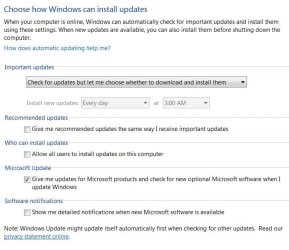
Best to only focus on Important updates first with these settings and worry about Recommended and optional ones last,
update settings.JPG
 

My Computer

Computer type
PC/Desktop
Computer Manufacturer/Model Number
Custom assembled by me :}
OS
Win-7-Pro64bit 7-H-Prem-64bit
CPU
i7-5930K 2nd i9-9940x both water blocked VRM's too
Motherboard
ASUS SABERTOOTH X99 2nd ASUS x299 Apex
Memory
Trident-z 3200C14 2nd Trident-z 3600C16
Graphics Card(s)
EVGA 1080ti ftw3 2nd Titan Xp both water blocked
Sound Card
Built-in Realtek
Monitor(s) Displays
1-AOC G2460PG 24"G-Sync 144Hz/ 2nd 1-ASUS VG248QE 24" 144Hz
Screen Resolution
1920 x 1080 144Hz
Hard Drives
2-Samsung M.2 Evo & Evo Plus
2-Samsung 850 EVO 500GB SSD's/ 3-2.5 W.D. Black 1tb-&3-1tb/3-3.5 WD Black 1tb hdd's
PSU
EVGA SuperNOVA 1000-P2 2nd 1200-P2
Case
2-Corsair Obsidian Series 450D Black ATX Mid Tower
Cooling
Custom water loops
Keyboard
Logitech G710+/ 2nd Logitech G910
Mouse
2-RedDragon M901 Perdition 16400 dpi Gaming mouse = wired
Internet Speed
Comcast Ping 19ms 89.31mbps download speed 6.12mbps upload
Antivirus
Malwarebytes Pro/ Superantispyware Pro
Browser
FireFox & Pale moon
Other Info
2nd ASUS X299 Apex/Intel i9-9940x with Custom water loop/7H-Prem-x64/Corsair 450D case/Ram Trident-z 3600C16 4x8gb / Samsung970Evo plus 500gb SSD/Dual ssd EZ swap evo/PSU EVGA SuperNova 1200w-P2 80+Platinum/GPU Titan Xp /8-ML-140 on push-pull on 2-280GTX rads
Thanks for the suggestions I've now changed the settings finger crossed it will work. Left the machine running all night and it still found no updates...
 

My Computer

Computer type
PC/Desktop
Computer Manufacturer/Model Number
Me :D
OS
Windows 7
CPU
AMD X6 1090T 4.02Ghz
Motherboard
ASUS Crosshair IV Formula
Memory
16.00GB
Graphics Card(s)
Nvidia Geforce 470
Sound Card
ASUS Xonar DX
Monitor(s) Displays
Dell 24" Monitor
Hard Drives
2TB WD
1TB WD
2TB WD
60 SSD
60 SSD
PSU
700W Crosshair
Case
Antec Three hundred
Cooling
Water Cooling
Hi,
Restart
If windows is not still searching on restart shut down for a little while 15 minutes....
Then restart and try again.

Click start and right click the Computer listing and click on Properties
On the bottom see if windows shows as Activated.
 

My Computer

Computer type
PC/Desktop
Computer Manufacturer/Model Number
Custom assembled by me :}
OS
Win-7-Pro64bit 7-H-Prem-64bit
CPU
i7-5930K 2nd i9-9940x both water blocked VRM's too
Motherboard
ASUS SABERTOOTH X99 2nd ASUS x299 Apex
Memory
Trident-z 3200C14 2nd Trident-z 3600C16
Graphics Card(s)
EVGA 1080ti ftw3 2nd Titan Xp both water blocked
Sound Card
Built-in Realtek
Monitor(s) Displays
1-AOC G2460PG 24"G-Sync 144Hz/ 2nd 1-ASUS VG248QE 24" 144Hz
Screen Resolution
1920 x 1080 144Hz
Hard Drives
2-Samsung M.2 Evo & Evo Plus
2-Samsung 850 EVO 500GB SSD's/ 3-2.5 W.D. Black 1tb-&3-1tb/3-3.5 WD Black 1tb hdd's
PSU
EVGA SuperNOVA 1000-P2 2nd 1200-P2
Case
2-Corsair Obsidian Series 450D Black ATX Mid Tower
Cooling
Custom water loops
Keyboard
Logitech G710+/ 2nd Logitech G910
Mouse
2-RedDragon M901 Perdition 16400 dpi Gaming mouse = wired
Internet Speed
Comcast Ping 19ms 89.31mbps download speed 6.12mbps upload
Antivirus
Malwarebytes Pro/ Superantispyware Pro
Browser
FireFox & Pale moon
Other Info
2nd ASUS X299 Apex/Intel i9-9940x with Custom water loop/7H-Prem-x64/Corsair 450D case/Ram Trident-z 3600C16 4x8gb / Samsung970Evo plus 500gb SSD/Dual ssd EZ swap evo/PSU EVGA SuperNova 1200w-P2 80+Platinum/GPU Titan Xp /8-ML-140 on push-pull on 2-280GTX rads
Hi,
Restart
If windows is not still searching on restart shut down for a little while 15 minutes....
Then restart and try again.

Click start and right click the Computer listing and click on Properties
On the bottom see if windows shows as Activated.
I've done this. Updates have been checking all day and still nothing & Yes windows is activated.
 

My Computer

Computer type
PC/Desktop
Computer Manufacturer/Model Number
Me :D
OS
Windows 7
CPU
AMD X6 1090T 4.02Ghz
Motherboard
ASUS Crosshair IV Formula
Memory
16.00GB
Graphics Card(s)
Nvidia Geforce 470
Sound Card
ASUS Xonar DX
Monitor(s) Displays
Dell 24" Monitor
Hard Drives
2TB WD
1TB WD
2TB WD
60 SSD
60 SSD
PSU
700W Crosshair
Case
Antec Three hundred
Cooling
Water Cooling

My Computer

Computer type
PC/Desktop
Computer Manufacturer/Model Number
Custom assembled by me :}
OS
Win-7-Pro64bit 7-H-Prem-64bit
CPU
i7-5930K 2nd i9-9940x both water blocked VRM's too
Motherboard
ASUS SABERTOOTH X99 2nd ASUS x299 Apex
Memory
Trident-z 3200C14 2nd Trident-z 3600C16
Graphics Card(s)
EVGA 1080ti ftw3 2nd Titan Xp both water blocked
Sound Card
Built-in Realtek
Monitor(s) Displays
1-AOC G2460PG 24"G-Sync 144Hz/ 2nd 1-ASUS VG248QE 24" 144Hz
Screen Resolution
1920 x 1080 144Hz
Hard Drives
2-Samsung M.2 Evo & Evo Plus
2-Samsung 850 EVO 500GB SSD's/ 3-2.5 W.D. Black 1tb-&3-1tb/3-3.5 WD Black 1tb hdd's
PSU
EVGA SuperNOVA 1000-P2 2nd 1200-P2
Case
2-Corsair Obsidian Series 450D Black ATX Mid Tower
Cooling
Custom water loops
Keyboard
Logitech G710+/ 2nd Logitech G910
Mouse
2-RedDragon M901 Perdition 16400 dpi Gaming mouse = wired
Internet Speed
Comcast Ping 19ms 89.31mbps download speed 6.12mbps upload
Antivirus
Malwarebytes Pro/ Superantispyware Pro
Browser
FireFox & Pale moon
Other Info
2nd ASUS X299 Apex/Intel i9-9940x with Custom water loop/7H-Prem-x64/Corsair 450D case/Ram Trident-z 3600C16 4x8gb / Samsung970Evo plus 500gb SSD/Dual ssd EZ swap evo/PSU EVGA SuperNova 1200w-P2 80+Platinum/GPU Titan Xp /8-ML-140 on push-pull on 2-280GTX rads

My Computer

Computer type
PC/Desktop
Computer Manufacturer/Model Number
Me :D
OS
Windows 7
CPU
AMD X6 1090T 4.02Ghz
Motherboard
ASUS Crosshair IV Formula
Memory
16.00GB
Graphics Card(s)
Nvidia Geforce 470
Sound Card
ASUS Xonar DX
Monitor(s) Displays
Dell 24" Monitor
Hard Drives
2TB WD
1TB WD
2TB WD
60 SSD
60 SSD
PSU
700W Crosshair
Case
Antec Three hundred
Cooling
Water Cooling
Back
Top