
You are using an out of date browser. It may not display this or other websites correctly.
You should upgrade or use an alternative browser.
You should upgrade or use an alternative browser.
Checking my graphics card specs
- Thread starter Chips
- Start date

You can download CPU-z for basic specs of your GPU, or GPU-z for thorough information.
My Computer
- Computer Manufacturer/Model Number
- Home Made
- OS
- Windows 7 Home Premium x64
- CPU
- Intel 2500k @4.5ghz 66deg max P95/IBT
- Motherboard
- Gigabyte Z68A-D3-B3
- Memory
- 8 Gigs Patriot Viper 2 Extreme @1600
- Graphics Card(s)
- EVGA GTX 580 3 GIG 35degrees idle
- Sound Card
- Nvidia HD audio via HDMI to 7.1 Receiver
- Monitor(s) Displays
- 32" Olevia hdtv
- Screen Resolution
- 1080p
- Hard Drives
- 64gig SSD(OS/Apps)
250gig (Files and Dox)
1tb (imaging and backup)
- PSU
- Corsair vx550w
- Case
- Thermaltake V3 black
- Cooling
- CM 212+(push n pull) 4 case fans
- Keyboard
- Logitech wireless Combo, G13
- Mouse
- G300
- Internet Speed
- 40mps
- Other Info
- Two others up and running; C2D E5200/MSI G41M-P26/Corsair XMS3 8gb/GTS 250 1gb and C2D E8200/xFx 750sli/8gb Corsair Dominator/2x EVGA 550ti
Working on; i2600 Build...
HP DV6
@Work I use a Lenovo 5536B8U + Lenovo U300s

Speccy - System Information - Free Download should provide all that and a bit more.
My Computer
- Computer type
- PC/Desktop
- Computer Manufacturer/Model Number
- Me
- OS
- Win 7 Ultimate x64
- CPU
- FX-8350 @ 4.6 GHz so far
- Motherboard
- Asus M5A97 EVO
- Memory
- ADATA XPG V1 Series Black 8GB DDR3 1600
- Graphics Card(s)
- Sapphire R9 270x Dual-X
- Sound Card
- Xonar DGX w/ Corsair Vengence 1300
- Monitor(s) Displays
- Acer S232HL Abid
- Screen Resolution
- 1920x1080
- Hard Drives
- 120 GB OCZ Vertex 3
500 GB Seagate 7200.12
- PSU
- Antec Earthwatts 650W Green
- Case
- Antec Three Hundred
- Cooling
- Cooler Master 212 EVO
- Keyboard
- Logitech G510
- Mouse
- Logitech G500s
- Internet Speed
- 35000/3000
Or that.Speccy - System Information - Free Download should provide all that and a bit more.

My Computer
- Computer Manufacturer/Model Number
- Home Made
- OS
- Windows 7 Home Premium x64
- CPU
- Intel 2500k @4.5ghz 66deg max P95/IBT
- Motherboard
- Gigabyte Z68A-D3-B3
- Memory
- 8 Gigs Patriot Viper 2 Extreme @1600
- Graphics Card(s)
- EVGA GTX 580 3 GIG 35degrees idle
- Sound Card
- Nvidia HD audio via HDMI to 7.1 Receiver
- Monitor(s) Displays
- 32" Olevia hdtv
- Screen Resolution
- 1080p
- Hard Drives
- 64gig SSD(OS/Apps)
250gig (Files and Dox)
1tb (imaging and backup)
- PSU
- Corsair vx550w
- Case
- Thermaltake V3 black
- Cooling
- CM 212+(push n pull) 4 case fans
- Keyboard
- Logitech wireless Combo, G13
- Mouse
- G300
- Internet Speed
- 40mps
- Other Info
- Two others up and running; C2D E5200/MSI G41M-P26/Corsair XMS3 8gb/GTS 250 1gb and C2D E8200/xFx 750sli/8gb Corsair Dominator/2x EVGA 550ti
Working on; i2600 Build...
HP DV6
@Work I use a Lenovo 5536B8U + Lenovo U300s

Go to RUN and type dxdiag. It will show you all the info you need about your card.
My Computer
- Computer type
- PC/Desktop
- Computer Manufacturer/Model Number
- Custom Bulid/Self made
- OS
- Windows 11 x64
- CPU
- i5 2500K @ 3.3 GHz
- Motherboard
- ASUS P8 Z77 V pro
- Memory
- 16 GB DDR 3 @ 1600Mhz
- Graphics Card(s)
- MSI 1050TI 4GB OC version
- Sound Card
- On Board (Realtek HD audio)
- Monitor(s) Displays
- Samsung 22" LCD
- Screen Resolution
- 1920*1080
- Hard Drives
- Seagate 1 TB, WD 1TB, Seagate 2 TB ( I use a lot of space)
- PSU
- coolermaster 750 W
- Case
- Coolermaster HAF912
- Cooling
- Coolermaster hyper 212 EVO
- Keyboard
- Samsung
- Mouse
- Dell Wireless
- Internet Speed
- Wireless 50 Mbps
- Antivirus
- AVG 2016 Internet Security
- Browser
- Google Chrome
Go to RUN and type dxdiag. It will show you all the info you need about your card.
And some that may be misleading.
Im pretty sure, for example, that the physical VRAM on my GTX 680 is less than the 4GB shown as total memory in DXDIAG.
My Computer
- Computer Manufacturer/Model Number
- homegrown
- OS
- Windows 7 Pro X64 SP1
- CPU
- Intel Core I7-3930k
- Motherboard
- Asus P9X79 Pro
- Memory
- 16 GB Gskill DDR3-2133
- Graphics Card(s)
- eVGA GTX680
- Sound Card
- Creative X-Fi Titanium
- Monitor(s) Displays
- As PA246Q
- Screen Resolution
- 1920 X 1200
- Hard Drives
- Corsair Force GT, 120 GB
WDC 1.5TB Caviar Black
- PSU
- PCP&C Silencer 750 Crossfire
- Case
- Silverstone FT02
- Cooling
- Noctua NH-D14
- Keyboard
- cheap Logitech USB
- Mouse
- Microsoft Intellimouse Explorer (old optical) USB
- Internet Speed
- 6Mb cable
- Other Info
- Pioneer BDR-205
Samsung SH-203B
Monsoon 5.1 speakers

Go to RUN and type dxdiag. It will show you all the info you need about your card.
And some that may be misleading.
Im pretty sure, for example, that the physical VRAM on my GTX 680 is less than the 4GB shown as total memory in DXDIAG.
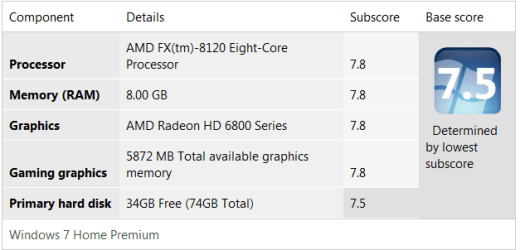
That with added Vram 1gb + So much V ram is the reason you are see-ing more then 4 Gb check out your WEI detailed info it will show you how much dedicated ram is available also i seen someone else running a GTX 580 but it said intel hd graphics on Unigene heaven
Attachments
My Computer
- Computer type
- PC/Desktop
- Computer Manufacturer/Model Number
- CoreI7-6700K MrFingerIII Special Builds
- OS
- Windows 10 Home Premium 64bit sp1
- CPU
- Intel I7-6700K @ 4.6 Ghz 1.344 volts everyday OC
- Motherboard
- Asrock Fatality K6 Z170 Socket 1151
- Memory
- 32GB G-Skill TridentZ 3200mhz 16-18-18-38 DDR4
- Graphics Card(s)
- Sli Gigabyte Windforce GTX 980 G1
- Sound Card
- AC97 Creative Rage Tactic 3D Headphones Bluetooth
- Monitor(s) Displays
- 27" Asus ROG Swift PG278Q G-Sync 48" Vizio Smart HD TV
- Screen Resolution
- 2560x1440p 27"- 48" Currently Gaming at 2560x1440p Res 2K
- Hard Drives
- 250GB Samsung Evo840SSD Seagate baracuda 500 GB WD Mybook 500Gb 1TB Seagate Barracuda
- PSU
- HX1050w Corsair Silver 80plus certified crosfire/sli
- Case
- Enthod Pro Full Tower
- Cooling
- Corsair H110i GT 280 mm High Performance WaterBlock
- Keyboard
- Logitech wireless keyboard
- Mouse
- Logitech wireless mouse
- Internet Speed
- Cox Cable 100+ mb
- Antivirus
- WebRoot Spysweeper with Antivirus
- Browser
- IE-10, Chrome, Opera
- Other Info
- My Other Rig is a AMD FX8320E @4.6Ghz 16GB Ballistic Sport Ram
Mobo Asrock Fatality 990FX 120GB OCZ SSD 1TB Seagate Barracuda Corsair H75 Cooling PSU Corsair CX750
GPU GTX Gigabyte 970G1