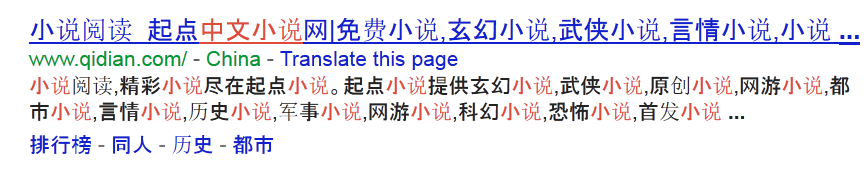
I believe this happened after I did something with the registry after using CCleaner, and now my computer displays Chinese in two fonts (standard font for simplified and bold for traditional, I think). Can someone please help me find a way to fix this?
Have u typed "Display language" in the start search?
if so try that, and go to change display language install the one u want and uninstall what you dont want
My Computer
Computer type
Laptop
Computer Manufacturer/Model Number
Lenovo Y560 Laptop
OS
Microsoft Windows 7 Ultimate 64-bit 7601 Multiprocessor Free Service Pack 1
I followed the "Install or change a display language" instructions, and it turns out I don't have a "Display language" section in my "Keyboards and Languages" tab.
Insert your Windows 7 installation disk, go to region and language options, select add support to East Asian languages, then check that box and then it will get installed.
Okay sorry for my slow activity, school is pounding me in the face.
It should look like this picture.
As well what version of windows 7 are you running, and in start type "cmd" right click it and run as admin.
Type