Solved Chinese Translator popup when I'm trying to use keyboard in Minecraft

Caboose Pootis

New member
Local time
4:11 PM
Messages
2
I just tried playing Minecraft, and in-game what seems to be English to Chinese. I can't use my keyboard at all in Minecraft, it automatically is typed into the translator. It most likely has something to do with changing my region locale to Chinese from English, but I changed it back to English and it still pops up. I've used my keyboard in other games but it has only happened in Minecraft. I have no idea how to get rid of it, it doesn't appear in applications. I wasn't sure if this would go into the Gaming thread, so I put it here.
 

My Computer My Computer

At a glance

Windows 7 Professional 32 bit
Computer type
PC/Desktop
OS
Windows 7 Professional 32 bit
Hi Caboose,
depends on what you have here,
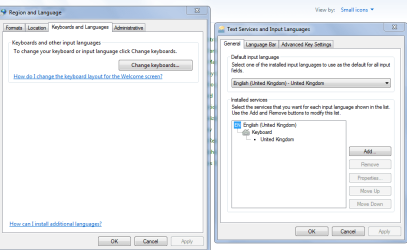
If you have both, English/Chinese, Remove Chinese.

W7 pro does not support Additional language packs


Roy
 

Attachments

  • region.PNG
    region.PNG
    26 KB · Views: 1

My Computer My Computer

At a glance

W7 home premium 32bit/W7HP 64bit/w10 tp insid...E5300 dual core3gbNvidia Geforce 7100 Nforce 630i
Computer type
PC/Desktop
Computer Manufacturer/Model Number
medionl/Aspire 6930G/acer x55a
OS
W7 home premium 32bit/W7HP 64bit/w10 tp insider ring
CPU
E5300 dual core
Motherboard
medion MS7366
Memory
3gb
Graphics Card(s)
Nvidia Geforce 7100 Nforce 630i
Monitor(s) Displays
avixc
Internet Speed
n (isp resticted to 72)
Antivirus
mse/pands
Browser
palemoon
Other Info
Belkin Fd7050 n USB using Railink RT2870 drivers, more upto date
Thanks! It no longer appears.
 

My Computer My Computer

At a glance

Windows 7 Professional 32 bit
Computer type
PC/Desktop
OS
Windows 7 Professional 32 bit
Back
Top