Chipset Drivers

r00ploi

New member
VIP
Local time
4:54 PM
Messages
269
Hi

I have upgraded to a Gigabyte 890FXA UD5 motherboard and I was wondering which are the best chipset drivers to use either the ones that come standard with window
or is it a good idea to get the proper drivers from the
makers site?


Please can someone advise
 

My Computer

Computer type
Laptop
Computer Manufacturer/Model Number
HP
OS
Windows 7

My Computer

Computer Manufacturer/Model Number
HP m8000n
OS
Windows 7 Ultimate x86
CPU
DualCore AMD Athlon 64 X2, 2600 MHz 5200+
Motherboard
Asus M2N68-LA (Narra)
Memory
Samsung 2GB DDR2
Graphics Card(s)
Onboard NVIDIA GeForce 6150SE nForce 430
Sound Card
Onboard nVIDIA nForce 6100-430 (MCP61P)
Monitor(s) Displays
Westinghouse 19" LED
Screen Resolution
1280x1024
Hard Drives
SATA II Seagate Barracuda 500GB
USB II WD Elements 500GB
USB II WD My Book 1TB
USB II WD My Book 2TB
PSU
Stock (HP)
Case
Stock (HP)
Cooling
Stock
Keyboard
Logitech Classic KB 200
Mouse
Standard HP opticle USB mouse
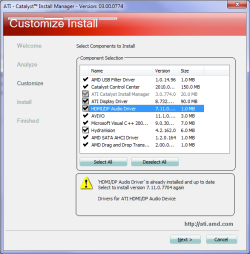
If you update you video card drivers as they come out (current is Catalyst 11.1), then you should already have the latest as the chipset drivers for AMD chipsets are included in the full Catalyst suite,

atihdmi1.png

or you can get them as individual downloads from here,

ATI Radeon

No point in getting them from Gigabyte as they have to get them from AMD in the first place.
 

My Computer

Computer type
PC/Desktop
Computer Manufacturer/Model Number
Me
OS
Win 7 Ultimate x64
CPU
FX-8350 @ 4.6 GHz so far
Motherboard
Asus M5A97 EVO
Memory
ADATA XPG V1 Series Black 8GB DDR3 1600
Graphics Card(s)
Sapphire R9 270x Dual-X
Sound Card
Xonar DGX w/ Corsair Vengence 1300
Monitor(s) Displays
Acer S232HL Abid
Screen Resolution
1920x1080
Hard Drives
120 GB OCZ Vertex 3
500 GB Seagate 7200.12
PSU
Antec Earthwatts 650W Green
Case
Antec Three Hundred
Cooling
Cooler Master 212 EVO
Keyboard
Logitech G510
Mouse
Logitech G500s
Internet Speed
35000/3000
Thanks for your replies,

I'll download them from ATI's website I'll get the south bridge drivers and AHCI drivers as well.

The only reason I'm asking is because the front USB ports on the case seem to be playing up I can insert a memory stick into it and the computer will recognize that is connected but when I click on the computer icon on the desktop all the other devices are displayed but not th pen drive. I have tried other memory sticks as well and it does it with these as well. Could this be a driver issue?


Edit - Some memory sticks seem to work in the front USBS and others dont.
 
Last edited:

My Computer

Computer type
Laptop
Computer Manufacturer/Model Number
HP
OS
Windows 7
Are you using the "Safely Remove Hardware and Eject Media" to "stop" a USB device before you remove it? If not the status of the device can get corrupted in Windows and when that happens you have to connect the device and then go to the Device Manager and there will be an Unknown Device shown in the USB section. Uninstall the device in the Device Manager then physically remove the device, restart the PC and after Windows starts you should be able to connect the corrupted device and Windows will detect and install it, and it should work after that as long as you use the Safely Remove Hardware to "Stop" the device before physically disconnecting.

This is one scenario.
 

My Computer

Computer type
PC/Desktop
Computer Manufacturer/Model Number
My Own Build
OS
Windows 10 64 bit
CPU
Intel i7 6700K
Motherboard
ASUS ROG Maximus VIII Hero
Memory
16GB Corsair Dominator
Graphics Card(s)
Intel CPU Graphics
Sound Card
RealTek
Monitor(s) Displays
27" Dell S2719dgf
Screen Resolution
2560X1440
Hard Drives
1 TB Samsung 850 EVO SSD for Win 10 Pro
500GB Samsung 850 EVO SSD for Win 10 Insider
2 TB drive for backup
PSU
EVGA Supernova 750G2
Case
BeQuiet Silent Base 600
Cooling
Deepcool Captain 120EX
Keyboard
Microsoft Wireless 2000
Mouse
Microsoft wireless
Internet Speed
100 MB/sec (Cable)
Antivirus
Microsoft Defender and Malwarebytes
Browser
Edge/Firefox
Other Info
Cakewalk (Sonar) by BandLab and Studio One 4.1 Pro recording studio software. MOTU 896Mk3 Hybrid recording interface, Frontier Tranzport wireless control unit, Behringer X-Touch Control Surface.
Five USB connected optical drives for CD Audio production using Nero BurningROM
Thanks for your reply.

The memory stick that does not work in the front USBS seems to work okay in the USBS on the motherboard. So I am not sure what could be causing this issue?
 

My Computer

Computer type
Laptop
Computer Manufacturer/Model Number
HP
OS
Windows 7
Ok, the memory stick in question is now showing up after a few minutes of it being plugged into the front USB ports on the case. Could this be something corrupted on the computer which is causing the delay in it showing up?
 

My Computer

Computer type
Laptop
Computer Manufacturer/Model Number
HP
OS
Windows 7
It is not normal.

The drivers for your motherboard are here: GA-890FXA-UD5 (rev. 2.1) - GIGABYTE - Support&Download - Motherboard - Driver

And I notice there is a USB 3.0 driver, but I'm not sure that is your problem. Can't hurt, might help.

You might try installing the Gigabyte Chipset/VGA/SATA-RAiD driver. The USB ports on the MB that your case ports plug into are on the Southbridge Controller and that controller is run on the Chipset Drivers, so it could be a driver issue. If the drivers you have now are newer you will be informed by the installer.
 

My Computer

Computer type
PC/Desktop
Computer Manufacturer/Model Number
Home Built - Jan 2013
OS
Windows 7 64 Bit Home Premium SP1
CPU
i7-3820
Motherboard
Asus P9X79-PRO - Bios 4608
Memory
GSkill F3-14900CL9Q - 16GB
Graphics Card(s)
EVGA GeForce GTX660 - Driver 352.86
Sound Card
On board Realtek ALC898
Monitor(s) Displays
Acer S271HL
Screen Resolution
1920 x 1080
Hard Drives
#1- Samsung 840 Pro Series
#2- Western Digital WD1002FAEX Sata3 Black
#3- Western Digital WD1002FAEX Sata3 Black
PSU
Corsair CMPSU-850TX-V2 - 850 watt (by Seasonic)
Case
Corsair Obsidian 550D
Cooling
Standard 3 120mm case fans, Cooler Master Hyper 212 EVO
Keyboard
MS KC-0405
Mouse
Intellimouse 5-button
Internet Speed
56 Mbits/Sec (on a good day)
Antivirus
Avast & Malwarebytes
Browser
Firefox
Other Info
Asus DVD - DRW-24B1ST 24X
Thanks for your reply I will try this tomorrow and
let u know what happens. when I installed windows I had to
download the USB 3 drivers to get the USB
3 ports working

it's a really odd issue because if I plug it in any of the other USB ports it seems to
work okay and only seems to be affecting the front usbs
 

My Computer

Computer type
Laptop
Computer Manufacturer/Model Number
HP
OS
Windows 7
That raises the possibility that it is the case's USB module or wiring. Happens.
Is it a new case?
 

My Computer

Computer type
PC/Desktop
Computer Manufacturer/Model Number
Home Built - Jan 2013
OS
Windows 7 64 Bit Home Premium SP1
CPU
i7-3820
Motherboard
Asus P9X79-PRO - Bios 4608
Memory
GSkill F3-14900CL9Q - 16GB
Graphics Card(s)
EVGA GeForce GTX660 - Driver 352.86
Sound Card
On board Realtek ALC898
Monitor(s) Displays
Acer S271HL
Screen Resolution
1920 x 1080
Hard Drives
#1- Samsung 840 Pro Series
#2- Western Digital WD1002FAEX Sata3 Black
#3- Western Digital WD1002FAEX Sata3 Black
PSU
Corsair CMPSU-850TX-V2 - 850 watt (by Seasonic)
Case
Corsair Obsidian 550D
Cooling
Standard 3 120mm case fans, Cooler Master Hyper 212 EVO
Keyboard
MS KC-0405
Mouse
Intellimouse 5-button
Internet Speed
56 Mbits/Sec (on a good day)
Antivirus
Avast & Malwarebytes
Browser
Firefox
Other Info
Asus DVD - DRW-24B1ST 24X
Hi
Thanks for your reply.

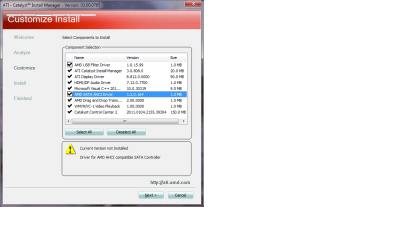
I have downloaded the Chipset drivers from Gigabytes website and there are only 2 drivers which are showing as not currently installed. Should I install them?
 

Attachments

  • Untitled.png
    Untitled.png
    30.4 KB · Views: 15

My Computer

Computer type
Laptop
Computer Manufacturer/Model Number
HP
OS
Windows 7
I'd say yes. I install all of the drivers for my motherboard from the manufacturer.

The AHCI driver is custom for your MB. Windows ships with it's own generic AHCI driver but it does not equal the one from the MB maker. One common problem with the Windows AHCI driver is that internal SATA drives show up as removable (external) devices.

As for USB Filter Driver - same deal - Gigabyte is probably offering it as an "enhancement" of the regular functions of the MB.
More Here: windows - What is an USB Filter Driver? - Super User
And since you are having an USB issue......
 

My Computer

Computer type
PC/Desktop
Computer Manufacturer/Model Number
Home Built - Jan 2013
OS
Windows 7 64 Bit Home Premium SP1
CPU
i7-3820
Motherboard
Asus P9X79-PRO - Bios 4608
Memory
GSkill F3-14900CL9Q - 16GB
Graphics Card(s)
EVGA GeForce GTX660 - Driver 352.86
Sound Card
On board Realtek ALC898
Monitor(s) Displays
Acer S271HL
Screen Resolution
1920 x 1080
Hard Drives
#1- Samsung 840 Pro Series
#2- Western Digital WD1002FAEX Sata3 Black
#3- Western Digital WD1002FAEX Sata3 Black
PSU
Corsair CMPSU-850TX-V2 - 850 watt (by Seasonic)
Case
Corsair Obsidian 550D
Cooling
Standard 3 120mm case fans, Cooler Master Hyper 212 EVO
Keyboard
MS KC-0405
Mouse
Intellimouse 5-button
Internet Speed
56 Mbits/Sec (on a good day)
Antivirus
Avast & Malwarebytes
Browser
Firefox
Other Info
Asus DVD - DRW-24B1ST 24X
Hi,

Thanks for your reply.

I have installed the SATA / AHCI drivers and now the hard drives are showing as SATA in device manager where as before they were showing as ATA devices. So at least thats sorted out.


I also installed the USB Filter Drivers but this has not made any difference. I have also done a clean install of windows on another hard drive to check to see if its something to do with windows and also the memory stick does not work in the front usbs of the case but if I plug it into any other USB port it shows up pretty much instantly.
 

My Computer

Computer type
Laptop
Computer Manufacturer/Model Number
HP
OS
Windows 7
Then I think you are down to bad case ports or perhaps the USB header on the motherboard.

Check the connection of the case's USB ports to the USB header(s). Be sure they are orientated correctly and that the connector is pushed all the way in.

Is this a new PC case?
 

My Computer

Computer type
PC/Desktop
Computer Manufacturer/Model Number
Home Built - Jan 2013
OS
Windows 7 64 Bit Home Premium SP1
CPU
i7-3820
Motherboard
Asus P9X79-PRO - Bios 4608
Memory
GSkill F3-14900CL9Q - 16GB
Graphics Card(s)
EVGA GeForce GTX660 - Driver 352.86
Sound Card
On board Realtek ALC898
Monitor(s) Displays
Acer S271HL
Screen Resolution
1920 x 1080
Hard Drives
#1- Samsung 840 Pro Series
#2- Western Digital WD1002FAEX Sata3 Black
#3- Western Digital WD1002FAEX Sata3 Black
PSU
Corsair CMPSU-850TX-V2 - 850 watt (by Seasonic)
Case
Corsair Obsidian 550D
Cooling
Standard 3 120mm case fans, Cooler Master Hyper 212 EVO
Keyboard
MS KC-0405
Mouse
Intellimouse 5-button
Internet Speed
56 Mbits/Sec (on a good day)
Antivirus
Avast & Malwarebytes
Browser
Firefox
Other Info
Asus DVD - DRW-24B1ST 24X
Hi

Thanks for your reply

I have changed the USB connections to another USB header on the board and the issue is still there.


Its an Antec 300 gaming case and the warranty is up next month on it.
 

My Computer

Computer type
Laptop
Computer Manufacturer/Model Number
HP
OS
Windows 7
I had an Antec Sonata One case that had front case USB ports that were defective - running at USB 1.0 speed when it was supposed to be USB 2.0. Antec replaced the module without question or cost upon request, and the case was 3 years old. YMMV.

If you can get your hands on a spare known working USB module from another case you could do a test to determine if it is indeed the Front panel connector module or the motherboard. You could also Gerry-Rig a test with a USB device if you are handy with wires.
 

My Computer

Computer type
PC/Desktop
Computer Manufacturer/Model Number
Home Built - Jan 2013
OS
Windows 7 64 Bit Home Premium SP1
CPU
i7-3820
Motherboard
Asus P9X79-PRO - Bios 4608
Memory
GSkill F3-14900CL9Q - 16GB
Graphics Card(s)
EVGA GeForce GTX660 - Driver 352.86
Sound Card
On board Realtek ALC898
Monitor(s) Displays
Acer S271HL
Screen Resolution
1920 x 1080
Hard Drives
#1- Samsung 840 Pro Series
#2- Western Digital WD1002FAEX Sata3 Black
#3- Western Digital WD1002FAEX Sata3 Black
PSU
Corsair CMPSU-850TX-V2 - 850 watt (by Seasonic)
Case
Corsair Obsidian 550D
Cooling
Standard 3 120mm case fans, Cooler Master Hyper 212 EVO
Keyboard
MS KC-0405
Mouse
Intellimouse 5-button
Internet Speed
56 Mbits/Sec (on a good day)
Antivirus
Avast & Malwarebytes
Browser
Firefox
Other Info
Asus DVD - DRW-24B1ST 24X
Hi,

I'll contact Antec and see what they say. Assume you contacted them through their site?
 

My Computer

Computer type
Laptop
Computer Manufacturer/Model Number
HP
OS
Windows 7
I have installed the SATA / AHCI drivers

Now go to the AMD link I posted previously and get the latest versions of both, which will be much newer than the one from Gigabyte (from what I can see the one from Gigabyte looks to be from around the time of the Catalyst 9.12).

I'll contact Antec and see what they say.

If they do like they did for me when I had a front panel go bad on one of their cases, they will issue the RMA for it and send you a new front panel assembly (took about a week and a half from start to finish for me, would have been quicker if I was in the States due to shipping to Canada). Start here,

Antec - Support Online

select your region and fill in the online forum. Just need your receipt.
 

My Computer

Computer type
PC/Desktop
Computer Manufacturer/Model Number
Me
OS
Win 7 Ultimate x64
CPU
FX-8350 @ 4.6 GHz so far
Motherboard
Asus M5A97 EVO
Memory
ADATA XPG V1 Series Black 8GB DDR3 1600
Graphics Card(s)
Sapphire R9 270x Dual-X
Sound Card
Xonar DGX w/ Corsair Vengence 1300
Monitor(s) Displays
Acer S232HL Abid
Screen Resolution
1920x1080
Hard Drives
120 GB OCZ Vertex 3
500 GB Seagate 7200.12
PSU
Antec Earthwatts 650W Green
Case
Antec Three Hundred
Cooling
Cooler Master 212 EVO
Keyboard
Logitech G510
Mouse
Logitech G500s
Internet Speed
35000/3000
Hi Stormy

Thanks for your reply.
I have installed the SATA / AHCI Drivers form AMD's website.

I will contact Antec and tell them what the issue is.
 

My Computer

Computer type
Laptop
Computer Manufacturer/Model Number
HP
OS
Windows 7
Sent a support request to Antec says they should reply within 48hours.

Its a odd issue because the memory stick in question will work in the front USBS of the case but just takes about 1-2 minutes to actually show up on the computer.
 

My Computer

Computer type
Laptop
Computer Manufacturer/Model Number
HP
OS
Windows 7
Back
Top