betterinblue
New member
- Local time
- 8:02 PM
- Messages
- 29
Hi
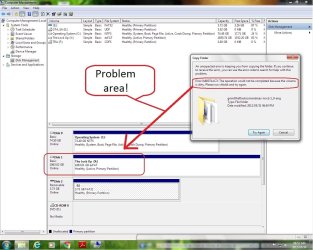
I noticed this problem when I tried to delete something off the drive, then I tried to run an antivirus scan and it gave me an error if incapacity to delete viruses due to a dirty disk and that I should run chkdsk.
So I right clock on the drive and attempt check now. It tells me that it must first dismount the drive before it can do so and asks if I would like to force a dismount. To which I respond yes. Then, the window disappears and I hear no word or see no signs of any chkdsk happening. Naturally I reboot the terminal expecting fire-works and chemistry, but get greeted by the sound of windows starting up again.
I have tried the administrator driven command prompt in this sequence. C:\Windows\System32>chkdsk x:/f
response:
The type of file system is exFAT.
Volume Serial Number is 2C7E-22C5
C:\Windows\System32>
then:
C:\Windows\System32>chkdsk x:/r
response:
The type of the file system is exFAT.
Chkdsk cannot run because the volume is in use by another process. Chkdsk May run if this volume is dismounted first. ALL OPENED HANDLES TO THIS VOLUME WOULD THEN BE INVALID. Would you like to force a dismount on this volume? <Y/N>
response:
Volume dismounted. ALL opened handles to this volume are now invalid.
Volume Serial Number is 2C7E-22C5
C:\Windows\System32>
then:
C:\Windows\System32>chkdsk x:/r
response:
The type of file system is exFAT.
Volume Serial Number is 2C7E-22C5
C:\Windows\System32>
then:
C:\Windows\System32>chkdsk x:/x
response:
The type of file system is exFAT.
Volume Serial Number is 2C7E-22C5
C:\Windows\System32>
So:
C:\Windows\System32>x:
X:\>
X:\>chkdsk
response:
The type of file system is exFAT.
This volume is in use by another process. Chkdsk might report errors when no corruption is present.
Volume Serial Number is 2C7E-22C5
X:\>
So:
X:\>chkdsk x:/x
response:
The type of file system is exFAT.
Cannot lock current drive.
Volume dismounted. ALL opened handles to this volume are now invalid.
Volume Serial Number is 2C7E-22C5
X:\>
So:
X:\>chkdsk
response
The type of file system is exFAT.
This volume is in use by another process. Chkdsk might report errors when no corruption is present.
Volume Serial Number is 2C7E-22C5
X:\>
ECT.
It does the same thing in safemode commad prompt and in safe mode... PLease HELP!
I noticed this problem when I tried to delete something off the drive, then I tried to run an antivirus scan and it gave me an error if incapacity to delete viruses due to a dirty disk and that I should run chkdsk.
So I right clock on the drive and attempt check now. It tells me that it must first dismount the drive before it can do so and asks if I would like to force a dismount. To which I respond yes. Then, the window disappears and I hear no word or see no signs of any chkdsk happening. Naturally I reboot the terminal expecting fire-works and chemistry, but get greeted by the sound of windows starting up again.
I have tried the administrator driven command prompt in this sequence. C:\Windows\System32>chkdsk x:/f
response:
The type of file system is exFAT.
Volume Serial Number is 2C7E-22C5
C:\Windows\System32>
then:
C:\Windows\System32>chkdsk x:/r
response:
The type of the file system is exFAT.
Chkdsk cannot run because the volume is in use by another process. Chkdsk May run if this volume is dismounted first. ALL OPENED HANDLES TO THIS VOLUME WOULD THEN BE INVALID. Would you like to force a dismount on this volume? <Y/N>
response:
Volume dismounted. ALL opened handles to this volume are now invalid.
Volume Serial Number is 2C7E-22C5
C:\Windows\System32>
then:
C:\Windows\System32>chkdsk x:/r
response:
The type of file system is exFAT.
Volume Serial Number is 2C7E-22C5
C:\Windows\System32>
then:
C:\Windows\System32>chkdsk x:/x
response:
The type of file system is exFAT.
Volume Serial Number is 2C7E-22C5
C:\Windows\System32>
So:
C:\Windows\System32>x:
X:\>
X:\>chkdsk
response:
The type of file system is exFAT.
This volume is in use by another process. Chkdsk might report errors when no corruption is present.
Volume Serial Number is 2C7E-22C5
X:\>
So:
X:\>chkdsk x:/x
response:
The type of file system is exFAT.
Cannot lock current drive.
Volume dismounted. ALL opened handles to this volume are now invalid.
Volume Serial Number is 2C7E-22C5
X:\>
So:
X:\>chkdsk
response
The type of file system is exFAT.
This volume is in use by another process. Chkdsk might report errors when no corruption is present.
Volume Serial Number is 2C7E-22C5
X:\>
ECT.
It does the same thing in safemode commad prompt and in safe mode... PLease HELP!
My Computer
- Computer type
- PC/Desktop
- Computer Manufacturer/Model Number
- custom build
- OS
- Windows 7 Pro 64 bit
- CPU
- Intel Core i3 4120 3.6 Ghz
- Motherboard
- unknown
- Memory
- 8Gb DDR 3
- Graphics Card(s)
- Radeon R9 290
- Monitor(s) Displays
- AOC e2050s
- Screen Resolution
- 1600 x 900
- Hard Drives
- 500gb os
2tb storage
- PSU
- 650 watt
- Case
- Antec one
- Cooling
- Stock intel
- Keyboard
- HP
- Mouse
- Dell
- Internet Speed
- 256kb/s
- Antivirus
- Avast
- Browser
- Google Chrome