JavaScript is disabled. For a better experience, please enable JavaScript in your browser before proceeding.
You are using an out of date browser. It may not display this or other websites correctly.
You should upgrade or use an
alternative browser .
CHKDSK memory bug revisited
Gomen ne Jenna-chan
Guru
VIP
Hi guys. OK, so, after discovering that EVENT VIEWER had errors regarding my 500GB drive having bad clusters, I decided to make a "CHKDSK E: /F /R" (where E: is my 500GB drive).
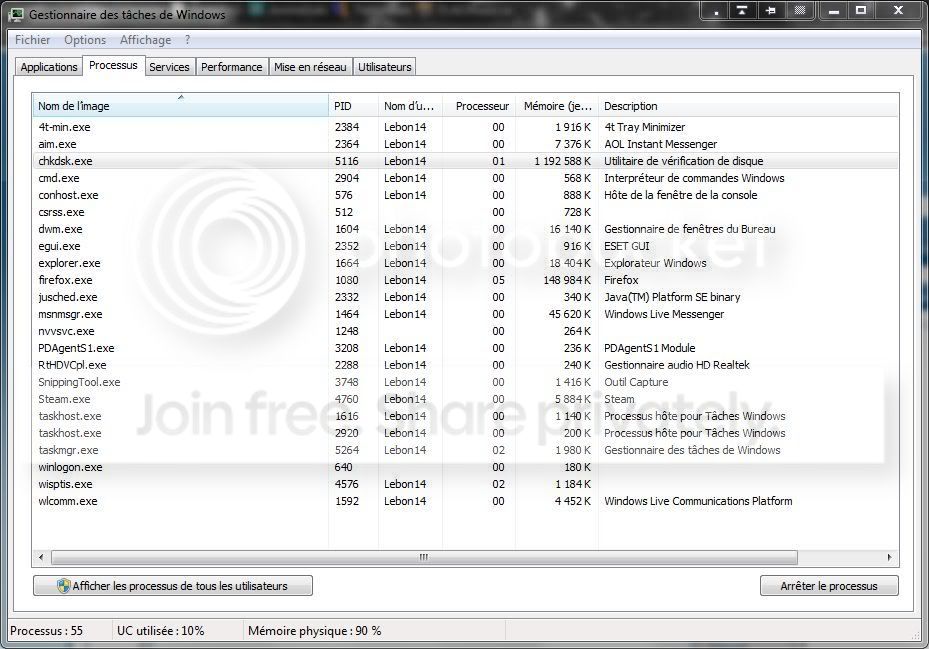
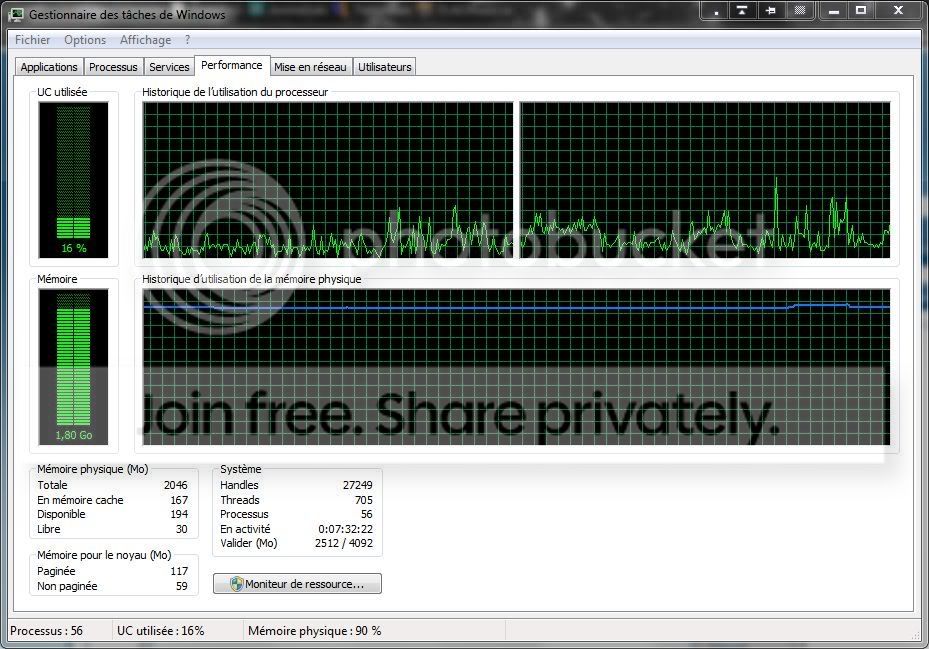
So, when doing small tasks with it running, I found that my computer went terribly slow... Memory is at 90% of usage (1.8GB on 2GB). CHKDSK in the processes says it's using 1 192 588 K of RAM
Two screenshots...
Discuss...
Computer type PC/Desktop Computer Manufacturer/Model Number Custom build OS Windows 10 Professional 64-bit CPU Ryzen 9 5900X Motherboard Gigabyte X570 Aorus Master Memory G.Skill 3600Mhz CL16 16GB × 4 Graphics Card(s) EVGA GeForce RTX 3070 Ti FTW3 Ultra Gaming Sound Card On-board Monitor(s) Displays Dell Alienware AW3418DW Screen Resolution 3440x1440 Hard Drives 1×Sabrent Rocket 4 Plus 2TB nvme SSD (System, internal) PSU Seasonic Focus Plus 850W Platinum Case Corsair 680X Cooling Stock fans + 3× Corsair QL120, Corsair H100i Platinum Keyboard Logitech K350 Mouse Logitech M510 Internet Speed 120Mbits dl - 20Mbits up Antivirus ESET NOD32 Antivirus Browser Firefox (latest version) Other Info Headphones : Audio-Technica ATH-M50x
If you have bad sectors, clusters and so on usually menas that the HDD is on the way out.
OS Windows 7 Ultimate x64 Service Pack 1 (Build 6.1.7601) CPU Intel Core 2 Quad Q6600 (G0 Kentsfield) LGA775 (FC-LGA6) Motherboard GIGABYTE GA-EP35C-DS3R (Rev. 2.1) Memory Corsair TW3X4G1333C9A 4GB PC-10600 (2x XMS3 2GB) Graphics Card(s) ASUS nVIDIA GeForce 560 Sound Card RealTek ALC885/889A/890 Monitor(s) Displays ChiMei CMV CT-730D 17inch (LCD Monitor) Screen Resolution 1280-1024 60Hertz (Ture Colour 32bit) Hard Drives 2x Barracuda 7200.10 SATA 3.0Gb/s 160-GB Hard Drive ST3160815AS (AHCI) PSU ANTEC 750w Earthwatts Case Thermaltake Shark (VA7000SWA ATX) Full Tower Cooling Front 120mm fan (1400 RPM) /Rear 120mm (1400 RPM) blue LED Keyboard Labtec Media Desktop Y-SAD65 Mouse Razer DeathAdder 3G Infrared Sensor (1800DPI) Internet Speed Telstra BigPond Elite Liberty ADSL2+ 24Mbps/256kbps Other Info ASUS PCE-N13 802.11n Wireless LAN card
Gomen ne Jenna-chan
Guru
VIP
Thread Starter
If you have bad sectors, clusters and so on usually menas that the HDD is on the way out.
I don't agree with what you said here...
Computer type PC/Desktop Computer Manufacturer/Model Number Custom build OS Windows 10 Professional 64-bit CPU Ryzen 9 5900X Motherboard Gigabyte X570 Aorus Master Memory G.Skill 3600Mhz CL16 16GB × 4 Graphics Card(s) EVGA GeForce RTX 3070 Ti FTW3 Ultra Gaming Sound Card On-board Monitor(s) Displays Dell Alienware AW3418DW Screen Resolution 3440x1440 Hard Drives 1×Sabrent Rocket 4 Plus 2TB nvme SSD (System, internal) PSU Seasonic Focus Plus 850W Platinum Case Corsair 680X Cooling Stock fans + 3× Corsair QL120, Corsair H100i Platinum Keyboard Logitech K350 Mouse Logitech M510 Internet Speed 120Mbits dl - 20Mbits up Antivirus ESET NOD32 Antivirus Browser Firefox (latest version) Other Info Headphones : Audio-Technica ATH-M50x
----------------------
VIP
SF Team
They still haven't fixed that out of control climbing memory when running it, no. That's my discussion on it.
Computer type PC/Desktop Computer Manufacturer/Model Number Airbot 2.0 OS Windows 7 Ultimate x64 SP1 CPU Core i7 920 (D0) @ 4Ghz, *26c idle *65c full load on air Motherboard Asus P6X58D Premium - Sata 6Gb/s - USB 3.0 Memory 12GB DDR3 Corsair Dominator -CMD12GX3M6A1600C8 at 1600MHz Graphics Card(s) Zotac Geforce GTX 770 Sound Card ASUS Xonar D2X Monitor(s) Displays 1 LG 24" Flatron W2453V-PF 1 Samsung 24" P2450H both 2ms RT Screen Resolution 1920x1080@60hz Hard Drives 1 Samsung 250GB 840 Evo SSD PSU Corsair HX1000W Case Cooler Master HAF 932 Cooling Case Fans *3 230mm, *1 140mm/CPU - *Tuniq Tower 120 Extreme Keyboard Logitech Wireless MK700 Mouse Logitech Wireless MK700 Internet Speed DL 15 Mbps UL 0.98 Mbps Antivirus None Browser Firefox Nightly Other Info Processor-7.7 *RAM- 7.9 *Graphics-7.9 *Gaming Graphics- 7.9 *SSD- 7.8 W.E.I final score= 7.7
Gomen ne Jenna-chan
Guru
VIP
Thread Starter
Yeah, they haven't unfortunately
Computer type PC/Desktop Computer Manufacturer/Model Number Custom build OS Windows 10 Professional 64-bit CPU Ryzen 9 5900X Motherboard Gigabyte X570 Aorus Master Memory G.Skill 3600Mhz CL16 16GB × 4 Graphics Card(s) EVGA GeForce RTX 3070 Ti FTW3 Ultra Gaming Sound Card On-board Monitor(s) Displays Dell Alienware AW3418DW Screen Resolution 3440x1440 Hard Drives 1×Sabrent Rocket 4 Plus 2TB nvme SSD (System, internal) PSU Seasonic Focus Plus 850W Platinum Case Corsair 680X Cooling Stock fans + 3× Corsair QL120, Corsair H100i Platinum Keyboard Logitech K350 Mouse Logitech M510 Internet Speed 120Mbits dl - 20Mbits up Antivirus ESET NOD32 Antivirus Browser Firefox (latest version) Other Info Headphones : Audio-Technica ATH-M50x
New member
Guru
Gold Member
VIP
They didn't "fix" it because its not a bug.
Computer type PC/Desktop Computer Manufacturer/Model Number Alienware Aurora ALX R4 OS Windows 10 Pro (x64) CPU Intel Core i7-3930K (3.2GHz - 4.5GHz) Motherboard Alienware Aurora-R4 x79 Memory 4x Samsung 4GB PC3-12800 DDR3 (16GB 1600MHz) Graphics Card(s) Nvidia Geforce GTX 690 Sound Card SteelSeries Siberia Elite Monitor(s) Displays Dell UltraSharp U3011 Screen Resolution 2560x1600 Hard Drives Samsung 850 Pro 256 GB, Seagate 1TB Desktop Hybrid HDD, 2x Western Digital 4TB Green HDD PSU 875W Some Dell PSU <.< Case Alienware Aurora ALX Cooling Custom Liquid Cooling (EK CPU & GPU blocks) dual EK 480RAD Keyboard Logitech G710+ Mechanical Mouse Logitech G700s Internet Speed Verizon Fios (50 mbps average) Other Info Server: Intel NUC D54250WYK: i5-4250U, 16GB, 256 GB mSATA, Windows Server 2012 R2
Hello,
OS Windows 7 Professional x64