Chkdsk runs everytime I restart

Okay I tried it again with UtraISO and this time used F12 to select USB. (The ImgBrn/Universal route would have likely worked as well with F12)

Its now starting the install process..

Will post back results shortly...

I am still at full ram.... so the 2GB route is next if this does not work....
 

My Computer My Computer

At a glance

DELL Win 7 Home Premium 64 BitIntel Core i7-930 (8MB L2, 2.8GHz) // ntel Co...16GB // 18GB DDR3 SDRAM 1333Mhhz 6 DIMMS (3x2...AMD HD7570 // AMD Radeon HD6750 // ATI Radeon...
Computer type
PC/Desktop
Computer Manufacturer/Model Number
DELL XPS 8500 // DELL XPS Studio 9100 // DELL Dim 9200
OS
DELL Win 7 Home Premium 64 Bit
CPU
Intel Core i7-930 (8MB L2, 2.8GHz) // ntel Core 2 Quad Q6600
Motherboard
?? // Dell A02 BIOS // ??
Memory
16GB // 18GB DDR3 SDRAM 1333Mhhz 6 DIMMS (3x2, 3x4) //4 GB
Graphics Card(s)
AMD HD7570 // AMD Radeon HD6750 // ATI Radeon HD5670 1 GB GD
Sound Card
?? // THX TruStudio PC //?
Monitor(s) Displays
Dual Dell 2405 WFP-HC24 //SAmsung 27" // Triple 19" LCD
Screen Resolution
1900 x 1200
Hard Drives
Main :WD Caviar Black 1 TB SATA WD1002FAEX
Backup :WD Caviar Black 1 TB SATA WD1002FAEX
PSU
?? // Ultra 900W // ??
Okay,

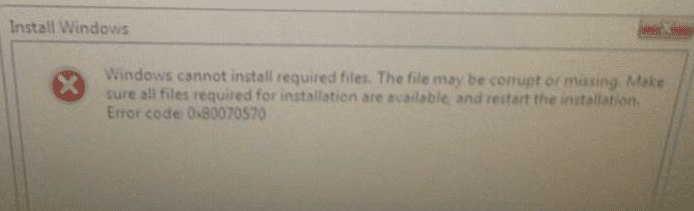
BAD NEWS - The UltraISO usb based install generated the install load driver error message below.

GOOD NEWS - I pulled out that USB and put in the thee ( ImgBrn/Univeral) ... I bought two new ones this morning jsut for this reason). The ImgBrn/Univeral usb based install did not generate any error messages. Saw three partitions to choose from ( like a few doesn posts ago), ie
-100MB reserver
-350 GB Primary
-550 Gb Unallocated

I selected the 350GB, Foramtted it, and it is now proceeding with the install...

BAD NEWS - The orignal error code 0x80070570 message (of several posst ago returned). See below.

NEXT STEPS - Okay, now I will pull the memory next to do the following
NEW HD + IMGBRIN USB INSTALL + 2GB MEM

if that fails I will try:


NEW HD + DELL WIN7 OEM + 2GB MEM

if that fails I will try

NEW HD + SYS RECOVERY DVDS + 2GB MEM

if that fails , I will put everythuing back otghter and call DELL, Hopefuy tehy wont capmain about the extra meemry and new HD. I assupose I can remove both, put back the hITACHI, then call for help.... but perhas one of teh baove three last ditch attempt will work.
 

Attachments

  • error2.PNG
    error2.PNG
    42.6 KB · Views: 2
  • ultraiso_error.PNG
    ultraiso_error.PNG
    119.4 KB · Views: 1

My Computer My Computer

At a glance

DELL Win 7 Home Premium 64 BitIntel Core i7-930 (8MB L2, 2.8GHz) // ntel Co...16GB // 18GB DDR3 SDRAM 1333Mhhz 6 DIMMS (3x2...AMD HD7570 // AMD Radeon HD6750 // ATI Radeon...
Computer type
PC/Desktop
Computer Manufacturer/Model Number
DELL XPS 8500 // DELL XPS Studio 9100 // DELL Dim 9200
OS
DELL Win 7 Home Premium 64 Bit
CPU
Intel Core i7-930 (8MB L2, 2.8GHz) // ntel Core 2 Quad Q6600
Motherboard
?? // Dell A02 BIOS // ??
Memory
16GB // 18GB DDR3 SDRAM 1333Mhhz 6 DIMMS (3x2, 3x4) //4 GB
Graphics Card(s)
AMD HD7570 // AMD Radeon HD6750 // ATI Radeon HD5670 1 GB GD
Sound Card
?? // THX TruStudio PC //?
Monitor(s) Displays
Dual Dell 2405 WFP-HC24 //SAmsung 27" // Triple 19" LCD
Screen Resolution
1900 x 1200
Hard Drives
Main :WD Caviar Black 1 TB SATA WD1002FAEX
Backup :WD Caviar Black 1 TB SATA WD1002FAEX
PSU
?? // Ultra 900W // ??
Didn't you successfully install with the Recovery Disks once before when the DVD failed?

I'd use them next if removing all but 2gb of RAM fails.

Remember to ground yourself by touching the case before touching the RAM. Don't force anything even if it takes too long.
 
Didn't you successfully install with the Recovery Disks once before when the DVD failed?

I'd use them next if removing all but 2gb of RAM fails.

Remember to ground yourself by touching the case before touching the RAM. Don't force anything even if it takes too long.

Yes, I did have success installing with the Recovery Disk,.. but then it could not do the Windows Updates....but that was with the old OEM HD.. and with full RAM.

I have never yet tried the Recovery Disks with the new drive, and certainly not with 2GB ram. We chatted about this earlier and decided used Ssytem Recovery DVDs should be last resort.

So are you are saying, of the choices below, try 1 and 3, but dont bother with 2??

1 NEW + IMGBURN USB INSTALL + 2GB MEM
2 NEW HD + DELL WIN7 OEM + 2GB MEM
3 NEW HD + SYS RECOVERY DVDS + 2GB MEM
 

My Computer My Computer

At a glance

DELL Win 7 Home Premium 64 BitIntel Core i7-930 (8MB L2, 2.8GHz) // ntel Co...16GB // 18GB DDR3 SDRAM 1333Mhhz 6 DIMMS (3x2...AMD HD7570 // AMD Radeon HD6750 // ATI Radeon...
Computer type
PC/Desktop
Computer Manufacturer/Model Number
DELL XPS 8500 // DELL XPS Studio 9100 // DELL Dim 9200
OS
DELL Win 7 Home Premium 64 Bit
CPU
Intel Core i7-930 (8MB L2, 2.8GHz) // ntel Core 2 Quad Q6600
Motherboard
?? // Dell A02 BIOS // ??
Memory
16GB // 18GB DDR3 SDRAM 1333Mhhz 6 DIMMS (3x2, 3x4) //4 GB
Graphics Card(s)
AMD HD7570 // AMD Radeon HD6750 // ATI Radeon HD5670 1 GB GD
Sound Card
?? // THX TruStudio PC //?
Monitor(s) Displays
Dual Dell 2405 WFP-HC24 //SAmsung 27" // Triple 19" LCD
Screen Resolution
1900 x 1200
Hard Drives
Main :WD Caviar Black 1 TB SATA WD1002FAEX
Backup :WD Caviar Black 1 TB SATA WD1002FAEX
PSU
?? // Ultra 900W // ??
Try all 3 now in that order. Report back exactly what happens.

RAM amount doesn't seem to affect Factory Recovery but memory may be causing the Update problems - or something in the factory image

This is why we should exhaust all steps to clean reinstall including applying a Win7 image made on another machine as a last resort - do you have either?
 
Ok, I removed all but 2GB, and proceeded with:
NEW + IMGBURN USB INSTALL + 2GB MEM

It successfuly completed with the full installation. HOWEVER, so did the
" OEM HD + SYS RECOVER DVD +FULL MEM" installation, which e know later failed and clobbered my machine on the Windwos Updates. .. but , taht was with a potentailly flayey drive and full RAM

OK, I will continue now with the true test - installing all windows updates, doing some restarts, and see it I get any of the isseud as per post 1 !

I will do all this with only the 2GB installed.

I will report back what happens.

(I may run into problems relating to drivers at some point ) - recall USB install does not quite have the same drivers as teh facotry install; the USB install has Windows only drivers)
.
NOTE - If successful, I still need to re-install the RAM. Once reseated, the next Windows update may clobber me again. I certainly do not want to remove memory each time there is a security patch. What is the game plan for that?? Is thrre a way, as a compromise, to lower thr available memory in thr BIOS? What is the common practice??? Do people really do this????
 

My Computer My Computer

At a glance

DELL Win 7 Home Premium 64 BitIntel Core i7-930 (8MB L2, 2.8GHz) // ntel Co...16GB // 18GB DDR3 SDRAM 1333Mhhz 6 DIMMS (3x2...AMD HD7570 // AMD Radeon HD6750 // ATI Radeon...
Computer type
PC/Desktop
Computer Manufacturer/Model Number
DELL XPS 8500 // DELL XPS Studio 9100 // DELL Dim 9200
OS
DELL Win 7 Home Premium 64 Bit
CPU
Intel Core i7-930 (8MB L2, 2.8GHz) // ntel Core 2 Quad Q6600
Motherboard
?? // Dell A02 BIOS // ??
Memory
16GB // 18GB DDR3 SDRAM 1333Mhhz 6 DIMMS (3x2, 3x4) //4 GB
Graphics Card(s)
AMD HD7570 // AMD Radeon HD6750 // ATI Radeon HD5670 1 GB GD
Sound Card
?? // THX TruStudio PC //?
Monitor(s) Displays
Dual Dell 2405 WFP-HC24 //SAmsung 27" // Triple 19" LCD
Screen Resolution
1900 x 1200
Hard Drives
Main :WD Caviar Black 1 TB SATA WD1002FAEX
Backup :WD Caviar Black 1 TB SATA WD1002FAEX
PSU
?? // Ultra 900W // ??
UPDATE

Still at 2GB. Generally very good so far in that many many updates and reboots were done without incident. In fact they did seem much faster ( but then again its a fresh install at new hard drive). but clearly low memory is good for updates!!

HOWEVER,

1) SP1 - Unlike previous version, is it not prompting me at all for Windows 7 SP1 update. I know this is not a known issue dicussed here : You do not have the option of downloading Windows 7 SP1 when you use Windows Update to check for updates , but I am curious why now?? All the other installs got passed this. Should I mannally intiiate it via this link ?

2) RAM - Per my note above, I still have my memory to put back Once reseated, the next big Windows update may clobber me again. I certainly do not want to remove memory each time there is a security patch. What is the game plan for that?? Is thrre a way, as a compromise, to lower thr available memory in thr BIOS? What is the common practice??? Do people really do this????

3) HOW MUCH IS TOO MUCH - Should I consder only putting back a max of 6GB... or 12GB .. or the full 18GB? At the time of purchase I did what I nomrally do, and that is I tend to buy (or plan to buy) the max memeory the unit can handle. This mnchine is for my home studio, so I was simply thinking ahead re recording software, control of studio equipment, music servers, streaming, videos, future home theatre use, etc But perhaps there is such a thing a too much memory. Nows a good time to downsize if thats the collective wisdom...


My Computer My Computer

At a glance

DELL Win 7 Home Premium 64 BitIntel Core i7-930 (8MB L2, 2.8GHz) // ntel Co...16GB // 18GB DDR3 SDRAM 1333Mhhz 6 DIMMS (3x2...AMD HD7570 // AMD Radeon HD6750 // ATI Radeon...
Computer type
PC/Desktop
Computer Manufacturer/Model Number
DELL XPS 8500 // DELL XPS Studio 9100 // DELL Dim 9200
OS
DELL Win 7 Home Premium 64 Bit
CPU
Intel Core i7-930 (8MB L2, 2.8GHz) // ntel Core 2 Quad Q6600
Motherboard
?? // Dell A02 BIOS // ??
Memory
16GB // 18GB DDR3 SDRAM 1333Mhhz 6 DIMMS (3x2, 3x4) //4 GB
Graphics Card(s)
AMD HD7570 // AMD Radeon HD6750 // ATI Radeon HD5670 1 GB GD
Sound Card
?? // THX TruStudio PC //?
Monitor(s) Displays
Dual Dell 2405 WFP-HC24 //SAmsung 27" // Triple 19" LCD
Screen Resolution
1900 x 1200
Hard Drives
Main :WD Caviar Black 1 TB SATA WD1002FAEX
Backup :WD Caviar Black 1 TB SATA WD1002FAEX
PSU
?? // Ultra 900W // ??
Windows Update will deliver many updates including Net Framework 4.0 and it's updates before delivering SP1. Just go with what it gives you, making sure to install the drivers delivered in optional Windows Updates promptly - in fact you can trust all optional WUD's. I wonder if lack of a driver caused your problem. I wouldn't rule out the excess RAM causing it although I've never heard of this before. I think it's good to leave it out until the updates are all installed.

I think you can reinstall all of the RAM but if problems crop up it should be suspect, tested with memtest86 for 5-6 passes or overnight, tried in different configurations, even taking some out systematically. I would consult our Hardware forum experts on this directly.
 
Windows Update will deliver many updates including Net Framework 4.0 and it's updates before delivering SP1. Just go with what it gives you.
Thats what I have been doing ; and I have 94 updates installed. I dont seem to have Net Framework : The.NET Framework 4 is available on Windows Update

...making sure to install the drivers delivered in optional Windows Updates promptly - in fact you can trust all optional WUD's. .
I think thats generral true. In one case for me, there is an optional upadate from a Realtex NIC driver whick renderws my NIC useless, so I now know not to downlaod that specific optional one.

. think it's good to leave it out until the updates are all installed.
[Re SP1] OK.. Will leave it alone and perhaps it will be offered up eventually.

I wouldn't rule out the excess RAM causing it....
Ya, me too. I am going to search the Dell forums as well to see if excess ram has come up. I can certainly put back 6GB and save the Kingston 12GB set for a future machine ( that will accept DDR3 SDRAM at 1333Mhhz)

Based on the history below, things do seem to point to execess memory
OEM HD + OEM DVD + FULL MEM = INSTALL SUCCESS BUT BUT CHKDSK ISSUES ON UPDATES
OEM HD + SYS RECOVER DVD +FULL MEM = INSTALL sucess BUT FAILS ON UPDATES
NEW HD + OEM DVD + FULL MEM = FAILS TO INSTALL
NEW HD + ULTRA ISO USB INSTALL + FULL MEM = FAILS TO START INSTALL
NEW HD + IMGBURN/UNIV USB INSTALL + FULL MEM = FAILS TO COMPLETE INSTALL
NEW HD + IMGBURN/UNIV USB INSTALL + 2GB RAM = INSTALL SUCCES INCL 94 WINDOWS UPDATES
-----
-----
Troubleshhoting Not tried (now not ncessary):
NEW HD + OEM DVD + 2GB MEM
NEW HD + SYS RECOVERY DVDS + 2GB MEM


NEXT STEPS
I will reseat remaining memory to either 6, 12 or 18GB levels and run some test on it as well

I will also test that Hitachi dirve if I can get the Ftiness test to recognize it ( maybe it will now), and if it fails, I will try to process a Dell warranty option claim for it. It if passes, fine , I pull put in 'stock'

STATUS
It would apprear I am back on track, (assuming my remaining Windwos update kick in and that CHKSDK cyckes does not return - if it does I will turn that 'feature' off per info in this thread. So I am hopefully will be on my way , I hope with without any future excitement.

THANK YOU
I want to sincerely thank you, and the other forum members who assisted, for the technical support, moral support and patience you have shown me here, getting things to a logcal conclusions A thousand thanks for sticking this out with me and giving me options I would have otherwise not tried. This was a long ordeal - I am certainly older now, but wiser now as well. Sincerely appreciate the effort extended.
 

My Computer My Computer

At a glance

DELL Win 7 Home Premium 64 BitIntel Core i7-930 (8MB L2, 2.8GHz) // ntel Co...16GB // 18GB DDR3 SDRAM 1333Mhhz 6 DIMMS (3x2...AMD HD7570 // AMD Radeon HD6750 // ATI Radeon...
Computer type
PC/Desktop
Computer Manufacturer/Model Number
DELL XPS 8500 // DELL XPS Studio 9100 // DELL Dim 9200
OS
DELL Win 7 Home Premium 64 Bit
CPU
Intel Core i7-930 (8MB L2, 2.8GHz) // ntel Core 2 Quad Q6600
Motherboard
?? // Dell A02 BIOS // ??
Memory
16GB // 18GB DDR3 SDRAM 1333Mhhz 6 DIMMS (3x2, 3x4) //4 GB
Graphics Card(s)
AMD HD7570 // AMD Radeon HD6750 // ATI Radeon HD5670 1 GB GD
Sound Card
?? // THX TruStudio PC //?
Monitor(s) Displays
Dual Dell 2405 WFP-HC24 //SAmsung 27" // Triple 19" LCD
Screen Resolution
1900 x 1200
Hard Drives
Main :WD Caviar Black 1 TB SATA WD1002FAEX
Backup :WD Caviar Black 1 TB SATA WD1002FAEX
PSU
?? // Ultra 900W // ??
Glad you got it installed.

We have seen RAM cause many installation issues.
If you are having any OS installation issues, take out all but one RAM card, 2GB RAM is good to install your OS with.
Then install the newest drivers from the Dell site, don't use the driver CD as they are older drivers (see driver comments below).
Then the MS updates, if all are good, you can re-install the RAM.

When you add RAM to an OEM (Dell, I have had several and still have two) there is the possibility of the RAM not being able to get enough voltage. On any OEM computer their BIOS won't allow you to adjust the voltage or frequency settings, one good thing is that they usually set the voltage fairly high, but, it might not be high enough for 18GB RAM.

If you have further issues try running with the original 6GB, if the system runs with no errors (crashes, failed updates, etc.) you can try running the 12GB (take out the 6GB first) and see if there are any errors.
If you have no issues with either the 6GB or 12GB RAM but problems with the 18GB RAM, the above reason will likely be the cause, not enough voltage for the RAM to run correctly.
With an OEM (Dell) system you have no choice but to run the amount of RAM the system settings will allow.

What are the brand, frequency, timings and stated voltage settings for the two different sets of RAM?

You can find these by downloading CPUZ and post a snip of the CPU, Mainboard, Memory, and SPD tabs for each set of RAM (SPD tab for each set of RAM, this is the manufacturers recommended/tested frequencies and timings).
For posting the information , enter 'Snipping tool' in the Start button > Search box, hit enter. Select the area you want to post and save to a convenient place.

How to Post a Screenshot in Seven Forums

This information will help us to determine if the two RAM sets are conflicting.
It is completely normal for RAM to pass memtest86+ several times and then show errors on the fifth or sixth run, it's just they way electronics are, intermittent errors can be very fickle.
This is why your system will run fine for a while and then under certain circumstances give errors/crashes, or blame other hardware/software as the cause.

If your system is running fine, the below suggestions are optional, if you are still having issues then try them.
Other issues I noticed while reading through the thread:
1. Always install your boot HDD in SATA port 0.
2.Your CD/DVD should be in any other SATA port, I wouldn't use any Marvell ports, just leave space for any additional HDD/SSD drives you might want to install later. Example: install the CD/DVD drive in SATA port 3.
3. Install the drivers from the Dell site, chipset driver first. I use the Intel RST drivers from the Intel site for my Dells and the graphics card drivers from the ATI/AMD site, all others should be from the Dell site. Unless you have added different non-Dell components, then get the latest drivers from their respective sites.

 
Last edited:

My Computer My Computer

At a glance

Windows 7 Ult x64 - SP1/ Windows 8 Pro x64Intel Core i5-3570K 4.6GHz8GB (2X4GB) DDR3 1600 Corsair Vengeance CL8 1.5vSapphire HD 7770 Vapor-X OC 1GB DDR5
Computer type
PC/Desktop
Computer Manufacturer/Model Number
76~2.0
OS
Windows 7 Ult x64 - SP1/ Windows 8 Pro x64
CPU
Intel Core i5-3570K 4.6GHz
Motherboard
Gigabyte GA-Z77X UD3H, f18
Memory
8GB (2X4GB) DDR3 1600 Corsair Vengeance CL8 1.5v
Graphics Card(s)
Sapphire HD 7770 Vapor-X OC 1GB DDR5
Sound Card
Onboard VIA VT2021
Monitor(s) Displays
22" LCD Dell
Screen Resolution
1680x1050
Hard Drives
Samsung 840Pro 128GB SSD,
Seagate Barracuda 500GB SATA2 7200rpm 32MB cache, Seagate Barracuda 1TB SATA2 7200rpm 32MB cache,
PSU
Corsair HX650W
Case
Cooler Master Storm Scout
Cooling
Corsair H80 2x12cm Noctua NF P12 , 2x14cm case fans
Keyboard
Logitech Wave
Mouse
CM Sentinel
Internet Speed
Dismal
Antivirus
Avast
Browser
Opera Next
Other Info
Haswell laptop: HP Envy 17t-j, i7-4700MQ, GeForce 740M 2GB DDR3, 17.3" Full HD 1920x1080, 16GB RAM, Samsung 840 Pro 128GB, 1TB Hitachi 7200 HDD,
Desktop: eSATA ports,
External eSATA Seagate 500GB SATA2 7200rpm,
External WD USB 500GB
:
1. Always install your boot HDD in SATA port 0.
2.Your CD/DVD should be in any other SATA port

that one may be easier said than done....

On the XPS Studio 9100, out of the factory, SATA 0 is the DVD and the DVD must phyisically sit in the factory position due to the case desgin. The cage it sits in is spefically marke ODD.. sopposed to HDD in other postions. So it can be only changed via the cabling.

There are only three typical SATA connectors .. all I can see doing is swap the cable connectors at the m/b end, but I dont knoe what other conflicts that will cause. May not be such a good idea...

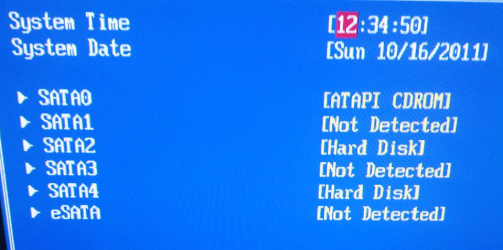
The blue cable currently goes to the DVD (SATA 0 in BIOS )
The black cable goes to the main drive ( factory position) S(ATA 2 in BIOS)
The red cable goes to the backup drive (SATA 4 in BIOS)

In this configuration, the BIOS reports the drives as shown below.

Is SATA0 for a hard drive that critical ??? is yes why does Dell specifically NOT to this???


(As an aside, I put the HITACHI drive in to do testing on it. But the HITACHI Fitness test does not recognize it or any other drive. Will have to use Dell or other other diagnostics)
 

Attachments

  • sata0.PNG
    sata0.PNG
    920.7 KB · Views: 1
  • sata0_bios.PNG
    sata0_bios.PNG
    245.4 KB · Views: 0
Last edited:

My Computer My Computer

At a glance

DELL Win 7 Home Premium 64 BitIntel Core i7-930 (8MB L2, 2.8GHz) // ntel Co...16GB // 18GB DDR3 SDRAM 1333Mhhz 6 DIMMS (3x2...AMD HD7570 // AMD Radeon HD6750 // ATI Radeon...
Computer type
PC/Desktop
Computer Manufacturer/Model Number
DELL XPS 8500 // DELL XPS Studio 9100 // DELL Dim 9200
OS
DELL Win 7 Home Premium 64 Bit
CPU
Intel Core i7-930 (8MB L2, 2.8GHz) // ntel Core 2 Quad Q6600
Motherboard
?? // Dell A02 BIOS // ??
Memory
16GB // 18GB DDR3 SDRAM 1333Mhhz 6 DIMMS (3x2, 3x4) //4 GB
Graphics Card(s)
AMD HD7570 // AMD Radeon HD6750 // ATI Radeon HD5670 1 GB GD
Sound Card
?? // THX TruStudio PC //?
Monitor(s) Displays
Dual Dell 2405 WFP-HC24 //SAmsung 27" // Triple 19" LCD
Screen Resolution
1900 x 1200
Hard Drives
Main :WD Caviar Black 1 TB SATA WD1002FAEX
Backup :WD Caviar Black 1 TB SATA WD1002FAEX
PSU
?? // Ultra 900W // ??
Is SATA0 for a hard drive that critical ??? is yes why does Dell specifically NOT to this???
No it's not, guys that have been building for some time usually go to SATA0 out of habit as do I, but it's not necessary...
 

My Computer My Computer

At a glance

Windows 7 Ultimate (64)i7-2600KG.SKILL Ripjaws X Series 8GB (2 x 4GB)ATI 5750
Computer Manufacturer/Model Number
Home Grown
OS
Windows 7 Ultimate (64)
CPU
i7-2600K
Motherboard
Asus P8P67-M Pro
Memory
G.SKILL Ripjaws X Series 8GB (2 x 4GB)
Graphics Card(s)
ATI 5750
Sound Card
On-Board
Monitor(s) Displays
LG W2486L
Screen Resolution
1920X1080
Hard Drives
Intel X-25M 80 Gig SSD | Intel X-25M 160 Gig SSD | WD Black 500MB - External eSata
PSU
Zalman ZM770-XT 770 Watts
Case
Antec 180 mini
Cooling
Cooler Master V8
Internet Speed
15MB - Cable
Other Info
Sissy OC - 4.6 @ 1.3175 24/7 | 18' Idle - 55' Load
OH NO -- WE WERE SO CLOSE ....

Man, we were so close. As noted above, devil is in the Windows updates success. Issue is SP1.

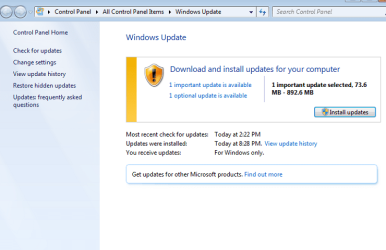
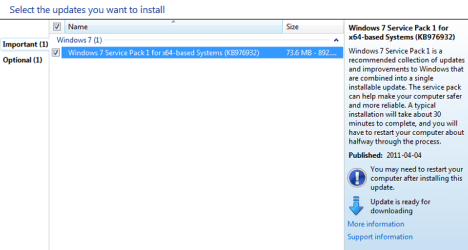
THE GOOD NEWS - I actually finally did get the SP1 prompt. All it took was for me to power down. Windows did its 'configuring" thing on power down and on the next restart, I checked Windows Update and sure enough there it was ready for download. (The other optional one listed is the NIC driver which clobbers me)

THE BAD NEWS

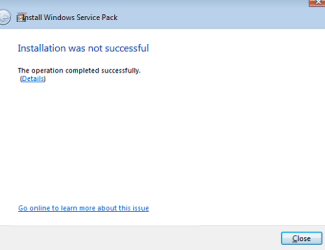
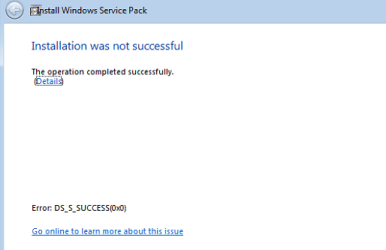
Attempt 1 - I started the update process with the download, let it install and it prompted for a restart. On the restart I got teh error message below . very cryptic as you can see , it says both failure and success.

Attempt 2- I closed the cryptic message went to Windows Update and the SP1 update was still listed there, ready for download. Tried it again, same exact problem.

Attempt 3 - So this time I powered down,, then powered up, went to windows update. Again SP1 update was still listed there ready for download. Thats where I am now.

Needless to say this is dissapointing after all the efforts to date.

OK, the machine currently has the orignal Dell 6 GB of RAM installed, as I has started reseating the memory after the first 94 updates.

I suppose the next step it go back to 2 GB?? I can, and will, but again as I do not want to do this every time, can it be dialed back to 2GB in the BIOS ??
 

Attachments

  • sp1.PNG
    sp1.PNG
    6.6 KB · Views: 2
  • sp1_2.PNG
    sp1_2.PNG
    8.4 KB · Views: 3
  • sp1_3.PNG
    sp1_3.PNG
    39.5 KB · Views: 3
  • sp1_4.PNG
    sp1_4.PNG
    38 KB · Views: 4

My Computer My Computer

At a glance

DELL Win 7 Home Premium 64 BitIntel Core i7-930 (8MB L2, 2.8GHz) // ntel Co...16GB // 18GB DDR3 SDRAM 1333Mhhz 6 DIMMS (3x2...AMD HD7570 // AMD Radeon HD6750 // ATI Radeon...
Computer type
PC/Desktop
Computer Manufacturer/Model Number
DELL XPS 8500 // DELL XPS Studio 9100 // DELL Dim 9200
OS
DELL Win 7 Home Premium 64 Bit
CPU
Intel Core i7-930 (8MB L2, 2.8GHz) // ntel Core 2 Quad Q6600
Motherboard
?? // Dell A02 BIOS // ??
Memory
16GB // 18GB DDR3 SDRAM 1333Mhhz 6 DIMMS (3x2, 3x4) //4 GB
Graphics Card(s)
AMD HD7570 // AMD Radeon HD6750 // ATI Radeon HD5670 1 GB GD
Sound Card
?? // THX TruStudio PC //?
Monitor(s) Displays
Dual Dell 2405 WFP-HC24 //SAmsung 27" // Triple 19" LCD
Screen Resolution
1900 x 1200
Hard Drives
Main :WD Caviar Black 1 TB SATA WD1002FAEX
Backup :WD Caviar Black 1 TB SATA WD1002FAEX
PSU
?? // Ultra 900W // ??
Please provide the details from the highlighted link on error message.

Next I would try the SP1 standalone installer to see what happens.

Then try with 2gb of RAM as it solved the install and some Updates issues.

If necessary open a Support case on WUD website via email as it may be a known issue to them.
 
Please provide the details from the highlighted link on error message.
Its the second pic, at the bottom . It says " Error DS_S_SUCCESS(0x0)

Next I would try the SP1 standalone installer to see what happens.
OK, per URL a few post back. Will do. Good idea.

Then try with 2gb of RAM as it solved the install and some Updates issues.
Yup ok. - I gather there is nothing in the BIOS I can set.
 

My Computer My Computer

At a glance

DELL Win 7 Home Premium 64 BitIntel Core i7-930 (8MB L2, 2.8GHz) // ntel Co...16GB // 18GB DDR3 SDRAM 1333Mhhz 6 DIMMS (3x2...AMD HD7570 // AMD Radeon HD6750 // ATI Radeon...
Computer type
PC/Desktop
Computer Manufacturer/Model Number
DELL XPS 8500 // DELL XPS Studio 9100 // DELL Dim 9200
OS
DELL Win 7 Home Premium 64 Bit
CPU
Intel Core i7-930 (8MB L2, 2.8GHz) // ntel Core 2 Quad Q6600
Motherboard
?? // Dell A02 BIOS // ??
Memory
16GB // 18GB DDR3 SDRAM 1333Mhhz 6 DIMMS (3x2, 3x4) //4 GB
Graphics Card(s)
AMD HD7570 // AMD Radeon HD6750 // ATI Radeon HD5670 1 GB GD
Sound Card
?? // THX TruStudio PC //?
Monitor(s) Displays
Dual Dell 2405 WFP-HC24 //SAmsung 27" // Triple 19" LCD
Screen Resolution
1900 x 1200
Hard Drives
Main :WD Caviar Black 1 TB SATA WD1002FAEX
Backup :WD Caviar Black 1 TB SATA WD1002FAEX
PSU
?? // Ultra 900W // ??

My Computer My Computer

At a glance

DELL Win 7 Home Premium 64 BitIntel Core i7-930 (8MB L2, 2.8GHz) // ntel Co...16GB // 18GB DDR3 SDRAM 1333Mhhz 6 DIMMS (3x2...AMD HD7570 // AMD Radeon HD6750 // ATI Radeon...
Computer type
PC/Desktop
Computer Manufacturer/Model Number
DELL XPS 8500 // DELL XPS Studio 9100 // DELL Dim 9200
OS
DELL Win 7 Home Premium 64 Bit
CPU
Intel Core i7-930 (8MB L2, 2.8GHz) // ntel Core 2 Quad Q6600
Motherboard
?? // Dell A02 BIOS // ??
Memory
16GB // 18GB DDR3 SDRAM 1333Mhhz 6 DIMMS (3x2, 3x4) //4 GB
Graphics Card(s)
AMD HD7570 // AMD Radeon HD6750 // ATI Radeon HD5670 1 GB GD
Sound Card
?? // THX TruStudio PC //?
Monitor(s) Displays
Dual Dell 2405 WFP-HC24 //SAmsung 27" // Triple 19" LCD
Screen Resolution
1900 x 1200
Hard Drives
Main :WD Caviar Black 1 TB SATA WD1002FAEX
Backup :WD Caviar Black 1 TB SATA WD1002FAEX
PSU
?? // Ultra 900W // ??
OK, the machine currently has the orignal Dell 6 GB of RAM installed, as I has started reseating the memory after the first 94 updates.

I suppose the next step it go back to 2 GB?? I can, and will, but again as I do not want to do this every time, can it be dialed back to 2GB in the BIOS ??
Your comments suggest that you're thinking the updates failed because of "Too Much Ram", don't think so. It's much more likely that one of the original (Dell) ram sticks has failed. Why not remove all the dell ram and run with the newer ram you purchased? IMO everything in the thread points to a hardware issue, particularly ram, yet it could also be one of the memory slots. Removing all the dell ram gets you one step closer the identifying the problem since the problems returned after adding ram back...

Keep in mind every time the box crashes you're take the risk of file corruption, therefore you reduce the chance of properly isolating the problem. I'm not certain why you started adding ram back before you finished loading drivers and completing updates. If you would have waited until the box was completely updated you could have started testing and loading up the box with Prime95 or whatever to ensure it was stable before adding ram back (one stick at a time), then more testing, and finally loading apps.

I’m certain you’re frustrated and tired of looking at it, but if you’re still having issues you may have to start over again. Considering you can load the OS, install all drivers, and do all updates in less than an hour, that's probably significantly less time than trouble shooting again, the current issues.
 

My Computer My Computer

At a glance

Windows 7 Ultimate (64)i7-2600KG.SKILL Ripjaws X Series 8GB (2 x 4GB)ATI 5750
Computer Manufacturer/Model Number
Home Grown
OS
Windows 7 Ultimate (64)
CPU
i7-2600K
Motherboard
Asus P8P67-M Pro
Memory
G.SKILL Ripjaws X Series 8GB (2 x 4GB)
Graphics Card(s)
ATI 5750
Sound Card
On-Board
Monitor(s) Displays
LG W2486L
Screen Resolution
1920X1080
Hard Drives
Intel X-25M 80 Gig SSD | Intel X-25M 160 Gig SSD | WD Black 500MB - External eSata
PSU
Zalman ZM770-XT 770 Watts
Case
Antec 180 mini
Cooling
Cooler Master V8
Internet Speed
15MB - Cable
Other Info
Sissy OC - 4.6 @ 1.3175 24/7 | 18' Idle - 55' Load
Your comments suggest that you're thinking the updates failed because of "Too Much Ram", don't think so. It's much more likely that one of the original (Dell) ram sticks has failed.

Thats of course quite possible. All the mem tests to test did however pass. The 'too much ram" is certainly not an idea or concept I can take credit for. This thread has advised me a dozen times that pulling all the memory except 2GB ofter addresses the issue. Was not my thought at all. I was the first to express surprise . memory failures - yup much more plausibe.... but even that would be really strange that I woold not see that impact on any application except a Windows Update. .. and the Dell diagnostic would not see it either.

Why not remove all the dell ram and run with the newer ram you purchased?
Sure, I can do that. Likely the next logical step. Advice to date was to start with the original Dell 6GB and work my way up. But I can certainly do the opposite and start with the new memory instead.

I'm not certain why you started adding ram back before you finished loading drivers and completing updates. If you would have waited .....
Whoa . With all due respect, thats a completely unfair comment. I specically folowed every instruction, direction, suggestion here, in the right order and asked a thousand questions along the way, including tre question of when to start putting back the ram in post 51. I thinl it was post 68 that said "I think you can reinstall all of the RAM but if problems crop up it should be suspect". As well, "completing updates" is not a fixed endpoint. Updates never end. At that rate I would never be able to put the RAM back. In hindsight, perhaps the advice should have been to not reinstall RAM until SP1 is fully installed.


I’m certain you’re frustrated and tired of looking at it, but if you’re still having issues you may have to start over again.
Frustrated and tired are understatments. I'm exhauted. I'm beated down and worn out. I'm disaapointed. I'm seconds from throwing in the towel. I gave it more than a good shot. I put up a good fight. But sometimes you need to know fold up and to walk away. A beginner would have done so 5 dozen posts ago. Starting all over again? I dont think so. If I cannot solve this , with forom help, then there is only one option left and thats put Dell only hardware back, throw it in the car, drive to Dell (wherever that is), before my warranty expires in 80 days, and tell them SP1 cannot be installed (even though months back it did). I can tell them I suspect its a RAM stick or a memory slot or the harddrive. They likely have a slipstreamed DVD and will simply and sucessfuly load it without issue and not even test the hardware (which by the way passed the Dell diagnostics)
Considering you can load the OS, install all drivers, and do all updates in less than an hour, that's probably significantly less time than trouble shooting again, the current issues.
Less than an hour??? From USB or DVD install to SP1? I think its a lot longer than that...and besides, all that "is" troubleshooting". No, this ship has sailed. I am 'so' done. I will play with the memory one and try the last set gregrocker options, but I will not start over again and again and again. Been there done that. It s too much. You guys have been great, but i think we need to cut our losses if the "new" memory doesnt help.
 
Last edited:

My Computer My Computer

At a glance

DELL Win 7 Home Premium 64 BitIntel Core i7-930 (8MB L2, 2.8GHz) // ntel Co...16GB // 18GB DDR3 SDRAM 1333Mhhz 6 DIMMS (3x2...AMD HD7570 // AMD Radeon HD6750 // ATI Radeon...
Computer type
PC/Desktop
Computer Manufacturer/Model Number
DELL XPS 8500 // DELL XPS Studio 9100 // DELL Dim 9200
OS
DELL Win 7 Home Premium 64 Bit
CPU
Intel Core i7-930 (8MB L2, 2.8GHz) // ntel Core 2 Quad Q6600
Motherboard
?? // Dell A02 BIOS // ??
Memory
16GB // 18GB DDR3 SDRAM 1333Mhhz 6 DIMMS (3x2, 3x4) //4 GB
Graphics Card(s)
AMD HD7570 // AMD Radeon HD6750 // ATI Radeon HD5670 1 GB GD
Sound Card
?? // THX TruStudio PC //?
Monitor(s) Displays
Dual Dell 2405 WFP-HC24 //SAmsung 27" // Triple 19" LCD
Screen Resolution
1900 x 1200
Hard Drives
Main :WD Caviar Black 1 TB SATA WD1002FAEX
Backup :WD Caviar Black 1 TB SATA WD1002FAEX
PSU
?? // Ultra 900W // ??
Back
Top