CHKDSK Stuck on same file during stage 4/5 for 15+ hours

lanboy

New member
Local time
3:01 AM
Messages
5
Hi,

Thanks for your time and help in advance. Here's what happened:

I've been getting some corrupted files on download, especially when using a DL program called JDownloader; some people in related forums mentioned that checking the disk via CHKDSK solved the problem, and I decided to do a check on my data partition (D:\). My OS and all system files are on partition (C:\) of the same 1TB HDD. I've run chkdsk on the C: partition before with no issues, but first time running it for the D: partition.

I knew that CHKDSK would take a while to run, so I left it alone. But when I came back to check, it had been stuck on

CHKDSK is verifying file data (stage 4 of 5)...
10 percent complete. (20162 of 47600 files processed)

The previous stages were all reported as completed and no error is shown. It has been stuck on this particular file (20162 of 47600) for at least 15 hours now--since I came back to check on it, I don't know how long it's been stuck there before I came to check.

More importantly, the HDD activity light is not blinking at all. However, the HDD is still spinning (I checked by opening the case and feeling the HDD's vibration). It doesn't appear to be making any of the read/access sounds that it usually makes, however.

Some additional info:
- Everything, other than the download/corrupt file problem I mention above, had been running smoothly. I had no reason to suspect any HDD issues; wanted to run CHKDSK just to figure out if it is the cause of the corrupt downloads.
- I partitioned the 1TB partition into two equal portions. This particular partition (D:\) has about ~120GB free space left.

Please let me know what I should do in this circumstance. I'm tempted to reset the computer but fear aborting CHKDSK would cause issues. I don't mind waiting, but with the HDD light not blinking at all, I fear that even if I keep waiting it will just continue to be stuck at that point.
 

My Computer My Computer

Computer type
PC/Desktop
Computer Manufacturer/Model Number
Custom build
OS
Windows 7 Professional 64bit
CPU
Intel i5 2500K 3.3 Ghz
Motherboard
ASUS SABERTOOTH P67
Memory
4GBx2|GSKILL F3-12800CL9D
Graphics Card(s)
MSI GeForce GTX 560 Ti (Fermi) N560GTX-TI Twin Frozr II/OC
Hard Drives
1TB|WD SATAIII WD1002FAEX
Antivirus
Microsoft Security Essentials
Browser
Google Chrome

My Computer My Computer

Computer type
PC/Desktop
Computer Manufacturer/Model Number
Own build (new) Desk1 / Asus ROG Win 7 / Desk2 1st build
OS
Desk1 7 Home Prem / Desk2 10 Pro / Main lap Asus ROG 10 Pro 2 laptop Toshiba 7 Pro Asus P2520 7 & 10
CPU
Desk1 i5 3750K / Laptop i7 GTX 860M / Desk2 i5 2500
Motherboard
Desk1 Asus P877-V / Desk2 Gigabyte H67 UD3H / Laptop ?
Memory
Desk1 8GB (1866) / Desk2 16GB (1333) / Laptop 8Gb DDR3
Graphics Card(s)
Desk 1& 2NVidia GTX 650 & Laptops on board Intel
Sound Card
Desk 1 & 2 -XONAR DG Realtek High Def audio Laptop
Monitor(s) Displays
Desk 1 Benq HD 2450 / Desk2 Philips 24" / Laptop 17.5"
Screen Resolution
1920x1080 D1 & D2 & Laptop 1
Hard Drives
Desk1 Samsung 120GB 830 SSD
Asus ROG 256GB 850 Pro SSD
Desk2 Samsung 840 256 SSD
Toshiba 120GB EVO
PSU
Desk 1 Corsair HX 1050/ Laptop ? / Desk 2 Corsair HX 650
Case
Desk 1 Cooler HAF XM ? Toshiba laptop / Desk2 Coolermaster
Cooling
Fans on all Desk1 -2 Desk2 - all Coolermasters 5 Laptop ?
Keyboard
Desk 1 MS Sidewinder X6 Desk 2 MS Sidewinder X 4
Mouse
Desk 1&2 - Gigabyte MS 900 gamer - laptop - Logitec wireless
Internet Speed
ADSL2+
Other Info
One other Desktop (tester) and spare Toshba laptop both with SSD's
Running Kaspersky 2016 ISS on all machines config'd identically
Logitec audio stereo systems on each machine (x3)
Canon MG5250MFC
Router/modem TP-Link running WPA2SK
Thanks for the reply; sorry if I don't fully understand your suggestion, but it doesn't seem to address my immediate problem. By now CHKDSK has been stuck on that same file for 24+ hours. Do I abort it or keep on waiting it to finish? What kind of damage could I cause if I abort it?
 

My Computer My Computer

Computer type
PC/Desktop
Computer Manufacturer/Model Number
Custom build
OS
Windows 7 Professional 64bit
CPU
Intel i5 2500K 3.3 Ghz
Motherboard
ASUS SABERTOOTH P67
Memory
4GBx2|GSKILL F3-12800CL9D
Graphics Card(s)
MSI GeForce GTX 560 Ti (Fermi) N560GTX-TI Twin Frozr II/OC
Hard Drives
1TB|WD SATAIII WD1002FAEX
Antivirus
Microsoft Security Essentials
Browser
Google Chrome
Well I would go ahead and abort it the other scans were the normal stuff I always use the SFC is the other Windows check the others obviously for malware.

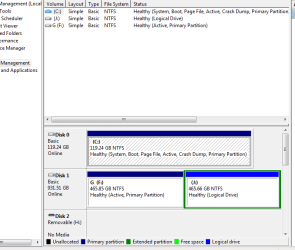
Can you send a pic of the disk management as in the pic
 

Attachments

  • MANAGE.PNG
    MANAGE.PNG
    13.5 KB · Views: 12

My Computer My Computer

Computer type
PC/Desktop
Computer Manufacturer/Model Number
Own build (new) Desk1 / Asus ROG Win 7 / Desk2 1st build
OS
Desk1 7 Home Prem / Desk2 10 Pro / Main lap Asus ROG 10 Pro 2 laptop Toshiba 7 Pro Asus P2520 7 & 10
CPU
Desk1 i5 3750K / Laptop i7 GTX 860M / Desk2 i5 2500
Motherboard
Desk1 Asus P877-V / Desk2 Gigabyte H67 UD3H / Laptop ?
Memory
Desk1 8GB (1866) / Desk2 16GB (1333) / Laptop 8Gb DDR3
Graphics Card(s)
Desk 1& 2NVidia GTX 650 & Laptops on board Intel
Sound Card
Desk 1 & 2 -XONAR DG Realtek High Def audio Laptop
Monitor(s) Displays
Desk 1 Benq HD 2450 / Desk2 Philips 24" / Laptop 17.5"
Screen Resolution
1920x1080 D1 & D2 & Laptop 1
Hard Drives
Desk1 Samsung 120GB 830 SSD
Asus ROG 256GB 850 Pro SSD
Desk2 Samsung 840 256 SSD
Toshiba 120GB EVO
PSU
Desk 1 Corsair HX 1050/ Laptop ? / Desk 2 Corsair HX 650
Case
Desk 1 Cooler HAF XM ? Toshiba laptop / Desk2 Coolermaster
Cooling
Fans on all Desk1 -2 Desk2 - all Coolermasters 5 Laptop ?
Keyboard
Desk 1 MS Sidewinder X6 Desk 2 MS Sidewinder X 4
Mouse
Desk 1&2 - Gigabyte MS 900 gamer - laptop - Logitec wireless
Internet Speed
ADSL2+
Other Info
One other Desktop (tester) and spare Toshba laptop both with SSD's
Running Kaspersky 2016 ISS on all machines config'd identically
Logitec audio stereo systems on each machine (x3)
Canon MG5250MFC
Router/modem TP-Link running WPA2SK
Last edited:
Great, I will do those and get back to you. Thanks!
 

My Computer My Computer

Computer type
PC/Desktop
Computer Manufacturer/Model Number
Custom build
OS
Windows 7 Professional 64bit
CPU
Intel i5 2500K 3.3 Ghz
Motherboard
ASUS SABERTOOTH P67
Memory
4GBx2|GSKILL F3-12800CL9D
Graphics Card(s)
MSI GeForce GTX 560 Ti (Fermi) N560GTX-TI Twin Frozr II/OC
Hard Drives
1TB|WD SATAIII WD1002FAEX
Antivirus
Microsoft Security Essentials
Browser
Google Chrome

Attachments

  • TEST.PNG
    TEST.PNG
    42.5 KB · Views: 3

My Computer My Computer

Computer type
PC/Desktop
Computer Manufacturer/Model Number
Own build (new) Desk1 / Asus ROG Win 7 / Desk2 1st build
OS
Desk1 7 Home Prem / Desk2 10 Pro / Main lap Asus ROG 10 Pro 2 laptop Toshiba 7 Pro Asus P2520 7 & 10
CPU
Desk1 i5 3750K / Laptop i7 GTX 860M / Desk2 i5 2500
Motherboard
Desk1 Asus P877-V / Desk2 Gigabyte H67 UD3H / Laptop ?
Memory
Desk1 8GB (1866) / Desk2 16GB (1333) / Laptop 8Gb DDR3
Graphics Card(s)
Desk 1& 2NVidia GTX 650 & Laptops on board Intel
Sound Card
Desk 1 & 2 -XONAR DG Realtek High Def audio Laptop
Monitor(s) Displays
Desk 1 Benq HD 2450 / Desk2 Philips 24" / Laptop 17.5"
Screen Resolution
1920x1080 D1 & D2 & Laptop 1
Hard Drives
Desk1 Samsung 120GB 830 SSD
Asus ROG 256GB 850 Pro SSD
Desk2 Samsung 840 256 SSD
Toshiba 120GB EVO
PSU
Desk 1 Corsair HX 1050/ Laptop ? / Desk 2 Corsair HX 650
Case
Desk 1 Cooler HAF XM ? Toshiba laptop / Desk2 Coolermaster
Cooling
Fans on all Desk1 -2 Desk2 - all Coolermasters 5 Laptop ?
Keyboard
Desk 1 MS Sidewinder X6 Desk 2 MS Sidewinder X 4
Mouse
Desk 1&2 - Gigabyte MS 900 gamer - laptop - Logitec wireless
Internet Speed
ADSL2+
Other Info
One other Desktop (tester) and spare Toshba laptop both with SSD's
Running Kaspersky 2016 ISS on all machines config'd identically
Logitec audio stereo systems on each machine (x3)
Canon MG5250MFC
Router/modem TP-Link running WPA2SK
+1 on running Partition Wizard. I had a similar issue, chkdsk would freeze near the end of the test when it encountered a bad sector, it did this repeatedly. I ran PW surface check, did the repair and it fixed the problem, the hdd has been perfect since then.
 

My Computer My Computer

Computer type
PC/Desktop
Computer Manufacturer/Model Number
Custom, Dell and Lenono LT's
OS
Win8/8.1,Win7-U64, Vista U64, uncounted Linux distor's
CPU
AMD and Intell, 9590, 8350, i5 3570k
Motherboard
CFVFZ, GA990FXA, Z77e-itx
Memory
Corsair G Skill
Graphics Card(s)
Crossfired Sapphire HD 7950 Vapor-X, ASUS R9 280X TOP
Sound Card
Realtek ALC889
Monitor(s) Displays
ViewSonic VX2770SMH 27" / ViewSonic VX2433 LCD 24"
Screen Resolution
1080i HD
Hard Drives
Samsung SSD 840 Pro
OCZ Agility 3's
OCZ Vector's
WD's Blue, red, green, Velociraptors
Seagate USB3 & Hybrid's
ASUS Blu-Ray
ASUS DVD
PSU
Corsair AX1200i, Seasonice 850 Gold
Case
Cooler Master HAF 922 & HAF 932, Lian Li Train case.
Cooling
Air, Glacer 240L expanded, custom EK loop with duel D5's
Keyboard
Microsoft SideWinder X4 USB Keyboard / Logitech 250 PS2
Mouse
Logitech G500 / MS wireless 5000
Internet Speed
Best of 5ms / 75+ dn / 12+ up More or less.
Antivirus
MS esentials-MalwareBytes
Browser
Firefox Chromebook
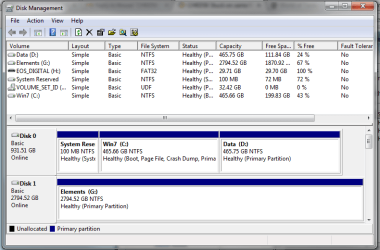
Sorry for getting back to you guys so slowly; I've done all of the things you guys suggested, and none of the scans found any problems (though adwcleaner did find a bunch of tracking cookies and removed them).

I've also attached of the disk management screen as requested. I did a Partition Wizard CD Partition surface test and it found no errors. I also ran Western Digital's HD diagnostic tool, and it also found no errors.

I have not yet done the suggested HD Diagnostic extended CD scan -- just because I don't have any blank CDs handy to burn a boot disk, but will do so as soon as I get some.

Also, recently I noticed that the HDD chatter/clicking has been getting louder. I don't know if this is just because I'm becoming more self-conscious of the HDD noise. The chatter is loudest during boot-up, and it'll also occur from time to time while I'm using the computer. I'm not sure how to describe it (maybe almost like a scratching sound?), but it def doesn't sound normal in my opinion.

disk_management.png
 

My Computer My Computer

Computer type
PC/Desktop
Computer Manufacturer/Model Number
Custom build
OS
Windows 7 Professional 64bit
CPU
Intel i5 2500K 3.3 Ghz
Motherboard
ASUS SABERTOOTH P67
Memory
4GBx2|GSKILL F3-12800CL9D
Graphics Card(s)
MSI GeForce GTX 560 Ti (Fermi) N560GTX-TI Twin Frozr II/OC
Hard Drives
1TB|WD SATAIII WD1002FAEX
Antivirus
Microsoft Security Essentials
Browser
Google Chrome
Please follow the steps in Disk Management - Post a Screen Capture Image so that we see all columns and don't have to guess which is the Active partition. Until we know the Active flag is there (since you hid it by not maximizing the window) we can't even tell you its correct.

If you're sure the HD is making the noise then I'd do the bootable CD scan although you'll have to use Seagate Seatools because Western Digital hasn't posted theirs up for some time now. Burn to CD using Windows Image Burner. There is also WD scan on Hirens Boot Disk.
 
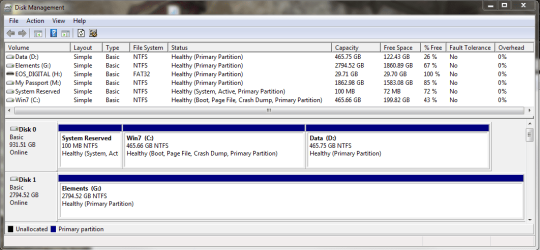
Sure, no problem, here it is. I just didn't know exactly what info was needed.

disk_management.png
 

My Computer My Computer

Computer type
PC/Desktop
Computer Manufacturer/Model Number
Custom build
OS
Windows 7 Professional 64bit
CPU
Intel i5 2500K 3.3 Ghz
Motherboard
ASUS SABERTOOTH P67
Memory
4GBx2|GSKILL F3-12800CL9D
Graphics Card(s)
MSI GeForce GTX 560 Ti (Fermi) N560GTX-TI Twin Frozr II/OC
Hard Drives
1TB|WD SATAIII WD1002FAEX
Antivirus
Microsoft Security Essentials
Browser
Google Chrome
Sorry for getting back to you guys so slowly; I've done all of the things you guys suggested, and none of the scans found any problems (though adwcleaner did find a bunch of tracking cookies and removed them).

I've also attached of the disk management screen as requested. I did a Partition Wizard CD Partition surface test and it found no errors. I also ran Western Digital's HD diagnostic tool, and it also found no errors.

I have not yet done the suggested HD Diagnostic extended CD scan -- just because I don't have any blank CDs handy to burn a boot disk, but will do so as soon as I get some.

Also, recently I noticed that the HDD chatter/clicking has been getting louder. I don't know if this is just because I'm becoming more self-conscious of the HDD noise. The chatter is loudest during boot-up, and it'll also occur from time to time while I'm using the computer. I'm not sure how to describe it (maybe almost like a scratching sound?), but it def doesn't sound normal in my opinion.

View attachment 292354
Just how loud is this clatter lanboy you should hear some slight clicking/fluttering and the disk spinning but loud clatter does not seem right to me at least.
 

My Computer My Computer

Computer type
PC/Desktop
Computer Manufacturer/Model Number
Own build (new) Desk1 / Asus ROG Win 7 / Desk2 1st build
OS
Desk1 7 Home Prem / Desk2 10 Pro / Main lap Asus ROG 10 Pro 2 laptop Toshiba 7 Pro Asus P2520 7 & 10
CPU
Desk1 i5 3750K / Laptop i7 GTX 860M / Desk2 i5 2500
Motherboard
Desk1 Asus P877-V / Desk2 Gigabyte H67 UD3H / Laptop ?
Memory
Desk1 8GB (1866) / Desk2 16GB (1333) / Laptop 8Gb DDR3
Graphics Card(s)
Desk 1& 2NVidia GTX 650 & Laptops on board Intel
Sound Card
Desk 1 & 2 -XONAR DG Realtek High Def audio Laptop
Monitor(s) Displays
Desk 1 Benq HD 2450 / Desk2 Philips 24" / Laptop 17.5"
Screen Resolution
1920x1080 D1 & D2 & Laptop 1
Hard Drives
Desk1 Samsung 120GB 830 SSD
Asus ROG 256GB 850 Pro SSD
Desk2 Samsung 840 256 SSD
Toshiba 120GB EVO
PSU
Desk 1 Corsair HX 1050/ Laptop ? / Desk 2 Corsair HX 650
Case
Desk 1 Cooler HAF XM ? Toshiba laptop / Desk2 Coolermaster
Cooling
Fans on all Desk1 -2 Desk2 - all Coolermasters 5 Laptop ?
Keyboard
Desk 1 MS Sidewinder X6 Desk 2 MS Sidewinder X 4
Mouse
Desk 1&2 - Gigabyte MS 900 gamer - laptop - Logitec wireless
Internet Speed
ADSL2+
Other Info
One other Desktop (tester) and spare Toshba laptop both with SSD's
Running Kaspersky 2016 ISS on all machines config'd identically
Logitec audio stereo systems on each machine (x3)
Canon MG5250MFC
Router/modem TP-Link running WPA2SK
Back
Top