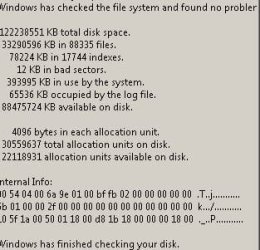
Chkdsk - X Number Kilobytes in Bad Sectors

dw85745

New member
Member
VIP
Local time
8:10 AM
Messages
199
Error Received
Ran Chkdsk on C Drive.
Received result of 12 Kilobytes in Bad Sectors.
See Image at End


Ran Western Digital Diagnostics
1) SMART Passed
2) Quick Test Passed
3) Extended Test Passed

Appear Hard Disk OK

Returned with No Errors

Per Other Thread This Forum
Indicated Possibly Windows Update caused corruption (maybe sometime back)
Suggested Run SFFix.
Author of SFFix is Unknown, hence concern over software usage and what it does?

Questions
1) Where to go from here?
IMHO not a HD issue, but a OS issue of some type.
2) Anyone know how to get - or - where to go for SFC log?
Also will "|" or ">" work with either Chkdsk or SFC?
 

Attachments

  • Chkdsk_C_20170826.JPG
    Chkdsk_C_20170826.JPG
    28.3 KB · Views: 33
Last edited:

My Computer My Computer

At a glance

Win 7 Pro x32Intel I5-4690K8 GBOn Board
Computer type
PC/Desktop
Computer Manufacturer/Model Number
build -
OS
Win 7 Pro x32
CPU
Intel I5-4690K
Motherboard
ASUS H-97Plus
Memory
8 GB
Graphics Card(s)
On Board
Sound Card
On Board
Other Info
ASUS MOBO Issues never resolved even by ASUS:
1) MOBO will NOT boot from other than the Default HDD drive.
2) MOBO will NOT boot Most DOS based CDs
There are two types of disk errors one is file coruption which isn't a hardware fault just Windows getting files mixed up and fixed by chkdsk or format. The second is hardware failure which is what you have the actual disk has a fault on some parts. By default any bad sector is remapped to engineering tracks and you don't see them only when that's full do you see errors so it means there are lots of errors. They can't be repaired and will get worse and the disk will fail. You need to replace the disk and do a clean install. On no account try cloning the drive as that will copy bad sectors to a new drive
 

My Computer My Computer

At a glance

win 8 32 bit
Computer type
PC/Desktop
OS
win 8 32 bit
samuria: Thanks for your response. Not to be contrary, but I question the need for an HD Replacement. That seems (number posts I've read) to be the stock answer without any facts supporting the statement -- replace HD".
AFAIK, a lot of hard disks are shipped with bad sectors. That's how the manufacturer down sizes drives -- i.e. if the platter was manufacturered for a 1TB drive, and has X bad sectors, they call it a 750 GB, or 500 GD, or whatever and sell it as a smaller drive. I'm also of the opinion -- no real basis for my opinion -- that if the File System identifies bad sectors then those sectors should be marked as unavailable, but that in and of itself -IMO - doesn't mean the drive is bad. Most drives are rated with a MBTF of ~ 50,000 hours, and I'm sure the manufacturer monitors this pretty closely to see there is NOT much variance from that figure. I did find this ( CHKDSK HDTUNE show bad sectors, but no SMART reallocation events) FWIW:
You're seeing two (at least) differnt things at work.

The "bad sectors" are marked as such in the file system, for reasons lost to time. Possibly there was a transient seek or recoverable read which timed out causing windows to report an i/o error. In the old days (before they loaded tons of software in the drive controller and started LBA) the only way to track potentially bad sectors was for the file system to mark them as such in the file system disk allocation tables.

Then came IDE and LBA, where the drive automagically did bad sector tracking and tracked them inside the drive and did automatic bad sector relocation/reallocation. The idea was the the drive would always appear "perfect" to the attached computer, so the OS could stop worrying about bad sectors. (The OS didn't, thus "bad cluster" marking is still going on in the file system. Of course if the drive lived up to it's claim of always appearing "perfect", the file system would never mark any space as bad/unusable... )

Finally SMART (which is dumb) comes in. The drive is supposed to track statistics and warn when the numbers indicate impending failure. However, what manufacturer is going to confess that their drive is going flakey? Instead, the wait until the last possible moment before sending the SMART "immenent death" message. I've had drives last only 90 minutes from first SMART warning to total failure!

And while the drive is keeping stats, they fudge and clean. Somehow the "worst experienced" number will slowly increase, after a long period of no errors, back up to near the original "never had a problem" values, thus wiping the memory of any problems encountered.

I've seen drives that have two levels of sector reallocation (alternate sector on the same track, and full track reallocation) not bother to count (or at least report in the defined SMART number bucket) the sector reallocs; just the track reallocs. These drives also reported nearly perfect SMART numbers, including no reallocations, until just before the bitter end.

In short, the manufactures will do anything to make their drive SMART data look as good as possible for as long as possible, which defeats the whole goal of failure prediction.

So what you probably saw was a glitch in an average drive which isn't going to fail any sooner than most of its production run siblings, resulting in the file system creating a "bad area" record for an area that the drive would say is perfectly usable. I'd wager a file system true low level chkdsk type full-read test would return the failed area to use.


  • Marked as answer by Jeffery Smith Monday, February 08, 2010 9:19 PM

I don't know who Jeffery Smith is, but answer seems logical. Would be nice if some authority -- Chen, Gibson, etc. would detail what's going on and what can be done, if anything.
 

My Computer My Computer

At a glance

Win 7 Pro x32Intel I5-4690K8 GBOn Board
Computer type
PC/Desktop
Computer Manufacturer/Model Number
build -
OS
Win 7 Pro x32
CPU
Intel I5-4690K
Motherboard
ASUS H-97Plus
Memory
8 GB
Graphics Card(s)
On Board
Sound Card
On Board
Other Info
ASUS MOBO Issues never resolved even by ASUS:
1) MOBO will NOT boot from other than the Default HDD drive.
2) MOBO will NOT boot Most DOS based CDs
My recomendation with over 30 years in IT is replace the drive at the end of the day its your data you do a risk assesment on your data
 

My Computer My Computer

At a glance

win 8 32 bit
Computer type
PC/Desktop
OS
win 8 32 bit
The drive will remap bad sectors during a write operation. This is possible because the accurate contents of the sector is known. But during a read operation there isn't much that can be done if an error is detected. Remapping the sector would eliminate any possibility of recovering it's data. The drive does keep track of the sector and will remap it if there is a later write to the sector or if a read succeeds. You have no assurance that either will occur.

I would replace the drive.

The 12K equating to 4 clusters is somewhat misleading. By default chkdsk does not check file contents or sectors not yet assigned to files. These could contain many more bad sectors. And drive errors tend to get worse with time and you have no way of knowing how much. As always be very sure you have a backup of all important files. This is always important but particularly so with a questionable drive.

SMART and other tests will reveal detected problems but the lack of errors does not necessarily mean all is well. The "check engine light" in your car will warn you of problems but the lack of a warning does not mean all is well.
 

My Computer My Computer

At a glance

Windows 7 Pro 64 bitXeon W35208 GBNvidia Geforce 210
Computer type
PC/Desktop
Computer Manufacturer/Model Number
HP
OS
Windows 7 Pro 64 bit
CPU
Xeon W3520
Memory
8 GB
Graphics Card(s)
Nvidia Geforce 210
Thanks both for taking your time to respond.

Maybe I'm reading to much between the lines.
One question is why Chkdsk even shows bytes in bad sectors. One would think if:
1) Chkdsk can recover the data, it would either move it to another sector and mark the bad sector as bad (so not to reuse it) - OR
2) if can only recover part of the data, create a file in the "found000" directory with this partial data
- OR
3) if data not recoverable, just mark the sector as bad and not use it.

Checking further will post back.
 

My Computer My Computer

At a glance

Win 7 Pro x32Intel I5-4690K8 GBOn Board
Computer type
PC/Desktop
Computer Manufacturer/Model Number
build -
OS
Win 7 Pro x32
CPU
Intel I5-4690K
Motherboard
ASUS H-97Plus
Memory
8 GB
Graphics Card(s)
On Board
Sound Card
On Board
Other Info
ASUS MOBO Issues never resolved even by ASUS:
1) MOBO will NOT boot from other than the Default HDD drive.
2) MOBO will NOT boot Most DOS based CDs
Chkdsk showed bad sectors because it was unable to read them. Whatever file they were a part of is corrupt and chkdsk can't fix the problem. This being the case the best thing to do is leave things as they are. The problem may be temporary and at some later time the sectors may be successfully read. The drive would then be able to replace them with spares and no data would be lost. If the sectors were remapped when they problem first appeared there would be no hope of recovery and the data would be permanently lost. If the sectors can not be read we are no worse off.

Be aware that bad sector remapping is done internally by the drive and chkdsk has no control over it. What chkdsk did was to make the drive aware of the bad sectors.
 

My Computer My Computer

At a glance

Windows 7 Pro 64 bitXeon W35208 GBNvidia Geforce 210
Computer type
PC/Desktop
Computer Manufacturer/Model Number
HP
OS
Windows 7 Pro 64 bit
CPU
Xeon W3520
Memory
8 GB
Graphics Card(s)
Nvidia Geforce 210
LMiller7: Makes sense, thanks for followup.

FWIW and prior to your post.
Went ahead and did my normal clone backup, then ran Chkdsk on clone.
Same 12KB shows, so IMO reflects a function of NTFS not HD failure issue.
One would think (??), that if the file could be placed in the
same or new sector on the cloned drive, the issue would disappear since the
likelyhood that that same sector on the clone would be bad.
Looking into some Linux tools - appear available - to see what other info about the drive / files, if any, I can gather.
 

My Computer My Computer

At a glance

Win 7 Pro x32Intel I5-4690K8 GBOn Board
Computer type
PC/Desktop
Computer Manufacturer/Model Number
build -
OS
Win 7 Pro x32
CPU
Intel I5-4690K
Motherboard
ASUS H-97Plus
Memory
8 GB
Graphics Card(s)
On Board
Sound Card
On Board
Other Info
ASUS MOBO Issues never resolved even by ASUS:
1) MOBO will NOT boot from other than the Default HDD drive.
2) MOBO will NOT boot Most DOS based CDs
As I explained in my post never ever clone a drive with bad sectors as it writes them to new drive which is almost impossible to recover spinwrite may do it. A clone is an exact copy of the drive bad sectors and all
 

My Computer My Computer

At a glance

win 8 32 bit
Computer type
PC/Desktop
OS
win 8 32 bit
samuria:

I guess I can reload the OS on the new drive from CD, but
If you don't mind my asking, what do you suggest -- easiest way - to:
1) Keep from having to reload all software from CD.
AND
2) Copy all "data" folders / files to the new drive
 

My Computer My Computer

At a glance

Win 7 Pro x32Intel I5-4690K8 GBOn Board
Computer type
PC/Desktop
Computer Manufacturer/Model Number
build -
OS
Win 7 Pro x32
CPU
Intel I5-4690K
Motherboard
ASUS H-97Plus
Memory
8 GB
Graphics Card(s)
On Board
Sound Card
On Board
Other Info
ASUS MOBO Issues never resolved even by ASUS:
1) MOBO will NOT boot from other than the Default HDD drive.
2) MOBO will NOT boot Most DOS based CDs
What parameters did you use on chkdsk c: ?
I would run it again with /r (chkdsk c: /r)
It will take hours, even a day. Once it begins DON'T interrupt or you may loose data. If tit finds more bad clusters or bad sectors, replace the disk ASAP.

You can try to copy all files from the HDD to the new one.
On disk management, format the new disk and set it as Active.
Boot from a Linux disk, select all files and copy to the new one.
Boot from win 7 installation disk and then do a boot repair.
 

My Computers My Computers

  • At a glance

    Windows 7 HP 64i5 6600K - 800MHz to 4200MHz4+4G GSkill DDR4 3000IG - Intel 530
    Computer type
    PC/Desktop
    Computer Manufacturer/Model Number
    custom build
    OS
    Windows 7 HP 64
    CPU
    i5 6600K - 800MHz to 4200MHz
    Motherboard
    GA-Z170-HD3P
    Memory
    4+4G GSkill DDR4 3000
    Graphics Card(s)
    IG - Intel 530
    Monitor(s) Displays
    Samsung 226BW
    Screen Resolution
    1680x1050
    Hard Drives
    (1) -1 SM951 – 128GB M.2 AHCI PCIe SSD drive for Windows 7 and Lubuntu
    (2) -1 WD SATA 3 - 1T for Data
    (3) -1 WD SATA 3 - 1T for backup
    PSU
    Thermaltake 450W TR2 gold
    Keyboard
    Old and good Chicony mechanical keyboard
    Mouse
    Logitech mX performance - 9 buttons (had to disable some)
    Internet Speed
    500Mb/s
    Browser
    Firefox 64
    Other Info
    TinyWall firewall
  • At a glance

    Windows 7 Proi7-4500U 800MHz to 3.0GHz(4+4)G DDR3 1600IG intel 4400 + NVIDIA GeForce GT 745M
    Computer type
    Laptop
    System Manufacturer/Model Number
    Asus Q550LF
    OS
    Windows 7 Pro
    CPU
    i7-4500U 800MHz to 3.0GHz
    Motherboard
    Asus Q550LF
    Memory
    (4+4)G DDR3 1600
    Graphics Card(s)
    IG intel 4400 + NVIDIA GeForce GT 745M
    Sound Card
    Realtek
    Monitor(s) Displays
    LG Display LP156WF4-SPH1
    Screen Resolution
    1920 x 1080
    Hard Drives
    BX500 120G SSD for Windows and programs +
    1T HDD for data
    Internet Speed
    500 Mb/s
    Browser
    Firefox
    Other Info
    TinyWall firewall
Megahertz97.
Used chkdsk c: /f. (FWIW per chkdsk docs /r defaults to /f).
NOT real familiar with Linux but played with it some.
What Linux distribution do you suggest and what program to copy?

======================
FWIW spent lot time this weekend learning about HD and NTFS.
Turns out if the OS (NTFS) can't read the file in approximately 600ms, then
the sector is marked bad. Also when running chkdsk, it only is checking two bytes
within the MFT table (my guess is - still checking - that those two bytes represent
the threshold and/or average read time while the other is the last actual read time).
 

My Computer My Computer

At a glance

Win 7 Pro x32Intel I5-4690K8 GBOn Board
Computer type
PC/Desktop
Computer Manufacturer/Model Number
build -
OS
Win 7 Pro x32
CPU
Intel I5-4690K
Motherboard
ASUS H-97Plus
Memory
8 GB
Graphics Card(s)
On Board
Sound Card
On Board
Other Info
ASUS MOBO Issues never resolved even by ASUS:
1) MOBO will NOT boot from other than the Default HDD drive.
2) MOBO will NOT boot Most DOS based CDs
Check disk /f fix logical disk issues.
/R Locates bad sectors and recovers readable information (implies /F)
Run Check Disk from a Command Line to Check for and fix Disk Errors

I use Lubuntu - lubuntu | lightweight, fast, easier that is a light version of Ubuntu.
Download the iso, burn a CD or use Rufus - Create bootable USB drives the easy way to create a boot able USB flash disk.

Samuria told NOT to clone the old disk to the new one as bad clusters will also be copied. I don't think so. It will copy bad clusters IF you do a cluster by cluster clone. If you use default clone, it will read and then white. It's faster and also defrags the files.
Macrium Software | Your Image is Everything
 

My Computers My Computers

  • At a glance

    Windows 7 HP 64i5 6600K - 800MHz to 4200MHz4+4G GSkill DDR4 3000IG - Intel 530
    Computer type
    PC/Desktop
    Computer Manufacturer/Model Number
    custom build
    OS
    Windows 7 HP 64
    CPU
    i5 6600K - 800MHz to 4200MHz
    Motherboard
    GA-Z170-HD3P
    Memory
    4+4G GSkill DDR4 3000
    Graphics Card(s)
    IG - Intel 530
    Monitor(s) Displays
    Samsung 226BW
    Screen Resolution
    1680x1050
    Hard Drives
    (1) -1 SM951 – 128GB M.2 AHCI PCIe SSD drive for Windows 7 and Lubuntu
    (2) -1 WD SATA 3 - 1T for Data
    (3) -1 WD SATA 3 - 1T for backup
    PSU
    Thermaltake 450W TR2 gold
    Keyboard
    Old and good Chicony mechanical keyboard
    Mouse
    Logitech mX performance - 9 buttons (had to disable some)
    Internet Speed
    500Mb/s
    Browser
    Firefox 64
    Other Info
    TinyWall firewall
  • At a glance

    Windows 7 Proi7-4500U 800MHz to 3.0GHz(4+4)G DDR3 1600IG intel 4400 + NVIDIA GeForce GT 745M
    Computer type
    Laptop
    System Manufacturer/Model Number
    Asus Q550LF
    OS
    Windows 7 Pro
    CPU
    i7-4500U 800MHz to 3.0GHz
    Motherboard
    Asus Q550LF
    Memory
    (4+4)G DDR3 1600
    Graphics Card(s)
    IG intel 4400 + NVIDIA GeForce GT 745M
    Sound Card
    Realtek
    Monitor(s) Displays
    LG Display LP156WF4-SPH1
    Screen Resolution
    1920 x 1080
    Hard Drives
    BX500 120G SSD for Windows and programs +
    1T HDD for data
    Internet Speed
    500 Mb/s
    Browser
    Firefox
    Other Info
    TinyWall firewall
Megahertz07: Thanks for info.

Had the fortune to be in contact with one of the top HD recovery specialist in the US.
His recommendation is that one should NEVER run chkdsk as running it manually screws things up.
This seems to be supported by a "Chkdsk" article by Chen, that NTFS is self healing on Windows 7 (believe implemented beginning with VISTA).

To confirm type:

cmd > fsutil repair query c: {if c is your boot drive}
Mine shows on.

Also found out chkdsk has a /b option which will unflag bad sectors to have them reevaluated
but EXTREME care must be taken with this option as can ruin a drive. Backup drive first!!!
 
Last edited:

My Computer My Computer

At a glance

Win 7 Pro x32Intel I5-4690K8 GBOn Board
Computer type
PC/Desktop
Computer Manufacturer/Model Number
build -
OS
Win 7 Pro x32
CPU
Intel I5-4690K
Motherboard
ASUS H-97Plus
Memory
8 GB
Graphics Card(s)
On Board
Sound Card
On Board
Other Info
ASUS MOBO Issues never resolved even by ASUS:
1) MOBO will NOT boot from other than the Default HDD drive.
2) MOBO will NOT boot Most DOS based CDs
When you clone a disk with bad sectors it depeneds on the software and the setting if you search for each imaging software how it handles bad sector there is a wide scope some abourt some copy this that dont you have to set them up specifically not to copy its all ways safer NOT to clone as you dont know if there are more bad blocks and what files are corrupt v5: Imaging disks with bad sectors (Bad Sectors)
 

My Computer My Computer

At a glance

win 8 32 bit
Computer type
PC/Desktop
OS
win 8 32 bit
samuria: Point well taken. I happen to use Clonezilla, which copied the bad blocks based on comparing the original to the clone. However Clonezilla has a option -- used since all this issue -- that repairs source prior to copy. What that really means not real sure as have not found a lot of docs on Clonezilla that go into detail about how it clones.

=========================================
Based on my research, I'll give My2Cents with the following summary on Chkdsk from an end users perspective:

1) On the one hand we have the drive manufacturers who are competing to sell drives. Naturally they want to look better than their competitor, hence they may fudge the numbers a bit to try both to sell the drive and reduce their RMA's.
Since most drives -- I'm aware of - have about a 50,000 MBTF, most users won't even come close to this usage and will either purchase a new system or drive before any issues develop -- OR - technology will change (e.g IDE to SATA) which most likely will have the same effect. So for me, I will give little weight to SMART, but rely on the manufacturers Test software as properly reflecting the integrity of the physical disk and its ability to hold/track the data put on it.

On the other hand we have for the most part Microsoft, who sells an OS, but is really selling services to troubleshoot OS problems as well as information about the OS they sell. While they give the end user some information -- they've been a lot better at this recently -- the end user may not have enough of a personal knowledge base to accurately use this information. For example, I'm sure there are a number of APIs to manipulate the NTFS file system at a very low level. But how many of us have used them and understand what impact -- consequences - they may have. Microsoft is also interested in keeping the customer happy. Hence they don't want users complaining about their OS or of lost data. So by marking sectors as bad earlier then they maybe should be (hopefully they transferred this data to another sector), they solve both problems. However, they still provide tools but don't really go into depth on their impact. So I'm NOT going to run chkdsk in the future. Also as Chen pointed out in his book, Microsoft gets blamed for a lot of problems, because people identify with the OS, when in fact the problem may have been caused by the software one just loaded from whereever.

My problems didn't start -- or at least become known (ignorance is bliss here) until I ran chkdsk. Prior to running chkdsk I had no "found000" directory and everything seemed to work fine.

Two additional points.
1) I saw today that Western Digital is bidding for Toshiba. If this occurs we will be down to two drive manufacturers and who knows what may occur other than the cost of HD most likely will rise.
2) We have a lot of third party and free software developers. But does one really know whether or Not their software is messing up your NTFS?
 
Last edited:

My Computer My Computer

At a glance

Win 7 Pro x32Intel I5-4690K8 GBOn Board
Computer type
PC/Desktop
Computer Manufacturer/Model Number
build -
OS
Win 7 Pro x32
CPU
Intel I5-4690K
Motherboard
ASUS H-97Plus
Memory
8 GB
Graphics Card(s)
On Board
Sound Card
On Board
Other Info
ASUS MOBO Issues never resolved even by ASUS:
1) MOBO will NOT boot from other than the Default HDD drive.
2) MOBO will NOT boot Most DOS based CDs
In 30 years working with PC I had seen many hardware fails, and most of them were HDD failures. HDD are basically mechanical devices with rotating disks and a sensor arm floating very, very close from disk surface.
There are two kinds of disk problems: Hardware and logical.
Check disk doesn't repair hardware problems. But it identifies them and try to manipulate data to avoid the defective part of the disk.
There is no way that check disk can cause a hardware problem as it only manipulate data.
On the DOS era, I use to run it at startup (autoexec.bat) and it never damaged the disk.
When you ran check disk and it detected bad clusters the disk was already damaged. It only showed up to you.
As I wrote before, I would run check disk with the /r parameter. If it finds more bad sectors, replace the disk.
It's up to you. But is better be safe than sorry, so back up your data.
 

My Computers My Computers

  • At a glance

    Windows 7 HP 64i5 6600K - 800MHz to 4200MHz4+4G GSkill DDR4 3000IG - Intel 530
    Computer type
    PC/Desktop
    Computer Manufacturer/Model Number
    custom build
    OS
    Windows 7 HP 64
    CPU
    i5 6600K - 800MHz to 4200MHz
    Motherboard
    GA-Z170-HD3P
    Memory
    4+4G GSkill DDR4 3000
    Graphics Card(s)
    IG - Intel 530
    Monitor(s) Displays
    Samsung 226BW
    Screen Resolution
    1680x1050
    Hard Drives
    (1) -1 SM951 – 128GB M.2 AHCI PCIe SSD drive for Windows 7 and Lubuntu
    (2) -1 WD SATA 3 - 1T for Data
    (3) -1 WD SATA 3 - 1T for backup
    PSU
    Thermaltake 450W TR2 gold
    Keyboard
    Old and good Chicony mechanical keyboard
    Mouse
    Logitech mX performance - 9 buttons (had to disable some)
    Internet Speed
    500Mb/s
    Browser
    Firefox 64
    Other Info
    TinyWall firewall
  • At a glance

    Windows 7 Proi7-4500U 800MHz to 3.0GHz(4+4)G DDR3 1600IG intel 4400 + NVIDIA GeForce GT 745M
    Computer type
    Laptop
    System Manufacturer/Model Number
    Asus Q550LF
    OS
    Windows 7 Pro
    CPU
    i7-4500U 800MHz to 3.0GHz
    Motherboard
    Asus Q550LF
    Memory
    (4+4)G DDR3 1600
    Graphics Card(s)
    IG intel 4400 + NVIDIA GeForce GT 745M
    Sound Card
    Realtek
    Monitor(s) Displays
    LG Display LP156WF4-SPH1
    Screen Resolution
    1920 x 1080
    Hard Drives
    BX500 120G SSD for Windows and programs +
    1T HDD for data
    Internet Speed
    500 Mb/s
    Browser
    Firefox
    Other Info
    TinyWall firewall
Megahertz07:
Not trying to one up you, but been dealing with PC since 1981, and writing code since 1968.
This was before ASCII was even a standard.
That said, things change very rapidly, and keeping up is a major task.
Even with all I feel I know, I'd say it is about 10-20% of what's out there now.
I appreciate all the input and feedback from everyone who posts, and from that
try and make the best decision based on my knowledge, input received, and any additional research
throughout the discussion.
The above is the best I can provide at this point time.
Like everything else Cavet Emptor.
 

My Computer My Computer

At a glance

Win 7 Pro x32Intel I5-4690K8 GBOn Board
Computer type
PC/Desktop
Computer Manufacturer/Model Number
build -
OS
Win 7 Pro x32
CPU
Intel I5-4690K
Motherboard
ASUS H-97Plus
Memory
8 GB
Graphics Card(s)
On Board
Sound Card
On Board
Other Info
ASUS MOBO Issues never resolved even by ASUS:
1) MOBO will NOT boot from other than the Default HDD drive.
2) MOBO will NOT boot Most DOS based CDs
Back
Top