JavaScript is disabled. For a better experience, please enable JavaScript in your browser before proceeding.
You are using an out of date browser. It may not display this or other websites correctly.
You should upgrade or use an
alternative browser .
Choose defaults for this program checkboxes grayed out
All checkboxes in the "choose defaults for this program" for WMP are grayed out. How do i get them to respond?
OS Windows 7 Enterprise 64-bit CPU I3-2120 Motherboard Gigabyte B75M-D2V Memory 4GB Corsair 1333 Graphics Card(s) Radeon 7750 Sound Card Realtek PSU 400W Antivirus Avira Free Browser Firefox
Have you tried from an adminstrator account?
Computer type PC/Desktop Computer Manufacturer/Model Number Dell XPS 420 OS Windows 10, Home Clean Install CPU Intel Core2 processsor Q8200(2.33Ghz 1333FSB) Quad Core Tech Motherboard Dell Memory 6 gb Graphics Card(s) ATI Radeon 256MB HD3650 Sound Card Intergrated 7.1 Channel Audio Monitor(s) Displays Dell SP2009W 20" Hard Drives 640 GB Serial ATA Hard drive Cooling Fan Keyboard Dell USB Keyboard Mouse Dell Premium Optical USB Internet Speed DSL 2.85
New member
Thread Starter
I'm using an administrator account. I can't right click and run as administrator since it's not an installed program but an option in the control panel, the "default programs" option.
OS Windows 7 Enterprise 64-bit CPU I3-2120 Motherboard Gigabyte B75M-D2V Memory 4GB Corsair 1333 Graphics Card(s) Radeon 7750 Sound Card Realtek PSU 400W Antivirus Avira Free Browser Firefox
Maybe there is another media player which does not support the running of Windows Media Player. Try actually running it with your other Media players and see if they ask you to close it down to start up.
Computer Manufacturer/Model Number Fujitsu Siemens OS Windows 7 Professional Memory 2gb Graphics Card(s) 1gb Sound Card 265 Monitor(s) Displays 1080p Hard Drives 1 external 1tb Cooling fan
Type media player in search. When it pops up right click. That can be done, I just tested on my own.
Computer type PC/Desktop Computer Manufacturer/Model Number Dell XPS 420 OS Windows 10, Home Clean Install CPU Intel Core2 processsor Q8200(2.33Ghz 1333FSB) Quad Core Tech Motherboard Dell Memory 6 gb Graphics Card(s) ATI Radeon 256MB HD3650 Sound Card Intergrated 7.1 Channel Audio Monitor(s) Displays Dell SP2009W 20" Hard Drives 640 GB Serial ATA Hard drive Cooling Fan Keyboard Dell USB Keyboard Mouse Dell Premium Optical USB Internet Speed DSL 2.85
New member
Thread Starter
Maybe there is another media player which does not support the running of Windows Media Player. Try actually running it with your other Media players and see if they ask you to close it down to start up.
So i go to control panel > default programs > set your default programs > windows media player > choose defaults for this program, and then i see this
http://img838.imageshack.us/img838/9697/grayedout.jpg
I can't uncheck any of the associations. I don't have trouble checking them, i want to uncheck them. Anyway, as for other players, i only have winamp installed with no associations.
Type media player in search. When it pops up right click. That can be done, I just tested on my own.
Yes, that can be done. But that doesn't help me since the associations aren't changed from within WMP but from a setting in control panel.
OS Windows 7 Enterprise 64-bit CPU I3-2120 Motherboard Gigabyte B75M-D2V Memory 4GB Corsair 1333 Graphics Card(s) Radeon 7750 Sound Card Realtek PSU 400W Antivirus Avira Free Browser Firefox
exact same problem
Dark Lord of the Sith
Guru
VIP
exact same problem
What other Media Players do you have installed?
Computer type PC/Desktop Computer Manufacturer/Model Number Virtual Machine OS Windows 7 Professional 32-bit SP1 CPU AMD A4/A6 Motherboard Intel Corporation 440BX Desktop Reference Platform Memory 3.00GB EDO Graphics Card(s) VMware SVGA 3D Sound Card High Definition Audio Device Monitor(s) Displays Generic Non-PnP Monitor on VMware SVGA 3D Screen Resolution 1440x900 Hard Drives 1 x 60GB VMware Virtual SATA Hard Drive ATA Device Antivirus Kaspersky Total Security
Dark Lord of the Sith
Guru
VIP
Try this:
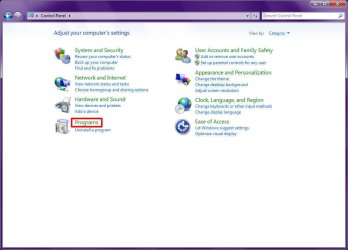
1) Open Control Panel
2) Click "Programs":
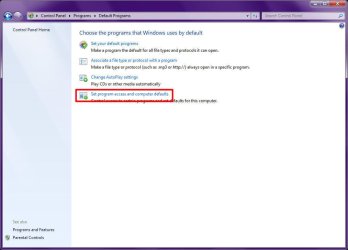
3) Click "Default Programs"
4) Click "Set program access and computer defaults"
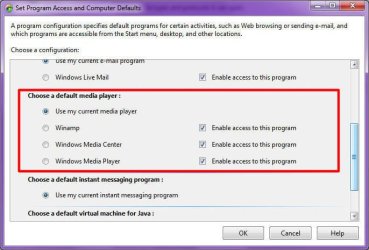
5) Click the chevron for "Custom", and then scroll the list down to "Choose a default media player":
6) Make the appropriate adjustments, then click OK
Computer type PC/Desktop Computer Manufacturer/Model Number Virtual Machine OS Windows 7 Professional 32-bit SP1 CPU AMD A4/A6 Motherboard Intel Corporation 440BX Desktop Reference Platform Memory 3.00GB EDO Graphics Card(s) VMware SVGA 3D Sound Card High Definition Audio Device Monitor(s) Displays Generic Non-PnP Monitor on VMware SVGA 3D Screen Resolution 1440x900 Hard Drives 1 x 60GB VMware Virtual SATA Hard Drive ATA Device Antivirus Kaspersky Total Security
New member
Guru
Gold Member
VIP
What happens when you click 'Select All' then save ?
Computer Manufacturer/Model Number Compaq Desktop OS Windows 7 Ultimate x64 CPU AMD Sempron Dual Core Memory 3GB Graphics Card(s) NVIDIA GeForce 6150SE nForce 430 Screen Resolution 1024x768 Hard Drives 150GB Sata
Still not answered??
Administrator
Staff member
Hello Random, and welcome to Seven Forums.
Yeah, it's been a while, but we can't solve a problem if the OP doesn't reply back.
I do not believe that you are able to ungray the items, but there are workarounds to get the job done. You could use the tutorial below to unassociate
.mp4 file extensions to no longer have a default program for them.
http://www.sevenforums.com/tutorials/178296-file-extension-type-unassociate.html
Hope this helps,
Shawn
Computer type PC/Desktop Computer Manufacturer/Model Number Self built custom OS 64-bit Windows 11 Pro for Workstations CPU Intel i7-8700K OC'd to 5 GHz Motherboard ASUS ROG Maximus XI Formula Z390 Memory 64 GB (4x16GB) G.SKILL TridentZ RGB DDR4 3600 MHz Graphics Card(s) ASUS ROG-STRIX-GTX1080TI-O11G-GAMING Sound Card Integrated Monitor(s) Displays 2 x Samsung Odyssey G7 27" Screen Resolution 2560x1440 Hard Drives 1TB Samsung 990 PRO M.2, PSU Seasonic Prime Titanium 850W Case Thermaltake Core P3 Cooling Corsair Hydro H115i Keyboard Logitech wireless K800 Mouse Logitech MX Master 4 Internet Speed 2 Gb/s Download and 100 Mb/s Upload Antivirus Malwarebyte Anti-Malware Premium Browser Google Chrome Other Info Logitech Z625 speaker system,