
Chrome and cursor problem.

xXSevenXx

New member
Member
VIP
Local time
10:05 PM
Messages
419
Does anyone here know the fix for this problem?
 

My Computer My Computer

At a glance

Windows 7 Ultimate SP1 64- bitIntel Core i7-3770K @3.50ghzKingston Technology 16GB (2x 8GB) 2133MHz DDR...EVGA GTX 670 4gb SC
Computer type
PC/Desktop
Computer Manufacturer/Model Number
Home Built
OS
Windows 7 Ultimate SP1 64- bit
CPU
Intel Core i7-3770K @3.50ghz
Motherboard
EVGA Z77 FTW
Memory
Kingston Technology 16GB (2x 8GB) 2133MHz DDR3 Non-ECC
Graphics Card(s)
EVGA GTX 670 4gb SC
Sound Card
Nil
Monitor(s) Displays
Samsung 22"
Screen Resolution
1920 x 1080 60hz
Hard Drives
OCZ Vertex 4 SSD 128GB
SAMSUNG Spinpoint F3 HD502HJ 500GB 7200 RPM
PSU
Enermax Platinax EPM1000EWT Special OC Edition
Case
Cooler Master HAF Full Tower nVIDIA Edition
Cooling
CoolerMaster Hyper 212 Plus
Keyboard
HP Wireless Keyboard
Mouse
Corsair Vengeance M90
Internet Speed
20 Mb
Other Info
ASUS DRW-24B1ST/BLK/B/AS Black SATA 24X DVD Burner
Does anyone here know the fix for this problem?

It's a bug in the developer release of Chrome.

What did you expect from a piece of beta software?

To get rid of the bug (if you really want to) just downgrade Chrome.

Oli

PS This problem relates mainly to Mac OS X, why did you post it here? Or does it affect all dev builds of Chrome? :p
 

My Computer My Computer

At a glance

Windows 7 Profesional x86, Mac OS X 10.6 Snow...Intel Core 2 Duo 2.4Ghz4GB DDR3Nvidia 9400m
Computer Manufacturer/Model Number
Apple MacBook 5,1
OS
Windows 7 Profesional x86, Mac OS X 10.6 Snow Leopard
CPU
Intel Core 2 Duo 2.4Ghz
Memory
4GB DDR3
Graphics Card(s)
Nvidia 9400m
Monitor(s) Displays
13.3" Internal + 22" DVI + 21.5" USB
Screen Resolution
1280x800 + 1920x1080 + 1920x1080
Hard Drives
Internal SATA 2.5" 500GB (395GB Mac HFS+, 105GB Windows NTFS)
2.48TB RAID consisting of 5 disks (HFS+)
Case
Aluminium Unibody
Keyboard
Apple Late 2009 Wireless Keyboard (US)
Mouse
Apple Magic Mouse
Internet Speed
6.33Mb/s up. 0.36Mb/s down.
Other Info
Harman Kardon Soundsticks II Speakers
Does anyone here know the fix for this problem?

It's a bug in the developer release of Chrome.

What did you expect from a piece of beta software?

To get rid of the bug (if you really want to) just downgrade Chrome.

Oli

PS This problem relates mainly to Mac OS X, why did you post it here? Or does it affect all dev builds of Chrome? :p
Thanks for your views.
Here's my version of Chrome, is this beta?
 

Attachments

  • gc.PNG
    gc.PNG
    14.2 KB · Views: 26

My Computer My Computer

At a glance

Windows 7 Ultimate SP1 64- bitIntel Core i7-3770K @3.50ghzKingston Technology 16GB (2x 8GB) 2133MHz DDR...EVGA GTX 670 4gb SC
Computer type
PC/Desktop
Computer Manufacturer/Model Number
Home Built
OS
Windows 7 Ultimate SP1 64- bit
CPU
Intel Core i7-3770K @3.50ghz
Motherboard
EVGA Z77 FTW
Memory
Kingston Technology 16GB (2x 8GB) 2133MHz DDR3 Non-ECC
Graphics Card(s)
EVGA GTX 670 4gb SC
Sound Card
Nil
Monitor(s) Displays
Samsung 22"
Screen Resolution
1920 x 1080 60hz
Hard Drives
OCZ Vertex 4 SSD 128GB
SAMSUNG Spinpoint F3 HD502HJ 500GB 7200 RPM
PSU
Enermax Platinax EPM1000EWT Special OC Edition
Case
Cooler Master HAF Full Tower nVIDIA Edition
Cooling
CoolerMaster Hyper 212 Plus
Keyboard
HP Wireless Keyboard
Mouse
Corsair Vengeance M90
Internet Speed
20 Mb
Other Info
ASUS DRW-24B1ST/BLK/B/AS Black SATA 24X DVD Burner
Does anyone here know the fix for this problem?

It's a bug in the developer release of Chrome.

What did you expect from a piece of beta software?

To get rid of the bug (if you really want to) just downgrade Chrome.

Oli

PS This problem relates mainly to Mac OS X, why did you post it here? Or does it affect all dev builds of Chrome? :p
Thanks for your views.
Here's my version of Chrome, is this beta?

The problem still persists in the stable release?

Strange.

Send Google a bug report using the tutorial at Report a bug or broken website : Webpage display issues - Google Chrome Help.

What sites is this happening on, is it every flash site?

If it is only happening on sites such as YouTube I implore you to use HTML5 instead o Flash for reasons of ethics and for the environment. You can make YouTube HTML5 by going to YouTube - Broadcast Yourself..

Also try reinstalling flash if you have not already done so.

Oli
 

My Computer My Computer

At a glance

Windows 7 Profesional x86, Mac OS X 10.6 Snow...Intel Core 2 Duo 2.4Ghz4GB DDR3Nvidia 9400m
Computer Manufacturer/Model Number
Apple MacBook 5,1
OS
Windows 7 Profesional x86, Mac OS X 10.6 Snow Leopard
CPU
Intel Core 2 Duo 2.4Ghz
Memory
4GB DDR3
Graphics Card(s)
Nvidia 9400m
Monitor(s) Displays
13.3" Internal + 22" DVI + 21.5" USB
Screen Resolution
1280x800 + 1920x1080 + 1920x1080
Hard Drives
Internal SATA 2.5" 500GB (395GB Mac HFS+, 105GB Windows NTFS)
2.48TB RAID consisting of 5 disks (HFS+)
Case
Aluminium Unibody
Keyboard
Apple Late 2009 Wireless Keyboard (US)
Mouse
Apple Magic Mouse
Internet Speed
6.33Mb/s up. 0.36Mb/s down.
Other Info
Harman Kardon Soundsticks II Speakers
It's a bug in the developer release of Chrome.

What did you expect from a piece of beta software?

To get rid of the bug (if you really want to) just downgrade Chrome.

Oli

PS This problem relates mainly to Mac OS X, why did you post it here? Or does it affect all dev builds of Chrome? :p
Thanks for your views.
Here's my version of Chrome, is this beta?

The problem still persists in the stable release?

Strange.

Send Google a bug report using the tutorial at Report a bug or broken website : Webpage display issues - Google Chrome Help.

What sites is this happening on, is it every flash site?

If it is only happening on sites such as YouTube I implore you to use HTML5 instead o Flash for reasons of ethics and for the environment. You can make YouTube HTML5 by going to YouTube - Broadcast Yourself..

Also try reinstalling flash if you have not already done so.

Oli
This site for starters ITV1 - ITV Channels
Bug report sent.
 

My Computer My Computer

At a glance

Windows 7 Ultimate SP1 64- bitIntel Core i7-3770K @3.50ghzKingston Technology 16GB (2x 8GB) 2133MHz DDR...EVGA GTX 670 4gb SC
Computer type
PC/Desktop
Computer Manufacturer/Model Number
Home Built
OS
Windows 7 Ultimate SP1 64- bit
CPU
Intel Core i7-3770K @3.50ghz
Motherboard
EVGA Z77 FTW
Memory
Kingston Technology 16GB (2x 8GB) 2133MHz DDR3 Non-ECC
Graphics Card(s)
EVGA GTX 670 4gb SC
Sound Card
Nil
Monitor(s) Displays
Samsung 22"
Screen Resolution
1920 x 1080 60hz
Hard Drives
OCZ Vertex 4 SSD 128GB
SAMSUNG Spinpoint F3 HD502HJ 500GB 7200 RPM
PSU
Enermax Platinax EPM1000EWT Special OC Edition
Case
Cooler Master HAF Full Tower nVIDIA Edition
Cooling
CoolerMaster Hyper 212 Plus
Keyboard
HP Wireless Keyboard
Mouse
Corsair Vengeance M90
Internet Speed
20 Mb
Other Info
ASUS DRW-24B1ST/BLK/B/AS Black SATA 24X DVD Burner
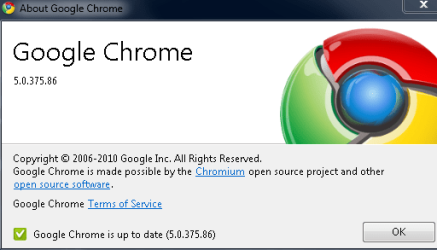
Thanks for your views.
Here's my version of Chrome, is this beta?

The problem still persists in the stable release?

Strange.

Send Google a bug report using the tutorial at Report a bug or broken website : Webpage display issues - Google Chrome Help.

What sites is this happening on, is it every flash site?

If it is only happening on sites such as YouTube I implore you to use HTML5 instead o Flash for reasons of ethics and for the environment. You can make YouTube HTML5 by going to YouTube - Broadcast Yourself..

Also try reinstalling flash if you have not already done so.

Oli
This site for starters ITV1 - ITV Channels
Bug report sent.

Are you talking specifically about the play and pause buttons or the whole thing?

The play and pause buttons don't appear I admit but that may be by design and not be a bug.

I can't help much more we'll have to wait for Google to fix it, it happens on Mac too so its obviously something major.

Oli
 

My Computer My Computer

At a glance

Windows 7 Profesional x86, Mac OS X 10.6 Snow...Intel Core 2 Duo 2.4Ghz4GB DDR3Nvidia 9400m
Computer Manufacturer/Model Number
Apple MacBook 5,1
OS
Windows 7 Profesional x86, Mac OS X 10.6 Snow Leopard
CPU
Intel Core 2 Duo 2.4Ghz
Memory
4GB DDR3
Graphics Card(s)
Nvidia 9400m
Monitor(s) Displays
13.3" Internal + 22" DVI + 21.5" USB
Screen Resolution
1280x800 + 1920x1080 + 1920x1080
Hard Drives
Internal SATA 2.5" 500GB (395GB Mac HFS+, 105GB Windows NTFS)
2.48TB RAID consisting of 5 disks (HFS+)
Case
Aluminium Unibody
Keyboard
Apple Late 2009 Wireless Keyboard (US)
Mouse
Apple Magic Mouse
Internet Speed
6.33Mb/s up. 0.36Mb/s down.
Other Info
Harman Kardon Soundsticks II Speakers
The problem still persists in the stable release?

Strange.

Send Google a bug report using the tutorial at Report a bug or broken website : Webpage display issues - Google Chrome Help.

What sites is this happening on, is it every flash site?

If it is only happening on sites such as YouTube I implore you to use HTML5 instead o Flash for reasons of ethics and for the environment. You can make YouTube HTML5 by going to YouTube - Broadcast Yourself..

Also try reinstalling flash if you have not already done so.

Oli
This site for starters ITV1 - ITV Channels
Bug report sent.

Are you talking specifically about the play and pause buttons or the whole thing?

The play and pause buttons don't appear I admit but that may be by design and not be a bug.

I can't help much more we'll have to wait for Google to fix it, it happens on Mac too so its obviously something major.

Oli
It works perfectly with FF.
 

My Computer My Computer

At a glance

Windows 7 Ultimate SP1 64- bitIntel Core i7-3770K @3.50ghzKingston Technology 16GB (2x 8GB) 2133MHz DDR...EVGA GTX 670 4gb SC
Computer type
PC/Desktop
Computer Manufacturer/Model Number
Home Built
OS
Windows 7 Ultimate SP1 64- bit
CPU
Intel Core i7-3770K @3.50ghz
Motherboard
EVGA Z77 FTW
Memory
Kingston Technology 16GB (2x 8GB) 2133MHz DDR3 Non-ECC
Graphics Card(s)
EVGA GTX 670 4gb SC
Sound Card
Nil
Monitor(s) Displays
Samsung 22"
Screen Resolution
1920 x 1080 60hz
Hard Drives
OCZ Vertex 4 SSD 128GB
SAMSUNG Spinpoint F3 HD502HJ 500GB 7200 RPM
PSU
Enermax Platinax EPM1000EWT Special OC Edition
Case
Cooler Master HAF Full Tower nVIDIA Edition
Cooling
CoolerMaster Hyper 212 Plus
Keyboard
HP Wireless Keyboard
Mouse
Corsair Vengeance M90
Internet Speed
20 Mb
Other Info
ASUS DRW-24B1ST/BLK/B/AS Black SATA 24X DVD Burner
This site for starters ITV1 - ITV Channels
Bug report sent.

Are you talking specifically about the play and pause buttons or the whole thing?

The play and pause buttons don't appear I admit but that may be by design and not be a bug.

I can't help much more we'll have to wait for Google to fix it, it happens on Mac too so its obviously something major.

Oli
It works perfectly with FF.

Then it's Google... as always :p.

Oli
 

My Computer My Computer

At a glance

Windows 7 Profesional x86, Mac OS X 10.6 Snow...Intel Core 2 Duo 2.4Ghz4GB DDR3Nvidia 9400m
Computer Manufacturer/Model Number
Apple MacBook 5,1
OS
Windows 7 Profesional x86, Mac OS X 10.6 Snow Leopard
CPU
Intel Core 2 Duo 2.4Ghz
Memory
4GB DDR3
Graphics Card(s)
Nvidia 9400m
Monitor(s) Displays
13.3" Internal + 22" DVI + 21.5" USB
Screen Resolution
1280x800 + 1920x1080 + 1920x1080
Hard Drives
Internal SATA 2.5" 500GB (395GB Mac HFS+, 105GB Windows NTFS)
2.48TB RAID consisting of 5 disks (HFS+)
Case
Aluminium Unibody
Keyboard
Apple Late 2009 Wireless Keyboard (US)
Mouse
Apple Magic Mouse
Internet Speed
6.33Mb/s up. 0.36Mb/s down.
Other Info
Harman Kardon Soundsticks II Speakers
Cursor arrow off target

Using Chrome 21.0.1180.60 m and Windows 7, my cursor arrow needs to be close to the line of text BELOW the point I intend to click on to hit my intended target. In other words, the cursor is way off the target. In all other apps, it is on target.

What adjustments are possible in Chrome to retarget the cursor?
 

My Computer My Computer

At a glance

Windows 7
OS
Windows 7
Back
Top