Chrome And Firefox Getting Installed without my Knowledge

TroyRussia

New member
Local time
10:29 AM
Messages
6
My computer was working all fine.
(I use Avast Premier activated and updated)
Opera is my default browser.
but today after booting up I realized that my default browser has changed to firefox (Which I don't remember Installing) and chrome is installed too. I tried to uninstall them through control panel but they didn't show up there. So I Manually Removed them from my PC. But After some time (While I am still using my computer) Firefox and chrome shortcuts show up in the desktop, start menu and taskbar. I have removed them several times but they repeatedly show up after an hour or so (even while all the Avast Shields are on)
I ran A Full scan But it didn't help. Any Idea what is going on.
Thanks in advance
 

My Computer

Computer type
PC/Desktop
Computer Manufacturer/Model Number
Intel i3 Processor
OS
Windows 7 Ultimate x64
CPU
3.04 GHz Processor
Motherboard
Azus
Memory
8GB
Graphics Card(s)
nVidia GTX 1080
Sound Card
DX9
Monitor(s) Displays
3 LG HD Monitors
Screen Resolution
1600 x 1024 , 1360 x 768 , 1600 x 1024
Hard Drives
2TB
Internet Speed
500Mbps
Antivirus
Avast Premier Activated
Browser
Opera
Things that come to mind.

1. Your installation media for Windows 7 Ultimate was not proper and it came with a lot of extra things. The only browser that should comes with Windows 7 is Internet Explorer.

2. You have downloaded something that came with the extra browsers and you didn't notice.

We can help you with checking your installation of Windows 7 if you complete this tutorial by Brink.

Windows Genuine and Activation Issue Posting Instructions - Windows 7 Help Forums

We have no way of knowing what you have download and what came with it.

Try this so we can see.

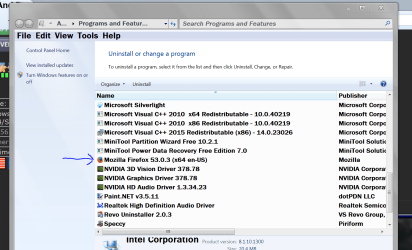
Go to the Start Orb and type 'add and remove' tick on 'add and remove' and post a picture like this from my system.


Add and Remove.PNG

Post the picture using this tutorial by Brink.

Screenshots and Files - Upload and Post in Seven Forums - Windows 7 Help Forums

Jack
 

My Computer

Computer type
PC/Desktop
Computer Manufacturer/Model Number
Home made Desktop
OS
Windows 10 Pro. 64/ version 1709 Windows 7 Pro/64
CPU
Intel i7-6800K @ 4.3
Motherboard
ASUS X-99 Deluxe II
Memory
Corsair Platinum 16 gig @2400
Graphics Card(s)
EVGA GTX 1070 OC
Monitor(s) Displays
Asus 27" LED LCD/VE278Q
Screen Resolution
1920-1080 or 1280-720 HDMI
Hard Drives
INTEL SSD 730-240 Gb Sata 3.0/
PSU
EVGA Platium 1200W
Case
Phanteks Luxe Tempered Glass 8 fans/ one radiator
Cooling
XSPC/ Water Cooled CPU
Keyboard
Das 4 Professional
Mouse
Logitech M705/MX Anywhere 2-S
Internet Speed
100 mbits
Antivirus
Microsoft Security Essentials/ Malwarebytes Premium 3.0/ SAS
Browser
I.E. 11 default/Firefox/ ISP Time Warner Cable/Spectrum
Other Info
LG BluRay Burner/
Sound system-KLipsch-THX/
Icy Dock ssd Hot Swap bays.
chrome

Hi Layback Bear, I have read that when installing Avast it will install google chrome, it is supposed to have

a custom install box so you can uncheck chrome. Sorry for butting in.:D
 

My Computer

Computer type
PC/Desktop
Computer Manufacturer/Model Number
ASUS A85XM-A custom build
OS
Windows 10 Pro 64 bit
CPU
AMD A4-5300 APU with Radeon(tm) HD Graphics
Motherboard
ASUSTeK COMPUTER INC. A85XM-A
Memory
8.00 GB
Graphics Card(s)
AMD Radeon HD 7480D
Sound Card
(1) High Definition Audio Device (2) Realtek High Definiti
Monitor(s) Displays
HP W2072a 20 inch Led Backlit Monitor
Screen Resolution
1600 x 900 x 32 bits (4294967296 colors) @ 60 Hz
Hard Drives
TOSHIBA DT01ACA100 SATA Disk Device
Keyboard
Acer
Mouse
Acer
Internet Speed
varies
Antivirus
Windows Defender Antivirus
Browser
Waterfox, Edge
mmmm my advice is google for uninstall and install tool for windows when i reinstalled windows 7 yet again due to combofix leaving behind qoobox that wont delete i noticed even if you uninstall it from control panel with revouninstaller free it still hiding in your pc
i found googleupdate hiding in my pc

https://support.microsoft.com/en-gb...lock-programs-from-being-installed-or-removed

dropbox and googleupdate was hijacking my pc and hiding and doing things in the background
to me revouninstaller and ccleaner dont do a proper job after you you typed in msconfig and disable all the startup then use the windows uninstaller tool to remove it from your pc completely

dont disable any windows startup just the programs that starting up safeboot wont do naff so bootup normal
 

My Computer

Computer type
PC/Desktop
Computer Manufacturer/Model Number
dell
OS
windows 7
CPU
intel r
Motherboard
???
Memory
4gb
Graphics Card(s)
none
Hard Drives
ata device
Antivirus
microsoft essentials
Browser
firefox
@ ethel

You are not butting in. Your information can be helpful.

That is why this is under my signature.

Feel free to help me help other members


Yes you are correct. Some programs when installed will add little goodies if one does not watch closely.

Normally one will have a choice of what kind of install is done.
Normally when offered the 'Recommend' method and chooses to do in that fashion, you will get the add on junk.
I use the customer installation that is also offered. That way one can choose what is downloaded and installed.
Sometimes that doesn't work, and you still get the unwanted.

What I do is write down what the junk is and when done doing a custom install and rebooting I check to make sure what I didn't want, I didn't get.

Jack
 

My Computer

Computer type
PC/Desktop
Computer Manufacturer/Model Number
Home made Desktop
OS
Windows 10 Pro. 64/ version 1709 Windows 7 Pro/64
CPU
Intel i7-6800K @ 4.3
Motherboard
ASUS X-99 Deluxe II
Memory
Corsair Platinum 16 gig @2400
Graphics Card(s)
EVGA GTX 1070 OC
Monitor(s) Displays
Asus 27" LED LCD/VE278Q
Screen Resolution
1920-1080 or 1280-720 HDMI
Hard Drives
INTEL SSD 730-240 Gb Sata 3.0/
PSU
EVGA Platium 1200W
Case
Phanteks Luxe Tempered Glass 8 fans/ one radiator
Cooling
XSPC/ Water Cooled CPU
Keyboard
Das 4 Professional
Mouse
Logitech M705/MX Anywhere 2-S
Internet Speed
100 mbits
Antivirus
Microsoft Security Essentials/ Malwarebytes Premium 3.0/ SAS
Browser
I.E. 11 default/Firefox/ ISP Time Warner Cable/Spectrum
Other Info
LG BluRay Burner/
Sound system-KLipsch-THX/
Icy Dock ssd Hot Swap bays.
Back
Top