Chrome GPU Hardware Acceleration - Turn On or Off

How to Turn GPU "Hardware Acceleration" On or Off in Chrome


   Information
In computing, hardware acceleration is the use of computer hardware to perform some function faster than is possible in software running on the general-purpose CPU. Examples of hardware acceleration include blitting acceleration functionality in graphics processing units (GPUs) and instructions for complex operations in CPUs.

This tutorial will show you how to turn GPU Hardware Acceleration on or off in Google Chrome browser.


   Tip
You can revert to original settings by simply following the same steps on this tutorial.


Here's How:

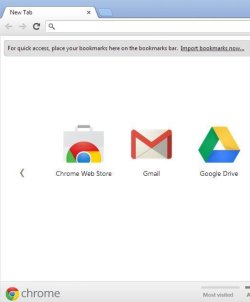
1. Open Chrome:
201305101116.png

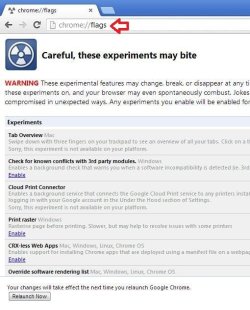
2. Type "chrome://flags" in the search bar:
201305101117.png

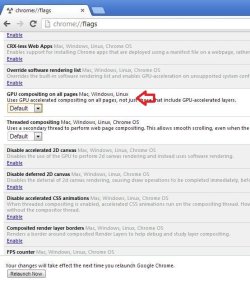
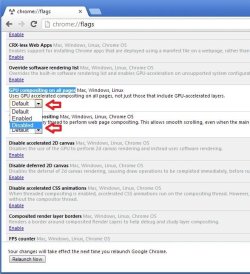
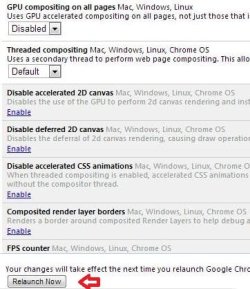
3. Hit enter and it should take you to a page like this. Scroll down till you find "GPU compositing on all pages". Select the option "Default" and change it to "Disabled":
201305101118.png

4. Lastly, click on the "Relaunch now" button to confirm settings:
201305101129.png

That's it :)


Attachments

  • C1.JPG
    C1.JPG
    24.9 KB · Views: 2,409
  • C2.JPG
    C2.JPG
    59.6 KB · Views: 2,415
  • C3.JPG
    C3.JPG
    61.4 KB · Views: 2,546
  • C5.jpg
    C5.jpg
    58.4 KB · Views: 2,409
  • C6.JPG
    C6.JPG
    40.8 KB · Views: 2,404
Last edited by a moderator:
Another nice addition! Great job :thumbsup:
 

My Computer My Computer

Computer type
PC/Desktop
Computer Manufacturer/Model Number
Self Assembled
OS
Microsoft Windows 10 Pro Insider Preview 64-bit
CPU
Intel(R) Core(TM) i3-4130 CPU @ 3.40GHz
Motherboard
Gigabyte Technology Co., Ltd. B85M-D3H
Memory
Corsair Vengence 4GB x2 (8.00GB Dual-Channel DDR3 @ 798MHz)
Graphics Card(s)
2047MB GeForce GTS 450 (ZOTAC International)
Sound Card
Onboard (Realtek High Definition Audio)
Monitor(s) Displays
LG Flatron E2040T
Screen Resolution
1600x900
Hard Drives
Western Digital 1 TB
Seagate 500 GB
PSU
Corsair VS550
Case
Cooler Master K380
Cooling
Cooler Master Seidon 120V Plus
Keyboard
Logitech MK260r
Mouse
Logitech MK260r
Internet Speed
PMPL Broadband
Antivirus
Windows Defender + MBAM
Browser
Firefox
Other Info
Dell Studio 15" Laptop
Cool, just another neat thing to know if ya need it!
 

My Computer My Computer

Computer Manufacturer/Model Number
Home Built
OS
Windows 7 Ultimate x64 / Windows 8 Pro x64
CPU
Intel i7-3770k
Motherboard
Asus Sabertooth Z77
Memory
4x4GB 1600mhz
Graphics Card(s)
EVGA SuperClocked+ GeForce GTX 660 Ti 3GB 192-bit
Sound Card
Integrated Realtek ALC892
Monitor(s) Displays
x2 Asus VW-246H 24" LCD
Screen Resolution
1920x1080
Hard Drives
SanDisk Extreme 256GB SSD; 1TB External Seagate HDD
PSU
Corsair HX750
Case
Corsair Obsidian 650D
Cooling
Thermaltake Water 2.0 Extreme Water Cooling
Keyboard
Logitech K750 Black Wireless solar-powered
Mouse
Logitech M705 Wireless Laser Marathon
How to Turn GPU "Hardware Acceleration" On or Off in Chrome

Select the option "Default" and change it to "Disabled".

Just to clarify for the OCD folks like me, the steps indicated specifically show how to turn OFF hardware acceleration, and GPU compositing acceleration is the same as Hardware acceleration. And default means Chrome is referencing a flag embedded in the destination site's HTML to force GPU acceleration already for certain sites but that's all negotiated behind the scenes by the browser.

Do I got it? I'm pretty sure I do, but humor me here and I can sleep better at night knowing for sure :D
 

My Computer My Computer

Computer type
PC/Desktop
Computer Manufacturer/Model Number
Custom build
OS
Windows 7 Professional 64 bit
CPU
AMD Phenom II X6 1055T 2.8 GHz (3.51 over clocked)
Motherboard
Asus M4A87TD-EVO
Memory
Corsair 8 GB CMX4GX3M2A1600C9R (1333 mHz)
Graphics Card(s)
Saphire Radeon 5830HD + Hauppauge WinTV-HVR-2250 Dual Tuner
Sound Card
VIA VT1818 High Definition Audio 8-Channel, AMD Radeon HDMI
Monitor(s) Displays
23" Samsung SyncMaster PX2370 + 47" LG 47LH90 LED HDTV
Screen Resolution
1920x1080p
Hard Drives
Western Digital --> WD10EARS-00Y5B1 1 TB 5200 rpm (Backup)
Seagate --> ST2000DM001-1CH164 2 TB 7200 rpm (Media) Mirrored to
Seagate --> ST2000DM001-1CH164 2 TB 7200 rpm
BUSlink --> "USB2.0 Disk-On-The-Go/Lite" 18 GB mini HDD (Bootable Win 7 Insta
PSU
850 WATT OCZ --> OCZ850GXSSLI RTL
Case
Cool Master Scout --> SGC-2000-KKN1-GP RT
Cooling
CM 140mm front & top, 120mm rear & 2x side, stock CPU fan
Keyboard
Razer Lycosa Mirror, Logitech MX3200 wireless
Mouse
Logitech G9x, Logitech MX3200 wireless
Internet Speed
10 Mbps
Antivirus
Microsoft Security Essentials
Browser
Chrome & Internet Explorer 11
Other Info
Custom rig self build.
Recently upgraded for part time Media Center DVR duties.
Under windows 7 ultimate x64, Google Chrome Version 32.0.1700.107 m
Hello i tryied the steps but i don't have the option instead i have this :
GPU compositing on all pages Mac, LinuxUses GPU accelerated compositing on all pages, not just those that include GPU-accelerated layers. #force-compositing-mode-2


Sorry, this experiment is not available on your platform.


My Computer My Computer

Computer type
PC/Desktop
Computer Manufacturer/Model Number
self made
OS
Windows 7 Ultimate x64
CPU
i5 2500k @4,0ghz
Motherboard
Asus P8Z68-V-PRO
Memory
KingMax 2 x 4 GB DDR3 1333MHz
Graphics Card(s)
Msi Nvidia Gtx770 2gb OC Ed.
Hard Drives
SSD Kingston HyperX 3K 120GB
WesternDigital 640gb AAKS
Antivirus
avast!2014
Browser
GoogleChrome
Hi,

Sorry for answering so late but I only noticed lately that chrome is taking too much memory and found in Chrome Task Manager a process called GPU that was taking up to 115Mo so I end it and it didn't change anything.

Trying this tutorial, I found the same message as werr. This was weird as if the GPU is not available, why a related process is running ?

I tried to contact the developers through the Leave feedback button on the About page but didn't got any answer.

I finally found this solution that I wanted to share with people which have or will face this problem :

Just create a shortcut to Chrome and then add to the Target field of the Properties window the following command (separated by a space from the "chrome.exe")
Code:
[B]--disable-gpu[/B]
and that will prevent this process from running.

open-chrome-properties-shortcut.jpg


If the process keep running, try adding
Code:
 --disable-software-rasterizer
but normally this is not necessary.

Good navigation with a little lighter Chrome !
 

My Computer My Computer

Computer type
PC/Desktop
OS
Windows 7 Ultimate 32bits
Back
Top