JavaScript is disabled. For a better experience, please enable JavaScript in your browser before proceeding.
You are using an out of date browser. It may not display this or other websites correctly.
You should upgrade or use an
alternative browser .
Master of Technology
Power User
Ever since I installed a bunch of fonts for a program, the fonts on Chrome look weird.
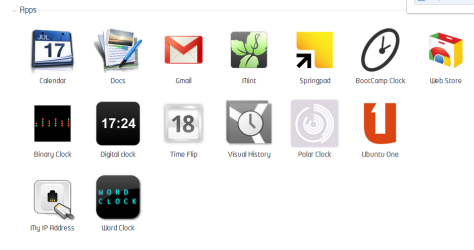
As you can see, that doesn't look like a normal font. It seems it uses that font wherever a font isnt defined on the webpage.
I checked the font settings on chrome and they havent changed.
Any idea how to make it back to normal?
Computer Manufacturer/Model Number Toshiba Satellite L505D-S9565 OS Windows 7 Home Premium x64, Mac OS X 10.6.2 x64 CPU AMD Athlon X2 Dual-Core 2.1 GHz Motherboard Toshiba Built-In with Insyde H20 BIOS 1.40 Memory 4 GB DDR2 800 MHz Graphics Card(s) ATI Radeon HD Mobility 3100 Graphics 256MB to 1468 MB Shared Sound Card Realtek Mobile ALC272 HD Audio Monitor(s) Displays 15.6" TFT LCD with TruBrite, Samsung 1080p HDTV Screen Resolution 1366x768, 1920x1080 Hard Drives ❶:Main: Toshiba 250 GB SATA 5400 RPM PSU N/A Case N/A Cooling Built-in/Open window in winter :P Keyboard Built-in Mouse Build-in Symantics SmartTouch Pad Internet Speed 55 MB/sec Down, 9 MB/sec Up Other Info ❷:Backup: Seagate FreeAgent Desk USB 2.0 5400 RPM
BSOD Dump Analyst
Guru
Gold Member
Have you recently installed a new theme for Chrome? Try updating to the latest version of Google Chrome.
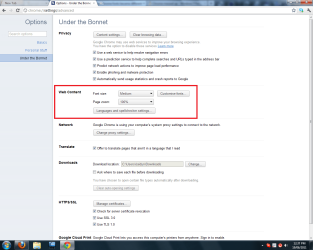
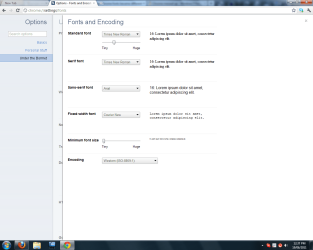
Go to options and make the settings similar to the following screenshots:
Hope this helps.
Jaidyn
Computer Manufacturer/Model Number Custom Build OS Windows 7 Ultimate x64/Windows 8 Consumer Preview x64/Ubuntu 11.04 CPU Intel Pentium Dual Core E6700 3.2GHz Motherboard ASUS P5G41T-M LX Memory Strontium 8192MB DDR3 1333Mhz Graphics Card(s) msi GeForce N560GTX-M2D1GD5 1GB Sound Card Realtek HD Audio Monitor(s) Displays CHIMEI CMV 221D 22" Screen Resolution 1680x1050 Hard Drives Seagate Barracuda LP Green 3.5'' 2TB Internal HDD 5900RPM + WD Elements Desktop 1TB External HDD 7200RPM PSU SHAW Viper-1500w Gaming PSU Case Black eMaxx ATX Mini Tower Case Keyboard Microsoft Wireless Keyboard 1000 Mouse Microsoft Wireless Optical Mouse 2000 Internet Speed 100GB @ 4.76Mbps
Master of Technology
Power User
Thread Starter
It was actually after I updated chrome. Plus I am and most likely always will be on the default theme.
Computer Manufacturer/Model Number Toshiba Satellite L505D-S9565 OS Windows 7 Home Premium x64, Mac OS X 10.6.2 x64 CPU AMD Athlon X2 Dual-Core 2.1 GHz Motherboard Toshiba Built-In with Insyde H20 BIOS 1.40 Memory 4 GB DDR2 800 MHz Graphics Card(s) ATI Radeon HD Mobility 3100 Graphics 256MB to 1468 MB Shared Sound Card Realtek Mobile ALC272 HD Audio Monitor(s) Displays 15.6" TFT LCD with TruBrite, Samsung 1080p HDTV Screen Resolution 1366x768, 1920x1080 Hard Drives ❶:Main: Toshiba 250 GB SATA 5400 RPM PSU N/A Case N/A Cooling Built-in/Open window in winter :P Keyboard Built-in Mouse Build-in Symantics SmartTouch Pad Internet Speed 55 MB/sec Down, 9 MB/sec Up Other Info ❷:Backup: Seagate FreeAgent Desk USB 2.0 5400 RPM
BSOD Dump Analyst
Guru
Gold Member
Computer Manufacturer/Model Number Custom Build OS Windows 7 Ultimate x64/Windows 8 Consumer Preview x64/Ubuntu 11.04 CPU Intel Pentium Dual Core E6700 3.2GHz Motherboard ASUS P5G41T-M LX Memory Strontium 8192MB DDR3 1333Mhz Graphics Card(s) msi GeForce N560GTX-M2D1GD5 1GB Sound Card Realtek HD Audio Monitor(s) Displays CHIMEI CMV 221D 22" Screen Resolution 1680x1050 Hard Drives Seagate Barracuda LP Green 3.5'' 2TB Internal HDD 5900RPM + WD Elements Desktop 1TB External HDD 7200RPM PSU SHAW Viper-1500w Gaming PSU Case Black eMaxx ATX Mini Tower Case Keyboard Microsoft Wireless Keyboard 1000 Mouse Microsoft Wireless Optical Mouse 2000 Internet Speed 100GB @ 4.76Mbps
Go to Start & search for fonts you should be able to find it easy enough then right click & copy & paste it to your desktop ( might have to reinstall it if you have problems) then delete the font.
Computer type PC/Desktop Computer Manufacturer/Model Number self build OS Windows 7 Ultimate 64 bit CPU Intel Core i7 4770K overclocked to 4.7GHz Quad Core Haswell Motherboard Asus Z87 Pro (Socket 1150) ATX Motherboard Memory 16GB Team Group Vulcan Gold 2133MHz Graphics Card(s) ATI Radeon HD 7880 Series Display adapter Monitor(s) Displays NEC LCD2690WUXi2 Screen Resolution 26" 1920 x 1200 Hard Drives Samsung 500GB SSD 840 EVO SATA 6Gb/s PSU Corsair AX760 Platinum Case Cooler Master HAF X Gaming Tower Cooling XSPC RayStorm 750 RS360 Water cooling Mouse Razer Death Adder left handed Internet Speed 126Mb download 11.5Mb up Antivirus Avast free Browser Opera Other Info Main Browser is Opera