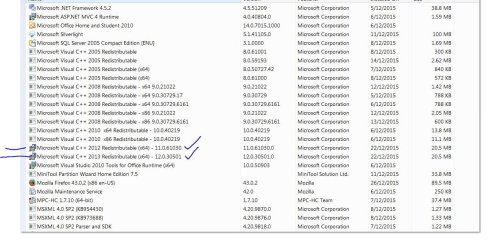
- Local time
- 4:56 PM
- Messages
- 58
Problem is intermittent and happens with both Chrome & Firefox and across multiple download locations. Have just done a fresh install of W7-64bit and use paid version Avast Pro Antivirus.
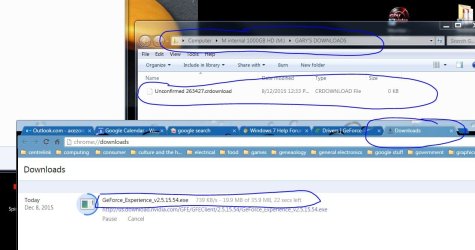
How it occurs is when I look at Chrome or Firefox Download window I can see the download happening with usual for example '25MB of 50MB downloaded at say 300Kilobytes/sec'. As the download is not completed it will appear greyed out. However it will get to what 'appears' to be finished saying for example '50MB of 50MB downloaded at 300Kilobytes/sec. The downloads window entry remains greyed out and does not complete at which point it should change to full colour rather than a greyed out appearance.
If I go to my Downloads Folder location or destination folder the download itself in this folder also remains greyed out as if download is not completed. Attached is Pic showing what I mean by greyed out...note this is an example pic only of download information and not an example where problem occurred.
I have gone to Internet Options in Control Panel and deleted all browsing history under the General tab and this did not fix the problem. Also uninstalled and reinstalled Chrome. Done a System File Check via Command Prompt which indicated everything is OK.
Secondary problem with this is that if I try to clear the download within chromes download window I cannot delete it as it remains greyed out. If I try to delete the greyed out item in my downloads folder Windows Explorer cannot delete it and goes into some sort of loop. I guess because the file is not completely there though appearing to be.
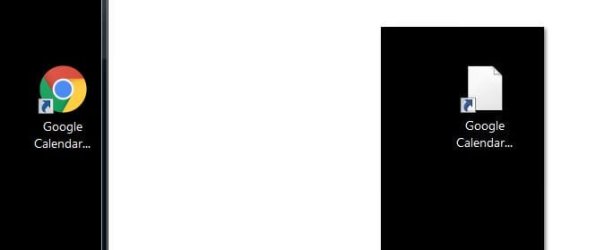
Something that also started happening at same time as all this is if I click and drag from the far left side of the address bar within chrome so as to create a shortcut say on desktop I get a whited out Chrome shortcut icon. Attached is an image showing that next to a normal Chrome icon as it should look. The whited out icon does not function and does not want to be deleted much like greyed out file in my Downloads folder. Same situation with Mozilla. Pic attached showing this.
Also a Restart of PC solves these problems until it next happens again.
Any help appreciated...Gary
How it occurs is when I look at Chrome or Firefox Download window I can see the download happening with usual for example '25MB of 50MB downloaded at say 300Kilobytes/sec'. As the download is not completed it will appear greyed out. However it will get to what 'appears' to be finished saying for example '50MB of 50MB downloaded at 300Kilobytes/sec. The downloads window entry remains greyed out and does not complete at which point it should change to full colour rather than a greyed out appearance.
If I go to my Downloads Folder location or destination folder the download itself in this folder also remains greyed out as if download is not completed. Attached is Pic showing what I mean by greyed out...note this is an example pic only of download information and not an example where problem occurred.
I have gone to Internet Options in Control Panel and deleted all browsing history under the General tab and this did not fix the problem. Also uninstalled and reinstalled Chrome. Done a System File Check via Command Prompt which indicated everything is OK.
Secondary problem with this is that if I try to clear the download within chromes download window I cannot delete it as it remains greyed out. If I try to delete the greyed out item in my downloads folder Windows Explorer cannot delete it and goes into some sort of loop. I guess because the file is not completely there though appearing to be.
Something that also started happening at same time as all this is if I click and drag from the far left side of the address bar within chrome so as to create a shortcut say on desktop I get a whited out Chrome shortcut icon. Attached is an image showing that next to a normal Chrome icon as it should look. The whited out icon does not function and does not want to be deleted much like greyed out file in my Downloads folder. Same situation with Mozilla. Pic attached showing this.
Also a Restart of PC solves these problems until it next happens again.
Any help appreciated...Gary
Attachments
Last edited:
My Computer
At a glance
Microsoft Windows 7 Professional 64-bit 7601 ...Intel(R) Core(TM) i7-4770 CPU @ 3.40GHz16.00 GBNVIDIA GeForce GTX 1060
- Computer type
- PC/Desktop
- OS
- Microsoft Windows 7 Professional 64-bit 7601 Multiprocessor Free Service Pack 1
- CPU
- Intel(R) Core(TM) i7-4770 CPU @ 3.40GHz
- Motherboard
- ASUSTeK COMPUTER INC. Z87-C
- Memory
- 16.00 GB
- Graphics Card(s)
- NVIDIA GeForce GTX 1060
- Sound Card
- Asus Xonar Essence STX
- Monitor(s) Displays
- 2X Dell U2713H
- Screen Resolution
- 2560 x 1440 x 32 bits (4294967296 colors) @ 59 Hz
- Hard Drives
- (1) INTEL SSDSC2CW120A3 ATA Device (2) WDC WD1001FALS-00J7B0 ATA Device (3) WDC WD10EARS-00MVWB0 ATA Device (4) Generic- SD/MMC/MS/MSPRO USB Device (5) HP Photosmart C6180 USB Device (6) SanDisk Cruzer Switch USB Device (7) ST2000DM 001-1
- Antivirus
- Avast Pro Antivirus