
- Local time
- 9:00 AM
- Messages
- 101
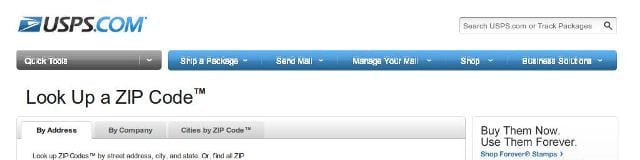
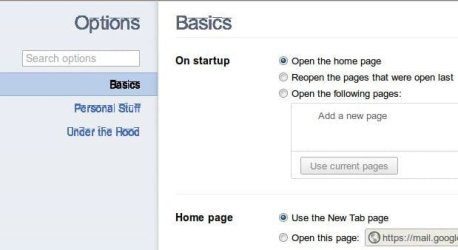
I've noticed some fonts within Chrome are not working correctly, and am trying to see how many users are affected. Long story short if you go to "options" under the wrench the text fonts on the left are all messed up looking. Same with a couple of web-sites I visit. USPS being one. I attached an example of USPS (notice the text in the gray and blue menu strips), and of the options text, and here are some links to what I have found so far from others. If anyone has a fix I would love you for life! Even a clean install didn't fix it. I'm current running the latest stable 14.0.835.163 on Win7 Ult 64 and Win7 Ent 32. Chrome "Options" Font display issue?!?! - Google Chrome Help
Menu fonts and some webpage fonts not normal. - Google Chrome Forums
Menu fonts and some webpage fonts not normal. - Google Chrome Forums
Attachments
My Computer
At a glance
Windows 7 Ultimate
- Computer type
- Laptop
- Computer Manufacturer/Model Number
- Dell Inspiron
- OS
- Windows 7 Ultimate

